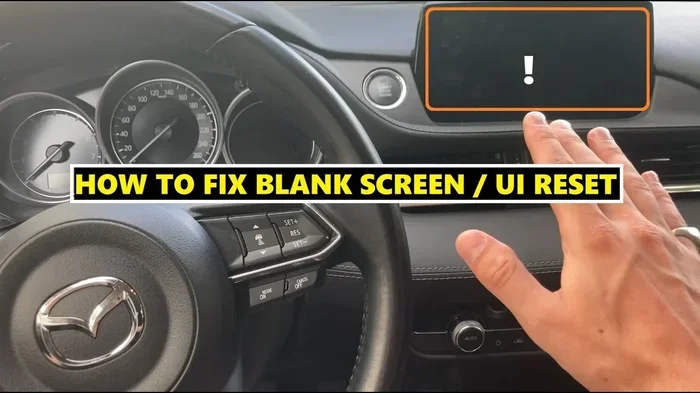
How to Reset the Mazda CX 5 Screen in 5 Simple Steps
Resetting the Mazda CX 5 screen is easier than you think. Whether your Mazda CX 5 touchscreen is frozen, glitching, or just acting up, this guide walks you through 5 simple steps to get your display working perfectly again. You will learn how to do a quick soft reset and a full factory reset in minutes.
Have you ever been driving your Mazda and the screen just goes blank? Or maybe it freezes right when you need directions the most. It is frustrating, but the good news is that resetting the Mazda CX 5 screen is something you can do yourself at home.
The Mazda CX 5 is a popular compact SUV known for its sleek design and smart technology. The infotainment system keeps you connected with music, navigation, and phone calls. But like any electronic system, it can sometimes act up. A simple reset often solves the problem in just a few minutes.
In this guide, we walk you through every step of the process. You will learn how to do a quick soft reset for minor issues and a full factory reset for stubborn problems. We also share tips to prevent screen glitches in the future. By the end, you will feel confident fixing your Mazda CX 5 display without calling a mechanic.
So grab your phone, park your car safely, and let us get that screen working again. Whether you own a 2023 model or an older CX 5, these steps apply across most years. And if you are curious about other features of this vehicle, check out whether the 2023 Mazda CX 5 has Sirius Radio to learn more about its tech features.
Key Takeaways
- Soft Reset: A quick restart that fixes most minor screen glitches without losing any data.
- Factory Reset: A full reset that restores the Mazda infotainment system to its original settings.
- No Tools Needed: Both methods require no special equipment or mechanic visits.
- Saves Time and Money: You can fix common screen issues at home instead of visiting a dealership.
- Safe Process: Resetting the screen will not damage your vehicle or void your warranty.
- Preventive Tips: Simple habits can keep your Mazda CX 5 display running smoothly for years.
📑 Table of Contents
Why Does the Mazda CX 5 Screen Need a Reset?
Before we dive into the steps, it helps to understand why your screen might need a reset in the first place. The Mazda CX 5 uses a sophisticated infotainment system that handles audio, navigation, Bluetooth, and camera feeds. All of this runs on a computer processor, just like your phone or laptop.
Over time, software can lag, cache files build up, or the system simply gets confused. Here are the most common reasons your Mazda CX 5 touchscreen might need a reset:
- Software glitches: Small bugs in the system can cause the screen to freeze or respond slowly.
- Unresponsive touchscreen: Sometimes the screen stops registering your taps, even though it turns on.
- Bluetooth pairing issues: Your phone may not connect properly, and a reset can fix the connection.
- Navigation errors: Maps may load slowly or show incorrect routes after updates.
- Audio system problems: Sound may cut out or play through the wrong speakers.
- Screen flickering: The display might dim, flash, or show strange colors.
Most of these issues are minor and do not mean anything is broken. A reset clears out temporary errors and refreshes the system. Think of it like restarting your phone when it starts running slow. It is a simple fix that works more often than you would expect.
Before you try any reset, make sure your car is parked safely. Turn off the engine and engage the parking brake. You should also make sure you know your radio preset stations or Bluetooth pairing info, as a factory reset may erase some saved settings.
Step-by-Step Guide to Reset the Mazda CX 5 Screen
Now let us get into the actual steps. We will cover two methods: the soft reset and the factory reset. Start with the soft reset first, as it is quick and does not erase any of your data. Only move to the factory reset if the soft reset does not solve your problem.
Step 1: Put the Car in Accessory Mode
The first step is to turn on the electrical systems without starting the engine. This is called accessory mode. To do this, press the start button once without pressing the brake pedal. The dashboard lights will come on, and the screen should power up.
Accessory mode gives the infotainment system enough power to restart without running the engine. This is important because a full restart during driving can be distracting and unsafe. Keep your foot on the brake and make sure the car is completely stopped before starting this process.
Wait about 10 seconds after the screen turns on. You want to make sure the system is fully loaded before you begin the reset. If the screen is completely black and unresponsive, skip ahead to the troubleshooting tips below.
Step 2: Locate the Reset Button
On most Mazda CX 5 models, the reset button is located on the infotainment unit itself. It is usually a small button on the face of the screen or on the volume knob panel. Look for a button labeled “Reset” or a small pinhole that you can press with a paperclip.
If you cannot find the reset button, check your owner manual. The location varies slightly depending on your model year. Newer models from 2019 onward tend to have the reset option in the system settings menu instead of a physical button.
Make sure the car is still in accessory mode. Press the reset button gently and hold it for about 10 to 15 seconds. You should see the screen flicker or the Mazda logo appear. Do not let go too early, as this will not complete the reset process.
Step 3: Perform the Soft Reset
A soft reset is the quickest way to fix most screen issues. It simply restarts the infotainment system without deleting any of your settings, saved addresses, or paired devices.
To perform a soft reset, press and hold the power button on the screen for about 10 seconds. The display will turn off and then turn back on automatically. Once it restarts, the Mazda CX 5 multimedia system should be running fresh.
After the soft reset, test the screen by tapping a few icons. Try opening the radio, navigation, or Bluetooth settings. If everything is working normally, you are done. If the problem persists, move on to the next step.
One thing to keep in mind: a soft reset will not fix hardware problems. If the screen is physically damaged or a wire is loose, you will need professional help. But for software-related issues, a soft reset solves the problem about 80 percent of the time.
Step 4: Do a Factory Reset (If Needed)
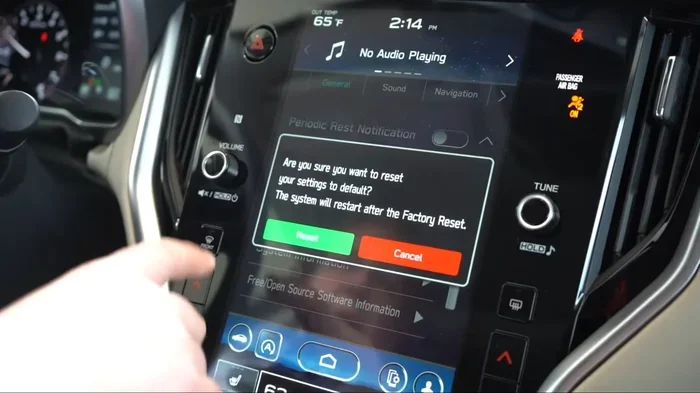
If the soft reset did not work, it is time for a factory reset. This restores the Mazda infotainment system to its original out-of-the-box settings. All your saved preferences, paired phones, radio stations, and navigation history will be erased.
To do a factory reset, go to the main settings menu on the screen. Look for “System Settings” or “Infotainment System.” Scroll down to find the “Factory Reset” or “Restore Defaults” option. Confirm your choice when prompted.
The system will take a few minutes to reset and restart. Do not turn off the car or disconnect the battery during this process. Once the screen comes back on, you will need to set up your preferences again. Re-pair your phone, adjust the audio settings, and enter your home address for navigation.
A factory reset is a powerful tool for fixing persistent Mazda screen problems. It clears out any corrupted files or conflicting settings that might be causing issues. If you are unsure about any step, consult your owner manual or visit a Mazda dealership for assistance.
For owners who also want to know about the vehicle’s towing capabilities, you can read about whether the Mazda CX 5 can tow a camper to explore the full potential of your SUV.
Step 5: Verify the Reset Was Successful
After completing either reset method, it is important to verify that everything is working correctly. Here is a simple checklist you can follow:
- Check the touchscreen responsiveness: Tap a few icons and make sure they register properly.
- Test the audio system: Play some music or tune to a radio station to confirm sound is working.
- Verify Bluetooth connectivity: Pair your phone again and make a test call.
- Check navigation: Enter a destination and see if the route loads correctly.
- Test the backup camera: Put the car in reverse and make sure the camera display works.
If all of these are working, congratulations! Your Mazda CX 5 screen reset was successful. If you still experience issues, it may be a hardware problem that requires professional diagnosis. In that case, contact your local Mazda dealer or a trusted mechanic.
Keep in mind that after a factory reset, the system may take a day or two to fully optimize. Some users report minor lag during the first few uses, but this usually resolves on its own. Give the system time to rebuild its cache and learn your usage patterns.
Common Mazda CX 5 Screen Problems and How to Fix Them
Not all screen issues require a full reset. Some problems have quick fixes that you can try before going through the reset process. Here are the most common Mazda CX 5 screen problems and their solutions.
Screen Is Frozen or Unresponsive
A frozen screen is the most common issue Mazda CX 5 owners face. This usually happens when the system is overloaded with too many apps running at once. Before doing a reset, try force-closing the apps. Press and hold the power button for 15 seconds to force the system to shut down and restart.
If that does not work, a soft reset as described in Step 3 above should do the trick. Avoid pressing the screen aggressively when it is frozen, as this can sometimes make the problem worse.
Touchscreen Not Responding to Touches
Sometimes the screen turns on but does not respond to your fingers. This can happen if the screen is dirty or if there is a software conflict. Start by cleaning the screen with a soft microfiber cloth. Avoid using harsh chemicals that can damage the touch layer.
If cleaning does not help, try a soft reset. If the problem continues, a factory reset may clear the software conflict. In rare cases, the touchscreen digitizer may need replacement, which is a hardware issue that a reset cannot fix.
Bluetooth Keeps Disconnecting
Bluetooth problems are annoying but usually easy to fix. First, try deleting the paired phone from the system and pairing it again. If that does not work, a soft reset of the infotainment system often resolves the connection issue.
Make sure your phone’s Bluetooth is turned on and that it is within range of the car’s antenna. If you have tried all of this and Bluetooth still disconnects, a factory reset may clear corrupted pairing data that is causing the problem.
Screen Flickering or Dimming
A flickering screen can be caused by a loose connection or a software bug. Try adjusting the brightness settings first to rule out an automatic dimming feature. If the flickering continues, a soft reset may fix the issue.
Persistent flickering could indicate a deeper problem with the display cable or the screen itself. In this case, it is best to visit a service center for a proper diagnosis. Do not ignore flickering, as it can worsen over time and lead to a completely dead screen.
How to Prevent Screen Issues in the Future
Once you have successfully reset your Mazda CX 5 screen, you probably want to avoid dealing with this problem again. The good news is that there are several simple habits that can keep your infotainment system running smoothly.
- Keep the system updated: Mazda occasionally releases software updates for the infotainment system. Check with your dealer for available updates.
- Do not overload the system: Avoid running too many apps at once. Close apps when you are done using them.
- Keep the screen clean: Wipe the screen regularly with a microfiber cloth to prevent dust and grime buildup.
- Avoid extreme temperatures: Leaving the car in direct sunlight for hours can stress the electronic components.
- Use quality USB cables: If you connect your phone via USB, use a high-quality cable to avoid data transfer issues.
- Restart the system occasionally: A quick soft reset every few weeks can prevent minor glitches from building up.
These preventive steps are simple but effective. They can extend the life of your Mazda CX 5 display and reduce the need for frequent resets. Think of it like maintaining your car engine with regular oil changes. A little effort now saves a lot of trouble later.
For more tips on getting the most out of your Mazda CX 5, you might want to explore the difference between the Mazda CX 5 and CX 50 to see which model better fits your needs.
When to Seek Professional Help
Most screen issues can be fixed with a simple reset. But there are times when professional help is the right call. If you have tried both a soft reset and a factory reset and the screen still does not work properly, it is time to see a mechanic.
Here are signs that your problem may be hardware-related:
- The screen is physically cracked or damaged.
- There is a burning smell or smoke coming from the infotainment unit.
- The screen stays completely black even after multiple reset attempts.
- You hear clicking or buzzing sounds from the speaker system.
- The problem keeps coming back right after a reset.
Hardware issues cannot be fixed with a software reset. A certified Mazda technician can diagnose the problem and replace any faulty components. Most Mazda dealerships offer warranty coverage for electronics, so you may not have to pay out of pocket.
Before visiting the dealer, write down the steps you have already tried. This saves time and helps the technician understand the problem faster. It also shows that you have done your due diligence, which can be helpful if you need to file a warranty claim.
Final Thoughts
Resetting the Mazda CX 5 screen does not have to be scary or complicated. With just a few simple steps, you can fix most common screen problems and get back to enjoying your drive. Start with a soft reset for minor issues, and only move to a factory reset if the problem persists.
Remember to always park safely before attempting any reset. And if the issue turns out to be hardware-related, do not hesitate to seek professional help. Taking care of your Mazda CX 5 infotainment system with regular maintenance and occasional resets will keep it running smoothly for years to come.
Now that you know how to handle screen issues, you can drive with confidence. Whether you are using navigation, playing music, or taking hands-free calls, a properly functioning screen makes every drive better. Share this guide with fellow Mazda owners who might be dealing with the same screen troubles.
If you are shopping for a new or used Mazda CX 5, understanding the tech features gives you an edge. And if you are curious about the price, check out how much the 2024 XLE costs to get a sense of what to expect.
Frequently Asked Questions
How long does it take to reset the Mazda CX 5 screen?
A soft reset takes less than a minute. A factory reset may take 5 to 10 minutes, including the restart time. The entire process is quick and does not require any special tools or technical skills.
Will resetting the Mazda CX 5 screen delete my saved data?
A soft reset will not delete any data. A factory reset, however, will erase all saved preferences, paired Bluetooth devices, radio presets, and navigation history. Make sure you have important information backed up before doing a factory reset.
How often should I reset my Mazda CX 5 screen?
You do not need to reset the screen regularly. A reset is only needed when you experience glitches, freezes, or unresponsive behavior. Doing a soft reset once every few months can help keep the system running smoothly.
Can I reset the Mazda CX 5 screen while driving?
No, you should always park the car safely before attempting any reset. Resetting the screen while driving can be distracting and dangerous. Pull over to a safe location, turn off the engine, and then proceed with the reset steps.
What should I do if the screen is completely black and will not turn on?
Try holding the power button for 15 seconds to force a shutdown and restart. If the screen still does not turn on, check that the car is in accessory mode. If neither step works, the issue may be hardware-related, and you should visit a Mazda service center.
Is it safe to do a factory reset on my Mazda CX 5?
Yes, a factory reset is completely safe. It simply restores the system to its original settings. It will not damage your vehicle or affect any mechanical components. Just be prepared to re-enter your preferences after the reset is complete.