How to Reset a Subaru Radio And Get It Working Again
Resetting a Subaru radio is easier than you think. Whether your Subaru audio system is frozen, unresponsive, or acting glitchy, a simple reset can fix the problem in minutes. This guide walks you through every method, from a quick soft reset to a full factory reset, so you can get your Subaru infotainment back up and running without visiting a dealer.
There is nothing more frustrating than climbing into your Subaru, turning the key, and staring at a blank or frozen screen where your Subaru radio should be. Whether it is a glitchy touchscreen, a system that won’t power on, or audio that cuts out randomly, a radio that will not work can ruin your whole morning commute. The good news is that most Subaru audio problems can be solved with a simple reset. You do not need to be a mechanic, and you definitely do not need to spend hundreds of dollars at a dealership.
In this guide, we will walk you through every way to reset a Subaru radio and get it working again. We will cover soft resets, hard resets, factory resets, and even some troubleshooting tips for common issues. By the end of this article, you will know exactly what to do no matter what is going on with your Subaru infotainment system. Let us dive in.
Key Takeaways
- Soft Reset: A quick restart that fixes most minor glitches and frozen screens.
- Hard Reset: A deeper reset that clears more stubborn issues and error messages.
- Factory Reset: The full nuclear option that restores all settings to original defaults.
- Battery Connection Method: A simple trick using the car battery to power cycle the system.
- Prevention Tips: Easy habits to keep your Subaru radio running smoothly long-term.
📑 Table of Contents
Why Does a Subaru Radio Need a Reset?
Before we get into the how, let us talk about the why. Understanding what causes radio problems helps you prevent them in the future. A Subaru radio reset is not just a random fix. It addresses specific issues that build up over time.
Modern Subarus come packed with technology. The Subaru multimedia system runs complex software that manages everything from Bluetooth connections to GPS navigation. Like any computer, this system can slow down, freeze, or develop errors. Here are the most common reasons your Subaru stereo might need a reset:
- Software Glitches: Just like your phone, the infotainment system can have bugs that cause it to freeze or act unpredictably.
- Memory Overload: Too many saved stations, paired devices, or stored data can bog down the system.
- Power Surges: A jump start or a weak battery can cause electrical irregularities that affect the radio.
- Failed Updates: If a software update did not install correctly, the system may malfunction.
- Sensor Conflicts: Sometimes connected devices or accessories interfere with the radio’s normal operation.
Knowing the root cause helps you choose the right reset method. A minor glitch might only need a soft reset. But a deeper software issue could require a full factory reset. We will cover all of these methods below.
How to Soft Reset a Subaru Radio
A soft reset is the quickest and easiest way to fix most Subaru radio problems. Think of it like restarting your computer. It does not delete anything, and it takes less than a minute. This should always be your first step.
Method 1: The Restart Button
Most newer Subarus have a dedicated restart option in the settings menu. Here is how to find it:
- Press the Home button on your touchscreen.
- Navigate to Settings or the gear icon.
- Look for System or Audio System.
- Select Restart or Reboot.
- Wait for the screen to go dark and then come back on.
That is it. Your Subaru audio system will reboot just like your phone does. This fixes the majority of minor issues like a frozen screen or slow response times.
Method 2: The Power Cycle
If you cannot find the restart option, you can power cycle the system manually:
- Turn off the engine and remove the key from the ignition.
- Press and hold the power button on the radio for 10 to 15 seconds.
- Wait about 30 seconds.
- Turn the ignition back on without starting the engine.
- The radio should power back up with a fresh start.
This method works wonders for Subaru radio screen frozen situations. It forces the system to fully power down and clear any temporary errors. If your screen is stuck on a black screen or showing weird static, this is the first thing you should try.
How to Hard Reset a Subaru Radio
A hard reset goes deeper than a soft reset. It clears more system data and can fix issues that a simple restart cannot handle. Use this method when the soft reset does not solve your problem.
Method 1: The Fuse Reset
Every Subaru has a fuse box that controls the electrical systems. The radio has its own fuse, and resetting it effectively hard resets the entire unit. Here is what to do:
- Turn off the engine and open the driver side door.
- Locate the fuse box under the dashboard on the left side.
- Look for the fuse labeled Audio or Radio (check your owner manual if you are unsure).
- Use a fuse puller or a pair of needle-nose pliers to remove the fuse.
- Wait 2 to 3 minutes.
- Reinsert the fuse firmly.
- Start the engine and check if the radio powers on normally.
This is one of the most effective ways to fix Subaru radio issues that persist after a soft reset. It resets all the internal memory and clears out any corrupted data that might be causing problems.
Method 2: The Battery Disconnect
If the fuse method does not work, you can disconnect the car battery entirely. This resets every electrical system in the vehicle, including the radio:
- Turn off the engine and all accessories.
- Open the hood and locate the negative battery terminal (the black cable).
- Use a wrench to loosen the nut on the negative terminal.
- Remove the cable and tuck it away from the battery.
- Wait 10 to 15 minutes.
- Reconnect the cable and tighten the nut.
- Start the car and test the radio.
Warning: Disconnecting the battery may reset other settings in your car, like the clock, radio presets, and Bluetooth pairings. You will need to reconfigure those after reconnecting. Also, some Subaru models may require a security code after a battery disconnect, so have your key fob handy.
How to Factory Reset a Subaru Radio
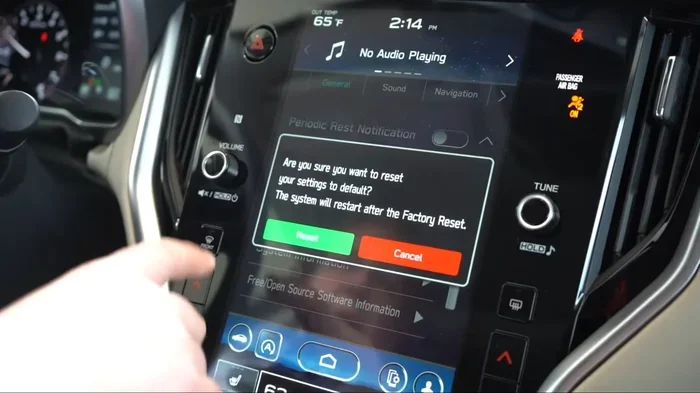
A factory reset is the most thorough option. It wipes all custom settings, saved stations, paired devices, and preferences, and returns the system to its original out-of-the-box state. You should only use this method when the soft and hard resets do not work.
When Should You Factory Reset?
Not every radio problem requires a factory reset. Here are the situations where it makes sense:
- The radio screen is constantly freezing or crashing.
- You are getting persistent error messages that will not go away.
- The audio quality has degraded significantly with no clear cause.
- The system is running extremely slowly or unresponsive.
- You are selling or giving away the car and want to clear all personal data.
How to Perform a Factory Reset
The exact steps vary slightly depending on your Subaru model and year, but the general process is similar across most models:
- Turn on the ignition without starting the engine.
- Go to the Home screen on the touchscreen.
- Navigate to Settings, then System.
- Look for Factory Reset or Reset to Factory Defaults.
- Confirm your selection when prompted.
- Wait for the system to complete the reset process. This can take several minutes.
- Once complete, restart the car and set up your preferences again.
After a factory reset, you will need to reconnect your phone via Bluetooth, re-tune your favorite radio stations, and adjust your audio settings. Think of it like setting up a new device. It takes a few minutes, but the result is a clean, fully functional Subaru infotainment system.
If you own a Subaru with the Starlink system, you may want to check whether you need Subaru Starlink for Apple CarPlay before doing a reset, since some connectivity features depend on it.
Common Subaru Radio Problems and How to Fix Them
Not every radio issue requires a reset. Some problems have simple fixes that take just a few seconds. Here are the most common Subaru car audio problems and how to solve them.
Radio Won’t Turn On
If your radio will not power on at all, the issue is usually electrical. Start by checking the fuse. A blown fuse is the most common cause of a dead radio. Replace the fuse with one of the same amperage. If the new fuse blows immediately, there may be a wiring issue that needs professional attention.
Also check your battery voltage. A weak battery can prevent the radio from turning on. If you have recently had a jump start, the electrical surge may have tripped a safety mechanism. A battery disconnect reset usually fixes this.
Screen Is Frozen or Unresponsive
A frozen screen is almost always a software issue. Start with a soft reset using the power cycle method described above. If that does not work, hold the power button for 20 seconds to force a shutdown. Wait a full minute before turning it back on.
Avoid pressing random buttons on a frozen screen. This can sometimes make the problem worse by triggering conflicting commands.
Poor Audio Quality or Static
If your radio sounds fuzzy or full of static, the problem might not be the radio itself. Check the antenna connection first. A loose or corroded antenna cable is the number one cause of poor reception. You can find the antenna wire running along the back of the radio unit.
Also consider your location. Being in a tunnel, underground parking garage, or remote area can cause temporary signal loss. If the static only happens in certain spots, it is likely a reception issue, not a radio problem.
Bluetooth Keeps Disconnecting
Bluetooth issues are incredibly common and annoying. The first fix is to delete the paired device from both your phone and the car radio, then pair them again from scratch. If that does not work, try resetting the Bluetooth module through the radio settings.
Sometimes the problem is on the phone side. Make sure your phone’s Bluetooth is turned off and back on. Also check that your phone software is up to date. If you have the Starlink system, you may want to review how Subaru Starlink interacts with Apple CarPlay to ensure your connectivity settings are correct.
Prevention Tips to Keep Your Subaru Radio Running Smoothly
Prevention is always better than fixing. Once you get your Subaru radio working again, you want to keep it that way. Here are simple habits that help:
- Keep Your Software Updated: Subaru occasionally releases infotainment updates. Check with your dealer to see if any are available for your model.
- Avoid Overloading the System: Too many paired Bluetooth devices can slow things down. Delete devices you no longer use.
- Use a Surge Protector: If you live in an area with frequent power surges or lightning, a surge protector can protect your electronics.
- Turn Off the Radio Before Shutting Down: This prevents power spikes from affecting the system when you restart.
- Keep the Antenna Clean: A dirty or damaged antenna connector leads to poor reception and static.
- Restart Periodically: Just like your phone, giving the system a regular restart keeps it running smoothly.
These small habits can add years of reliable use to your Subaru audio system. Most people never have radio problems again once they build these into their routine.
When to See a Professional
Most radio issues are fixable with the methods above. But some problems need a professional touch. Here are signs it is time to visit a mechanic or Subaru dealer:
- The radio still does not work after a full factory reset.
- You smell burning or notice a strange odor coming from the radio unit.
- There is visible damage to the screen or wiring.
- The radio works intermittently and you cannot identify a pattern.
- You get a security code error that you cannot clear.
A professional has diagnostic tools that can read error codes and identify hidden electrical problems. If you have tried everything in this guide and the issue persists, do not hesitate to seek help. Continuing to force the system can sometimes cause more damage.
Also, if your Subaru is still under warranty, the radio repair may be covered. Check with your dealer before paying for any repairs out of pocket. And if you are shopping for a new vehicle, check how much a brand new car costs to see if upgrading makes sense for your budget.
Final Thoughts
Resetting a Subaru radio is one of those simple skills that saves you time, money, and frustration. Whether a quick soft reset fixes a frozen screen or a full factory reset clears up a stubborn software issue, you now have all the tools you need. The key is to start simple and work your way up to more intensive methods only when needed.
Keep the prevention tips in mind, and your Subaru infotainment system should serve you well for years to come. Most radio problems are temporary and easily fixed. You do not need to stress, and you certainly do not need to spend a fortune at a dealership. With the steps in this guide, you can handle the vast majority of radio issues right from your driveway.
Next time your Subaru stereo acts up, take a deep breath and work through the methods above. You have got this. And if the problem persists, a professional is always just a phone call away.
Frequently Asked Questions
How long does a Subaru radio reset take?
A soft reset takes less than a minute. A hard reset with a fuse or battery disconnect takes about 5 to 10 minutes. A full factory reset can take 10 to 20 minutes because the system needs to clear all data and reboot completely.
Will resetting my Subaru radio delete my saved stations?
A soft reset keeps all your saved stations and settings. A factory reset will delete everything and restore the system to its original defaults. You will need to re-tune your favorite stations after a factory reset.
Why does my Subaru radio keep freezing?
Freezing is usually caused by software glitches, memory overload, or outdated firmware. Start with a soft reset. If the problem continues, try a hard reset. If freezing persists, a factory reset or software update may be needed.
Do I need any special tools to reset a Subaru radio?
No special tools are needed for a soft reset or factory reset. For a fuse reset or battery disconnect, you need a basic wrench and a fuse puller. Both are inexpensive and available at any auto parts store.
Is it safe to disconnect the battery to reset the radio?
Yes, it is safe. Just make sure the engine is off and you only disconnect the negative terminal. Wait at least 10 minutes before reconnecting. Be aware that this will reset other car settings too, like the clock and Bluetooth pairings.
Can a dead key fob battery cause radio problems?
A dead key fob battery can sometimes cause issues with the car’s electrical systems, including the radio. If your radio acts strangely, try replacing your key fob battery first. It is a quick and easy fix that many people overlook.