How Do You Reset the TPMS Sensor on Your Toyota Truck
Resetting the TPMS sensor on your Toyota Truck is a simple process you can do at home in just a few minutes. Whether the tire pressure warning light is on after a rotation, a temperature change, or a slow leak, this guide walks you through every method. You will learn the TPMS reset button location, the manual reset steps for different Toyota models, and how to check tire pressure properly to keep your truck running safely.
That little yellow warning light on your Toyota dashboard can really get on your nerves. You know the one. It looks like a horseshoe with an exclamation point in the middle, and it means your tire pressure monitoring system has detected something is off. Maybe you just rotated your tires. Maybe the weather dropped 20 degrees overnight. Or maybe one of your tires is slowly leaking air. Whatever the reason, the light is on, and you want it off.
Here is the good news. Resetting the TPMS sensor on a Toyota truck is one of the easiest things you can do yourself. You do not need a mechanic. You do not need expensive tools. In most cases, it takes less than five minutes. This guide covers every method, from the quick button reset to the manual steering wheel controls. By the end, you will know exactly how to handle this yourself and keep your truck safe on the road.
Before we dive into the steps, let us talk about what the TPMS light actually means and why it shows up in the first place. Understanding the basics will help you figure out whether a simple reset is all you need or whether something deeper is going on with your tire pressure sensor.
Key Takeaways
- Quick Reset Method: Most Toyota trucks have a dedicated TPMS reset button under the steering column or on the dashboard panel.
- Manual Reset Option: You can also reset the system through the steering wheel controls on newer Toyota models.
- Check Tire Pressure First: Always verify and adjust tire pressure before resetting the sensor to avoid the light coming back on.
- Sensor Battery Life: TPMS sensors have a battery that lasts around 5 to 10 years. A persistent light may mean the battery needs replacing.
- When to See a Pro: If the light stays on after a full reset, the sensor itself may be faulty and need professional diagnosis.
📑 Table of Contents
What Is the TPMS and Why Does It Light Up?
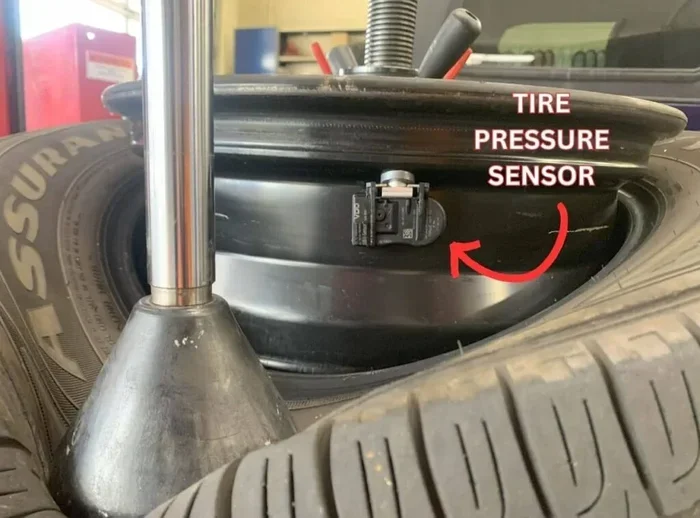
The tire pressure monitoring system is a safety feature built into every modern Toyota truck. It uses small sensors inside each tire, usually mounted on the tire valve stem, to measure the air pressure in real time. When the pressure drops below the recommended level, the system sends a signal to your Toyota dashboard, and the warning light turns on.
There are two common reasons the light comes on:
- Actual low pressure: One or more tires are underinflated. This can happen from a slow leak, a puncture, or simply air loss over time.
- Temperature changes: Cold weather causes the air inside your tires to contract, which can temporarily lower the pressure and trigger the light.
Sometimes the light also comes on after you replace tires, rotate them, or change a wheel. The system just needs to be recalibrated. That is where the reset comes in.
How to Check Your Tire Pressure Before Resetting
Here is a step many people skip, and it matters a lot. Before you reset the TPMS sensor, check the actual pressure in each tire. You can use a basic tire pressure gauge from any auto parts store. The recommended pressure for your Toyota truck is listed on a sticker inside the driver side door frame.
If a tire is genuinely low, add air first. Resetting the sensor on a tire that still has low pressure will just cause the light to come right back on. Also, if you are unsure which tire is low and do not have a gauge handy, you can learn how to tell which tire is low without a gauge using visual and tactile checks.
How to Reset the TPMS Sensor on a Toyota Truck
Now for the main event. There are three common ways to reset the TPMS light on a Toyota truck. The method you use depends on the year and model of your vehicle. Let us walk through each one.
Method 1: The TPMS Reset Button
Most Toyota trucks have a physical TPMS reset button. It is usually located under the steering column, to the left of the steering wheel. On some models, you will find it on the lower part of the dashboard near the driver side door.
Here is how to use it:
- Make sure all your tires are at the correct pressure.
- Turn the ignition to the “ON” position. Do not start the engine. Just turn the key or press the start button without pressing the brake.
- Look for the TPMS reset button. It is often labeled with a tire icon or the letters “TPMS.”
- Press and hold the button until the tire pressure warning light on the dashboard blinks three times.
- Release the button.
- Start the engine and let the truck idle for about 20 minutes. The system will recalibrate.
Once the 20 minutes are up, the light should be off. If it comes back on, try the next method or check your tire pressure again.
Method 2: The Steering Wheel Controls
Newer Toyota trucks, especially models from 2015 and later, use a digital display and steering wheel controls instead of a physical reset button. Here is how it works:
- Press the steering wheel menu button to access the Toyota dashboard display.
- Use the arrow buttons to navigate to the “Settings” menu.
- Look for “Vehicle Settings” or “TPMS Maintenance.”
- Select “Reset TPMS” or “Initialize Tire Pressure Monitoring.”
- Confirm the reset when prompted.
- Drive the truck at a steady speed for about 10 to 15 minutes. The system will relearn the sensor readings.
This method works on many Toyota vehicle models with digital displays. If you cannot find the TPMS option in the settings menu, check your owner’s manual. The exact menu path can vary slightly between model years.
Method 3: The Odometer Reset Trick
On some older Toyota trucks, there is a clever workaround. This method uses the odometer trip button to trigger the TPMS reset. Here is what you do:
- Turn the ignition to the “ON” position without starting the engine.
- Press and hold the trip meter reset button on the dashboard cluster.
- While holding the trip button, turn the ignition off and then back to “ON.”
- Keep holding the trip button for about 10 seconds until the TPMS light blinks slowly three times.
- Release the button.
- Start the engine and drive for 15 to 20 minutes.
This trick works on several Toyota truck models from the early 2000s through the mid-2010s. It is not officially documented in every owner’s manual, but many Toyota owners swear by it.
Common Reasons the TPMS Light Comes Back On
You have done the reset. The light went off. You drove for a few days. And then it is back. This is frustrating, but it happens more often than you might think. Here are the most common reasons the TPMS light keeps coming back on a Toyota truck.
Slow Tire Leak
A slow leak is the number one culprit. Even a tiny puncture or a worn valve stem can let out just enough air to trigger the sensor. The light might go off for a few days and then come back as the pressure drops further. If you keep having to add air to the same tire, get it checked for a leak. A simple soap and water solution sprayed on the tire valve stem can reveal a leak — look for bubbles forming.
Cold Weather
Air pressure inside tires drops when the temperature drops. A 10-degree drop in temperature can reduce tire pressure by about 1 PSI. In winter, this is very common. The light may come on in the morning and go off after the tires warm up from driving. If this happens often, you may want to slightly overinflate your tires during the cold months. Just do not exceed the maximum pressure listed on the tire sidewall.
TPMS Sensor Battery Failure
Every TPMS sensor has a small battery inside that typically lasts between 5 and 10 years. When the battery dies, the sensor cannot send readings to the Toyota dashboard, and the light stays on. You cannot replace just the battery in most sensors — the entire sensor unit needs to be replaced. A mechanic can test the sensor battery and replace it if needed.
After a Tire Change or Rotation
If you recently got new tires, rotated your tires, or changed a wheel, the system may need to be reset again. The sensors need time to relearn the position and pressure of each tire. Driving for 15 to 20 minutes after a reset usually fixes this. You can also learn more about checking tire pressure on your Toyota through the Toyota app tire pressure feature if your truck supports it.
TPMS Sensor Replacement: When to Do It
Sometimes resetting the light is not enough. If the TPMS sensor itself is damaged or the battery has died, you need a replacement. Here is how to know when it is time.
- The tire pressure warning light stays on solid even after a full reset and after confirming all tires are at the right pressure.
- The dashboard shows a “Service TPMS” message instead of just the warning light.
- You have had the tires checked and they are fine, but the light still does not go off.
- The truck is more than 10 years old and the sensors have never been replaced.
Replacing a tire pressure sensor typically costs between $50 and $100 per sensor for the part, plus labor if you have a shop do it. Many Toyota owners choose to replace the sensors themselves if they are comfortable with basic tire work. The sensor pops off the valve stem and a new one screws right on.
Quick Tips for TPMS Sensor Longevity
You can extend the life of your TPMS sensors with a few simple habits:
- Keep your tires properly inflated at all times. Underinflated tires put extra stress on the sensors.
- Avoid hitting potholes and curbs hard. Impact can damage the sensor or knock it loose from the valve stem.
- Check the valve stem cores periodically and tighten them if they are loose.
- When replacing tires, ask the shop to handle the sensors carefully and not to use too much force when mounting the tire.
Toyota TPMS Reset: Model Year Differences
Toyota makes several truck models, and the reset process can vary slightly between them. Here is a quick overview of how the process differs across common Toyota truck models.
| Model | Reset Method | Approximate Year Range |
|---|---|---|
| Toyota Tacoma | Physical reset button under steering column or steering wheel menu | 2005–2024 |
| Toyota Tundra | Reset button or steering wheel controls depending on trim | 2007–2024 |
| Toyota 4Runner | Reset button under dashboard or steering wheel menu | 2010–2024 |
| Toyota FJ Cruiser | Reset button near steering column | 2007–2014 |
If you are not sure which method applies to your specific model, the owner’s manual is your best friend. You can also find the reset procedure on the first page of the manual under the “Maintenance” section. If you do not have the physical manual anymore, Toyota also offers digital versions on their website.
For owners who also want to monitor tire pressure remotely, you can check your tire pressure readings through the Toyota app on your phone if your truck is equipped with the connected features. This can help you catch low pressure issues before the dashboard light even comes on.
When to See a Professional
Most of the time, resetting the TPMS sensor is a DIY job. But there are situations where you should take your Toyota truck to a professional. If you have tried all three reset methods and the light still does not go off, there may be a deeper issue. A certified Toyota technician can run a diagnostic scan to see which specific sensor is malfunctioning. They can also check for issues with the TPMS module itself, which is rare but does happen.
It is also worth a professional visit if you notice any of these signs:
- The light flashes instead of staying solid. Flashing usually indicates a sensor communication error.
- You hear a clicking sound near the tire when driving, which could mean a loose or damaged sensor.
- Multiple warning lights are on at the same time, which could point to an electrical issue.
Do not ignore a persistent tire pressure warning light. Driving on underinflated tires is dangerous. It reduces fuel efficiency, causes uneven tire wear, and increases the risk of a blowout. Taking care of the problem quickly keeps you and your truck safe.
Key Takeaways
- Quick Reset Method: Most Toyota trucks have a dedicated TPMS reset button under the steering column or on the dashboard panel.
- Manual Reset Option: You can also reset the system through the steering wheel controls on newer Toyota models.
- Check Tire Pressure First: Always verify and adjust tire pressure before resetting the sensor to avoid the light coming back on.
- Sensor Battery Life: TPMS sensors have a battery that lasts around 5 to 10 years. A persistent light may mean the battery needs replacing.
- When to See a Pro: If the light stays on after a full reset, the sensor itself may be faulty and need professional diagnosis.
Frequently Asked Questions
How long does it take to reset the TPMS sensor on a Toyota Truck?
The actual reset process takes about 2 to 3 minutes. After pressing the reset button or using the steering wheel menu, you just need to drive the truck for 15 to 20 minutes so the system can recalibrate. Total time from start to finish is usually under half an hour.
Why does my TPMS light come back on after I reset it?
The most common reason is a slow tire leak that slowly reduces the pressure again. Cold weather can also cause the light to return. If the light keeps coming back after multiple resets, one of the tire pressure sensors may have a dead battery or be damaged and need replacement.
Can I drive my Toyota Truck with the TPMS light on?
You can drive short distances, but it is not recommended. The light means one or more tires are underinflated, which affects handling, braking, and fuel economy. Check your tire pressure as soon as possible and add air if needed. If you are unsure about your tire pressure, refer to the sticker on the driver side door frame for the correct inflation levels.
How much does it cost to replace a TPMS sensor on a Toyota Truck?
A single TPMS sensor costs between $50 and $100 for the part. If you go to a shop for installation, add about $20 to $50 per sensor for labor. Many Toyota owners choose to replace the sensors themselves since it is a straightforward job that involves unscrewing the old sensor and threading on the new one at the valve stem.
Do I need any special tools to reset the TPMS on a Toyota Truck?
No special tools are needed for most Toyota trucks. The reset is done either with a physical button or through the steering wheel controls. A basic tire pressure gauge is helpful to check your tire pressure before resetting. Some owners also find that a small screwdriver helps if the reset button is hard to reach, but it is not required.
Can cold weather cause the TPMS light to come on?
Yes, cold weather is one of the most common reasons the TPMS light activates. When temperatures drop, the air inside your tires contracts and the pressure decreases. A drop of just 10 degrees Fahrenheit can reduce tire pressure by about 1 PSI. This is usually temporary, and the light may go off once the tires warm up from driving. If it happens frequently in winter, consider slightly increasing your tire pressure during the colder months.
=== CONCLUSION ===
Resetting the TPMS sensor on your Toyota truck is one of those simple maintenance tasks that every owner should know how to do. It saves you time, money, and the hassle of booking a trip to the dealership. Whether you use the physical reset button under the steering column, the digital menu on the dashboard, or the odometer trick on older models, the process is quick and straightforward.
Remember to always check your tire pressure before resetting. A proper tire pressure check with a reliable gauge ensures the light stays off and your truck runs safely. If the light keeps coming back, do not ignore it. A failing sensor or a slow leak needs attention before it turns into a bigger problem.
With the steps in this guide, you have everything you need to handle a TPMS reset like a pro. Keep a tire pressure gauge in your truck, check your tires regularly, and you will rarely see that yellow warning light again. Stay safe out there, and enjoy the ride in your Toyota truck.