What Happens When the Battery in Your Key Fob Dies
When the battery in your key fob dies, your car may not start, the remote features stop working, and warning lights can appear on your dashboard. Understanding the signs of a dead key fob battery saves you time and stress at the parking lot or driveway. This guide covers everything from key fob battery replacement to troubleshooting tips that keep your vehicle running smoothly.
You walk toward your car on a busy morning. You press the button on your key fob. Nothing happens. You press it again. Still nothing. That sinking feeling in your stomach tells you something is wrong. More often than not, the culprit is a simple one: the battery in your key fob has died.
A dead key fob battery is one of the most common and frustrating experiences for car owners today. Modern vehicles rely heavily on smart key systems and remote key fobs for everything from unlocking doors to starting the engine. When that small coin-cell battery loses its charge, it can bring your entire routine to a halt. But here is the good news: this is a problem you can fix yourself quickly and affordably.
In this article, we will walk you through exactly what happens when your key fob battery dies, how to recognize the warning signs, and what steps to take next. Whether you need a quick key fob battery replacement or want to understand the technology behind your remote key fob, this guide has you covered.
Key Takeaways
- A dead key fob battery prevents remote unlocking and push-button starting in most modern vehicles.
- Common signs include reduced range, intermittent remote function, and dashboard warning lights.
- Most key fob batteries are inexpensive CR2032 coin cells that you can replace at home in minutes.
- After replacing the battery, you may need to reprogram the key fob or perform a simple reset.
- Dealerships and auto parts stores can help if you are unsure about replacing the battery yourself.
- Keeping a spare battery in your glove box prevents unexpected lockouts.
- Regular maintenance of your remote key fob extends its lifespan and reliability.
📑 Table of Contents
- What Is a Key Fob and How Does It Work?
- What Happens When the Battery in Your Key Fob Dies
- Common Signs Your Key Fob Battery Is Dying
- How to Replace the Battery in Your Key Fob
- When to See a Professional for Key Fob Battery Replacement
- How to Prevent Key Fob Battery Problems
- Comparison: Key Fob Battery Replacement at Home vs. at a Dealership
- Expert Insights on Key Fob Battery Longevity
- What to Do If You Get Locked Out Due to a Dead Key Fob Battery
- How Driving Without a Working Key Fob Affects Your Vehicle
- Key Takeaways
What Is a Key Fob and How Does It Work?
Before we dive into what goes wrong, it helps to understand how your key fob actually works. A remote key fob is a small handheld device that communicates with your car using radio frequency signals. When you press a button, the fob sends a coded signal to your vehicle’s smart key system. The car receives the signal and responds accordingly.
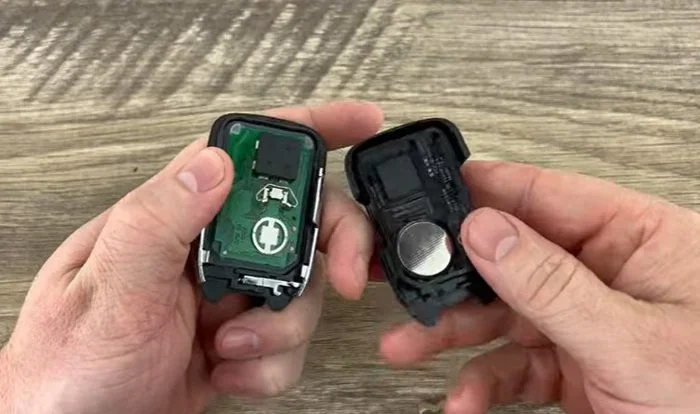
Most modern key fobs use a CR2032 battery, a small silver coin-cell battery that is easy to find and inexpensive. This battery powers the fob’s transmitter and, in some vehicles, a tiny chip that communicates with your car’s vehicle immobilizer. The immobilizer is a security feature that prevents your car from starting unless it recognizes the correct transponder key signal from the fob.
When the battery weakens or dies, the signal weakens or stops entirely. This means your car may not detect the fob, and functions like push button start and remote locking will fail. Understanding this basic process helps you troubleshoot problems faster and avoid unnecessary panic.
What Happens When the Battery in Your Key Fob Dies
A dead key fob battery affects your car in several noticeable ways. The severity of the symptoms depends on your vehicle model, the smart key system it uses, and how low the battery was before it fully died. Here are the most common things that happen:
You Cannot Unlock the Car Remotely
The first and most obvious sign is that your remote unlocking feature stops working. You press the button on your key fob, but the doors do not unlock. This is often the moment car owners realize something is wrong with the fob. In some vehicles, you may still be able to unlock the driver’s door using a mechanical key hidden inside the fob. However, many newer cars do not have this backup option, which can leave you locked out.
The Push Button Start Does Not Work
If your car uses a push button start system, a dead key fob battery can prevent the engine from starting entirely. The car’s computer looks for a valid signal from the fob before it will allow ignition. Without that signal, the engine simply will not turn over, even if the fob is inside the vehicle. Some cars have a backup start procedure, such as placing the fob directly against the start button, but this varies by manufacturer.
Can You Drive A Car If The Key Fob Battery Dies? In most cases, the answer is no if the battery is completely dead and there is no backup procedure. This is why replacing the battery quickly is so important.
Dashboard Warning Lights Appear
Many modern vehicles display a key fob warning light on the dashboard when the fob battery is low or dead. This light often looks like a key icon or a flashing indicator. Some cars also show a message on the instrument cluster, such as “Key Not Detected” or “Replace Key Fob Battery.” These warnings are your car’s way of telling you to act fast before you get stranded.
The Remote Range Decreases Significantly
Before a key fob battery dies completely, it usually shows signs of weakening. You may notice that the remote range shrinks. You have to stand closer to the car for the signal to work. In some cases, you need to press the button multiple times before the car responds. This gradual loss of range is one of the earliest warning signs that the battery needs replacement.
The Key Fob Becomes Unresponsive
In some situations, the remote key fob becomes completely unresponsive. None of the buttons work, and the car does not recognize the fob at all. This can happen suddenly if the battery dies mid-use or if moisture or damage has affected the fob’s internal components along with the battery.
Common Signs Your Key Fob Battery Is Dying
Catching the warning signs early can save you from an unexpected lockout. Here are the most reliable indicators that your key fob battery is running low:
- Increased distance needed: You must stand closer to the car for the fob to work.
- Intermittent function: The fob works sometimes but not others, especially in cold weather.
- Delayed response: There is a noticeable delay between pressing the button and the car responding.
- Dashboard warning light: A key-shaped icon or message appears on your instrument panel.
- Multiple attempts needed: You need to press the button two or three times for it to work.
- Locking or unlocking fails: The remote lock and unlock functions become inconsistent.
If you notice any of these signs, it is a good idea to replace the battery right away. Waiting too long can result in a completely dead fob that leaves you unable to start or access your vehicle.
How to Replace the Battery in Your Key Fob
Replacing a key fob battery is one of the easiest maintenance tasks you can do at home. Most key fobs use a CR2032 battery, which costs just a few dollars and is available at almost any grocery store, pharmacy, or auto parts shop. Here is a step-by-step guide to doing it yourself.
Step 1: Identify the Correct Battery Type
Check your vehicle’s owner manual or look up your specific key fob model online. While the CR2032 is the most common, some vehicles use different battery types such as CR2025 or CR2016. Using the wrong battery can damage the fob or cause it to malfunction.
Step 2: Open the Key Fob Case
Most key fobs have a small seam or notch along the edge. Use a flat-head screwdriver, a coin, or a key fob opening tool to gently pry the case apart. Be careful not to damage the plastic clips or the internal circuit board. Some fobs have a small release button that you need to press before the case separates.
Step 3: Remove the Old Battery
Take note of how the old battery sits inside the fob. Observe the positive and negative sides. Use a small flat tool to gently lift the old battery out. Do not use metal tools that could short-circuit the fob’s internal components.
Step 4: Insert the New Battery
Place the new battery in the same orientation as the old one. Make sure the positive side faces up (or in the direction indicated inside the fob). Press the battery firmly into place until it clicks or sits snugly.
Step 5: Reassemble the Key Fob
Align the two halves of the fob case and press them together firmly until the clips snap into place. Test the fob by standing near your car and pressing the unlock button. If it works, you are all set.
After replacing the battery, some vehicles require you to reprogram the key fob or perform a reset procedure. You can find specific instructions in your owner’s manual. In some cases, you may need to visit a dealership or locksmith for key fob reprogramming. If you are unsure whether your vehicle needs reprogramming after a battery change, check out Can A Toyota Key Be Reprogrammed for helpful guidance on this process.
Quick Tips for Key Fob Battery Replacement
- Always wash your hands before handling the new battery to avoid transferring oils or moisture.
- Keep the old battery until you have confirmed the new one works, in case you need to revert.
- Buy batteries from reputable brands like Energizer or Duracell for the best performance.
- Store spare batteries in a cool, dry place away from direct sunlight.
- Do not mix old and new batteries in the same fob.
When to See a Professional for Key Fob Battery Replacement
While replacing a key fob battery is straightforward for most people, there are times when professional help is the right choice. If your fob is damaged, water-damaged, or the case is cracked, a new battery alone may not fix the problem. In these situations, you may need a key fob replacement or repair.
Many car dealerships offer key fob battery replacement services. If you are wondering whether a dealership can handle this for you, the answer is yes. You can read more about this in our article Can The Dealership Change My Key Fob Battery, which covers what to expect when you bring your vehicle to a dealer for battery service.
Auto parts stores like AutoZone and O’Reilly also carry key fob batteries and can sometimes help you open the fob and swap the battery on the spot. This is a convenient option if you are not comfortable doing it yourself.
Keep in mind that do dealerships replace key batteries for free varies by dealership and brand. Some offer this service at no charge, while others may ask for a small fee. It is always worth calling ahead and asking before you visit.
How to Prevent Key Fob Battery Problems
Prevention is always better than dealing with a dead battery at the worst possible moment. Here are some simple habits that can help you avoid key fob battery issues:
- Replace the battery proactively. Do not wait until the fob stops working. Most CR2032 batteries last between two and four years. Replace yours on a regular schedule.
- Keep a spare battery in your glove box. A spare CR2032 battery takes up almost no space and can save you in an emergency.
- Avoid extreme temperatures. Heat and cold can drain key fob batteries faster than normal. Do not leave your fob in direct sunlight or in a freezing car overnight.
- Handle the fob with care. Dropping or exposing the fob to moisture can damage the internal components and shorten the battery’s life.
- Turn off unused features. Some remote key fobs have buttons you rarely use, like trunk release or panic alarm. Disabling features you do not need can conserve battery life.
After replacing your key fob battery, there are a few things you should do to make sure everything works correctly. Some vehicles require a reset or reprogramming step. To learn more about what to do after a battery replacement, check out our detailed guide on Do You Have To Do Anything After Replacing A Key Fob Battery. This article walks you through the post-replacement steps for different vehicle brands and models.
Comparison: Key Fob Battery Replacement at Home vs. at a Dealership
| Factor | At Home | At a Dealership |
|---|---|---|
| Cost | $2-$5 for the battery | $0-$20 depending on the dealership |
| Time Required | 5-10 minutes | 30 minutes to 1 hour |
| Convenience | Do it anytime, anywhere | Must visit during business hours |
| Expertise Needed | Basic, easy to learn | None required |
| Reprogramming Support | You may need to do it yourself | Staff can assist with reprogramming |
| Risk of Damage | Low if you are careful | Very low |
For most car owners, replacing the battery at home is the fastest and most cost-effective option. However, if you are uncomfortable with the process or your vehicle requires specialized steps, a dealership is a reliable alternative.
Expert Insights on Key Fob Battery Longevity
Automotive experts agree that key fob battery maintenance is one of the most overlooked aspects of car care. According to industry professionals, the average driver does not think about their remote key fob until it stops working. By that point, they may already be standing outside their car in the rain or rushing to work.
Experts recommend keeping track of when you last replaced the battery and setting a reminder to replace it every two to three years. This simple habit eliminates the surprise of a dead battery and keeps your smart key system functioning without interruption.
Another expert tip is to avoid placing your key fob near other electronic devices that emit strong electromagnetic fields. Devices like laptops, tablets, and wireless chargers can interfere with the fob’s signal and, in rare cases, drain the battery faster.
If you find that your key fob continues to have problems even after replacing the battery, the issue may not be the battery at all. Moisture damage, a faulty circuit board, or a worn-out fob housing could be the real cause. In these cases, a key fob replacement or professional repair may be necessary.
What to Do If You Get Locked Out Due to a Dead Key Fob Battery
Getting locked out of your car because of a dead key fob battery is stressful, but it happens to many drivers. Here is what you should do:
- Check for a mechanical key: Many key fobs have a hidden mechanical key blade. Look for a small release button or slider on the fob to expose it. Use this key to unlock the driver’s door.
- Use the backup start procedure: Some vehicles allow you to start the engine with a dead fob by placing it directly against the push button start or the ignition slot. Check your owner’s manual for the exact procedure.
- Call roadside assistance: If you do not have a mechanical key or backup start option, call your roadside assistance provider or a trusted locksmith.
- Contact your dealership: If none of the above options work, your dealership can help you gain access to your vehicle and provide a key fob battery replacement or new fob if needed.
Being prepared for this situation is the best defense. Keep a mechanical key accessible and always know where your spare key fob battery is stored.
How Driving Without a Working Key Fob Affects Your Vehicle
You might wonder whether driving with a dead key fob battery causes any long-term damage to your vehicle. The short answer is no. Once you replace the battery or use a backup method to start the car, your vehicle will function normally. The smart key system and vehicle immobilizer do not suffer any lasting effects from a dead fob battery.
However, repeatedly trying to start your car with a dead fob can drain your car’s 12-volt battery, especially if you leave the ignition in the “on” position for too long. This is why it is important to address a dead key fob battery as soon as you notice the symptoms.
If you are concerned about whether a dead fob battery affects other systems in your car, such as the hybrid battery or electrical components, rest assured that the two systems operate independently. The key fob only handles access and ignition commands; it does not interact with your vehicle’s main battery or powertrain systems.
For more information on related topics, you might be interested in reading about Can You Drive A Car If The Key Fob Battery Dies, which explores the specific scenarios and vehicle models where a dead fob battery impacts driving ability.
Key Takeaways
- A dead key fob battery prevents remote unlocking and push-button starting in most modern vehicles.
- Common signs include reduced range, intermittent remote function, and dashboard warning lights.
- Most key fob batteries are inexpensive CR2032 coin cells that you can replace at home in minutes.
- After replacing the battery, you may need to reprogram the key fob or perform a simple reset.
- Dealerships and auto parts stores can help if you are unsure about replacing the battery yourself.
- Keeping a spare battery in your glove box prevents unexpected lockouts.
- Regular maintenance of your remote key fob extends its lifespan and reliability.
Frequently Asked Questions
How long does a key fob battery last?
Most key fob batteries last between two and four years, depending on how frequently you use the remote features. Vehicles with smart key systems that constantly communicate with the fob may drain the battery faster. Replacing the battery proactively every two to three years is a smart habit.
Can I still drive my car if the key fob battery dies?
It depends on your vehicle. Some cars allow you to start the engine by placing the dead fob directly against the push button start or ignition slot. Others require a mechanical key to unlock the door. Check your owner’s manual for your specific vehicle’s backup procedures.
What type of battery does my key fob use?
The most common key fob battery type is the CR2032, a small silver coin-cell battery. However, some vehicles use CR2025 or CR2016 batteries. Always check your vehicle’s owner manual or look up your specific fob model before purchasing a replacement.
Do dealerships replace key fob batteries for free?
This varies by dealership and manufacturer. Some dealerships offer key fob battery replacement at no charge, while others may apply a small service fee. It is always a good idea to call ahead and ask about their policy before visiting.
Can a dead key fob battery damage my car?
No, a dead key fob battery will not damage your car. The fob and your vehicle’s systems operate independently. However, repeatedly attempting to start the car with a dead fob can drain your car’s 12-volt battery if the ignition is left in the “on” position for an extended period.
How do I know if my key fob battery is low?
The earliest signs include reduced remote range, intermittent function, and the need to press buttons multiple times. Many vehicles also display a key fob warning light or a message on the dashboard when the battery is low. These indicators give you time to replace the battery before it dies completely.
=== CONCLUSION ===
A dead key fob battery is a minor inconvenience that can feel like a major crisis if you are not prepared. Now that you understand what happens when the battery in your key fob dies, you can spot the warning signs early and take action before you get locked out. Replacing the battery is quick, affordable, and something you can do at home with just a few simple tools.
Remember to keep a spare CR2032 battery in your glove box, replace your fob battery on a regular schedule, and know your vehicle’s backup start procedures. These small steps go a long way in keeping your smart key system running smoothly and your daily routine on track.
If you ever feel unsure about replacing the battery yourself, your local dealership or auto parts store is always ready to help. Staying proactive with key fob maintenance means you will never have to worry about standing outside your car, unable to get in. Take charge of your remote key fob health today, and drive with confidence tomorrow.