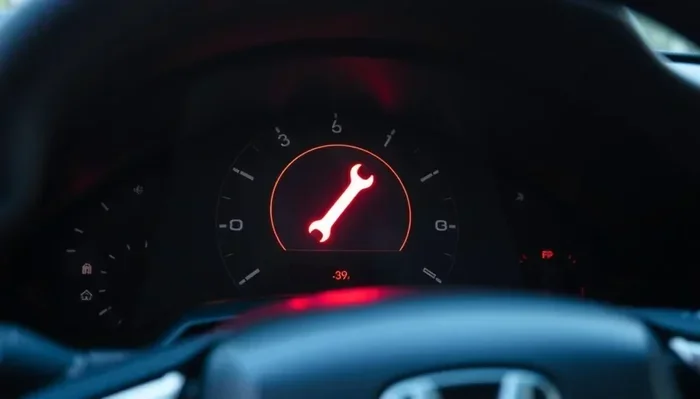
How to Quickly Reset the Wrench Light on Honda Civic
The wrench light on a Honda Civic can be confusing, but resetting it is simple once you know the steps. This guide walks you through every method to turn off the maintenance required light on your Honda Civic. You will learn what the wrench symbol means, why it appears, and exactly how to clear it yourself at home.
This is a comprehensive guide about How to Reset Wrench Light on Honda Civic.
Key Takeaways
- The wrench light is Honda’s maintenance minder system: It reminds you when your car needs service based on driving patterns.
- Resetting is quick and easy: Most Honda Civic models can be reset in under five minutes using the steering wheel buttons.
- Common causes include oil changes, tire rotations, and fluid checks: The light tracks multiple service intervals.
- You do not need a mechanic to reset it: This is a DIY task anyone can do with basic instructions.
- The light may return if the service is not actually performed: Honda’s system tracks maintenance completion over time.
- Understanding dashboard symbols saves money: Knowing what each light means helps you avoid unnecessary shop visits.
[FEATURED_IMAGE_PLACEHOLDER]
How to Quickly Reset the Wrench Light on Honda Civic
That little wrench icon on your Honda Civic dashboard can catch you off guard. One moment you are driving along, and the next you see a symbol that looks like a spanner or a wrench staring back at you. It is not an emergency light like the check engine light, but it is still annoying and hard to ignore.
Here is the good news. Resetting the wrench light on a Honda Civic is one of the easiest things you can do yourself. You do not need expensive tools. You do not need to visit a mechanic. In most cases, you can clear the light in just a few minutes right from your driver’s seat.
This guide covers everything you need to know. We will explain what the wrench light actually means, why Honda designed it this way, and then walk you through the exact reset process for different Honda Civic model years. Whether you drive a 2012 Civic or a 2023 Civic, you will find the steps you need right here.
We also share tips to prevent the light from coming back too soon and explain when the wrench light actually signals something that needs real attention. By the end of this article, you will feel confident handling this common Honda dashboard issue on your own.
What Does the Wrench Light Mean on a Honda Civic?
The wrench symbol on a Honda Civic is part of the Maintenance Minder system. This is Honda’s smart reminder system built into the car’s computer. It tracks your driving habits and tells you when certain services are due. The wrench is not a warning about a broken part. It is more like a friendly nudge from your car saying, “Hey, I am due for some attention.”
Honda designed this system to help owners stay on top of routine maintenance. Instead of relying on a fixed mileage schedule, the Maintenance Minder adjusts based on how you drive. If you drive in stop-and-go traffic a lot, the system may prompt service sooner. If you drive mostly on highways, it might give you more time.
The wrench light often appears alongside a code. You might see something like “Maintenance Required 15000 miles” or a simple “SERVICE DUE” message on your dashboard display. These codes tell you what type of service is coming up. Common codes include oil change reminders, tire rotation alerts, and transmission fluid check notifications.
It is important to understand that the wrench light is different from the check engine light. The check engine light usually means something is wrong with your engine or emissions system. The wrench light is purely about scheduled maintenance. Still, ignoring it for too long can lead to problems, so it is best to address it promptly.
How the Maintenance Minder System Works
Honda’s Maintenance Minder uses algorithms to calculate when your car needs service. The system looks at engine revolutions, temperature, driving time, and distance. Based on all of this data, it estimates when your oil, fluids, and filters need changing.
The system breaks down services into main items and sub-items. Main items are the big services like oil changes. Sub-items cover smaller tasks like checking the drive belt or replacing the air filter. When the wrench light comes on, the main item is usually what needs attention first.
You can find the specific maintenance code by pressing the select button on your dashboard display. This shows you exactly what Honda recommends for your car at that moment. It is a helpful feature that takes the guesswork out of car maintenance.
Common Reasons the Wrench Light Comes On
The wrench light does not just pop up randomly. There is always a reason behind it. Understanding these reasons helps you know whether the reset will actually solve the problem or if something deeper needs attention.
Oil Change Due: This is the most common reason. Honda’s system tracks your oil life percentage. When it drops to around 15 percent, the wrench light activates. Regular oil changes keep your engine running smoothly and prevent long-term damage.
Tire Rotation Needed: Honda recommends rotating your tires every 7,500 miles or so. The Maintenance Minder tracks this interval too. A tire rotation helps your tires wear evenly and extends their lifespan.
Transmission Service: Some Honda Civic models prompt a transmission fluid check or change. This is especially common in higher-mileage vehicles. Fresh transmission fluid keeps shifting smooth and protects internal components.
Brake Inspection: The system may also remind you to inspect your brakes. Brake pads wear down over time, and the wrench light can serve as a helpful prompt to get them checked.
Coolant and Other Fluids: Honda’s system monitors various fluid levels and conditions. When any of these fall below optimal levels, the wrench light may appear as a reminder.
Other Dashboard Warning Lights: Sometimes the wrench light appears alongside other symbols. If you see multiple lights at once, it could indicate a more complex issue. Understanding each symbol helps you prioritize what needs attention first.
How to Reset the Wrench Light on Honda Civic
Now for the part you have been waiting for. Resetting the wrench light on a Honda Civic is straightforward. The exact steps vary slightly depending on your model year, but the general process is very similar across most generations. Below we cover the most common methods.
Method 1: Reset Using the Steering Wheel Controls (2012 and Newer Models)
Most modern Honda Civics use the steering wheel buttons to control the dashboard display. Here is how you reset the wrench light using this method.
- Turn the ignition to ON. Do not start the engine. Just press the start button once or turn the key to the ON position.
- Press the MENU button on the steering wheel. This brings up the main settings menu on your dashboard screen.
- Use the up and down arrow buttons to scroll to Setup. Press the right arrow to enter the Setup menu.
- Scroll to Maintenance Reset. This option may be listed differently depending on your model year. Look for words like “Reset Maintenance” or “Clear Service.”
- Press and hold the SELECT button for about 10 seconds. The display should show a confirmation message or the wrench light should turn off.
- Turn the ignition off and then back on. This confirms the reset was successful. The wrench light should no longer appear.
This method works on most Honda Civic models from 2012 onward. If your Civic has a touchscreen display, the menu layout might look slightly different, but the steps are essentially the same.
Method 2: Reset Using the Trip Meter (Older Models)
If you drive an older Honda Civic, the reset process uses the trip meter instead of steering wheel buttons. This method works on models from around 2006 to 2011.
- Turn the ignition to ON. The dashboard lights will illuminate but the engine stays off.
- Locate the trip meter reset button. This is usually on the dashboard near the speedometer or on the turn signal stalk.
- Press and hold the trip reset button. Keep holding it down.
- While holding the button, turn the ignition to OFF and then back to ON. Continue holding the button for about 10 to 15 seconds after turning to ON.
- Release the button when the wrench light goes off. The light should disappear from the display.
- Turn the ignition off and back on again to confirm. The wrench light should stay off.
This method is simple but requires a bit of timing. Make sure you hold the button long enough. If the light does not go off the first time, try again. It sometimes takes a couple of attempts.
Method 3: Reset Using the Information Display (2016 and Newer Models)
Newer Honda Civic models with the more advanced information display have their own reset process. Here is how it works.
- Press the home button on the display. This takes you to the main screen.
- Navigate to Settings. Use the touchscreen or steering wheel controls to find the Settings option.
- Select Vehicle Settings. Look for a section related to vehicle maintenance or service.
- Choose Reset Maintenance. The system will walk you through the confirmation process.
- Confirm the reset. The wrench light should disappear from the dashboard.
Honda updates their infotainment systems frequently, so the exact menu names might vary slightly. But the general path through Settings to Maintenance Reset stays consistent across most models.
What to Do If the Reset Does Not Work
Sometimes the wrench light does not go away after a reset. This can happen for a few reasons. First, you may not have held the buttons long enough. Try the process again and be patient with the timing.
Second, the service may actually still be overdue. If you have not performed the recommended maintenance, the system might keep triggering the light. In this case, you need to complete the service first, then reset the light.
Third, there could be a glitch in the car’s computer system. Try disconnecting the battery for about 15 minutes and then reconnecting it. This can sometimes clear minor electrical glitches that prevent the reset from working.
Fourth, if none of these solutions work, it might be time to visit a Honda dealer or a trusted mechanic. Sometimes the Maintenance Minder system needs a professional reset tool to clear properly. The good news is that most mechanics charge between $80 and $150 per hour, and a simple reset should not take long or cost much.
When Should You Actually Visit a Mechanic?
Resetting the wrench light is easy, but it is not always the right move. There are times when the wrench light is telling you something real needs attention, and simply resetting it would be a mistake.
Check Your Oil Level First: Before you reset anything, pop the hood and check your oil level. If the oil is low or dirty, the wrench light is doing its job. Add oil or schedule an oil change before resetting the light. Driving with low oil can cause serious engine damage.
Look for Other Warning Signs: If the wrench light comes with unusual noises, vibrations, or changes in how your car drives, do not just reset it. These could be signs of a real mechanical problem. Have the car inspected before clearing the light.
Consider Your Mileage: If you are close to a major service interval like 30,000 or 60,000 miles, the wrench light might be telling you it is time for a full service. Resetting it without doing the work just delays the inevitable and could hurt your car’s longevity. Most well-maintained Honda Civics can last well over 200,000 miles with proper care.
Watch for Repeated Light Activation: If the wrench light keeps coming back after you reset it, something is wrong. The system is detecting a maintenance need that has not been addressed. Keep a log of when the light appears and what services are due. This helps you and your mechanic identify patterns.
Check Other Fluid Levels: The wrench light can sometimes be related to low coolant, brake fluid, or power steering fluid. If you notice the wrench light alongside other warning symbols, check your fluid levels right away. Knowing how to check your power steering fluid is a simple skill that can save you from bigger problems down the road.
Preventing the Wrench Light from Coming Back Too Soon
Once you have successfully reset the wrench light, you probably want to keep it off for a while. Here are some tips to help prevent the light from returning prematurely.
- Follow Honda’s Maintenance Schedule: Stick to the service intervals recommended in your owner’s manual. Regular oil changes, tire rotations, and fluid checks keep the Maintenance Minder happy.
- Keep a Maintenance Log: Write down every service you perform and when. This helps you stay on track and gives you proof of maintenance if you ever sell the car.
- Use Quality Parts and Fluids: Honda recommends specific grades of oil and fluids. Using the right products helps your car run as designed and keeps the Maintenance Minder accurate.
- Drive Consistently: The Maintenance Minder tracks driving patterns. Aggressive driving, short trips, and heavy stop-and-go traffic can trigger service reminders sooner. Try to include some longer highway drives when possible.
- Reset the Light After Each Service: Always reset the wrench light after completing the recommended service. This keeps the system calibrated and prevents false reminders.
- Keep Software Updated: Honda occasionally releases software updates for the Maintenance Minder system. Check with your dealer to see if any updates are available for your model year.
Taking these simple steps can help you avoid the frustration of a wrench light that keeps coming back. It also keeps your Honda Civic running at its best for years to come.
How the Wrench Light Compares to Other Honda Dashboard Lights
Honda Civics have several dashboard warning lights. Understanding the difference between them helps you respond appropriately to each one.
The wrench light is a maintenance reminder. It is not urgent. The check engine light, on the other hand, signals a potential problem with the engine or emissions system and should be checked promptly. The oil pressure light is urgent and means you should stop driving immediately if it comes on.
The battery light indicates a charging system issue. The temperature warning light means your engine is overheating. Each light has a different meaning and requires a different response. The wrench light sits at the low end of the urgency scale. It is a reminder, not a warning.
Knowing the difference between these lights helps you make better decisions about when to pull over, when to schedule service, and when you can simply reset the light and keep driving. The wrench light falls into that last category most of the time.
Frequently Asked Questions
What does the wrench light mean on a Honda Civic?
The wrench light on a Honda Civic is part of the Maintenance Minder system. It reminds you that your car is due for scheduled maintenance such as an oil change, tire rotation, or fluid check. It is not an emergency warning, but you should address it within a reasonable timeframe to keep your car running well.
Can I drive my Honda Civic with the wrench light on?
Yes, you can generally drive with the wrench light on. It is not an urgent warning like the check engine light or oil pressure light. However, you should schedule the recommended service soon. Ignoring maintenance for too long can lead to bigger problems and higher repair costs over time.
How do I know what service is due when the wrench light comes on?
Press the select or menu button on your dashboard display to see the specific maintenance code. The system will show you a code and a mileage number indicating what service is needed and how many miles remain until it is due. Common codes include oil change, tire rotation, and transmission service reminders.
Will resetting the wrench light clear any error codes?
No, resetting the wrench light only clears the maintenance reminder. It does not affect any diagnostic trouble codes stored in your car’s computer. If you have a check engine light or other error codes, those need to be addressed separately. You may need an OBD-II scanner or a visit to a mechanic to clear those codes.
How often does the wrench light come on in a Honda Civic?
The wrench light frequency depends on your driving habits and the Maintenance Minder settings. Most Honda Civic owners see the wrench light every 5,000 to 10,000 miles, which aligns with the recommended oil change interval. If you drive in harsh conditions, the light may appear more frequently.
Do I need special tools to reset the wrench light?
No special tools are needed. You can reset the wrench light using the buttons on your steering wheel or dashboard display. The process takes just a few minutes and requires no equipment beyond your car’s built-in controls. If the reset does not work, a simple battery disconnect for 15 minutes can sometimes clear the issue.
Final Thoughts
The wrench light on a Honda Civic is one of the most common dashboard reminders drivers encounter. It can be frustrating when it pops up unexpectedly, but the good news is that resetting it is quick, easy, and something you can do yourself at home. You do not need to be a mechanic or have any special equipment.
Resetting the wrench light on your Honda Civic takes just a few minutes using the steering wheel controls or dashboard buttons. The key is to follow the right steps for your specific model year and to make sure you have actually completed the recommended service before resetting the light.
Remember, the wrench light is your car’s way of staying on top of routine maintenance. It is a helpful feature, not a cause for panic. By understanding what it means and how to respond, you keep your Honda Civic running smoothly and avoid unnecessary trips to the shop.
Keep this guide bookmarked for the next time the wrench light appears. And if you ever feel unsure about what your car is telling you, reach out to a trusted Honda mechanic or dealer. Staying on top of maintenance is the best way to get the most miles out of your Honda Civic.
Frequently Asked Questions
What is How to Reset Wrench Light on Honda Civic?
How to Reset Wrench Light on Honda Civic is an important topic with many practical applications.