How to Start a Hyundai Tucson With Your Mechanical Key
Learning how to Start a Hyundai Tucson With a Mechanical Key is essential when your key fob dies or fails. Every Tucson comes with a hidden emergency key blade tucked inside the key fob. You can use this mechanical key to manually unlock the door and start the engine. This guide walks you through the entire process in simple, clear steps so you are never stuck behind the wheel again.
There is nothing worse than standing next to your car, ready to go, and realizing your Hyundai Tucson key fob is dead. The screen is blank. The buttons do nothing. You press the start button and nothing happens. It is frustrating, especially when you are in a hurry.
But here is the good news. Every Hyundai Tucson comes with a built-in backup. A mechanical key blade hides inside the key fob itself. This small metal key can unlock your door and start the engine when the smart key system fails. Whether your battery died, the fob got wet, or the electronics simply gave out, you are not stranded. This article shows you exactly how to use it.
We will cover everything from finding the hidden key slot to starting the car step by step. We will also look at why key fobs fail, how to prevent it, and when you should visit a dealer. By the end, you will feel fully prepared for any key-related situation with your Tucson.
Key Takeaways
- Every Hyundai Tucson includes a hidden mechanical key blade inside the key fob for emergencies.
- The key slot is located near the driver’s side door handle and also on the steering column for ignition.
- A dead key fob battery is the most common reason drivers need to use the mechanical key.
- Replacing the key fob battery is cheap and easy and takes less than five minutes.
- You can still drive your Tucson even if the key fob completely stops working.
- Regular maintenance of your key fob helps prevent unexpected lockouts and starting issues.
- Knowing the manual start process gives you confidence and saves time in urgent situations.
📑 Table of Contents
Understanding Your Hyundai Tucson Key System
The Hyundai Tucson uses a smart key system also called a proximity key or push-button start. The key fob sends a signal to the car when you are nearby. When you press the start button, the engine turns on automatically. It is convenient and modern. But like all electronic systems, it can fail.
Your Tucson key fob contains a small mechanical key blade hidden inside. This is the backup system. It works without batteries. It does not need a signal. It is pure mechanical operation. Understanding how both systems work together helps you stay calm when the smart key stops working.
The Key Fob vs. The Mechanical Key
The key fob handles everything automatically. It locks the doors, unlocks them, and starts the engine. You just need to carry it in your pocket or bag. The mechanical key is the emergency fallback. It does not have fancy features. It simply unlocks the door and starts the ignition the old-fashioned way.
Most drivers never need the mechanical key. But when the situation arises, you will be glad it is there. Think of it as your insurance policy against a dead fob battery or a malfunctioning electronic system.
How the Smart Key System Works
The smart key system uses a low-frequency radio signal. The car detects the fob when it is within a few feet. Once detected, you can press the start button and the engine fires up. The system also checks that the correct key is present before allowing the transmission to shift.
This is why a dead key fob battery causes so many problems. When the battery dies, the fob cannot send its signal. The car does not recognize the key. The start button does nothing. But the mechanical key bypasses all of that. It connects directly to the ignition and lock mechanism.
How to Start a Hyundai Tucson With a Mechanical Key
Now let us get into the main process. Starting your Tucson with the mechanical key is straightforward. Once you know where the key blade is and how to use it, the whole process takes less than a minute.
Step 1: Remove the Mechanical Key Blade
First, you need to get the mechanical key out of the fob. Look closely at your key fob. You will notice a small button or latch on the side. Press it and the key blade slides out. It is a thin, flat metal key designed for the lock cylinder.
Keep this key blade somewhere safe. Some drivers tape it inside the fob housing. Others keep it in a separate pocket. Find a method that works for you. The key blade should always be accessible.
Step 2: Locate the Key Slot on the Driver’s Door
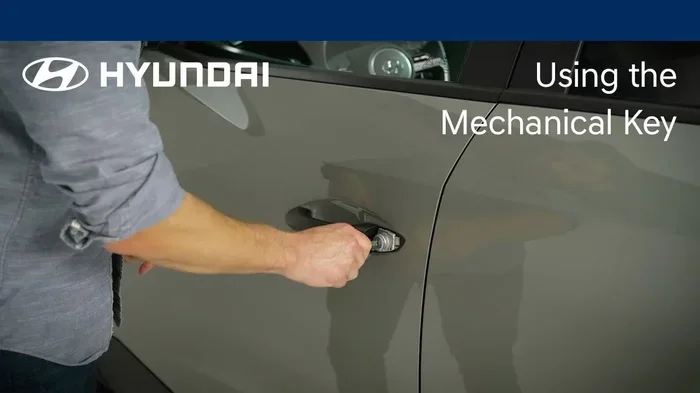
Walk up to the driver’s side door. Look closely near the door handle. You will see a small cover or slot. This is where you insert the mechanical key to unlock the door. On some Tucson models, the slot is hidden under a small plastic cap. Gently pop the cap off to reveal the keyhole.
Insert the key blade fully into the lock cylinder. Turn it to the left to unlock the door. The door handle should release immediately. If it does not, make sure the key is inserted all the way and that you are turning it in the correct direction.
Step 3: Enter the Vehicle
Once the door is unlocked, open it and sit inside. You will notice the push-button start on the dashboard or steering column. Even though you are using the mechanical key to enter, the engine still needs the key fob to be inside the car for the smart system to detect it.
Place the key fob somewhere near the start button. Some models have a specific tray or zone. Check your owner’s manual for the exact location on your Tucson model year. This is important because the car needs to sense the fob even if the battery is low.
Step 4: Start the Engine
Press the brake pedal with your foot. Then press the start button. The engine should turn over normally. If the fob battery is completely dead, the car may not recognize it right away. In that case, try placing the fob directly against the start button before pressing it. Some Tucson models have a backup antenna in the button area that can read a dead fob through direct contact.
If the engine still does not start, do not panic. Hold the fob against the start button and try again. The mechanical key got you into the car. Now the fob just needs to be close enough for the system to detect it.
Step 5: Drive Safely
Once the engine starts, you are good to drive. The dashboard lights should come on normally. Shift the transmission into drive and release the parking brake. The Tucson operates exactly the same way whether you started it with the key fob or the mechanical key. There is no difference in performance or safety.
Just remember to address the key fob battery issue as soon as possible. Driving with a dead fob battery means you will not be able to lock the doors remotely or use the keyless entry features. Plan a battery replacement soon.
Common Reasons Your Key Fob Might Fail
Understanding why your key fob stops working helps you prevent it from happening. Most failures come down to a few common causes. Let us look at each one.
Dead Key Fob Battery
The number one reason key fobs fail is a dead battery. The CR2025 or CR2032 battery inside the fob typically lasts two to four years. When it dies, the fob cannot send its signal. The car does not respond to any buttons.
Signs of a dying battery include:
- Reduced range — you have to be closer to the car for it to work.
- Intermittent response — the fob works sometimes but not always.
- Dashboard warning — some Tucsons show a key fob battery warning light.
- Complete failure — the fob stops working entirely.
If you notice these signs, replace the battery right away. You do not need to visit a dealer. A new battery costs just a few dollars and you can swap it yourself in minutes.
Water Damage and Moisture Exposure
Key fobs are not waterproof. If your fob gets wet, the internal electronics can short out. This can happen from rain, a spilled drink, or dropping the fob in water. Even small amounts of moisture can cause corrosion on the circuit board over time.
If your fob has been exposed to water, dry it out immediately. Remove the battery and let the fob air dry for 24 hours. If it still does not work after drying, the battery is likely the issue or the internal electronics are damaged. In that case, you may need a key fob replacement.
Physical Wear and Damage
Key fobs take a beating over the years. They get dropped, sat on, and scratched. The buttons wear out. The internal contacts can become loose. Physical damage is another common cause of fob failure.
If your fob looks visibly damaged or the buttons feel mushy, it might be time for a replacement. A Hyundai Tucson key fob replacement can cost anywhere from $50 to $200 depending on the model year and where you get it done.
Electromagnetic Interference
Sometimes the problem is not the fob at all. Strong electromagnetic fields from other devices can interfere with the signal. This is rare but it does happen. If you notice the fob works in some places but not others, interference might be the cause.
Try moving away from large electronic devices or power lines. If the fob works normally in a different location, interference was likely the issue. This is usually a temporary problem and not something to worry about.
Replacing Your Key Fob Battery
Replacing the key fob battery is one of the easiest car maintenance tasks you can do. You do not need any special tools. You do not need to visit a dealer. Anyone can do it at home in under five minutes.
Here is what you need:
- A CR2025 or CR2032 battery (check your owner’s manual for the correct type).
- A small flathead screwdriver or coin.
- A clean, dry workspace.
Follow these simple steps to replace the battery:
- Use the screwdriver to pry open the key fob housing along the seam.
- Carefully lift the top half off. Avoid damaging the circuit board inside.
- Note which side the old battery is facing. Take a photo if you are unsure.
- Remove the old battery and insert the new one with the positive side facing up.
- Snap the fob housing back together until it clicks.
- Test the fob by standing near your car and pressing the unlock button.
After replacing the battery, you may want to check if you have to do anything after replacing a key fob battery. In most cases, the fob works immediately. Some models may require you to press all buttons or hold the start button for a few seconds to reset the system.
If you are not comfortable doing this yourself, any dealership can replace the battery for you. You can also visit a locksmith or an auto parts store. Many stores even offer free battery replacement if you purchased the fob from them.
When to Seek Professional Help
Most key fob issues are simple and easy to fix at home. But some situations require professional help. Knowing when to call for assistance saves you time and prevents further damage.
You should visit a dealer or locksmith if:
- The key fob is physically broken and cannot be repaired at home.
- You have replaced the battery but the fob still does not work.
- The car does not recognize the fob even when it is placed right against the start button.
- You have lost your only key fob and need a new one programmed.
- The mechanical key blade is stuck or damaged.
Dealers can program new key fobs and replace faulty ones. Locksmiths are often a more affordable option for key fob programming and replacement. Before you go, check if any dealership can replace a key fob battery or if your local locksmith offers the same service at a lower cost.
It is also worth noting that if your car won’t start with a new battery in the fob, the issue might be with the car’s receiver, not the fob itself. A professional diagnostic can pinpoint the exact problem and save you from guessing.
Preventing Key Fob Problems in the Future
Prevention is always better than cure. A few simple habits can keep your Tucson key fob working reliably for years.
- Replace the battery every two to three years even if it seems to be working fine. This prevents unexpected failures.
- Keep the fob away from water and extreme temperatures. Do not leave it in direct sunlight or in a freezing car.
- Handle the fob gently. Avoid dropping it or sitting on it. The internal electronics are delicate.
- Keep a spare battery in your glove box. This way you are always prepared for a dead fob battery.
- Test the fob regularly. Stand a few feet from your car and press the buttons. If the range seems shorter than usual, replace the battery.
These small habits add up over time. They keep your Hyundai Tucson running smoothly and prevent the stress of a dead key fob at the worst possible moment.
Key Takeaways
- Every Hyundai Tucson includes a hidden mechanical key blade inside the key fob for emergencies.
- The key slot is located near the driver’s side door handle and also on the steering column for ignition.
- A dead key fob battery is the most common reason drivers need to use the mechanical key.
- Replacing the key fob battery is cheap and easy and takes less than five minutes.
- You can still drive your Tucson even if the key fob completely stops working.
- Regular maintenance of your key fob helps prevent unexpected lockouts and starting issues.
- Knowing the manual start process gives you confidence and saves time in urgent situations.
Conclusion
Knowing how to start a Hyundai Tucson with a mechanical key is a practical skill every Tucson owner should have. It is simple, fast, and it can save you from a really frustrating situation. The mechanical key blade is always there inside your fob, waiting for the moment you need it.
Whether your key fob battery died, the electronics failed, or the fob got wet, the mechanical key gets you back on the road. Just remember to remove the key blade from the fob, find the lock cylinder near the door handle, unlock the door, place the fob near the start button, and press the ignition. It is that easy.
Take a few minutes right now to locate your mechanical key blade and practice the steps. Familiarity makes all the difference when you are under pressure. And make sure to replace your key fob battery regularly to avoid finding yourself in this situation in the first place. With a little preparation, you and your Tucson will always be ready to go.
Frequently Asked Questions
Can I Drive a Hyundai Tucson If My Key Fob Battery Dies?
Yes, you absolutely can. The mechanical key blade hidden inside your key fob allows you to unlock the door and start the engine manually. Once inside, place the fob near the start button and press it. The car will detect the fob even with a dead battery through direct proximity contact.
Where Is the Mechanical Key Slot on a Hyundai Tucson?
The mechanical key slot is located near the driver’s side door handle. It is usually hidden under a small plastic cap that you can pop off with the key blade itself. There is also a slot on the steering column for ignition. Check your owner’s manual for the exact location on your specific model year.
What Type of Battery Does a Hyundai Tucson Key Fob Use?
Most Hyundai Tucson key fobs use a CR2025 or CR2032 coin cell battery. The exact type depends on your model year. You can find this information in your owner’s manual or on the old battery itself. Replacement batteries are widely available at auto parts stores and online.
How Do I Know If My Tucson Key Fob Battery Needs Replacing?
Common signs include reduced range, intermittent button response, and a complete failure to unlock or start the car. Some Tucson models also display a key fob battery warning on the dashboard. If you notice any of these signs, replace the battery right away to avoid being stranded.
Can Any Dealership Replace a Key Fob Battery?
Yes, any Hyundai dealership can replace your key fob battery for free or a small fee. Many locksmiths and auto parts stores offer this service as well. However, replacing the battery at home is the fastest and most affordable option, and it only takes a few minutes.
Do I Need to Do Anything After Replacing a Key Fob Battery?
In most cases, the key fob works immediately after you insert the new battery. However, some Tucson models may require you to reset the system by pressing all buttons or holding the start button for a few seconds. Always test the fob near your car after replacement to confirm it is working properly.