How to Start a Honda Civic With Remote Start Made Easy
Starting your Honda Civic with remote start is simpler than you think. Whether you have a factory-installed system or an aftermarket setup, this guide walks you through every step. You will learn how to use your key fob, troubleshoot common issues, and get the most out of your Honda Civic’s remote start feature.
There is nothing quite like walking out to a warm Honda Civic on a freezing morning or a cool car on a hot summer day. The Honda Civic remote start feature makes this possible with just the press of a button. But if you have never used it before, the process can feel a little confusing.
This guide breaks down everything you need to know about starting a Honda Civic with remote start. From factory systems to aftermarket kits, we cover it all. You will learn the exact steps, troubleshoot problems, and discover tips that make the whole experience smoother. Let us get into it.
Key Takeaways
- Remote start lets you warm up or cool down your Honda Civic before you get in.
- Factory remote start systems work differently from aftermarket installations.
- You need a compatible key fob and proper setup to use remote start.
- Common issues like a dead key fob battery or incorrect button sequence are easy to fix.
- Safety features like automatic engine shutoff protect your vehicle.
- Aftermarket remote start kits offer extra features for older Honda Civic models.
- Understanding your specific trim and model year matters for remote start compatibility.
📑 Table of Contents
- What Is Remote Start on a Honda Civic?
- How to Start a Honda Civic With Remote Start
- Honda Civic Remote Start Compatibility by Model Year
- Benefits of Using Remote Start on Your Honda Civic
- Common Problems and How to Fix Them
- Installing an Aftermarket Remote Start System
- Safety Tips for Using Remote Start
- Frequently Asked Questions About Honda Civic Remote Start
What Is Remote Start on a Honda Civic?
Remote start is a feature that lets you start your Honda Civic engine from outside the vehicle. You use the key fob to send a signal to the car. The engine turns on, and the climate control system begins working. This means your car is ready when you are.
Not all Honda Civic models come with factory remote start. Newer trims and recent model years are more likely to include it. If your car does not have it built in, you can still add aftermarket remote start systems. These kits are widely available and relatively affordable.
How Does Honda Civic Remote Start Work?
The system works through a small transmitter in your key fob. When you press the remote start button, the fob sends a coded signal to your car’s computer. The computer verifies the signal, then starts the engine. The car stays running for a set period, usually between 10 and 20 minutes.
Most Honda Civic models allow you to extend the runtime. You simply press the button again before the first cycle ends. The system will add another 10 to 20 minutes. This gives you plenty of time to get to your car and drive away.
How to Start a Honda Civic With Remote Start
The exact steps depend on whether you have a factory system or an aftermarket kit. Below, we cover both scenarios in detail.
Starting With the Factory Remote Start System
If your Honda Civic came with a factory remote start, the process is straightforward. Follow these steps:
- Make sure you are within range. Most factory systems work up to 300 to 500 feet away. Stay within a reasonable distance from your vehicle.
- Press the lock button on your key fob. This locks the doors and arms the security system.
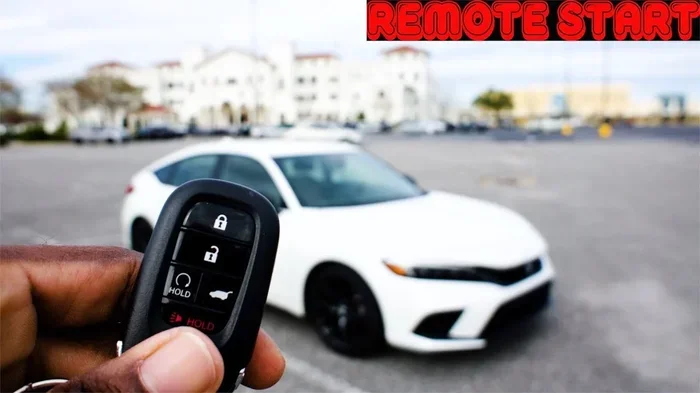
- Press the remote start button. It usually has a circular arrow icon. Press it once and hold for about two seconds.
- Wait for the engine to start. You will hear the engine turn over. The parking lights may flash to confirm the system is active.
- Get in and drive. Insert your key and turn the ignition, or press the start button if your Civic has push-button start. The engine will continue running.
It is that simple. The whole process takes about 10 seconds from start to finish.
Starting With an Aftermarket Remote Start Kit
Aftermarket remote start systems vary by brand and model. However, most follow a similar process. Here is what you typically need to do:
- Arm the alarm system. Use the key fob or the alarm remote that came with your kit.
- Press the remote start button. This is usually a dedicated button on your aftermarket fob.
- Listen for the engine to crank. The system should start the engine within a few seconds.
- Enter the vehicle and start driving. Most aftermarket systems require you to insert the key and turn it to the accessory or run position.
If you are unsure about your specific kit, check the user manual that came with the installation. Each brand has slight differences in the startup process.
Honda Civic Remote Start Compatibility by Model Year
Not every Honda Civic can use remote start. Compatibility depends on your model year, trim level, and whether the system was factory-installed. Here is a general breakdown:
- Honda Civic models from 2016 and newer are more likely to include factory remote start on higher trims like the EX and Touring.
- Older Honda Civic models from the 2000s and 2010s typically do not have factory remote start. However, you can install an aftermarket kit.
- Honda Civic Si and Type R trims may have different starting procedures depending on the model year.
- Hybrid Honda Civic models can use remote start, but the process may vary slightly from gas-only models.
To confirm whether your specific Honda Civic has remote start, check your owner’s manual. You can also look for the remote start button on your key fob. If you see the circular arrow icon, your car likely supports the feature.
Benefits of Using Remote Start on Your Honda Civic
Remote start is not just a luxury. It offers real, practical benefits that make your daily routine easier.
Pre-Condition Your Car
In cold weather, remote start lets you warm up the engine and the cabin before you get in. This is especially helpful in northern climates where winters are harsh. In summer, you can cool down the interior before stepping inside. Many modern systems allow you to set the temperature through a smartphone app.
Improved Engine Health
Letting your engine warm up before driving is better for its long-term health. Cold starts without a warm-up period can put extra stress on engine components. Remote start gives your Honda Civic a gentle warm-up period, which can help extend engine life.
Enhanced Security
Most remote start systems keep the car locked while the engine runs. The doors remain secured, and the alarm system stays active. This adds an extra layer of vehicle security compared to leaving your car idling unlocked.
Comfort and Convenience
Beyond temperature control, remote start can also activate your heated seats, rear defroster, and other comfort features. This makes your driving experience more pleasant from the moment you sit down.
Common Problems and How to Fix Them
Like any car feature, remote start can sometimes give you trouble. Here are the most common issues Honda Civic owners face and how to solve them.
The Engine Will Not Start Remotely
This is the most common complaint. The first thing to check is your key fob battery. A weak battery often causes the signal to fail. Replace the battery with a fresh one and try again. If that does not work, make sure you are within the system’s range. Walls, buildings, and other obstacles can weaken the signal.
Another common cause is the brake pedal position. Some Honda Civic models require you to press the brake pedal before the engine will start. This is a safety feature. Stand near the car, press the brake, and then try starting again.
If none of these steps work, the issue could be with the remote start module itself. In that case, you may need professional diagnostics.
Remote Start Stops After a Few Seconds
If your Honda Civic starts but immediately shuts off, the most likely cause is an open hood. Many remote start systems have a safety feature that shuts the engine down if the hood is not fully closed. Check the hood latch and make sure it is secure.
Another possibility is that the car detects a fault in the emissions system or another sensor. In this case, you should check for warning lights on your dashboard. A flashing check engine light usually means something needs attention.
The Key Fob Does Not Work After Replacing the Battery
Sometimes replacing the key fob battery resets the system. You may need to re-sync the fob with the car. To do this, follow the resync steps in your owner’s manual. Usually, this involves turning the ignition on and off a specific number of times while holding certain buttons.
If you have trouble with your key fob after a battery change, you are not alone. This is a common issue that many car owners experience. The fix is almost always simple and takes less than a minute.
Installing an Aftermarket Remote Start System
If your Honda Civic does not have factory remote start, you can add one. Aftermarket systems are widely available and can be installed by a professional or as a DIY project.
Choosing the Right System
When shopping for an aftermarket remote start, look for these features:
- Two-way remote control so you can confirm the system received your command.
- Smartphone compatibility for starting your car from anywhere with a cell signal.
- Extended range of up to 3,000 feet or more.
- Compatibility with your specific Honda Civic model and year.
Popular brands like Compustar, Viper, and DroneMobile offer reliable options. Compare features and read reviews before making a decision.
Installation Tips
Professional installation is recommended for most aftermarket kits. A trained technician will wire the system into your car’s electrical harness without damaging any components. The process usually takes two to four hours.
If you are considering a DIY installation, make sure you have basic wiring knowledge and the right tools. Always disconnect the car battery before starting any electrical work. Follow the installation manual carefully and take your time.
One thing to keep in mind: improper installation can void your car warranty. If your Honda Civic is still under warranty, check with your dealer before installing an aftermarket system.
Safety Tips for Using Remote Start
Remote start is convenient, but it is important to use it safely. Here are some essential safety tips every Honda Civic owner should follow.
- Never leave your car unattended in an enclosed space. Running a car engine in a garage, even with the door open, can lead to carbon monoxide buildup.
- Always lock the doors after remote starting. Most systems do this automatically, but it is good to double-check.
- Keep your key fob secure. Someone with a compatible fob could potentially start your car if it is lost or stolen.
- Do not exceed the maximum runtime. Most systems shut off automatically after 20 minutes. This prevents fuel waste and reduces emissions.
- Check local laws. Some areas have regulations about idling vehicles. Make sure you comply with local ordinances when using remote start.
Following these tips keeps your Honda Civic safe and ensures your remote start system lasts for years to come.
Frequently Asked Questions About Honda Civic Remote Start
Here are some of the most common questions we hear about starting a Honda Civic with remote start.
Can I Start My Honda Civic With Remote Start From Far Away?
Yes, but the range depends on your system. Factory systems typically work up to 500 feet. Aftermarket systems with extended range can reach up to 3,000 feet or more. Keep in mind that buildings and other obstacles can reduce the effective range. For best results, stay within a clear line of sight of your vehicle.
Does Remote Start Waste Gas?
Remote start uses a small amount of fuel, but not enough to worry about in most cases. A typical 10 to 20 minute warm-up period uses less than a quarter of a gallon. If you use remote start every day, the cost adds up slightly over time. However, the comfort and convenience often outweigh the minimal fuel cost.
Can I Install Remote Start on an Older Honda Civic?
Absolutely. Aftermarket remote start kits work with almost any Honda Civic, including older models from the 1990s and 2000s. The installation process is the same regardless of the model year. Just make sure you choose a kit that is compatible with your specific trim and engine type.
Will Remote Start Void My Honda Warranty?
This depends on how the system is installed. If you use a professional installer and the kit does not interfere with your car’s original electronics, your warranty should remain intact. However, if the installation causes damage or electrical issues, Honda may deny warranty claims related to those problems. Always check with your dealer before installing any aftermarket device.
Can I Use Remote Start in the Rain or Snow?
Yes. Remote start systems are designed to work in all weather conditions. You can start your Honda Civic in rain, snow, or extreme heat. The system is sealed and protected against moisture. Just make sure your key fob is not soaked or damaged, as this could affect signal strength.
What Should I Do If My Honda Civic Remote Start Stops Working?
Start by replacing the key fob battery. This solves the problem in most cases. If that does not work, check that all doors and the hood are closed. Try standing closer to the car and pressing the buttons again. If the issue persists, you may need to reset the system or have it inspected by a professional. For more help with car starting issues, check out our guide on car won’t start with a new battery for additional troubleshooting tips.
Using remote start on your Honda Civic is one of the best upgrades you can make. It saves time, improves comfort, and adds value to your daily driving experience. Whether you have a factory system or an aftermarket kit, the steps are simple and easy to master. Start using remote start today and enjoy the difference every time you walk out to your car.
Remember to follow the safety tips and maintain your system regularly. A well-maintained remote start setup will serve your Honda Civic faithfully for years. If you run into any issues, do not hesitate to consult your owner’s manual or reach out to a professional installer. Happy driving.