How to Reset Oil Life on a 2019 Honda Civic Step by Step
Resetting the oil life on a 2019 Honda Civic is a simple process you can do in under five minutes. This guide walks you through every step, from understanding the oil life system to completing the reset using your steering wheel controls. You will learn the exact button sequence, common mistakes to avoid, and tips to keep your engine oil in top shape between changes.
Changing your engine oil is one of the most important things you can do to keep your car running smoothly. But did you know that simply adding fresh oil is not enough? You also need to reset the oil life system on your vehicle. If you own a 2019 Honda Civic, you are in luck. The process is quick, easy, and something you can handle right from your driver’s seat.
Many car owners ignore the oil life indicator until it becomes a flashing reminder on the dashboard. This can lead to missed maintenance windows and, over time, engine wear. Understanding how to reset oil life on a 2019 Honda Civic ensures you stay on top of your service schedule. It also helps you track when your next oil change is due without relying on guesswork.
The 2019 Honda Civic comes equipped with a smart oil life monitoring system. This system tracks your driving habits, engine conditions, and oil quality to tell you when it is time for a change. After you complete an oil change, the system needs a manual reset. This guide will show you exactly how to do that, step by step, so you never have to wonder when your next service is coming up.
Key Takeaways
- Easy DIY Task: You can reset the oil life indicator on your 2019 Honda Civic without visiting a mechanic or paying for a service.
- Quick Process: The entire reset takes less than five minutes using the steering wheel controls and the information display.
- Know When to Reset: Always reset the oil life system after an oil change to keep your maintenance schedule accurate.
- Avoid Common Mistakes: Skipping the reset or pressing the wrong buttons can lead to confusion about your next service date.
- Regular Maintenance Matters: Keeping up with oil changes and resets helps your engine last longer and run more efficiently.
- Multiple Methods Available: The 2019 Honda Civic offers a straightforward menu-based reset process that is the same across most trim levels.
- Monitor Your Oil Life Bar: Pay attention to the oil life percentage on your dashboard to stay ahead of your next oil change.
📑 Table of Contents
- Understanding the Oil Life System on a 2019 Honda Civic
- When Should You Reset Your Oil Life Indicator?
- How to Reset Oil Life on a 2019 Honda Civic Step by Step
- Common Mistakes to Avoid When Resetting Oil Life
- Tips for Maintaining Your 2019 Honda Civic’s Engine Oil
- Should You Reset Oil Life Yourself or Visit a Mechanic?
- Final Thoughts
Understanding the Oil Life System on a 2019 Honda Civic
The oil life system is a smart feature built into your Honda Civic. It does not just track mileage. It monitors several factors that affect oil quality. These include engine temperature, driving conditions, and the number of short trips you take. Based on this data, the system calculates when your oil needs to be replaced.
How the Oil Life Indicator Works
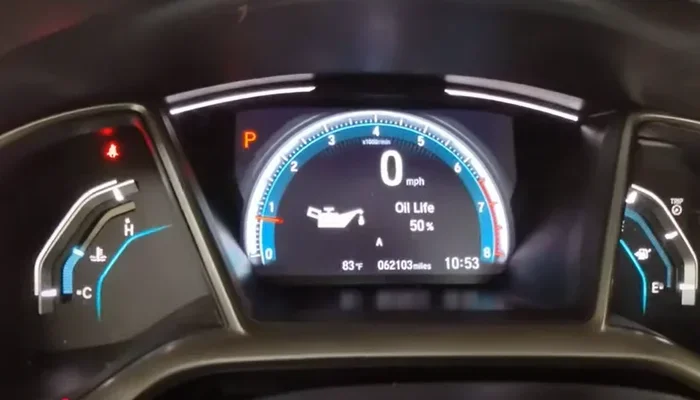
When you start your car, the oil life indicator appears on the dashboard display. It usually shows as a percentage or a bar that decreases over time. A reading of 100 percent means your oil is fresh and in good condition. As you drive, the system gradually lowers the percentage. When it drops to around 15 percent, the system will remind you that an oil change is approaching. At 0 percent, the indicator will flash, telling you it is time to service your vehicle.
The system uses an oil quality sensor to determine the condition of your engine oil. This sensor measures contaminants and moisture levels. It also accounts for extreme temperatures and heavy loads. Because every driving situation is different, the oil life percentage adjusts accordingly. This is why a fixed mileage schedule does not work for everyone.
It is important to note that the oil life system does not measure the exact quality of your oil. Instead, it estimates based on your driving patterns. This is why resetting the system after each oil change is so important. It gives you a fresh baseline to track from. If you ever wonder whether your car is trying to tell you something about maintenance, checking whether your car signals when you need an oil change can give you extra peace of mind about your monitoring system.
Why the Oil Life System Matters for Honda Civic Maintenance
Keeping up with your oil change interval is critical for engine health. Fresh oil lubricates moving parts, reduces friction, and removes heat. Old oil breaks down and loses its ability to protect your engine. Over time, this can lead to increased wear, reduced fuel efficiency, and even costly repairs.
The oil life system takes the guesswork out of maintenance timing. It adapts to your specific driving style. If you drive mostly in stop-and-go traffic, the system will recommend an earlier change. If you mostly drive on highways at steady speeds, the system may allow more miles between changes. This personalized approach helps you get the most out of every oil change.
When Should You Reset Your Oil Life Indicator?
Knowing when to reset the oil life indicator is just as important as knowing how. Many owners reset too early or too late, which throws off the maintenance schedule. Here are the key times you should perform a service light reset on your 2019 Honda Civic.
After Every Oil Change: This is the most important time to reset. Once your mechanic or you have drained the old oil and filled the engine with fresh oil, the system needs to be reset. This tells the monitor that you have started with a clean slate.
When the Oil Life Bar Reaches Zero: If you have been ignoring the indicator and it has hit zero, reset it right after you get the oil changed. Leaving it at zero for too long can cause the reminder to stay active even after servicing.
After Adding Oil Between Changes: If you top off your oil but do not perform a full change, you do not need to reset the system. The oil life monitor tracks the overall oil condition, not just the fluid level. Only a complete oil change warrants a reset.
When You Notice Inaccurate Readings: Sometimes the system may display incorrect percentages. This can happen after a battery disconnect or a reset that was not completed properly. In these cases, performing the reset procedure after an oil change will recalibrate the system.
Understanding your vehicle maintenance schedule helps you stay proactive. Regular oil changes and timely resets are the foundation of long engine life. For owners who want to understand more about how far their car can go between services, learning about how many miles a car can last provides valuable context on overall vehicle longevity.
How to Reset Oil Life on a 2019 Honda Civic Step by Step
The reset process for a 2019 Honda Civic is straightforward. You will use the steering wheel controls and the information display screen. No special tools are needed. No mechanic visit required. Follow these steps carefully, and you will have the job done in just a few minutes.
What You Will Need Before Starting
Before you begin, make sure you have the following ready:
- Your 2019 Honda Civic ignition key or push-start button
- The steering wheel control buttons (up, down, and OK buttons on the left side of the steering wheel)
- Fresh engine oil if you are resetting immediately after an oil change
- A few minutes of uninterrupted time to follow the steps without rushing
Step-by-Step Reset Procedure
Step 1: Turn the Ignition to the ON Position. Press the start/stop button without pressing the brake pedal. You can also turn the key to the ON position if your Civic uses a traditional key. Do not start the engine. You just need the dashboard display to be active.
Step 2: Access the Information Display Menu. Use the steering wheel controls to navigate to the main menu. Press the up or down arrows to scroll through the options on the dashboard screen. Look for the settings or vehicle information menu.
Step 3: Select the Oil Life System Option. Once you are in the vehicle information menu, scroll down until you find the oil life system or maintenance menu. This option may be labeled differently depending on your trim level. It is usually listed under “Vehicle Settings” or “Maintenance Info.”
Step 4: Choose the Reset Option. After selecting the oil life system, you will see a reset option on the screen. Press the OK button on the steering wheel to select it. The system may ask you to confirm that you want to reset the oil life indicator.
Step 5: Confirm the Reset. Use the up or down arrows to highlight “Yes” or “Reset” and press the OK button again. The screen will display a confirmation message. The oil life bar or percentage will return to 100 percent, indicating that the system has been successfully reset.
Step 6: Turn the Ignition Off and Then Back On. To verify the reset worked, turn the ignition off and then back on. Check the dashboard display. The oil life indicator should now show 100 percent or a full bar. If it does, congratulations. You have successfully completed the reset oil life procedure.
Tips for a Smooth Reset Experience
- Make sure the engine is off before starting the reset process.
- Do not rush through the steps. Give the system a moment to respond after each button press.
- If the screen goes blank, try turning the ignition off and back on again before retrying.
- Write down the steps if you think you might forget them. It is always easier to follow a written checklist.
- Have someone assist you if you are not comfortable navigating the menu alone.
Common Mistakes to Avoid When Resetting Oil Life
Even though the reset process is simple, mistakes can happen. These errors can cause confusion about your maintenance schedule or prevent the indicator from resetting properly. Here are the most common mistakes owners make and how to avoid them.
Mistake 1: Resetting Before Completing the Oil Change
One of the biggest errors is resetting the oil life indicator before the new oil is actually in the engine. This tricks the system into thinking you have already changed the oil when you have not. Always complete the oil change first. Then, and only then, should you perform the reset.
Mistake 2: Turning the Ignition to START Instead of ON
When you turn the key or press the start button with the brake pressed, the engine starts. You do not want this. You need the ignition in the ON position, which powers the electronics without starting the engine. If the engine is running during the reset, the display may not respond to the steering wheel controls properly.
Mistake 3: Pressing the Wrong Steering Wheel Buttons
The steering wheel controls can be tricky if you are not used to them. The up and down arrows navigate the menu, and the OK button selects options. Accidentally pressing the left or right arrow buttons can take you to a different menu entirely. If this happens, simply navigate back and try again.
Mistake 4: Not Confirming the Reset
Some owners select the reset option but skip the confirmation step. Without confirming, the system will not save the reset. Always look for the confirmation screen and press OK to finalize the process.
Mistake 5: Ignoring the Oil Life Bar After Resetting
After resetting, keep an eye on the oil life bar over the next few days. If it drops unexpectedly or does not seem to be tracking properly, you may need to repeat the reset. Sometimes the system needs a second attempt to calibrate correctly.
If you run into persistent issues or are unsure about any step, consulting a professional is always a smart move. Understanding how much most mechanics make per hour can help you feel more confident about the value of professional assistance versus DIY work.
Tips for Maintaining Your 2019 Honda Civic’s Engine Oil
Resetting the oil life indicator is just one part of the equation. To truly take care of your 2019 Honda Civic, you need to follow a solid engine oil maintenance routine. These tips will help you get the most out of every oil change and keep your engine running strong for years to come.
Use the Right Type of Engine Oil
Not all engine oils are created equal. The 2019 Honda Civic performs best with Honda-approved oil that meets the manufacturer’s specifications. Check your owner’s manual for the recommended viscosity grade. Most 2019 Civics use 0W-20 full synthetic oil. Using the wrong oil grade can reduce engine performance and affect how the oil life system calculates your change interval.
Check Your Oil Level Regularly
Between oil changes, make it a habit to check your oil level at least once a month. Pull out the dipstick, wipe it clean, reinsert it, and then check the level. The oil should fall between the minimum and maximum marks on the dipstick. If the level is low, top it off with the same type of oil you use for your changes.
Watch for Warning Signs
Your car will tell you when something is wrong with the oil. Listen for unusual engine noises, check for dark or gritty oil on the dipstick, and watch for the check engine light. These signs can indicate that your oil needs attention before the oil life system even triggers a reminder.
Keep a Maintenance Log
Write down every oil change date, mileage, and oil type used. This log helps you track patterns and stay ahead of your next service. It also comes in handy if you ever need to prove maintenance history when selling your vehicle or visiting a new mechanic.
Drive Smart to Extend Oil Life
Your driving habits directly affect oil life. Avoid aggressive acceleration and hard braking when possible. Try to combine short trips into longer drives when you can. Extreme stop-and-go traffic and short trips around town are harder on oil than steady highway driving. Being mindful of how you drive can help you get more miles between oil changes.
Should You Reset Oil Life Yourself or Visit a Mechanic?
This is a question many car owners ask, especially those who are new to DIY maintenance. The good news is that resetting the oil life on a 2019 Honda Civic is a task anyone can handle. You do not need special tools, mechanical skills, or a trip to the shop.
Doing it yourself saves time and money. A mechanic might charge you for a simple reset that takes less than five minutes. By learning to do it on your own, you take control of your vehicle maintenance. You also gain confidence in working with your car’s systems.
That said, there is nothing wrong with asking a professional for help. If you feel uncomfortable navigating the dashboard menu or if the reset process does not work the first time, a quick visit to a trusted mechanic is a perfectly fine option. Many quick-lube shops will reset the oil life indicator as part of their oil change service at no extra charge.
The key is to stay proactive about your vehicle maintenance. Whether you reset the system yourself or have a professional do it, the important thing is that it gets done after every oil change. A properly reset oil life system keeps your maintenance schedule accurate and your engine protected.
Final Thoughts
Knowing how to reset oil life on a 2019 Honda Civic is a valuable skill for any car owner. It is a quick, simple process that keeps your maintenance tracking accurate and your engine running at its best. By following the steps in this guide, you can handle the reset yourself in just a few minutes and never worry about missing an oil change window again.
Remember to reset the system every time you complete an oil change. Use the right type of engine oil. Check your oil level regularly. And pay attention to the oil life indicator on your dashboard. These small habits add up to big benefits over the life of your vehicle.
Take a few minutes today to familiarize yourself with the reset process on your 2019 Honda Civic. Write down the steps if you need to. The next time you get an oil change, you will be ready. Your engine will thank you for it, and you will enjoy the confidence that comes from staying on top of your car’s maintenance needs.
Frequently Asked Questions
How often should I reset the oil life on my 2019 Honda Civic?
You should reset the oil life indicator every time you get an oil change. The system tracks oil condition based on your driving habits, so resetting after each service gives you an accurate baseline for the next interval. Most 2019 Honda Civic owners will need to reset the system every 5,000 to 7,500 miles depending on driving conditions.
Can I reset the oil life without starting the engine?
Yes, you can. You only need to turn the ignition to the ON position, which powers the dashboard display without starting the engine. The reset process is done entirely through the steering wheel controls and the information screen. Do not press the start button with the brake pedal, as that will start the engine instead of turning the ignition to ON.
What should I do if the oil life indicator will not reset?
If the indicator does not reset after following the steps, try turning the ignition off and back on again. Make sure you are using the correct steering wheel buttons and that you have confirmed the reset on the screen. If the problem persists, the battery may be low or there could be a system glitch. In that case, a visit to a Honda dealership or mechanic can help diagnose the issue.
Does resetting the oil life mean I do not need to change the oil?
No. Resetting the oil life indicator simply clears the reminder and starts a new tracking cycle. It does not change or improve the condition of your engine oil. Always perform a full oil change with fresh oil before resetting the system. Resetting without changing the oil can lead to engine damage over time.
Is the reset process the same for all 2019 Honda Civic trim levels?
Yes, the reset process is essentially the same across all 2019 Honda Civic trim levels. Whether you have a LX, Sport, EX, or Touring model, the steering wheel controls and information display work the same way for the oil life reset. The only minor difference may be in the exact menu wording, but the steps remain consistent.
What happens if I never reset the oil life indicator?
If you never reset the oil life indicator, the system will continue to track from where it left off and may trigger premature oil change reminders. Over time, the indicator can become unreliable, making it difficult to know when your next service is actually due. Always reset after each oil change to keep your maintenance schedule accurate and your engine properly protected.