How to Reset the Oil Life on Your 2008 Honda Civic
Resetting the oil life on a 2008 Honda Civic is a simple DIY task you can do in minutes. This guide walks you through the exact steps, explains what the oil life indicator means, and helps you avoid common mistakes. Keep your Honda Civic maintenance on track without visiting a mechanic.
Owning a 2008 Honda Civic means enjoying a reliable, fuel-efficient car that keeps going mile after mile. But with that reliability comes the responsibility of keeping up with regular maintenance. One of the most important tasks is changing your engine oil on time. The good news? Your Civic has a built-in system that reminds you when it is time. This guide shows you exactly how to reset the oil life on a 2008 Honda Civic in just a few simple steps.
Many car owners ignore the oil life indicator until it becomes a flashing annoyance on the dashboard. That is a mistake. The oil life indicator is not just a light. It is a smart system that tracks your driving habits, engine temperature, and usage patterns. When the system determines that your oil is nearing the end of its useful life, it triggers a reminder. Resetting it after an oil change keeps everything accurate and your car running at its best.
Whether you just changed your oil yourself or visited a mechanic, this guide will help you understand the reset process from start to finish. We will cover what the system means, the exact steps for your 2008 model, and tips to avoid common pitfalls. By the end, you will feel confident handling this task every single time.
Key Takeaways
- Quick Reset: The oil life reset on a 2008 Honda Civic takes less than 5 minutes using the dashboard controls.
- No Tools Needed: You do not need any special equipment or mechanic help to complete the reset.
- Maintenance Insight: Understanding the oil life system helps you stay ahead of your next oil change schedule.
- Common Mistakes: Avoid skipping the reset after an oil change, as it can lead to confusion about service intervals.
- System Knowledge: The 2008 Civic uses a maintenance minder system that tracks driving conditions, not just mileage.
- Confidence Boost: Once you learn the process, you can reset the oil life on any Honda model with similar systems.
📑 Table of Contents
- Understanding the Oil Life System on a 2008 Honda Civic
- What You Need Before Starting the Reset
- Step-by-Step Guide to Resetting the Oil Life
- Common Mistakes People Make When Resetting Oil Life
- How Often Should You Change Oil on a 2008 Honda Civic?
- When to Seek Professional Help
- Tips for Keeping Your 2008 Honda Civic in Top Shape
- Final Thoughts on Resetting the Oil Life
Understanding the Oil Life System on a 2008 Honda Civic
Before you dive into the reset process, it helps to understand what the oil life system actually does. Unlike older cars that used simple mileage-based reminders, the 2008 Honda Civic uses a condition-based monitoring system. This means it does not just count miles. It watches how you drive and how your engine performs.
How the Maintenance Minder Works
The maintenance minder system on the 2008 Civic uses algorithms to calculate oil life. It considers factors like engine temperature, idle time, driving speed, and load conditions. For example, if you frequently drive in stop-and-go traffic, the system may reduce the oil life faster than someone who mostly drives on highways. This is because short trips and heavy traffic put more stress on engine oil.
The system displays the oil life as a percentage. When it drops to 15 percent, you will see a maintenance code on the dashboard. At 5 percent, the message becomes more urgent. Once the oil life reaches zero, the system will start flashing the maintenance light. This is your signal that an oil change is overdue.
Many people confuse the oil change reminder with the check engine light. They are not the same thing. The maintenance light specifically relates to scheduled service intervals. The check engine light signals an actual problem with the engine or emissions system. Understanding this difference helps you respond appropriately to each warning.
Why Resetting Matters
After you drain the old oil and install a fresh filter, you need to reset the system. If you do not, the old percentage stays on the display. This can confuse you about when the next oil change is actually due. Resetting the oil life monitor tells the system that fresh oil is now in the engine, and it starts the tracking process all over again.
Some owners wonder if they really need to reset it every time. The answer is yes. The system does not automatically know when you changed the oil. It relies on your input through the reset procedure. Skipping this step can lead to missed service windows or, worse, running oil past its useful life.
What You Need Before Starting the Reset
The great thing about resetting the oil life on a 2008 Honda Civic is that you need almost nothing. No special tools. No expensive equipment. Just your car and a few minutes of your time. Here is a quick checklist of what you should have ready.
- A 2008 Honda Civic with a working dashboard display
- The ignition key or push-button start
- A clean, flat surface to park on
- Your owner’s manual (optional but helpful)
- Fresh engine oil and a new filter if you are changing the oil right now
If you are resetting the system after an oil change, make sure the new oil is already in the engine. You should not reset the system with old oil still inside. That defeats the whole purpose of the maintenance reminder.
Safety Tips Before You Begin
Always park your car on a level surface. Turn off the engine and let it cool for a few minutes if you just finished driving. Working on a hot engine can be dangerous. If you are underneath the car or near the oil drain plug, make sure the vehicle is securely supported with jack stands. Never rely on a jack alone.
Also, make sure you have enough time. The reset process only takes a couple of minutes, but rushing through it can lead to mistakes. Find a quiet spot where you can focus on the steps without distractions.
Step-by-Step Guide to Resetting the Oil Life
Now for the part you have been waiting for. Here is the exact process to reset the oil life indicator on your 2008 Honda Civic. Follow each step carefully, and you will have it done in no time.
Step 1: Turn the Ignition to the ON Position
Insert your key into the ignition and turn it to the “ON” position. Do not start the engine. You just want the dashboard lights to come on. On models with a push-button start, press the start button without pressing the brake pedal. The display should light up, showing various indicators and readings.
If your dashboard is dim or unresponsive, check that the key is fully in the ON position. Sometimes the ignition switch can feel stiff, especially on older vehicles. A gentle turn should do the trick.
Step 2: Press the Select/Reset Button
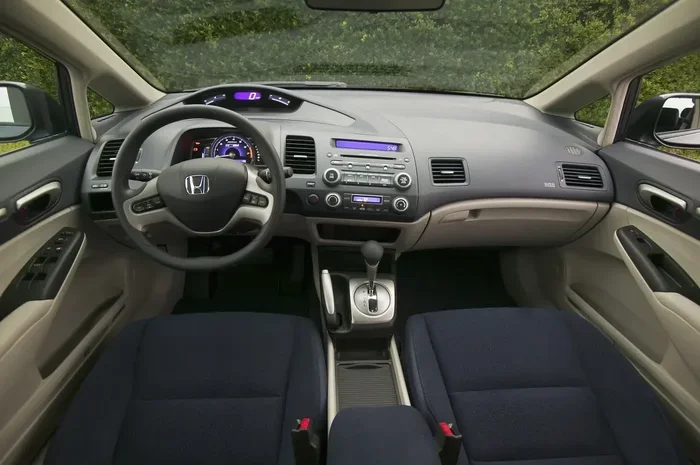
Locate the select/reset button on your dashboard. This small button is usually found near the speedometer or on the left side of the steering column. It controls the trip meter and maintenance display. Press and hold this button for about 10 to 15 seconds.
After holding the button, the oil life indicator should start blinking. You may see the word “OIL” or a wrench icon flash on the display. This means the system is now in reset mode. If nothing happens, try pressing the button again and holding it a bit longer.
Step 3: Release and Press Again
Once the indicator starts blinking, release the button. Then press and hold it again for another 10 seconds. The display should change, showing the oil life percentage resetting or the maintenance code disappearing.
Some owners report that the reset works on the second or third attempt. If the first try does not work, do not worry. Simply repeat the process. The system is designed to be forgiving, so a few extra tries will not cause any problems.
Step 4: Turn the Ignition Off and Back On
After the display confirms the reset, turn the ignition off. Wait a few seconds, then turn it back to the ON position. Check the dashboard to see if the maintenance light is gone. The oil life percentage should now read 100 percent or show a full maintenance interval.
If the light is still on or the percentage has not reset, repeat the entire process from the beginning. Sometimes the system needs a full cycle to register the change. Be patient and go through each step carefully.
Step 5: Start the Engine and Verify
Start the engine and let it idle for a moment. Watch the dashboard for any remaining warning lights. The maintenance light should be completely off. The oil life display should show a healthy percentage. If everything looks clean, you have successfully reset the oil life on your 2008 Honda Civic.
Take a short test drive if you want to be extra sure. The system should not trigger any maintenance warnings during normal driving. If it does, you may need to repeat the reset or check for other issues with the Honda maintenance minder.
Common Mistakes People Make When Resetting Oil Life
Even though the reset process is straightforward, mistakes do happen. Here are the most common errors owners make, and how to avoid them.
Resetting Before Changing the Oil
This is the number one mistake. Some people reset the system before actually draining and refilling the oil. This tricks the computer into thinking fresh oil is in the engine when it is not. Always change the oil first, then reset the system immediately after.
Not Holding the Button Long Enough
The select/reset button needs to be held for a full 10 to 15 seconds. Many owners release it too early. If the indicator does not start blinking, hold the button longer. Patience is key here.
Confusing the Oil Life Reset with Other Functions
The 2008 Civic dashboard has multiple reset functions. You can reset the trip meter, the tire pressure monitor, and the oil life. Each uses the same select/reset button but follows a different sequence. Make sure you are following the oil life steps, not the trip meter steps.
Ignoring the Reset After a Professional Oil Change
If you visit a shop for an oil change, confirm that they reset the system for you. Some mechanics forget this step. If you drive away and the maintenance light is still on, ask them to reset it before you leave. This is a quick task that should not cost you extra, especially when considering how much most mechanics make an hour for this kind of routine service.
Skipping the Reset After a DIY Oil Change
On the flip side, if you change the oil yourself, it is easy to forget the reset step. You might get so focused on draining the old oil and installing the new filter that you simply drive away without resetting. Make it a habit to always reset the system as the final step of any oil change.
How Often Should You Change Oil on a 2008 Honda Civic?
The oil change schedule for a 2008 Honda Civic depends on your driving conditions and the type of oil you use. Honda recommends changing conventional oil every 5,000 miles or 6 months, whichever comes first. If you use synthetic oil, the interval can extend to 7,500 or even 10,000 miles.
However, the oil life system on the 2008 Civic adjusts this based on your actual driving patterns. If you drive mostly in ideal conditions, the system may allow you to go longer between changes. If you drive in severe conditions, it will recommend more frequent service.
Severe driving conditions include short trips under 4 miles, extreme temperatures, dusty roads, and heavy towing. If any of these apply to your daily routine, trust the oil life indicator and change your oil sooner rather than later. Fresh oil is always cheaper than engine repairs.
Choosing the Right Oil for Your 2008 Civic
Check your owner’s manual for the recommended oil viscosity. Most 2008 Honda Civics run well on 0W-20 or 5W-30 synthetic blend oil. Using the wrong viscosity can affect engine performance and oil life accuracy. Always use quality oil that meets Honda’s specifications, and pair it with a compatible oil filter.
If you are unsure about which oil to choose, ask your mechanic or check with a Honda dealership. They can recommend the right product for your specific engine and driving conditions. Using the correct oil helps the maintenance minder system work accurately and keeps your engine protected.
When to Seek Professional Help
Resetting the oil life is a simple task that most owners can handle on their own. But there are times when professional help makes sense. If the maintenance light stays on after you follow the reset steps correctly, there may be an underlying issue. The oil life monitor could have a sensor problem, or the system may need a professional diagnostic scan.
Similarly, if you notice the oil life dropping unusually fast, it could indicate a problem with the engine or oil consumption. A mechanic can inspect the engine, check for leaks, and diagnose any issues that might be affecting the system. Routine maintenance like oil changes also gives professionals a chance to spot potential problems early, which can save you from costly repairs down the road.
Remember that regular Honda Civic maintenance goes beyond just oil changes. The system also tracks other service items like tire rotations, brake inspections, and fluid checks. Keeping up with all recommended services helps your car last longer and run more efficiently.
Tips for Keeping Your 2008 Honda Civic in Top Shape
Resetting the oil life is just one piece of the maintenance puzzle. Here are some extra tips to keep your Civic running strong for years to come.
- Check oil level monthly: Use the dipstick to verify the oil level between changes. Low oil can damage the engine quickly.
- Keep records: Write down every oil change date and mileage. This helps you track patterns and stay on schedule.
- Watch for warning signs: Unusual noises, reduced fuel economy, or dark oil color all signal it is time for service.
- Use genuine Honda parts: When possible, use OEM filters and fluids designed specifically for your vehicle.
- Stay consistent: Do not skip scheduled services, even if the car seems fine. Preventive maintenance is always cheaper than repairs.
Taking care of your 2008 Honda Civic does not have to be complicated. A little attention and a few simple routines go a long way. The oil life reset is one of those quick tasks that pays big dividends. Once you learn it, you will never forget it.
Many owners also wonder about other maintenance tasks like how to check tire pressure, when to replace brake pads, or how to read dashboard warning lights. Each of these skills builds your confidence as a car owner. The more you understand about your vehicle, the better equipped you are to handle minor issues before they become major problems.
Finally, remember that your 2008 Honda Civic is a smart machine. The maintenance minder system is designed to make your life easier. Trust it, reset it properly, and keep up with the recommended service intervals. Your car will reward you with reliable performance for many miles to come.
Final Thoughts on Resetting the Oil Life
Learning how to reset the oil life on a 2008 Honda Civic is one of the simplest and most useful skills any car owner can develop. It takes just a few minutes, requires no special tools, and keeps your maintenance tracking accurate. The process is the same whether you change the oil yourself or have it done at a shop. Just follow the steps, verify the reset, and drive with confidence.
Do not let the maintenance light stress you out. It is there to help you, not to scare you. With the knowledge in this guide, you now know exactly what to do when that light comes on. You understand the system, you know the steps, and you can handle the reset like a pro. Keep this guide bookmarked for future reference, and share it with fellow Honda Civic owners who might need a quick reminder.
Your car serves you every day. Taking a few minutes to reset the oil life is a small gesture of care that keeps everything running smoothly. Stay on top of your Honda maintenance schedule, and your 2008 Civic will keep you moving safely and reliably for many years ahead.
Frequently Asked Questions
Can I reset the oil life without changing the oil?
Yes, you can reset the system without changing the oil. However, this is not recommended. The oil life monitor tracks oil condition, and resetting it with old oil still in the engine will give you inaccurate maintenance intervals. Always change the oil first, then reset the system.
What does the oil life percentage mean on my 2008 Honda Civic?
The oil life percentage shows how much useful life remains in your current engine oil. At 100 percent, the oil is fresh and the system is tracking a new service interval. As you drive, the percentage drops based on driving conditions. When it reaches 15 percent, the system prompts you to schedule an oil change.
Why won’t my oil life reset light go off after following the steps?
If the light stays on after resetting, try repeating the process. Sometimes the system needs a full ignition cycle to register the change. If the light persists, there may be a sensor issue or the system needs a professional diagnostic scan. Check with a Honda mechanic for further assistance.
How long does the oil life reset process take?
The entire reset process takes less than 5 minutes. Once you know the steps, you can complete it quickly. The most time-consuming part is holding the select/reset button for the required 10 to 15 seconds per attempt.
Is the oil life reset the same for all Honda models?
The basic process is similar across most Honda models from the same era. The 2008 Civic uses the select/reset button method. However, newer Honda models may have slightly different procedures. Always refer to your specific owner’s manual for the exact steps for your vehicle.
What happens if I never reset the oil life on my Honda Civic?
If you never reset the system, the maintenance light will stay on after an oil change. This can be annoying and confusing. More importantly, the system will not track a new service interval, which means you might not get timely reminders for your next oil change. This can lead to running oil past its useful life and potential engine wear.