How to Reset Acura MDX Warning Lights the Easy Way
Learning how to reset Acura MDX warning lights is easier than you think. This guide covers every method, from steering wheel controls to battery disconnects. You will walk away knowing exactly how to clear dashboard alerts on your MDX quickly and safely.
Your Acura MDX dashboard lights up for a reason. Whether it is a check engine light, a maintenance indicator, or a traction control warning, those little symbols can cause real stress. The good news is that most warning lights on the MDX are straightforward to reset once you understand the process.
In this guide, we will walk you through every method to reset Acura MDX warning lights the easy way. You will learn what each light means, when to reset it, and the exact steps to follow. We will also cover common mistakes to avoid so you do not end up making things worse.
Whether you are a DIY mechanic or a first-time Acura owner, this guide has something for you. We keep things simple and practical. No jargon. No fluff. Just clear steps that work on your Acura MDX dashboard every time.
Key Takeaways
- Multiple Reset Methods: You can reset warning lights using steering wheel controls, battery disconnect, or an OBD-II scanner.
- Know What Each Light Means: Understanding dashboard symbols helps you respond correctly and avoid unnecessary resets.
- Reset After Repairs: Always reset lights after completing a fix to clear stored codes and confirm the issue is resolved.
- Avoid Common Mistakes: Do not reset lights without fixing the root cause first.
- Use Quality Tools: An OBD-II scanner gives you the most accurate diagnostic and reset capability for your MDX.
- When to See a Pro: Some warning lights signal serious problems that need a trained technician.
📑 Table of Contents
Understanding Acura MDX Warning Lights
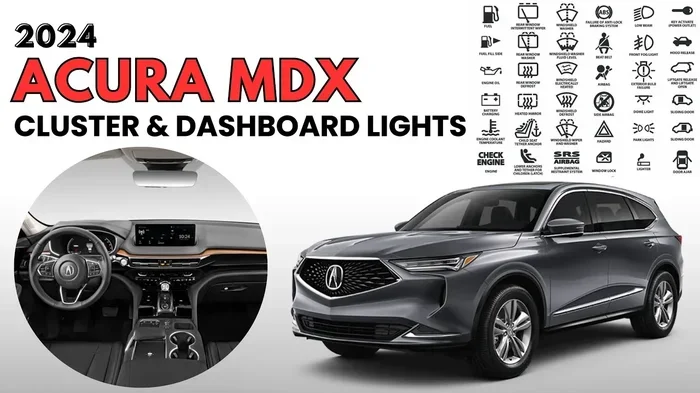
Before you learn how to reset Acura MDX warning lights, you need to understand what those lights actually mean. Each symbol on your dashboard serves a specific purpose. Some are minor reminders, while others signal serious problems that need immediate attention.
The Acura MDX uses a combination of color-coded warnings. Red lights mean stop and address the issue right away. Yellow or amber lights suggest a service need that can wait a bit. Green and blue lights simply tell you a system is active. Knowing this color system helps you decide how urgently you need to act before resetting anything.
Common Warning Lights on the Acura MDX
Here are the most common dashboard warning lights you will see on an Acura MDX:
- Check Engine Light: This is the most well-known symbol. It looks like an engine outline and can mean dozens of different things, from a loose gas cap to a serious engine problem.
- Maintenance Required Light: This tells you it is time for an oil change or scheduled service. It is not an emergency, but you should not ignore it for too long.
- Traction Control Light: This symbol shows a car sliding on a road. It means the traction control system is active or has a fault.
- Power Steering Warning: A steering wheel icon with an exclamation mark. This means your power steering fluid may be low or the system needs attention.
- Battery/Charging Warning: A battery icon that lights up when there is a charging system issue.
- Oil Pressure Warning: A red oil can symbol. This is a serious light that means you should stop driving immediately.
- Brake System Warning: This light can mean the parking brake is on, or there is a problem with your brakes.
What Each Dashboard Symbol Tells You
Every dashboard indicator on the Acura MDX is designed to give you real-time information about your vehicle. The warning light reset procedure depends heavily on which light is on and why it came on in the first place. A light that came on because you forgot to tighten your gas cap is very different from a light that came on because your engine has a serious fault.
For example, the check engine light stores a diagnostic trouble code (DTC) in your vehicle’s computer. You need a scanner to read that code before you can properly reset the light. On the other hand, the maintenance required light simply tracks mileage and can be reset with a few button presses on the steering wheel.
How to Reset Acura MDX Warning Lights
Now let us get into the actual reset Acura MDX warning lights process. There are three main methods you can use. Each one works for different types of warning lights. We will go through them step by step so you can pick the right method for your situation.
Method 1: Using the Steering Wheel Controls
The easiest and most common way to reset warning lights on an Acura MDX is through the steering wheel controls. This method works for the maintenance required light and some other basic indicators. Here is how to do it:
- Turn the ignition to the “ON” position without starting the engine. You can do this by pressing the start button without pressing the brake pedal.
- Locate the steering wheel controls on the left side. You will see buttons for adjusting the display and information screen.
- Press the “MENU” or “INFO” button to access the vehicle settings menu on the dashboard display.
- Use the arrow buttons to scroll to the “Vehicle Settings” or “Maintenance” section.
- Find the option that says “Reset Maintenance” or “Reset Warning.”
- Select it and hold the button for a few seconds until the light resets.
- Turn the ignition off and then back on to confirm the light is gone.
This method works great for the oil life system and routine service indicators. It takes less than two minutes and requires no special tools. However, it will not clear codes stored by a check engine light that was triggered by a fault.
Method 2: Disconnecting the Battery
Some owners prefer to reset Acura MDX warning lights by disconnecting the battery. This method clears all stored codes and resets the vehicle’s computer. It works well when you want a clean slate after completing a repair.
Here is how to do it safely:
- Make sure your vehicle is turned off and the keys are removed from the ignition.
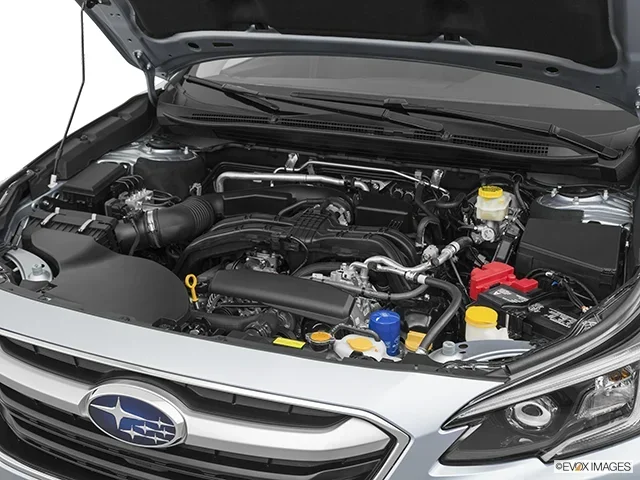
- Open the hood and locate the battery. The Acura MDX battery is typically in the engine bay on the right side.
- Using a wrench, loosen the negative (black) terminal first. Always disconnect the negative terminal first to avoid short circuits.
- Wait at least 15 to 30 minutes. This gives the vehicle’s computer time to fully discharge and reset.
- Reconnect the negative terminal and tighten it securely.
- Start the vehicle and check if the warning lights are gone.
Keep in mind that disconnecting the battery will also reset your radio presets, clock, and some personalized settings. You may need to reprogram these after reconnecting. This method is effective but should be used carefully. If you are unsure, consider using an OBD-II scanner instead.
Also, some newer Acura MDX models have sensitive electronics that may need a relearn procedure after a battery disconnect. If you notice any unusual behavior after resetting, you may need to drive the vehicle for a while to allow the systems to recalibrate.
Method 3: Using an OBD-II Scanner
For the most accurate and complete reset, an OBD-II scanner is the best tool. This device connects to your vehicle’s diagnostic port and lets you read and clear trouble codes directly. Here is how to use one:
- Find the OBD-II port on your Acura MDX. It is located under the dashboard on the driver’s side, near the steering column.
- Plug the scanner into the port. The connection should click in securely.
- Turn the ignition to the “ON” position.
- Follow the scanner’s on-screen instructions to read the stored codes.
- Review the codes to understand what triggered the warning light.
- Once you have addressed the underlying issue, use the scanner to clear the codes.
- Disconnect the scanner and start the vehicle. The warning light should be off.
Using an OBD-II scanner is the most thorough way to reset Acura MDX warning lights. It gives you actual diagnostic data, not just a reset. This means you can confirm the problem is truly fixed before clearing the light. If you do not own a scanner, you can find one at most auto parts stores or even at some Acura MDX repair shops that will read the codes for free.
If you are wondering whether you can get a free check at a local auto parts store, you might want to check if Does Autozone Clear Check Engine Lights at their location. Many stores offer this service, but results can vary.
When to Reset Your Acura MDX Warning Lights
Knowing when to reset your warning lights is just as important as knowing how to reset them. Resetting too early or without fixing the real problem can lead to bigger issues down the road. Here are the best times to perform a reset on your Acura MDX dashboard.
After Completing a Repair
Once you have fixed the problem that caused a warning light, you should reset the light to confirm the fix worked. For example, if your check engine light came on because of a loose gas cap, tighten the cap and then reset the light. If the light does not come back on, you know the issue is resolved.
If the light comes back after resetting, that tells you the problem is still there or has not been fully fixed. In that case, do not keep resetting the light. Instead, dig deeper into the warning light troubleshooting process. Continuing to reset without fixing the root cause can damage your vehicle over time.
After an Oil Change or Service
The maintenance required light on the Acura MDX is designed to remind you about oil changes and scheduled services. After you complete an oil change, you should reset this light so it does not keep nagging you. Use the steering wheel controls method described earlier to clear it quickly.
Some owners also reset the light after other types of service, such as tire rotations, brake pad replacements, or fluid changes. This keeps your maintenance records clean and helps you stay on top of your vehicle care schedule.
After Clearing Emissions Codes
If you have recently repaired an emissions-related issue on your Acura MDX, you may want to reset the codes and see if the vehicle passes its emissions test. However, timing matters here. You should not reset codes and immediately go for a test. Most states require the vehicle to complete a full drive cycle before the OBD-II system is ready to report results. If you are curious about how long you need to wait after clearing codes, you can read about how long after you clear codes to pass emissions to understand the drive cycle requirements better.
Common Mistakes When Resetting Warning Lights
Resetting warning lights seems simple, but many people make mistakes that cause more problems than they solve. Here are the most common errors to avoid when working on your Acura MDX dashboard.
Ignoring the Root Cause
The biggest mistake is resetting a light without fixing the underlying problem. A warning light comes on because your vehicle detected an issue. If you simply clear the light and drive on, you are ignoring a problem that could get worse. Always diagnose the issue first, fix it, and then reset the light to confirm the repair worked.
For example, if your traction control light is on because of a faulty wheel speed sensor, resetting the light will not fix the sensor. The light will just come back. Worse yet, driving without functioning traction control can be dangerous in wet or icy conditions. If you need guidance on handling the traction control system, you may want to read about how to manually turn off traction control as part of understanding your vehicle’s safety systems.
Resetting Too Soon
Another common mistake is resetting a light too early. After you complete a repair, drive the vehicle for a while before resetting. This gives the onboard computer time to run diagnostics and confirm the fix. If you reset immediately after a repair, the light might come right back on because the computer has not yet verified that the problem is gone.
Using the Wrong Reset Method
Not all warning lights respond to the same reset method. The maintenance required light can be cleared with steering wheel buttons. But a check engine light triggered by a real fault needs a scanner to clear the codes properly. Using the wrong method can lead to frustration and wasted time. Always match the reset method to the type of light you are dealing with.
Disconnecting the Battery Without Preparation
Disconnecting the battery is a quick fix, but it comes with side effects. You will lose your radio presets, clock settings, and in some cases, your power window calibration. Before disconnecting, write down any settings you want to keep. Also, never disconnect the battery while the engine is running, as this can damage the electrical system.
Expert Tips for Keeping Your MDX Dashboard Clean
Keeping your Acura MDX warning lights from coming on unnecessarily starts with good maintenance habits. Here are some expert tips to help you avoid dashboard alerts in the first place.
Regular Maintenance Habits
- Check your fluid levels regularly. Low oil, coolant, or power steering fluid can trigger warning lights. A quick check every few weeks can prevent most of these alerts.
- Tighten your gas cap after every fill-up. A loose gas cap is one of the most common reasons for a check engine light. It is a simple habit that saves you a trip to the mechanic.
- Stay on top of scheduled services. Following the maintenance schedule in your owner’s manual keeps your vehicle running smoothly and prevents most service lights from appearing.
- Inspect your tires regularly. Low tire pressure or worn tires can trigger the tire pressure monitoring system and traction control lights.
Using Diagnostic Tools
Investing in a basic OBD-II scanner is one of the best things you can do for your Acura MDX. A scanner lets you read codes at home before they turn into big problems. Many modern scanners also let you view live data from your vehicle’s sensors, which helps you catch issues early.
If you notice a warning light but are not sure what it means, do not just reset it and move on. Take a few minutes to research the symbol or use a scanner to read the code. Understanding what your vehicle is telling you is the first step to proper warning light troubleshooting and keeping your MDX in top shape.
Final Thoughts on Resetting Acura MDX Warning Lights
Resetting Acura MDX warning lights does not have to be complicated. Whether you use the steering wheel controls, disconnect the battery, or invest in an OBD-II scanner, the process is straightforward once you know the steps. The key is to always address the root cause before resetting. A reset is not a fix. It is simply a way to clear the alert after the problem has been resolved.
Keep this guide handy for your next dashboard alert. Follow the steps carefully, avoid the common mistakes we covered, and your Acura MDX will stay running strong with a clean, clear dashboard. Remember, those warning lights are there to protect you and your vehicle. Respect them, address them properly, and you will enjoy many more miles of worry-free driving in your MDX.
Frequently Asked Questions
Can I drive my Acura MDX with the check engine light on?
It depends on the severity of the issue. If the light is steady and not flashing, you can usually drive a short distance to get the vehicle checked. However, if the light is flashing, you should stop driving immediately and tow the vehicle to a shop. A flashing check engine light often signals a serious problem that can damage your catalytic converter if ignored.
How do I know which warning light is serious on my Acura MDX?
Use the color system. Red lights mean stop and address the issue right away. Yellow or amber lights suggest a service need that can wait. Green and blue lights just indicate a system is active. If you are ever unsure, refer to your owner’s manual or consult a trusted mechanic for warning light troubleshooting advice.
Will resetting the warning lights clear stored diagnostic codes?
Yes, if you use the right method. An OBD-II scanner will clear both the warning light and the stored diagnostic codes from your vehicle’s computer. The steering wheel button method only resets maintenance lights and does not clear diagnostic codes. For a full reset that includes clearing codes, use a scanner.
How often should I check my Acura MDX fluid levels?
You should check your oil level at least once a month and your other fluids like coolant and power steering fluid every few months. Regular checks help you catch low fluid levels before they trigger warning lights. Keeping up with fluid checks also extends the life of your vehicle.
What should I do if a warning light keeps coming back after I reset it?
If a light returns after you reset it, the underlying problem has not been fully fixed. Do not keep resetting the light. Instead, use an OBD-II scanner to read the code again and identify the root cause. You may need professional help for complex issues like power steering problems or emissions system faults. Consider visiting a qualified mechanic who can properly diagnose and repair the issue.
Is it safe to disconnect the battery to reset warning lights?
Yes, it is generally safe if you follow the correct steps. Always disconnect the negative terminal first, wait at least 15 minutes, and then reconnect it. However, be aware that this method will reset your radio presets, clock, and some vehicle settings. If your vehicle has a sensitive electrical system, a battery disconnect may require a relearn procedure for some features.