How to Program Mazda Key Fob Without Visiting a Dealer
Learning how to program Mazda key fob yourself is easier than you think. This guide walks you through the entire process step by step, so you can skip the dealer and save real money. Whether you have a Mazda 3 key fob or a Mazda CX-5 key fob, you will get clear, actionable instructions that work. We also cover troubleshooting tips, battery replacement advice, and when to call a pro. By the end, you will feel confident programming your remote key fob on your own.
There is something satisfying about fixing your own car problem. It saves money, builds confidence, and keeps you from sitting in a waiting room for hours. If you have been searching for how to program Mazda key fob without a dealer visit, you are in the right place.
This guide breaks down the entire key fob programming process into simple steps. We cover Mazda 3, Mazda CX-5, Mazda 6, and other popular models. You will learn what tools you need, what to do if things go wrong, and how to keep your remote key fob working for years. No fluff. No jargon. Just clear instructions that get the job done.
Before we dive in, let us talk about why this matters. Dealerships often charge anywhere from $50 to $200 for key fob programming. That is money you can keep in your pocket. With a little patience and the right information, you can handle this yourself. Let us get started.
Key Takeaways
- You can program a Mazda key fob at home without visiting a dealer or paying expensive labor fees.
- Most Mazda models follow a similar programming process that takes under 15 minutes.
- Replacing the Mazda key fob battery is a simple task you can do yourself before trying to reprogram.
- Common programming errors like incorrect key sequence or dead remote batteries are easy to fix.
- Knowing when to seek help from a locksmith or dealer saves time and prevents damage.
- Regular maintenance of your key fob keeps it working reliably for years.
📑 Table of Contents
- Understanding Your Mazda Key Fob
- Tools and Preparation You Will Need
- Step-by-Step Mazda Key Fob Programming Guide
- Troubleshooting Common Mazda Key Fob Issues
- When to Seek Professional Help
- Maintaining Your Mazda Key Fob for Long Life
- Quick Comparison: Mazda Key Fob Programming Methods
- Final Thoughts
Understanding Your Mazda Key Fob
Before you try to program anything, it helps to understand what you are working with. Mazda uses remote key fobs that handle locking, unlocking, trunk release, and in some models, push button start. These fobs communicate with your car through a Mazda transponder key chip embedded inside.
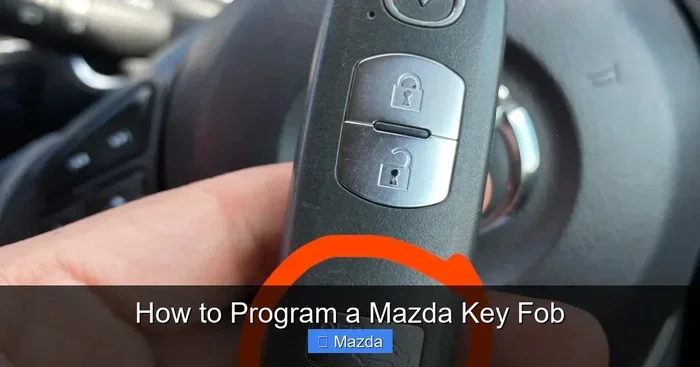
Most Mazda key fobs have a few standard buttons. You will see lock, unlock, trunk, and sometimes a panic button. Newer models also include a keyless entry sensor that lets you start the engine without taking the fob out of your pocket. Understanding these basics makes the programming process much easier.
Not all Mazda fobs are the same. The Mazda 3 key fob looks different from the Mazda CX-5 key fob, but the programming steps are very similar. The main difference is the number of buttons and the year of the vehicle. Always check your Mazda owner’s manual for model-specific details before you begin.
Types of Mazda Key Fobs
Mazda has used a few different fob designs over the years. Here is a quick look at what you might have.
- Standard Remote Fob: This is the basic type with lock, unlock, and trunk buttons. Found on older Mazda models from the early 2000s.
- Smart Key Fob: This fob has a push button start feature. It is common on Mazda 3, CX-5, and CX-9 models from 2014 and newer.
- Flip Key Fob: This type folds into a compact shape. It combines a remote and a physical key in one unit.
Knowing which type you have helps you follow the right steps. The programming process is similar across all three types, but the physical key release and battery access differ slightly.
Tools and Preparation You Will Need
Good preparation makes any job easier. Before you start programming your Mazda key fob, gather these items.
- Your new or existing Mazda key fob (make sure it is the correct model for your vehicle)
- A fresh CR2025 or CR2032 battery (check your owner’s manual for the correct size)
- Your Mazda vehicle parked close to the fob
- The Mazda owner’s manual for reference
- A clean, well-lit workspace
One thing people often overlook is the Mazda key fob battery. If the old battery was dead, the fob might not respond during programming. Always install a new battery first. It takes about two minutes and saves a lot of frustration. If you are unsure about the battery type, check the article Do You Have To Do Anything After Replacing A Key Fob Battery for helpful tips.
Also, make sure you have your vehicle registration or proof of ownership nearby. Some Mazda models require the ignition to be turned during programming, and the car needs to recognize you as the owner. This is a security feature that protects your vehicle.
Step-by-Step Mazda Key Fob Programming Guide
Now for the part you have been waiting for. Here is how to program your Mazda key fob without visiting a dealer. The steps below work for most Mazda models from 2010 onward. If your vehicle is older, the process may vary slightly.
Step 1: Get Inside and Sit in the Driver Seat
Open the driver door and sit down. Make sure all other doors and the trunk are closed. Close all windows too. You want the car to be in a quiet state with no interference. Place your new remote key fob on the driver seat next to you.
Step 2: Turn the Ignition to the ON Position
Insert your physical key into the ignition. Turn it to the ON position (not START, just ON). The dashboard lights should come on. In models with push button start, press the start button without pressing the brake pedal. The dash lights will illuminate.
Keep the ignition in the ON position for the entire programming process. Do not turn it off or switch to ACC mode.
Step 3: Press the Lock Button on the Fob
Within 10 seconds of turning the ignition to ON, press the lock button on your Mazda key fob. Hold it for about 2 seconds, then release it. You should hear the doors lock. This signals that the car is ready to accept a new fob.
Timing matters here. If you miss the 10-second window, turn the ignition off and wait a few seconds before trying again.
Step 4: Cycle the Ignition Off and On
Turn the ignition to OFF, then back to ON within 5 seconds. You have another 10-second window to press the lock button again. Repeat this cycle two more times for a total of three ON-OFF-ON cycles.
After the third cycle, the doors should lock and unlock automatically. This confirms that the car has entered programming mode.
Step 5: Press Any Button on the New Fob
Now press any button on your new Mazda key fob. The lock button works well for this. Within 5 seconds, the doors should lock and then unlock again. This means the fob has been successfully programmed.
If you are programming additional fobs, repeat this step for each one. You have about 30 seconds between fobs before the car exits programming mode.
Step 6: Turn the Ignition Off and Test
Turn the ignition to OFF and remove the key. Step out of the car and test all the fob buttons. Try locking, unlocking, and the trunk release. If everything works, you are done. Congratulations, you just saved yourself a trip to the dealer.
If the fob does not work, do not worry. Move on to the troubleshooting section below.
Troubleshooting Common Mazda Key Fob Issues
Sometimes things do not go as planned. That is normal. Here are the most common issues people run into when programming a Mazda key fob and how to fix them.
The Fob Does Not Respond During Programming
This usually means the battery is dead or weak. Replace the battery with a fresh one and try again. Also check that you are within 10 seconds of turning the ignition to ON when pressing the lock button. Timing is everything in key fob programming.
Another reason could be interference from other electronic devices. Move your phone, laptop, or other remotes away from the car and try again.
The Doors Do Not Lock and Unlock After Programming Mode
This means the car did not enter programming mode correctly. Go back to Step 2 and make sure you are cycling the ignition off and on exactly three times. Wait for the doors to lock and unlock before moving to the next step. If you rush through the steps, the car will not recognize the new fob.
The Fob Works Sometimes but Not Always
Intermittent fob issues are often caused by a weak battery or a damaged fob. Try replacing the battery first. If that does not help, the fob itself may need to be replaced. Check out How Do You Pop A Key for guidance on accessing the physical key inside your fob for manual entry.
Programming Mode Times Out
Mazda programming windows are short. If the car exits programming mode before you finish, start over from Step 1. Stay focused and do not rush, but also do not pause too long between steps.
When to Seek Professional Help
There is no shame in calling a professional. Some situations are better left to experts. Here is when you should consider getting help.
- Multiple fobs need programming: If you have lost all your remotes and need to program several new ones, a locksmith can handle this faster.
- Damaged fob or ignition cylinder: Physical damage to the fob or the car’s ignition system requires professional tools to fix.
- Security system error: If your car’s alarm or immobilizer is triggered, a dealer or locksmith can reset it safely.
- Older Mazda models: Some pre-2010 models have different programming procedures that are harder to find online.
Before you visit a dealer, check if a local locksmith can do the job for less. Many locksmiths specialize in key fob reprogramming and charge a fraction of what dealerships ask. You can also call your local Mazda dealer to ask if they will program a fob you purchased yourself. Some will do it for a small fee.
If you are wondering whether the dealership can handle battery replacement, the answer is yes. You can read more about that in this article on Can The Dealership Change My Key Fob Battery.
Maintaining Your Mazda Key Fob for Long Life
Programming your fob is only half the battle. Keeping it in good shape ensures it works reliably every day. Here are some simple habits that make a big difference.
Replace the Battery Regularly
Most Mazda key fobs use a CR2025 battery that lasts about 2 to 3 years. Do not wait until the fob stops working to replace it. Keep a spare battery in your glove box. This way, you are always prepared.
Protect the Fob from Physical Damage
Drop your fob on a hard floor and the circuit board inside can crack. Use a protective case or keep it in a small pouch. Avoid placing it near sharp objects or heavy items that could press the buttons accidentally.
Keep the Fob Away from Water and Heat
Water damage is one of the most common reasons fobs fail. Do not leave your fob in the sun on a hot day or near a heater vent. Extreme heat melts the internal components over time. Keep it in a cool, dry place.
Clean the Buttons Periodically
Dirt and grime build up on fob buttons over time. Use a soft, slightly damp cloth to wipe the surface. Avoid using harsh chemicals or soaking the fob. A gentle cleaning keeps the buttons responsive and the exterior looking good.
Store a Spare Fob Safely
Always keep a spare Mazda key fob in a safe place at home. If you lose your primary fob, having a backup saves you from a stressful situation. Some people keep one in their glove box and one at home. Just make sure both are programmed and the batteries are fresh.
Quick Comparison: Mazda Key Fob Programming Methods
There are a few ways to get your Mazda key fob programmed. Here is a quick comparison to help you decide which method is right for you.
| Method | Cost | Time | Difficulty |
|---|---|---|---|
| DIY Programming (this guide) | Free (just the fob cost) | 10-15 minutes | Easy to Moderate |
| Mazda Dealership | $50-$200 | 1-2 hours (including wait) | Very Easy |
| Mobile Locksmith | $30-$100 | 30-60 minutes | Easy |
| Online Programming Guide (varies) | Free-$20 | 15-30 minutes | Moderate |
As you can see, DIY programming is the most cost-effective option. It takes just a few minutes once you know the steps. The dealership is the easiest but the most expensive. A mobile locksmith strikes a nice balance between convenience and cost.
For more information on what happens after you replace your fob battery, check out Do You Have To Do Anything After Replacing A Key Fob Battery. That article covers important post-replacement steps that complement what you have learned here.
Final Thoughts
Programming your Mazda key fob at home is one of those small wins that makes you feel capable and resourceful. You saved money, learned a new skill, and avoided the hassle of a dealership visit. The process is straightforward once you know the steps, and most Mazda models follow the same basic procedure.
Remember to always start with a fresh battery, follow the timing carefully, and do not rush through the cycles. If something goes wrong, the troubleshooting tips above will help you get back on track. And if you ever feel stuck, a locksmith or dealership is just a phone call away.
Your Mazda key fob is a small device that plays a big role in your daily drive. Take care of it, keep the battery fresh, and it will serve you reliably for years to come. Now go out there and program that fob with confidence.
Frequently Asked Questions
Can I program a Mazda key fob myself without any special tools?
Yes, you absolutely can. All you need is your new fob, a fresh battery, and your Mazda vehicle. No special equipment or diagnostic tools are required. The programming process uses your car’s ignition and door locks to sync the new fob.
How much does it cost to program a Mazda key fob at a dealership?
Dealerships typically charge between $50 and $200 for key fob programming. The exact cost depends on your Mazda model, the type of fob, and your location. Programming it yourself costs nothing but the price of the fob itself.
Why won’t my Mazda key fob program even after following the steps?
The most common reason is a weak or dead battery in the new fob. Replace the battery and try again. Also double-check that you are within the 10-second window for each step. Interference from other electronic devices can also cause issues, so move away from phones and laptops and try again.
How many key fobs can I program to my Mazda at once?
Most Mazda vehicles can store up to four programmed key fobs at a time. You can add new fobs or replace existing ones by following the programming steps. If you are programming multiple fobs, do them one after another within the 30-second window.
What should I do if I lose all my Mazda key fobs?
Losing all fobs is stressful but not the end of the world. You will need a replacement fob and either a locksmith or dealer to program it. Some Mazda models require a special master key or scanner that only dealers have. A locksmith with Mazda experience can often handle this for less than a dealership would charge.
Can I drive my Mazda if my key fob battery dies?
In most cases, yes. Mazda vehicles with push button start have a backup method. Place the dead fob against the start button and press it. The car can read the transponder chip even without a working battery. However, you should replace the battery as soon as possible to avoid being stranded.