How Do You Reset a Toyota 4Runner and Fix Warning Lights
Resetting a Toyota 4Runner is easier than most owners think. Whether you are dealing with a stubborn maintenance light, a check engine warning, or a tire pressure alert, this guide walks you through every step. You will learn how to reset different warning systems, fix common issues, and know when to seek professional help.
Owning a Toyota 4Runner comes with a lot of perks. It is tough, reliable, and built to handle just about anything you throw at it. But every now and then, a warning light pops up on the dash, and suddenly your confidence takes a hit. Maybe the maintenance light won’t go away. Maybe the check engine light started blinking after a long road trip. Whatever the case, resetting a Toyota 4Runner is something every owner should know how to do.
This guide covers everything you need to know about resetting warning lights on your 4Runner. We will walk through the different types of lights, what they mean, and exactly how to reset each one. You will also learn about common mistakes people make and when it is smart to call in a professional. By the end, you will feel confident handling your dashboard like a pro.
The good news is that most resets are simple. You do not need fancy tools or expensive shop visits for the majority of issues. A few minutes and some basic knowledge go a long way. Let us dive in and take the mystery out of those scary little lights on your dash.
Key Takeaways
- Resetting the maintenance light on a 4Runner takes just a few simple steps using the steering wheel controls.
- Understanding dashboard warning lights helps you respond quickly and avoid costly repairs.
- Common causes of warning lights include loose gas caps, low fluids, and sensor malfunctions.
- Some resets require an OBD-II scanner or a visit to a qualified mechanic for deeper issues.
- Regular maintenance prevents most warning lights from appearing in the first place.
- Knowing when to see a professional saves time and keeps your 4Runner running safely.
📑 Table of Contents
- Understanding Toyota 4Runner Warning Lights
- How to Reset a Toyota 4Runner
- Fixing Common Warning Lights on the 4Runner
- When to See a Professional
- Quick Tips for Avoiding Warning Lights
- Common Mistakes When Resetting Warning Lights
- Expert Insights on Toyota 4Runner Dashboard Systems
- Key Takeaways
- Conclusion
Understanding Toyota 4Runner Warning Lights
Before you can reset anything, you need to understand what the lights are telling you. Dashboard warning lights are not random. Each one serves a specific purpose and alerts you to a particular system or issue. Ignoring them can lead to bigger problems down the road.
Common Dashboard Symbols on the 4Runner
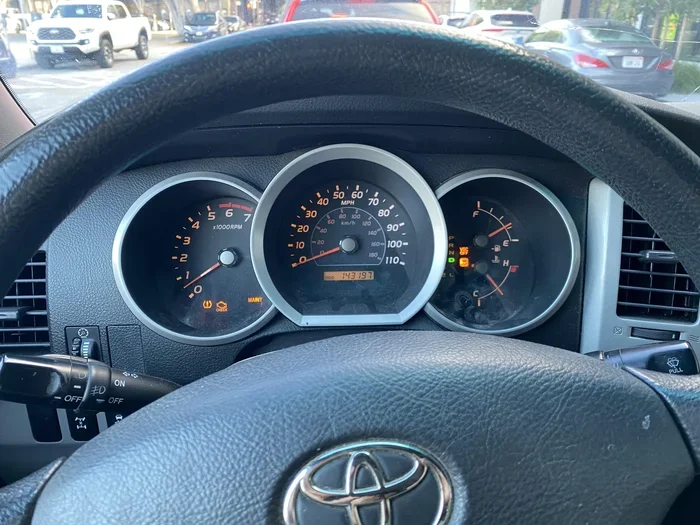
The Toyota 4Runner has dozens of warning symbols. Some are red and mean stop right away. Others are yellow or amber and suggest you should get things checked soon. Here are the most common ones you will see:
- Check Engine Light: This yellow engine-shaped icon is the most common warning. It can mean anything from a loose gas cap to a serious engine problem.
- Maintenance Required Light: A wrench symbol that tells you it is time for scheduled service or an oil change.
- Oil Pressure Warning: A red oil can symbol. This one demands immediate attention.
- Tire Pressure Monitoring System (TPMS): A horseshoe shape with an exclamation point. It means one or more tires are underinflated.
- Battery Warning: A red battery icon that signals a charging system issue.
- Brake System Warning: A red circle with an exclamation point. Do not ignore this one.
What Triggers Warning Lights
Warning lights come on for many reasons. Sometimes it is something minor, like a loose fuel cap. Other times, it points to a real mechanical issue. Common triggers include low fluid levels, faulty sensors, electrical glitches, and worn parts. Understanding the trigger helps you decide whether a simple reset will work or if you need deeper repairs.
For example, if you just got an oil change and the maintenance light is still on, a reset is all you need. But if the check engine light comes on because of a failing oxygen sensor, resetting it without fixing the sensor will just make the light come back again. Always diagnose first, then reset.
How to Reset a Toyota 4Runner
Now let us get into the hands-on part. Resetting your Toyota 4Runner depends on which light you are trying to clear. Different systems use different methods. Below, we break down the most common resets step by step.
Resetting the Maintenance Required Light
The maintenance required light is the easiest to reset on a 4Runner. This light typically comes on every 5,000 miles to remind you about an oil change or scheduled service. Here is how to do it:
- Turn the ignition to the “ON” position without starting the engine.
- Use the steering wheel buttons to scroll through the trip meter menu.
- Find the maintenance reset option.
- Hold the reset button until the light blinks and then turns off.
- Turn the ignition off and then back on to confirm the reset worked.
If you are unsure about the exact steps for your model year, you can also learn how to reset your maintenance required light through your owner’s manual. The process is very similar across most Toyota models.
Resetting the Check Engine Light
The check engine light is trickier. It is connected to your vehicle’s onboard diagnostics system, known as OBD-II. To reset this light properly, you usually need to address the root cause first. Here is the general approach:
- Step 1: Use an OBD-II scanner to read the error codes. This tells you exactly what triggered the light.
- Step 2: Fix the underlying issue. It could be a loose gas cap, a bad spark plug, or a failing sensor.
- Step 3: Clear the codes using the scanner. Most OBD-II tools have a “clear codes” function built in.
- Step 4: Drive the vehicle for a few days. If the issue is resolved, the light should stay off.
Some people try disconnecting the battery to reset the check engine light. While this can work temporarily, it does not fix the actual problem. The light will almost always come back if the underlying issue is not resolved.
Resetting the Oil Change Light
The oil change light is separate from the maintenance required light on some 4Runner models. Here is how to reset it:
- Press and hold the odometer trip reset button.
- Turn the ignition to the “ON” position.
- Continue holding the button for about 10 seconds.
- The light should flash and then turn off.
- Release the button and turn the ignition off.
If this does not work for your specific model year, check your owner’s manual or consult a Toyota dealer. The process can vary slightly between generations of the 4Runner.
Fixing Common Warning Lights on the 4Runner
Resetting a light is only half the battle. You also need to know how to fix the issue that caused it in the first place. Let us look at some of the most common warning lights and what you can do about them.
Traction Control and Stability Warning
The traction control light on a 4Runner can come on for several reasons. It might mean the system is actively working to keep you stable on a slippery road. Or it could indicate a malfunction in the system itself. If the light stays on constantly, you may need to manually turn off traction control to see if that clears the warning. Sometimes a simple sensor cleaning or a fuse replacement does the trick.
Here are a few things to try when the traction control light won’t go away:
- Check the fuse box for a blown traction control fuse.
- Inspect the wheel speed sensors for dirt or damage.
- Make sure the system is not already turned off.
- Have a mechanic scan for error codes if the light persists.
Tire Pressure Warning Light
A low tire pressure warning is one of the most common alerts on any vehicle. It usually means one or more tires are underinflated. Before you reset the light, make sure all tires are properly inflated. You can tell which tire is low without a gauge by visually inspecting the tires or feeling for soft spots. Once the pressure is corrected, the light should turn off on its own after a few miles of driving.
If the light stays on even after you inflate the tires, the TPMS sensor itself may need replacement or reprogramming. This is a quick fix at most tire shops.
Power Steering Fluid Warning
If your 4Runner is equipped with electronic power steering, you might see a steering-related warning light. This can happen when the fluid level is low or the system detects an issue. To determine whether your vehicle actually needs fluid, you should know if you need power steering fluid by checking the reservoir level under the hood. Low fluid often causes the warning to activate, and topping it off usually resolves the problem.
Keep in mind that some power steering issues are more serious. If the light comes with a grinding noise or stiff steering, get to a shop right away.
When to See a Professional
Not every warning light should be handled at home. Some issues require professional tools and expertise. Here are clear signs that it is time to visit a mechanic:
- The check engine light is flashing rather than staying solid. A flashing light often indicates a serious engine misfire that can damage the catalytic converter.
- Multiple warning lights come on at the same time. This could point to an electrical system problem.
- You have reset the light, but it returns within a few days.
- The vehicle is running rough, making unusual noises, or losing power.
- You do not have access to an OBD-II scanner or feel comfortable using one.
A trusted mechanic can run a full diagnostic scan and pinpoint the exact cause. This saves you from guessing and prevents unnecessary part replacements. It is always better to be safe than sorry when it comes to your truck.
Quick Tips for Avoiding Warning Lights
Prevention is the best medicine. Here are some quick tips to keep your 4Runner’s dashboard clear:
- Check tire pressure monthly. Even a small drop can trigger the TPMS light.
- Tighten the gas cap after every fill-up. A loose cap is the number one cause of the check engine light.
- Stay on top of oil changes. Fresh oil keeps the engine healthy and prevents oil pressure warnings.
- Inspect fluid levels regularly. Check coolant, brake fluid, and power steering fluid at least every few months.
- Do not ignore small alerts. A minor warning today can become a major repair tomorrow.
Common Mistakes When Resetting Warning Lights
Even experienced 4Runner owners make mistakes when dealing with warning lights. Here are some common ones to avoid:
- Resetting without diagnosing: Clearing a light without fixing the root cause is pointless. The light will return, and you may miss a serious issue.
- Ignoring red lights: Red warning lights mean stop and investigate. Do not just reset them and keep driving.
- Using the wrong reset method: Different lights require different reset procedures. Always follow the correct method for each specific light.
- Disconnecting the battery as a first resort: This can erase radio presets, clock settings, and even adaptation values in the engine computer. Use it only as a last resort.
- Skipping regular maintenance: Many warning lights appear simply because the vehicle is overdue for service. Staying current prevents most of them.
Expert Insights on Toyota 4Runner Dashboard Systems
Toyota engineers designed the 4Runner’s dashboard system to be both informative and user-friendly. The warning lights follow a logical hierarchy. Red lights indicate immediate dangers that require you to stop the vehicle. Yellow and amber lights suggest caution and prompt you to schedule service soon. Green and blue lights are informational and confirm that a system is active, such as high beams or cruise control.
Understanding this hierarchy helps you respond appropriately. When a red light comes on, pull over safely and assess the situation. When a yellow light appears, you often have time to address it at your convenience. But never ignore any light for too long. Even a small warning can develop into a costly repair if left unchecked.
Modern 4Runner models from recent years have more advanced diagnostic capabilities than older ones. The multi-information display screen gives you access to detailed fault descriptions. Some models even guide you through basic troubleshooting steps right on the dashboard. Take advantage of these features. They are there to help you.
Key Takeaways
- Resetting the maintenance light on a 4Runner takes just a few simple steps using the steering wheel controls.
- Understanding dashboard warning lights helps you respond quickly and avoid costly repairs.
- Common causes of warning lights include loose gas caps, low fluids, and sensor malfunctions.
- Some resets require an OBD-II scanner or a visit to a qualified mechanic for deeper issues.
- Regular maintenance prevents most warning lights from appearing in the first place.
- Knowing when to see a professional saves time and keeps your 4Runner running safely.
Conclusion
Knowing how to reset a Toyota 4Runner is an essential skill for any owner. Whether you are clearing a maintenance light after an oil change, addressing a tire pressure warning, or tackling a check engine alert, the steps are straightforward and manageable. Most resets take just a few minutes and require nothing more than your steering wheel controls and a little patience.
Remember that resetting a light is not the same as fixing the problem. Always diagnose the root cause before clearing any warning. Use the tips and steps in this guide to handle most dashboard alerts with confidence. And when a light signals something serious, do not hesitate to seek professional help.
Your 4Runner is a tough, dependable machine. With the right knowledge and a little regular care, you can keep those warning lights where they belong. Off the dashboard and on the trail, where your truck was meant to be.
Frequently Asked Questions
How do you reset the maintenance light on a Toyota 4Runner?
Turn the ignition to the “ON” position without starting the engine. Use the steering wheel buttons to navigate to the maintenance reset option in the trip meter menu. Hold the reset button until the light blinks and turns off, then turn the ignition off and back on to confirm.
Can I reset the check engine light myself?
Yes, you can reset the check engine light using an OBD-II scanner after fixing the underlying issue. However, if you do not address the root cause, the light will almost certainly come back. Always diagnose the problem first before attempting a reset.
Why does my Toyota 4Runner keep showing the tire pressure light?
The tire pressure light usually comes on when one or more tires are underinflated. Check all tire pressures and inflate them to the recommended level. If the light persists after inflating the tires, the TPMS sensor may need replacement or reprogramming.
Is it safe to drive with the maintenance light on?
Yes, it is generally safe to drive with the maintenance light on. This light is a reminder for scheduled service, not an immediate danger. However, you should schedule service soon to keep your vehicle running properly and avoid potential issues.
What should I do if multiple warning lights come on at once?
Multiple warning lights appearing simultaneously can indicate an electrical issue or a serious system malfunction. Pull over safely, check for obvious problems like low fluid levels, and if the lights do not clear, have the vehicle towed to a qualified mechanic for a full diagnostic scan.
How often should I reset the maintenance light on my 4Runner?
You should reset the maintenance light every time you complete a scheduled service, such as an oil change or tire rotation. The light typically activates every 5,000 miles on most 4Runner models. Keeping up with regular service intervals prevents the light from appearing unexpectedly.