How Do I Reset My Volkswagen Computer Without Stress
Resetting your Volkswagen computer is simpler than you think. Whether you need to clear a warning light, perform a VW reset after a battery change, or recalibrate your onboard VW system, this guide walks you through every method. You will learn the Volkswagen reset procedure for different models, discover the right reset VW tool to use, and avoid common mistakes that cause problems.
Have you ever stared at a blinking warning light on your Volkswagen dashboard and felt your stomach drop? You are not alone. Resetting a Volkswagen computer can feel intimidating, but it does not have to be. This guide breaks down every method in simple, easy-to-follow steps. Whether you own a Jetta, Golf, Passat, or Tiguan, you will find the right approach here.
We will cover everything from a basic battery disconnect reset to using a professional OBD2 scanner. You will also learn what to do after the reset and how to avoid mistakes that trip up even experienced car owners. By the end, you will feel confident tackling a Volkswagen reset on your own.
Key Takeaways
- Multiple reset methods exist: You can reset your VW computer using a battery disconnect, an OBD2 scanner, or the onboard menu system.
- Know your model: Different Volkswagen models require slightly different reset procedures, especially for the service light and ECU.
- Tools matter: Using the right VW reset tool or OBD2 scanner makes the process faster and safer.
- Avoid common mistakes: Disconnecting the wrong cable or skipping steps can cause data loss or error codes.
- Post-reset steps are important: After a car computer reset, you may need to relearn driving habits and recalibrate adaptive features.
- When to seek help: Some resets require professional equipment, and stubborn warning lights may point to deeper issues.
- Prevention saves time: Regular maintenance and timely resets keep your Volkswagen running smoothly and your dashboard clear.
📑 Table of Contents
- Why Would You Need to Reset Your Volkswagen Computer?
- Understanding Your Volkswagen Onboard Computer
- How to Reset Your Volkswagen Computer: Step-by-Step Methods
- Volkswagen Reset Procedure by Model
- What Happens After a Volkswagen Computer Reset?
- Common Mistakes to Avoid When Resetting Your VW Computer
- When Should You Seek Professional Help?
- Quick Tips for a Stress-Free Volkswagen Computer Reset
- Final Thoughts
Why Would You Need to Reset Your Volkswagen Computer?
Your Volkswagen is packed with smart technology. The onboard computer manages everything from fuel injection to emission controls. Sometimes, this computer needs a fresh start. Here are the most common reasons people look for a VW reset:
- Clearing warning lights: A stubborn check engine light or service light often needs a reset after the underlying issue is fixed.
- After a battery replacement: When you disconnect or replace your battery, the computer loses its learned data and needs recalibration.
- Resetting service intervals: The maintenance reminder light keeps buzzing until you manually reset the service counter.
- Fixing erratic behavior: Sometimes the computer throws false codes or causes poor fuel economy. A reset can clear these glitches.
- After installing new parts: Adding a new sensor, battery, or module may require the computer to relearn its settings.
- Preparing for inspection: Some states require all warning lights to be off before passing an emissions test.
Understanding why you need a reset helps you choose the right method. It also prevents you from masking a real problem with a simple reset.
Understanding Your Volkswagen Onboard Computer
Before you dive into the reset process, it helps to understand what you are working with. The Volkswagen onboard computer is essentially the brain of your car. It collects data from dozens of sensors and uses that data to optimize performance.
What Does the VW Computer Control?
The computer, often called the ECU or Engine Control Unit, handles many tasks:
- Fuel injection timing: It decides exactly when and how much fuel to inject into each cylinder.
- Ignition timing: It controls when the spark plugs fire for maximum efficiency.
- Emission controls: It monitors the catalytic converter and oxygen sensors to keep emissions in check.
- Adaptive learning: Over time, the computer learns your driving habits and adjusts accordingly.
- Dashboard alerts: It triggers warning lights when it detects a problem.
When you perform a car computer reset, you are essentially giving this brain a fresh start. It forgets learned adaptations and clears stored error codes. This can be helpful, but it also means the computer needs time to relearn your driving patterns.
How to Reset Your Volkswagen Computer: Step-by-Step Methods
There are several ways to reset a Volkswagen computer. Some methods are simple and free. Others require a small investment in tools. Let us walk through each one.
Method 1: The Battery Disconnect Reset
This is the most popular method for a Volkswagen reset at home. It works for most VW models and requires no special equipment.
What you will need:
- A wrench (usually 10mm)
- A memory saver device (optional but recommended)
- About 15 to 30 minutes of time
Steps:
- Turn off the engine and remove the key from the ignition.
- Open the hood and locate the negative battery terminal (it has a minus sign).
- Use the wrench to loosen the nut on the negative cable clamp.
- Carefully pull the cable off the battery terminal.
- Leave the cable disconnected for at least 15 minutes. Some experts recommend 30 minutes for a full ECU reset.
- Reconnect the negative cable and tighten the nut securely.
- Start the engine and let it idle for a few minutes.
Important tip: A memory saver device keeps your radio presets, clock, and other settings intact during a battery disconnect. Without one, you may need to reprogram these after the reset. This is a small detail that catches many people off guard.
Method 2: Using an OBD2 Scanner for a VW Reset
An OBD2 scanner is the most precise way to reset your Volkswagen computer. It connects to the diagnostic port and communicates directly with the ECU.
What you will need:
- An OBD2 scanner (basic models cost under $30)
- Your Volkswagen diagnostic port location (usually under the dashboard on the driver side)
Steps:
- Plug the OBD2 scanner into the diagnostic port.
- Turn the ignition to the “on” position (do not start the engine).
- Follow the scanner’s menu to read and clear error codes.
- Select the option to clear or erase stored codes.
- Wait for the scanner to confirm the codes have been cleared.
- Start the engine and check if the warning light stays off.
Using a VW reset tool like an OBD2 scanner is especially helpful when dealing with a Volkswagen check engine light reset. It gives you the added benefit of reading what codes were stored, so you know what triggered the light in the first place.
Method 3: The Onboard Menu Reset (For Service Light)
Many newer Volkswagen models allow you to reset the service light through the onboard computer menu. This method does not clear error codes but does reset the maintenance reminder.
General steps (varies by model):
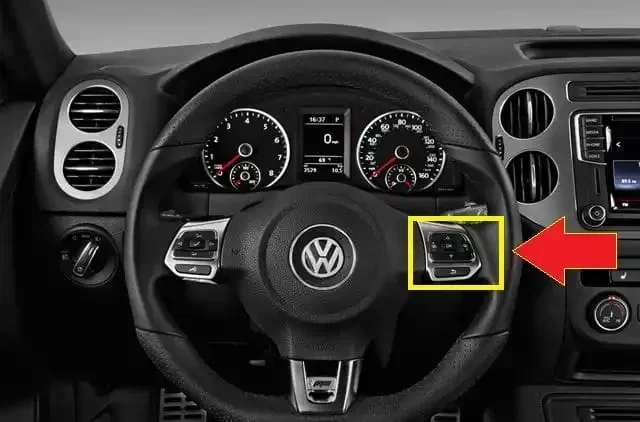
- Press the trip button on the steering wheel to access the odometer menu.
- Navigate to the “Service” or “Maintenance” menu.
- Hold the trip button for several seconds until the display prompts you to confirm.
- Select “Reset” or “Yes” to clear the service interval.
- The service light should turn off and reset to the next scheduled interval.
Check your Volkswagen owner’s manual for the exact steps specific to your model year. The menu layout changes between generations.
Volkswagen Reset Procedure by Model
Not all Volkswagen models are the same when it comes to resetting the computer. Here is a quick look at how the process differs across popular models.
| Model | Best Reset Method | Special Notes |
|---|---|---|
| Volkswagen Golf | OBD2 Scanner or Battery Disconnect | Some 2015+ models support onboard menu reset |
| Volkswagen Jetta | Battery Disconnect or OBD2 Scanner | Service light reset works through the dashboard menu |
| Volkswagen Passat | OBD2 Scanner Recommended | More complex systems may require dealer-level tools |
| Volkswagen Tiguan | OBD2 Scanner or Battery Disconnect | Infotainment system may also need a separate reset |
| Volkswagen Atlas | OBD2 Scanner | Multiple modules may need individual resets |
The table above gives you a starting point. Always cross-reference with your specific model’s owner manual for the most accurate instructions.
What Happens After a Volkswagen Computer Reset?
The reset is only half the battle. What happens after matters just as much. Here is what you can expect and what you should do.
The Relearning Period
After a Volkswagen ECU recalibration, your car’s computer enters a relearning phase. It has forgotten all the adaptive data it gathered over time. This means:
- Idle may feel slightly different for the first few drives as the computer relearns your engine’s baseline.
- Fuel economy might dip temporarily while the computer recalibrates the fuel mixture.
- Transmission shifts may feel firmer or softer until the adaptive transmission learning resets.
- Power window auto-up/down may need recalibration. You may need to run each window through its full up-and-down cycle.
These changes are completely normal. They usually resolve within 50 to 100 miles of driving. Give your Volkswagen time to adjust.
Post-Reset Checklist
After completing a VW reset, go through this quick checklist:
- Check that all warning lights are off after starting the engine.
- Verify your radio presets and clock still work (or reset them manually).
- Test your power windows for proper auto-function.
- Drive for at least 30 minutes and monitor fuel economy.
- Retest with your OBD2 scanner to confirm no codes have returned immediately.
Common Mistakes to Avoid When Resetting Your VW Computer
Even with the best instructions, mistakes happen. Here are the most common errors people make during a Volkswagen computer reset and how to avoid them.
Mistake 1: Resetting Without Fixing the Root Problem
A reset clears the warning light, but it does not fix the problem. If your check engine light came on because of a loose gas cap or a failing oxygen sensor, the light will return after the reset. Always diagnose and repair the issue first, then reset.
Mistake 2: Disconnecting the Wrong Battery Terminal
Always disconnect the negative terminal first. Removing the positive terminal can cause short circuits and damage sensitive electronics. This is one of the most important safety rules in any car reset after battery replacement procedure.
Mistake 3: Not Waiting Long Enough
Fifteen minutes is the minimum, but thirty minutes is better for a full ECU reset Volkswagen procedure. Rushing this step means the computer may not fully clear all stored data.
Mistake 4: Using a Cheap or Incompatible Scanner
Not all OBD2 scanners work equally well with Volkswagen vehicles. Some basic scanners cannot access VW-specific modules. Invest in a scanner that supports VW protocols for the best results.
Mistake 5: Ignoring Post-Reset Recalibration
Skipping the recalibration of adaptive features like power windows, sunroof, or steering angle sensor can leave your car running suboptimally. Always complete the full post-reset checklist.
When Should You Seek Professional Help?
Most Volkswagen computer resets are DIY-friendly. But there are situations where professional help is the smart choice.
- Multiple warning lights stay on: If several lights remain after a reset, there may be a deeper electrical issue.
- Codes keep returning: A persistent code that returns after clearing suggests an unresolved mechanical problem.
- You need a dealer-level scan tool: Some Volkswagen models require VCDS (VAG-COM) or similar professional-grade software for a full reset.
- You are uncomfortable working with the battery: There is no shame in letting a professional handle the Volkswagen diagnostic scan and reset.
- Your warranty is still active: Some dealers may require you to use their equipment to avoid voiding the warranty.
A professional Volkswagen diagnostic scan at your local dealership or independent shop typically costs between $80 and $150. It is a worthwhile investment if you are unsure about any step in the process.
Quick Tips for a Stress-Free Volkswagen Computer Reset
Follow these quick tips to make your VW reset experience smooth and successful:
- Read your owner’s manual first. It contains model-specific instructions that save you time and frustration.
- Keep a memory saver handy. This small device prevents you from losing radio presets and clock settings.
- Use the right tools. A quality OBD2 scanner makes a world of difference for a clean Volkswagen reset.
- Document your error codes. Write down any codes before clearing them. This helps you track patterns and recurring issues.
- Drive gently after the reset. Avoid aggressive driving during the relearning period. Smooth acceleration and steady speeds help the computer recalibrate faster.
- Reset your service light regularly. Staying on top of maintenance reminders keeps your car in top shape and prevents missed services.
- Keep a log of your resets. Note the date and reason for each reset. This history is valuable for future troubleshooting.
Final Thoughts
Resetting your Volkswagen computer does not have to be a stressful experience. With the right knowledge and the right tools, you can handle most resets yourself in under an hour. Whether you choose the battery disconnect method, an OBD2 scanner, or the onboard menu route, the key is to follow the steps carefully and avoid common mistakes.
Remember, a Volkswagen computer reset is a tool, not a cure-all. Always address the root cause of any warning light before resetting. Give your car time to relearn after the reset, and do not hesitate to seek professional help when needed.
Now that you know how to reset your Volkswagen computer without stress, you are better equipped to keep your car running at its best. Take the time to understand your specific model’s needs, gather the right tools, and approach each reset with confidence. Your Volkswagen will thank you for it.
Frequently Asked Questions
How long does it take to reset a Volkswagen computer?
A basic battery disconnect reset takes about 15 to 30 minutes. Using an OBD2 scanner is faster, often taking just 5 to 10 minutes. The onboard menu reset for the service light usually takes less than 2 minutes. The total time depends on the method you choose and your specific Volkswagen model.
Will resetting my VW computer erase any saved settings?
A battery disconnect reset will likely erase radio presets, clock settings, and power window auto-calibration. An OBD2 scanner reset typically does not affect these settings. To protect your saved settings, use a memory saver device during a battery disconnect.
Can I reset my Volkswagen computer without an OBD2 scanner?
Yes, you can. The battery disconnect method and the onboard menu reset do not require any special tools. However, an OBD2 scanner gives you more control and precision, especially when clearing specific error codes or performing a Volkswagen ECU recalibration.
Why does my check engine light come back after I reset it?
The light returns because the underlying problem has not been fixed. A reset clears the code but does not repair the issue. If the sensor or component that triggered the light is still faulty, the computer will detect the problem again and turn the light back on.
Is it safe to drive my Volkswagen after a computer reset?
Yes, it is generally safe. However, drive gently during the first 50 to 100 miles. The computer is in a relearning phase and may adjust fuel delivery and shift points differently than usual. Avoid hard acceleration and heavy braking until the system stabilizes.
How often should I reset my Volkswagen computer?
You should only reset your computer when necessary, such as after a battery replacement, after fixing a fault, or when resetting the service interval. Frequent resets are not recommended and can disrupt the computer’s adaptive learning, which is designed to optimize your driving experience over time.
=== CONCLUSION ===
A Volkswagen computer reset is one of the simplest and most effective maintenance tasks you can perform. It saves you money, keeps your dashboard clear, and helps your car run at its best. Whether you use the battery disconnect method, an OBD2 scanner, or the onboard menu, the process is straightforward when you know the steps.
Remember to always fix the root cause before resetting, give your car time to relearn after the reset, and use the right tools for the job. With the tips and methods shared in this guide, you have everything you need to reset your Volkswagen computer without stress. Take action today and enjoy a smoother, clearer driving experience in your Volkswagen.