How Do I Activate My Toyota Remote Step by Step Guide
Activating your Toyota remote is easier than you think. This guide walks you through every step to get your Toyota remote working quickly. You will learn how to program your key fob, fix common problems, and keep your remote in top shape.
There is nothing worse than standing in your driveway, pressing the button on your Toyota remote, and realizing it does nothing. Whether you just bought a used Toyota or replaced a lost key fob, getting your Toyota remote up and running is a task you can handle yourself. You do not need to be a mechanic or spend hours at a dealership. With the right steps and a little patience, your Toyota remote will be unlocking doors and starting your engine in no time.
This guide gives you a clear, step-by-step path to activate your Toyota remote. We cover everything from the basic programming process to troubleshooting common issues. You will also learn how to maintain your remote so it keeps working for years. Let us get started and bring your Toyota remote back to life.
Key Takeaways
- Activation is simple: Most Toyota remotes can be activated in minutes using your vehicle’s ignition and door locks.
- Battery matters: A weak battery is the most common reason a Toyota remote stops working.
- Programming varies by model: Different Toyota models have slightly different activation steps.
- Phone integration is growing: Some newer Toyotas let you start your car using a phone app.
- Reset often fixes issues: A simple reset can solve many Toyota remote problems without a dealer visit.
- Know when to seek help: Persistent issues may need a Toyota dealership or certified technician.
📑 Table of Contents
- What Is a Toyota Remote and How Does It Work
- How to Activate Your Toyota Remote Step by Step
- Common Problems When Your Toyota Remote Won’t Work
- How to Replace the Battery in Your Toyota Remote
- Toyota Remote Features You Should Know About
- When to Get Professional Help for Your Toyota Remote
- Keep Your Toyota Remote Working for Years
- Conclusion
What Is a Toyota Remote and How Does It Work
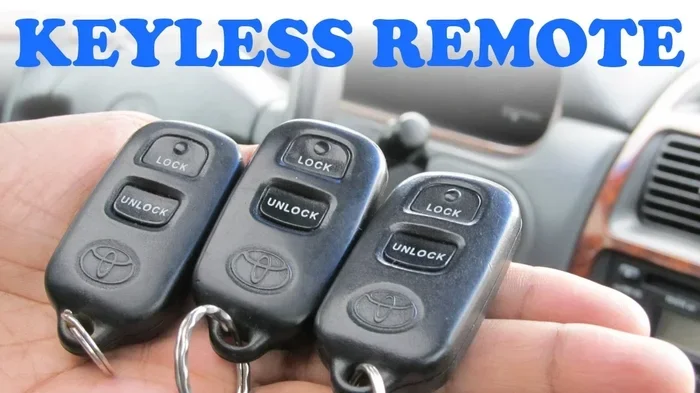
A Toyota remote is more than just a key fob. It is a small electronic device that communicates with your car using radio signals. When you press a button, the remote sends a coded message to your vehicle. The car receives that signal and performs the action you requested, whether that is locking the doors or starting the engine.
Modern Toyota vehicles use what is called a smart key system. This system lets you unlock and start your car without even taking the key fob out of your pocket. The remote contains a small chip that exchanges a unique code with your car’s computer. This is why each Toyota remote is programmed specifically to one vehicle.
Understanding how your Toyota remote works helps you troubleshoot problems faster. For example, if the signal is weak, it might be a battery issue. If the car does not respond at all, the remote might need reprogramming. Once you know the basics, you can handle most situations on your own.
How to Activate Your Toyota Remote Step by Step
Activating your Toyota remote might seem intimidating, but the process is straightforward. Follow these steps carefully and you will have your remote working in under ten minutes. The exact steps can vary slightly depending on your Toyota model, but the general process is the same across most vehicles.
Step 1: Get Inside Your Toyota
Sit in the driver’s seat and make sure all doors are closed. Put the key in the ignition or place your smart key near the start button. This step is important because the car needs to be in the right mode to accept a new Toyota remote code.
Step 2: Enter Programming Mode
For most Toyota models, you need to cycle the ignition on and off a specific number of times. Turn the key to the ON position, then back to OFF. Repeat this two or three times until the doors lock and unlock automatically. This tells the car you are entering Toyota remote programming mode.
If your Toyota has a push-button start, press the start button without pressing the brake pedal. Cycle between ACC and OFF two or three times. Watch for the doors to cycle their locks. That is your signal that programming mode is active.
Step 3: Program the Remote
Press and hold the lock and unlock buttons on your Toyota remote at the same time. Hold them for about five seconds. You should hear a chirp or see the lights flash on your car. This means the car has accepted the new remote.
Release the buttons and test the remote by pressing the lock button. If the doors lock, your Toyota remote is now activated. Repeat this process for any additional remotes you want to program.
Step 4: Exit Programming Mode
Turn the ignition off and remove the key. Walk away from the car and test the remote from a few feet away. If everything works, you are done. Your Toyota remote is fully activated and ready to use every day.
Some Toyota models may have slightly different steps. Always check your owner’s manual first. If you are still unsure, you can also visit a Toyota dealership for assistance. The process is designed to be simple, so do not worry if it takes a second attempt.
Common Problems When Your Toyota Remote Won’t Work
Even after following the activation steps, your Toyota remote might still give you trouble. This is more common than you think, and most issues have simple fixes. Let us look at the most frequent problems and how to solve them.
The Remote Does Nothing When You Press the Button
This is usually a battery problem. The battery inside your Toyota remote lasts about two to three years. When it gets weak, the signal becomes too faint for the car to pick up. Replacing the battery is quick and cheap. Use a CR2025 or CR2032 battery depending on your remote model.
The Remote Works Sometimes but Not Always
Intermittent issues often point to a worn-out battery or a weak signal. Try standing closer to the car when you press the button. If it works from nearby but not from across the parking lot, the battery needs replacing. Also check for any damage to the remote itself. Drops and moisture can affect the internal electronics.
The Car Does Not Recognize the Remote After Programming
This can happen if you did not enter programming mode correctly. Try the process again from the beginning. Make sure all doors are closed and the ignition cycles the right number of times. Some Toyota models require you to press the remote button within a specific time window after entering programming mode. Be quick but steady.
If you have tried everything and the remote still does not work, there might be an issue with the car’s receiver module. This is rare but can happen, especially after a battery disconnect or electrical work. In that case, it is best to consult a Toyota technician.
How to Replace the Battery in Your Toyota Remote
Keeping your Toyota remote battery fresh is one of the best ways to prevent activation problems. A dead battery is the number one reason people think their remote is broken. But replacing it is incredibly easy and takes less than two minutes.
First, find the small slot on the back of your remote. Use a flat tool like a coin or a small screwdriver to pry open the case. Slide the old battery out carefully. Insert the new battery with the positive side facing up. Snap the case back together and test the remote.
It is a good idea to keep a spare battery in your glove box. This way, you are never stuck with a dead Toyota remote when you need it most. Most auto parts stores carry the right battery for under two dollars.
Toyota Remote Features You Should Know About
Your Toyota remote does more than just lock and unlock doors. Understanding these features helps you get the most out of your vehicle.
Remote Start Function
Many Toyota models come with a remote start feature. This lets you start the engine from outside the car. It is especially useful in cold weather when you want the heater running before you get in. Check your owner’s manual for the specific button sequence to activate this feature on your Toyota remote.
Smart Key and Push-Button Start
If your Toyota has a smart key system, you can start the car without removing the fob from your pocket. The car detects the key’s proximity and allows you to start the engine with the push of a button. This feature relies on the same Toyota remote technology but adds a layer of convenience.
Phone Integration and Remote Apps
Newer Toyota models offer phone-based remote features through apps like Toyota Connect. You can lock your doors, start the engine, and locate your car using your smartphone. To set this up, you first need to put your phone in pairing mode and connect it to the car’s system. This is a great option if you ever leave your Toyota remote at home.
Some Toyota owners also ask whether they can start their vehicle using just their phone. The answer is yes, for models that support this feature. You can start your Rav4 with your phone if your model has the right connectivity features. Always check with your dealership about which remote features are available for your specific Toyota model.
When to Get Professional Help for Your Toyota Remote
Most Toyota remote issues can be solved at home. But there are times when professional help is the right call. Knowing when to seek help saves you time and frustration.
If you have replaced the battery, reprogrammed the remote, and it still does not work, visit a Toyota dealership. The problem might be with the car’s internal receiver or the remote itself. A technician can run diagnostics and determine if the remote needs to be replaced.
Another reason to seek help is if you lost all of your Toyota remote keys. Programming a new remote when you have no working key is much more complicated. A dealership has the tools and software to handle this situation safely. They can also cut a new mechanical key if needed.
Water damage is another common issue. If your remote has been soaked or exposed to heavy moisture, the internal circuits may be corroded. No amount of battery replacement will fix this. You will need a new remote, which a dealership can order and program for you.
Finally, if you are not comfortable working with your car’s electrical system, it is perfectly fine to let a professional handle the activation. There is no shame in asking for help. A Toyota technician can walk you through the process or handle it for you in just a few minutes.
Some people also wonder about driving their Toyota without the key fob. This is possible in certain situations, but it depends on your model. You can learn more about driving your Toyota without the key fob in our detailed guide. Understanding these features gives you confidence and keeps you prepared for any situation.
Keep Your Toyota Remote Working for Years
Once you have successfully activated your Toyota remote, a little maintenance goes a long way. Treat your remote well and it will serve you reliably for many years. Here are a few simple habits that make a big difference.
Always keep your remote clean. Wipe it down with a soft cloth every few weeks. Dirt and grime can build up around the buttons and cause them to stick. If your remote gets wet, dry it thoroughly right away. Moisture is the enemy of electronic devices.
Store your Toyota remote in a safe place when not in use. Avoid leaving it on the dashboard where it can slide around or fall. A small pouch or the glove box is a great spot. Also, keep it away from strong magnetic fields, which can interfere with the internal chip.
Replace the battery every two years even if it seems to be working fine. A fresh battery ensures a strong signal and prevents unexpected failures. When you buy a new battery, make sure it is the right type for your remote model. Using the wrong battery can damage the internal components.
If you buy a used Toyota or a spare remote, always have it programmed by a professional or follow the activation steps in this guide carefully. An unprogrammed remote will not work and could cause confusion. Taking a few extra minutes to set it up correctly saves headaches later.
Conclusion
Activating your Toyota remote is a skill every Toyota owner should have. It saves time, money, and the hassle of waiting at a dealership. With the steps in this guide, you can program and troubleshoot your Toyota remote with confidence. Remember to check the battery first when things go wrong, and do not hesitate to seek professional help when needed.
Your Toyota remote is a small device that makes a big difference in your daily driving experience. Keep it maintained, keep a spare battery handy, and it will keep working hard for you. Now that you know how to activate and care for your Toyota remote, you are fully equipped to handle whatever comes your way.
Frequently Asked Questions
How long does it take to activate a Toyota remote?
Most Toyota remotes can be activated in five to ten minutes. The process is quick as long as you follow the steps correctly. If you are programming multiple remotes, it may take a little longer.
Can I activate my Toyota remote without the original key?
This depends on your Toyota model. Some models allow you to program a new remote even without the original key, but others require at least one working key. Check your owner’s manual or contact a Toyota dealership for guidance specific to your vehicle.
Why does my Toyota remote stop working after a few months?
The most common reason is a weak battery. Replacing the battery usually fixes the problem immediately. If a new battery does not help, the remote may need reprogramming or there could be internal damage.
Is it safe to program a Toyota remote myself?
Yes, it is completely safe. Toyota designed the programming process for owners to handle at home. Just follow the steps carefully and avoid pressing random buttons while in programming mode. If you feel unsure, a dealership can walk you through it.
How much does it cost to replace a Toyota remote?
A replacement Toyota remote typically costs between 50 and 200 dollars depending on the model and features. Programming at a dealership may add an extra fee. However, many owners choose to program the remote themselves to save money.
Can I use a universal remote with my Toyota?
Some universal remotes are compatible with Toyota vehicles, but they may not support all features like smart key or push-button start. For full functionality, it is best to use an original Toyota remote or one specifically programmed for your model.