Reasons Why My Car Is Not Picking Up My Phone Anymore
Your car may not be picking up your phone due to Bluetooth glitches, outdated software, or compatibility issues. Understanding the root cause helps you fix the problem quickly and get back to hands-free calling and music streaming. This guide covers the most common reasons and simple solutions to restore your connection.
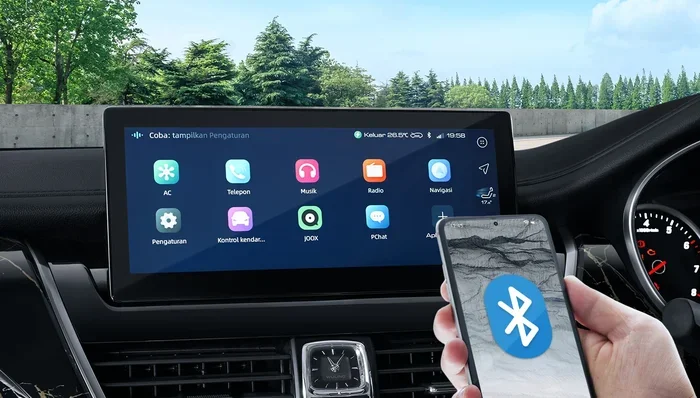
There is nothing more frustrating than getting into your car, ready to hit the road, and discovering that your car is not picking up your phone. You try to play your favorite playlist, make a hands-free call, or use navigation, and nothing happens. The Bluetooth symbol just sits there, stubbornly refusing to connect.
This problem is more common than you might think. Thousands of drivers face Bluetooth connection issues every day. The good news is that most causes are simple and fixable. You do not need to be a tech expert to get things working again.
In this article, we will explore all the reasons your phone connection in car might be failing. We will look at Bluetooth troubleshooting steps, software updates, and even hardware problems. By the end, you will know exactly what to do and how to prevent it from happening again.
Key Takeaways
- Bluetooth glitches are the most common cause: Simple resets often fix the problem.
- Outdated software can block connections: Keep both your phone and car system updated.
- Too many paired devices create conflicts: Delete old connections to improve performance.
- Hardware issues need professional attention: Antenna or module failures require expert diagnosis.
- Regular maintenance prevents future issues: Simple habits keep your connection stable.
- Phone settings matter just as much as car settings: Check both sides of the connection.
📑 Table of Contents
Why Bluetooth Connectivity Matters in Your Car
Bluetooth technology has become a standard feature in modern vehicles. It allows you to make calls, stream music, and use apps without touching your phone. This hands-free technology makes driving safer and more convenient.
When your car infotainment system stops recognizing your phone, it disrupts your entire driving experience. You lose access to navigation, music, and even emergency calling features. Understanding how this connection works helps you troubleshoot more effectively.
How Bluetooth Pairing Works
Bluetooth uses short-range radio waves to connect devices. Your phone and car system exchange signals to establish a wireless connection. Once paired, they remember each other and reconnect automatically.
However, several things can interfere with this process. Signal interference, software bugs, and hardware wear can all break the connection. Let us look at the most common reasons this happens.
Common Reasons Your Car Is Not Picking Up Your Phone
There are many reasons why your phone not connecting to car Bluetooth. Some are simple software issues, while others point to deeper problems. Let us break them down one by one.
Bluetooth Glitches and Temporary Bugs
The most common reason is a simple Bluetooth glitch. Just like any wireless technology, Bluetooth can experience temporary bugs. These often happen after a software update or when you switch locations.
Sometimes the car Bluetooth not working issue clears itself after a few minutes. Other times, you need to take action. Restarting both devices is the first step in Bluetooth troubleshooting.
Outdated Software on Your Phone or Car System
Both your phone and your car’s infotainment system need regular updates. Outdated software can cause phone connectivity issues that are hard to diagnose.
Car manufacturers release firmware updates to fix bugs and improve smartphone integration. Similarly, phone updates often include Bluetooth improvements. If you have not updated in a while, this could be the culprit.
Too Many Paired Devices
Your car’s Bluetooth system can only handle a limited number of paired devices. When the list gets too long, it can cause connection conflicts.
Old devices that you no longer use still take up memory. They can interfere with your current phone’s ability to connect. Cleaning up your paired device list often solves this problem.
Compatibility Issues Between Phone and Car
Not all phones work perfectly with all car systems. Vehicle compatibility matters, especially with older cars. Some older infotainment systems do not support newer phone features.
For example, if you have a very new phone and an older car, the media streaming features might not work. This does not mean something is broken. It just means the two systems are not fully compatible.
Phone Settings That Block Connections
Your phone has settings that control Bluetooth behavior. Sometimes these settings change without you noticing. Contact sync and hands-free calling permissions can be turned off accidentally.
Airplane mode, do not disturb mode, and battery saver settings can all affect Bluetooth. Checking these settings is a quick way to rule out simple causes.
Hardware Problems
In some cases, the issue is physical. The Bluetooth antenna in your car or phone might be damaged. This can happen after accidents, exposure to moisture, or simple wear over time.
Hardware problems are less common but more serious. They often require professional diagnosis and repair. If none of the software fixes work, a hardware issue might be to blame.
How to Fix a Car That Won’t Connect to Your Phone
Now that we know the common causes, let us look at the solutions. Most Bluetooth connection fixes are simple and take only a few minutes.
Step 1: Restart Both Devices
This is the simplest fix, and it works surprisingly often. Turn off your car and your phone. Wait about 30 seconds. Then turn them back on and try connecting again.
Restarting clears temporary memory and resets the Bluetooth module. It is like giving both systems a fresh start. This should always be your first step.
Step 2: Delete and Re-Pair the Devices
If restarting does not work, try deleting the old pairing and creating a new one. Go to your car’s Bluetooth settings and forget the device. Do the same on your phone.
Then start fresh. Turn on Bluetooth on both devices and search for each other. This process often resolves pairing problems that have built up over time.
Step 3: Check for Software Updates
Go to your phone’s settings and check for any pending updates. Do the same for your car’s infotainment system. Many newer cars support over-the-air updates.
If your car does not support wireless updates, you may need to visit a dealer. They can update the firmware using their tools. This is especially important for Apple CarPlay and Android Auto compatibility.
Step 4: Clear the Bluetooth Cache
On Android phones, you can clear the Bluetooth cache to fix connection issues. Go to Settings, then Apps, find the Bluetooth app, and clear its cache.
On iPhones, you can reset all settings. This will not delete your data but will reset network and Bluetooth settings. Either method can fix persistent wireless charging and connection problems.
Step 5: Reset Network Settings
If clearing the cache does not work, try resetting network settings. This removes all saved Wi-Fi passwords and Bluetooth pairings.
You will need to reconnect to your Wi-Fi and re-pair your phone. But this deep reset often fixes stubborn car audio system issues that simpler methods cannot.
Step 6: Check for Interference
Other electronic devices can interfere with Bluetooth signals. USB cables, phone chargers, and even other Bluetooth devices can cause problems.
Try disconnecting other devices and see if the connection improves. Sometimes simply moving your phone to a different location in the car helps. Bluetooth range can be affected by metal and electronic interference.
Quick Tips for Better Connectivity
- Keep your phone within arm’s reach of the car’s Bluetooth antenna.
- Avoid using your phone while it is connecting to the car system.
- Restart your phone at least once a week to keep Bluetooth running smoothly.
- Delete old paired devices that you no longer use.
- Keep both your phone and car software up to date.
When to Seek Professional Help for Phone Connection Issues
Most connection problems are easy to fix at home. But sometimes, the issue goes deeper than software. Knowing when to seek help saves you time and frustration.
Signs You Need Professional Help
If you have tried all the troubleshooting steps and your phone still will not connect, it is time to see a professional. Here are the warning signs:
- The Bluetooth icon appears but no audio plays through the car speakers.
- Your phone connects but drops frequently during drives.
- The car’s infotainment system freezes when trying to pair.
- Other Bluetooth devices connect fine, but your phone does not.
- You notice physical damage to the car’s USB ports or antenna.
What to Expect at the Repair Shop
A technician will run diagnostic tests on your car’s Bluetooth module. They check the antenna, the infotainment system, and the wiring. Most shops can fix hardware issues within a day or two.
The cost varies depending on the problem. Simple antenna replacements are affordable. More complex infotainment system repairs can be pricier. Always get a quote before approving any work.
Tips to Keep Your Car and Phone Connected
Prevention is always better than cure. A few simple habits can keep your phone and car connection strong and reliable.
Keep Your Software Updated
Make it a habit to check for updates regularly. Both phone and car manufacturers release updates that improve Bluetooth performance. Set a reminder to check once a month.
Limit the Number of Paired Devices
Keep your car’s Bluetooth memory clean. Only pair devices you actually use. This prevents connection conflicts and keeps the system running smoothly.
Protect Your Car’s Electronics
Moisture and extreme temperatures can damage Bluetooth components. Use a sunshade in hot weather. Address water leaks promptly. These small steps protect your car electronics from damage.
Use Quality Cables and Chargers
Cheap USB cables can cause interference with Bluetooth signals. Invest in quality cables from reputable brands. This small upgrade can make a big difference in connection stability.
Restart Your System Regularly
Just like your phone, your car’s infotainment system benefits from regular restarts. Turn the car off completely at least once a week. This clears temporary files and keeps everything running smoothly.
Final Thoughts on Car Phone Connectivity
Dealing with a car that will not pick up your phone is frustrating, but it is usually fixable. Most issues stem from simple software glitches, outdated firmware, or too many paired devices. With the troubleshooting steps in this guide, you can resolve the problem quickly.
Remember that Bluetooth connection issues are a normal part of using wireless technology. They do not mean your car or phone is broken. A little patience and the right approach will get you back on the road with full connectivity.
Stay proactive with updates and maintenance. Your hands-free calling and music streaming will work reliably when you take care of the basics. Safe driving and happy connecting.
Frequently Asked Questions
Why does my car keep disconnecting from my phone?
Frequent disconnections are usually caused by software glitches or too many paired devices. Try deleting the old pairing and creating a fresh connection. If the problem continues, check for software updates on both your phone and car system.
Can I use my phone in the car without Bluetooth?
Yes, you can use a USB cable or an auxiliary cord to connect your phone. Some cars also support wireless charging pads that work alongside wired connections. Bluetooth is the most convenient option, but alternatives exist.
How do I know if the problem is my phone or my car?
Try connecting a different phone to your car’s Bluetooth. If that phone connects fine, the issue is with your original phone. If no phone connects, the problem is likely with your car’s Bluetooth system.
Does phone case affect Bluetooth connection in cars?
Some thick or metal phone cases can interfere with Bluetooth signals. Try removing the case and see if the connection improves. This is a quick and easy test that often solves the problem.
How often should I update my car’s infotainment system?
Check for updates at least once a month. Many newer cars notify you when updates are available. Keeping your system current ensures the best smartphone integration and Bluetooth performance.
Is it normal for Bluetooth range to be limited in a car?
Yes, Bluetooth has a typical range of about 30 feet. Metal car bodies and electronic interference can reduce this range. Keeping your phone near the center console helps maintain a strong connection.
=== CONCLUSION ===
Your car not picking up your phone is a common problem with straightforward solutions. Whether it is a simple Bluetooth reset, a software update, or a hardware issue, you now have the tools to fix it. Start with the basics, work through the steps systematically, and you will likely have your connection restored in no time.
Keep your devices updated, manage your paired devices, and protect your car’s electronics. These habits go a long way in preventing future connection problems. Share this guide with friends who face the same car Bluetooth not working frustration. Happy driving and happy connecting.