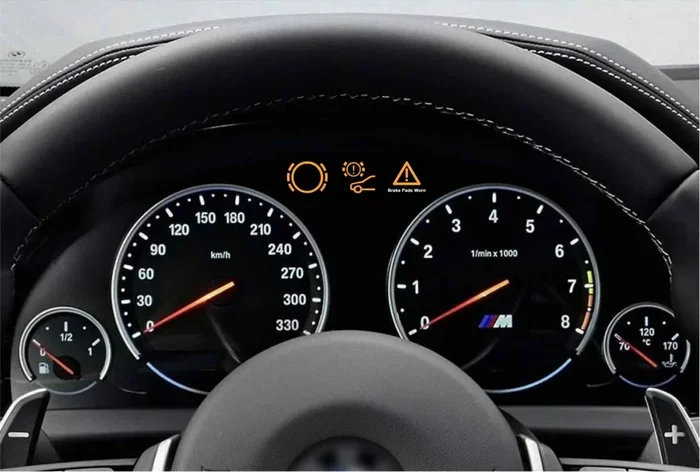
How to Turn Off BMW Warning Sounds for a Quieter Ride
BMW warning sounds can become annoying, especially during daily commutes. This guide shows you exactly how to turn off BMW warning sounds using the iDrive system, instrument cluster, and vehicle settings menu. We also cover which alerts are safe to disable and which safety-critical warnings you should always keep active.
There is nothing more frustrating than driving down the road and hearing constant beeps and chimes from your BMW. Whether it is the seatbelt reminder, the low fuel alarm, or a mysterious dashboard alert, BMW warning sounds can quickly turn a pleasant drive into a stressful experience. Many BMW owners want to know how to turn off these noises and enjoy a quieter cabin. The good news is that most warning sounds can be adjusted or disabled through simple settings. In this guide, we walk you through every method step by step. We also explain which sounds you should keep on and which ones are safe to silence.
Driving a BMW is a premium experience. The sleek design, powerful engine, and advanced technology all contribute to a top-tier driving feel. But one thing that often gets overlooked is the constant stream of warning sounds your vehicle makes. These alerts are designed to keep you safe. However, they can also become a nuisance over time. If you have ever wondered how to turn off BMW warning sounds, you are not alone. Thousands of BMW owners search for this solution every month. This comprehensive guide gives you everything you need to know.
Understanding BMW Warning Sounds
Before you start changing settings, it helps to understand what your BMW is trying to tell you. BMW uses a series of audible alerts to communicate important information. Each sound has a specific purpose. Some warn you of danger. Others simply remind you of a routine task. Understanding the different types of sounds helps you decide which ones to turn off and which ones to leave alone.
Common Types of BMW Warning Sounds
BMW vehicles use several distinct warning sounds. Here are the most common ones you will hear:
- Chime or single beep: This usually indicates a minor notification. It might be a reminder to fasten your seatbelt or close the trunk.
- Repeated beeping: This signals something more urgent. It often means your fuel level is low or a door is open.
- Continuous tone: A steady, unbroken sound typically means a serious issue. This could be a brake system warning or an engine alert.
- Intermittent chirping: This sound often relates to parking sensors or blind-spot monitoring.
- Voice alerts: Some BMW models use spoken warnings instead of beeps. These are common for navigation and safety alerts.
Why BMW Uses Warning Sounds
BMW engineers design warning sounds with safety in mind. These sounds grab your attention quickly. They work even when you are not looking at the dashboard. The goal is to alert you to potential problems before they become serious issues. That said, not every alert requires an audible warning every single time. Some sounds repeat too often for their own good. This is where knowing how to manage your settings becomes valuable.
How to Turn Off BMW Warning Sounds
Now that you understand the different types of sounds, let us get into the actual steps for turning them off. The method you use depends on your BMW model and the type of sound you want to silence. Below we cover the three main approaches.
Using the iDrive System to Adjust Sound Settings
The iDrive infotainment system is the brain of your BMW. Most sound settings can be controlled from here. Follow these steps to adjust your warning sounds:
- Press the Home button on your iDrive controller.
- Navigate to Settings.
- Select Vehicle Settings.
- Look for the Sounds or Alerts section.
- Toggle individual warning sounds on or off.
Keep in mind that the exact menu path may vary depending on your BMW model and iDrive generation. Newer models with the iDrive 7 or iDrive 8 system have a more intuitive layout. Older models may require you to dig through a few extra menus. If you cannot find the Sounds option, try looking under “Vehicle Status” or “Convenience Settings.”
Adjusting Warning Sounds Through the Instrument Cluster
Some BMW models allow you to change alert settings directly from the instrument cluster behind the steering wheel. Use the turn signal stalk or steering wheel buttons to scroll through the menu options on the dashboard display. Look for a section labeled “Warnings” or “Alerts.” From there, you can individually turn off specific sounds. This method is quick and convenient when you are already driving.
Using the BMW Connected App
If your BMW supports the BMW Connected app, you have another option. The app lets you control certain vehicle settings from your phone. You can check your vehicle status, receive notifications, and in some cases, adjust alert preferences. Open the app, go to your vehicle profile, and look for the notification or alert settings. Not all BMW models support full sound customization through the app. But it is worth checking if your vehicle is connected.
Specific Warning Sounds and How to Silence Them
Not all warning sounds work the same way. Some can be fully disabled. Others can only be reduced in volume. Here is a breakdown of the most common sounds and how to handle each one.
Silencing the Seatbelt Reminder Sound
The seatbelt reminder is one of the most annoying sounds in any car. In most BMW models, you can reduce the duration of this reminder but not completely disable it. This is because seatbelt warnings are considered a safety feature. However, you can often shorten how long the sound plays. Go to Settings, then Vehicle Settings, then look for Seatbelt Reminder. You may be able to set it to a shorter duration or mute it after a certain period.
Turning Off Low Fuel Warnings
The low fuel warning is designed to prevent you from running out of gas unexpectedly. You cannot completely turn off this alert in most BMW models. The system is intentionally persistent because running out of fuel can be dangerous. What you can do is keep your fuel tank topped up. This eliminates the problem at its source. Some owners also ask, can low coolant cause a car to shake? While that is a different issue, it shows how fluid-related warnings can create multiple symptoms.
Disabling Maintenance Reminder Chimes
BMW maintenance reminders are among the easiest sounds to silence. Once you complete an oil change or other scheduled service, the reminder will reset automatically. If you service your vehicle at an independent shop like Jiffy Lube, the reminder may not reset on its own. You will need to manually reset it through the iDrive system. Go to Vehicle Status, select Service, and choose Reset Maintenance Interval. This stops the recurring chime and gives you a fresh service countdown.
Managing Parking Sensor and Blind-Spot Alerts
Parking sensor beeps and blind-spot warnings can be especially irritating in tight spaces. Some BMW models allow you to turn off the audible parking sensor alerts. You can usually keep the visual display active while silencing the sound. Go to Settings, then Parking Assistance, and look for the audio alert toggle. For blind-spot monitoring, the options are more limited. These alerts exist for safety reasons, so many BMW models do not allow full silencing.
Important Warnings You Should NOT Turn Off
While it is tempting to silence every sound your BMW makes, some warnings are too important to disable. Here is what you need to know.
Safety-Critical Alerts That Must Stay On
Certain warning sounds are there to protect you and your passengers. These include:
- Collision warnings: These alert you to potential front or rear impacts. Turning these off removes a critical safety layer.
- Lane departure warnings: These help keep you aware of unintended lane changes.
- Brake system alerts: A continuous brake warning tone can indicate low brake fluid or worn brake pads.
- Airbag warnings: If the airbag light comes on with a sound, it means the system has a fault that needs immediate attention.
When to Keep Sounds Enabled
Even if a warning sound feels annoying, consider the consequences of not hearing it. A low tire pressure alert, for example, might save you from a blowout on the highway. A check engine warning could alert you to a serious engine issue before it becomes a costly repair. If you have ever wondered, can a check engine light go off by itself? The answer is yes, but it often means the underlying issue has resolved. However, you should never ignore a check engine alert when it does appear.
Troubleshooting Persistent Warning Sounds
Sometimes, warning sounds persist even after you have addressed the issue. This can be frustrating. Here are some common causes and solutions.
Common Causes of Unwanted Sounds
Persistent warning sounds often come from a few common sources:
- A weak key fob battery: When the battery in your key fob gets low, the car may emit warning sounds. If you have recently replaced the battery, do you have to do anything after replacing a key fob battery? Usually, the system resets automatically. But sometimes you need to re-sync the fob by holding the unlock button for several seconds.
- A faulty sensor: Dirty or malfunctioning sensors can trigger false alerts. This is common with parking sensors and tire pressure monitors.
- An unresolved fault code: If a sensor detected a problem and the code was never cleared, the warning sound may continue. A quick trip to a diagnostic tool can resolve this.
- Low fluid levels: Low coolant or low oil can trigger persistent warnings. These are important alerts you should address rather than silence.
When to Visit a Service Center
If you have tried all the settings adjustments and the warning sounds continue, it may be time to visit a service center. A persistent sound that will not go away could indicate a real mechanical issue. You can take your BMW to any authorized dealer for service. Many independent shops are also qualified to work on BMWs. However, if your vehicle is still under warranty, sticking with the dealer is usually the safer choice.
Preventing Unwanted Warning Sounds in the Future
The best way to deal with annoying BMW warning sounds is to prevent them from happening in the first place. Here are a few proactive steps you can take:
- Keep up with scheduled maintenance: Regular oil changes and fluid checks prevent many warning alerts from triggering.
- Check your fluids regularly: Low coolant can cause a car to shake and trigger warning sounds. Keeping fluids topped up avoids this.
- Replace key fob batteries on schedule: A fresh battery prevents low-battery warning sounds from appearing.
- Keep your sensors clean: A dirty air filter can cause your car to overheat, which triggers multiple warning systems. Regular cleaning and replacement keeps sensors working properly.
- Review your settings after updates: BMW software updates sometimes reset sound preferences. Check your settings after any update to make sure your preferences are still in place.
The Role of Dashboard Warning Lights in Warning Sounds
BMW warning sounds are closely tied to dashboard warning lights. When a light appears on your dash, it is usually accompanied by a sound. Understanding what each light means helps you decide whether to act on it or silence the alert. For example, a wrench light often signals a maintenance need. A bad battery can cause the wrench light to come on, and this is typically accompanied by a warning tone. Paying attention to both the light and the sound gives you a complete picture of your vehicle’s health.
Customizing Your BMW Sound Profile
Modern BMWs offer a surprising amount of customization when it comes to sound settings. Beyond warning sounds, you can also adjust the volume of turn signal clicks, the chime for the navigation system, and even the feedback sounds for the iDrive controller. These small adjustments add up to a much more pleasant driving experience. Spend a few minutes exploring the sound settings menu. You might discover options you did not know existed.
Final Thoughts on Managing BMW Warning Sounds
Knowing how to manage your BMW warning sounds gives you more control over your driving experience. You can silence the minor nuisances while keeping the safety alerts that truly matter. The key is to understand each sound, know where to find the settings, and make informed decisions about what to disable. Your BMW is a complex machine with many built-in safety features. Treating the warning system with respect ensures you stay safe while enjoying a quieter ride.
Take a few minutes today to go through your BMW’s sound settings. You will likely find several alerts you did not even know were active. Adjusting them takes only a few minutes but can make a big difference in your daily driving comfort. And remember, if a warning sound persists despite your best efforts, it is worth having a professional take a look. Ignoring a persistent sound could mean missing a real problem that needs attention.
Key Takeaways
- You can silence most BMW warning sounds through the iDrive infotainment system in just a few taps.
- Not all warnings should be turned off — safety alerts like collision warnings and seatbelt reminders serve an important purpose.
- The process varies by BMW model and year, so check your owner’s manual for model-specific steps.
- Persistent warning sounds may indicate a real problem that needs professional attention, not just silencing.
- The BMW Connected app offers additional control over certain vehicle alerts and notifications.
- Replacing a key fob battery can sometimes trigger unexpected sounds — here’s what to do if that happens.
- Regular maintenance resets can stop recurring chimes tied to service reminders and fluid checks.
Frequently Asked Questions
Can I completely turn off all BMW warning sounds?
Most BMW warning sounds can be adjusted or reduced, but safety-critical alerts like collision warnings and seatbelt reminders cannot be fully disabled. The exact options depend on your BMW model and year, so check your owner’s manual for specific details.
Why does my BMW keep beeping even after I fix the issue?
Persistent beeping often happens when a fault code has not been cleared from the system. You can reset it through the iDrive menu or have a diagnostic tool clear it at a service center. Sometimes a simple key fob battery replacement also stops phantom beeping.
Is it safe to disable the parking sensor beeps?
Disabling parking sensor beeps is generally safe as long as you remain attentive to your surroundings. The visual display on the iDrive screen still shows distance readings. However, keeping the audible alerts on provides an extra layer of protection when parking.
How do I reset the maintenance reminder after an oil change?
Go to the iDrive system, navigate to Vehicle Status, select Service, and choose Reset Maintenance Interval. If you get your oil changed at a shop like Jiffy Lube, they may be able to reset it for you as well.
Can a bad battery cause warning sounds in my BMW?
Yes, a weak or failing battery can trigger multiple warning sounds including the wrench light and various dashboard alerts. If you notice warning sounds appearing alongside electrical issues, checking your battery should be your first step.
Do I need to visit a dealer to adjust BMW warning sound settings?
No, you can adjust most warning sound settings yourself through the iDrive system or instrument cluster. You do not need to visit a dealer for routine sound adjustments. However, if the issue persists, a dealer or qualified mechanic can help diagnose the problem.
=== CONCLUSION ===
Turning off BMW warning sounds is a straightforward process that can dramatically improve your daily driving experience. Whether you use the iDrive system, the instrument cluster, or the BMW Connected app, you have more control over your vehicle’s alerts than you might think. Just remember to keep safety-critical alerts active and only silence the sounds that are truly just noise. Regular maintenance and timely attention to warning lights will help prevent most unwanted sounds from appearing in the first place. Your BMW is designed to keep you safe and informed. With the right settings, you can enjoy a quieter ride without sacrificing the safety features that make BMW vehicles stand out. Take charge of your sound settings today and enjoy the peaceful cabin your BMW was meant to provide.