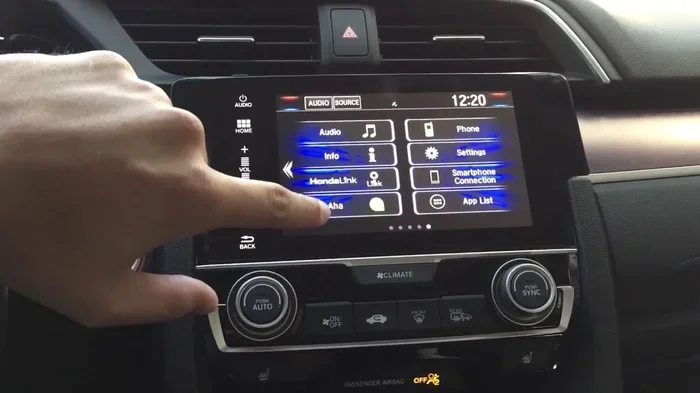
How to Reset the Radio on Your Honda Civic Step by Step
Resetting the radio on your Honda Civic is a simple fix for common audio issues like static, freezing, or no sound. Whether you have a older model or a newer Civic with a touchscreen, this guide walks you through every method step by step. You will learn how to reset the Honda Civic radio using the battery, the radio button, and the infotainment system settings. No mechanic or expensive repair is needed for most of these solutions.
Have you ever turned the key in your Honda Civic and been greeted by a blank screen, static noise, or a radio that simply refuses to turn on? It is one of those small frustrations that can make your entire drive feel off. The good news is that resetting the radio on your Honda Civic is usually a quick and painless process. You do not need to be a mechanic or spend a single dollar to get your audio system working again.
In this guide, we will walk you through every method for resetting the Honda Civic radio step by step. We cover older models with simple button radios and newer Civics with full touchscreen infotainment systems. By the end, you will know exactly what to do no matter which year Honda Civic you drive. Let us get your sound back.
Key Takeaways
- Easy DIY Fix: Most Honda Civic radio resets can be done at home in under 10 minutes with no special tools.
- Multiple Methods Available: You can reset the radio using the battery disconnect, the radio power button, or the infotainment menu.
- Model Year Matters: Different Honda Civic years use different reset methods, so always check your specific model.
- Prevention Tips Included: Simple habits can keep your Honda Civic radio working smoothly for years.
- No Cost Involved: All the methods described here are free and require no parts or professional labor.
📑 Table of Contents
Why You Might Need to Reset Your Honda Civic Radio
Before we dive into the steps, it helps to understand why your Honda Civic radio might need a reset in the first place. Cars are complex machines, and the audio system is no exception. Sometimes a simple glitch causes the radio to freeze, display nothing, or produce terrible sound quality.
Here are the most common reasons you might need to reset your car radio:
- Power Surge or Battery Issue: When your Honda Civic battery dies or gets disconnected, the radio system can lose its settings and freeze up.
- Software Glitch: Newer Civics with infotainment screens can experience software bugs that cause the display to freeze or the audio to cut out.
- Aftermarket Installations: If you recently added a new stereo, amplifier, or speakers, the factory radio may need a reset to recognize the changes.
- Blown Fuse: A blown fuse in the Honda Civic fuse box can cut power to the radio, making it appear dead even when the rest of the car works fine.
- Water or Moisture Damage: Spills or humid conditions can cause the radio buttons or screen to malfunction temporarily.
- Wiring Loose: Vibrations from driving can slowly loosen connections behind the radio unit over time.
Understanding the root cause helps you choose the right Honda Civic radio reset method. In most cases, a simple power cycle does the trick. But if the problem persists, you may need to try a deeper reset or investigate further.
How to Reset the Radio on a Honda Civic Step by Step
Now let us get into the actual steps. We will cover three main methods for resetting the Honda Civic radio. Start with Method 1 and work your way down only if needed. Each method is designed to be safe and will not damage your car.
Method 1: The Battery Disconnect Reset
This is the most common and effective way to reset your Honda Civic radio. It works by completely cutting power to the electrical system, which forces the radio to restart with fresh settings.
- Turn off your Honda Civic and remove the key from the ignition.
- Open the hood and locate the battery. You will see the negative terminal, which is marked with a minus sign (-).
- Using a wrench, loosen the nut on the negative battery terminal.
- Carefully lift the cable off the terminal and move it aside so it cannot touch the battery.
- Wait at least 15 minutes. This gives the electrical system time to fully discharge.
- Reconnect the negative cable and tighten the nut securely.
- Start your Honda Civic and check if the radio is working normally.
This method also resets other electronic settings in your car, such as the clock and radio presets. You will need to set those again, but that is a small trade-off for a working radio.
Method 2: The Radio Power Button Reset
For many Honda Civic owners, a simple power cycle of the radio itself is all it takes. This method works well when the radio screen is frozen or unresponsive but the rest of the car functions normally.
- Press and hold the power button on the Honda Civic radio for 10 seconds.
- The screen should go dark and the radio should shut off completely.
- Wait another 30 seconds.
- Press the power button again to turn the radio back on.
- Check if the display lights up and if you can tune to a station.
If this does not work, try holding the power button for a full 30 seconds. Some Honda Civic models require a longer press to fully reset the system.
Method 3: The Infotainment System Soft Reset
If your Honda Civic has a touchscreen infotainment system, you can perform a soft reset through the menu. This is the preferred method for newer models from 2016 and up.
- Press the Home button on the touchscreen to go to the main menu.
- Navigate to Settings.
- Look for System or Audio Settings.
- Select Reset or Factory Reset.
- Confirm your choice when prompted.
- The system will restart automatically.
After the reboot, your radio should be back to normal. If the screen still shows nothing, you may need to try the battery disconnect method described above.
Common Honda Civic Radio Problems and How to Fix Them
Not all radio issues are solved with a reset. Sometimes the problem runs deeper. Here are some common Honda Civic radio problems and what you can do about them.
Radio Display Is Blank but Sound Works
This is a common issue on older Honda Civics. The audio plays fine, but the screen stays dark. Often, this is a simple display backlight failure. You can try the battery disconnect reset first. If that does not work, the display unit itself may need replacement. This is a relatively affordable fix at most auto shops.
Radio Shows Static or Crackling Noise
Static noise is annoying but usually easy to fix. Start by checking your antenna connection. The antenna wire runs from the back of the radio to the outside of the car. If it is loose or corroded, the signal will be weak. You can also try tuning to a strong station to see if the static clears. If the static persists across all stations, the radio’s internal tuner may need servicing.
Radio Won’t Turn On at All
A completely dead radio could be caused by a blown fuse. Open your Honda Civic fuse box, which is usually located under the dashboard on the driver’s side. Check the fuse labeled “RADIO” or “AUDIO.” If it is blown, replace it with a new fuse of the same amperage. If the new fuse blows immediately, there may be a wiring issue that needs professional attention.
Radio Keeps Freezing or Restarting
If your Honda Civic radio freezes repeatedly, the software may need a full update or reset. Try the infotainment soft reset first. If that fails, you may need to visit a Honda dealer. They can update the firmware on your audio system for free or at a low cost.
Radio Works but No Sound from Speakers
This can be confusing. The radio turns on and you can change stations, but you hear nothing. Check the volume first, of course. Then make sure the balance setting is not turned all the way to one side. If those are fine, the issue could be a blown speaker or a loose wiring connection behind the radio unit.
Honda Civic Radio Reset by Model Year
Not all Honda Civics are created equal, and the reset process can vary depending on the year. Here is a quick breakdown of what to expect for different Honda Civic generations.
| Model Year | Radio Type | Best Reset Method |
|---|---|---|
| 2001 – 2005 | Standard CD/AM-FM | Battery Disconnect |
| 2006 – 2011 | CD/MP3 with auxiliary | Battery Disconnect or Power Button |
| 2012 – 2015 | Enhanced infotainment | Power Button or Infotainment Reset |
| 2016 – 2021 | Touchscreen Display Audio | Infotainment Soft Reset |
| 2022 – Present | Advanced Honda Link Infotainment | Infotainment Soft Reset or Battery Disconnect |
Knowing your Honda Civic model year helps you pick the right method quickly. If you are unsure of your year, check the VIN plate on the driver’s side door frame or the dashboard near the windshield.
Preventing Radio Issues on Your Honda Civic
Once you get your Honda Civic radio working again, you probably want to keep it that way. Prevention is always better than cure, and there are simple habits that can protect your car audio system.
- Keep the Battery Healthy: A weak battery causes electrical surges that can damage the radio. Have your Honda Civic battery tested every two years.
- Avoid Moisture: Keep drinks away from the center console. Spills can seep into the radio unit and cause short circuits.
- Use Quality Fuses: Always replace blown fuses with the correct amperage. Using the wrong fuse can cause further damage.
- Update Software: If your Civic has a touchscreen, check for software updates at your Honda dealer. Updates often fix audio bugs.
- Gentle Handling: Do not press radio buttons too hard. Over time, forceful pressing can damage the buttons or the circuit board underneath.
These small steps go a long way in keeping your Honda Civic audio system in top shape. A little maintenance now saves you time and trouble later.
When to Seek Professional Help
Most Honda Civic radio resets are simple and free to do yourself. But there are times when professional help is the right call. If you have tried all the methods in this guide and the radio still does not work, it is time to see a mechanic. You should also seek help if you notice any burning smells, visible damage to the radio unit, or if the radio issue is accompanied by other electrical problems in the car.
Some owners wonder about the cost of professional repairs. For perspective, how much labor it costs to put a bumper on can give you an idea of typical auto repair labor rates. Most radio repairs fall within a similar price range and are usually completed in under an hour.
Also, if you are someone who works on your own car, you might be interested in learning more about how difficult Toyotas are to work on compared to Hondas. Both brands are known for being relatively DIY-friendly, but Honda Civics tend to have more straightforward electrical systems that are easier for home mechanics to handle.
Final Thoughts
Resetting the radio on your Honda Civic does not have to be stressful. With the methods covered in this guide, you can troubleshoot and fix most radio issues in just a few minutes. Start with the simplest approach, work your way up if needed, and always keep your car’s maintenance routine in check.
Remember, your Honda Civic is a reliable machine built to last. Many owners drive their Civics for well over 200,000 miles with proper care. Keeping the radio and audio system in good shape is just one small part of that long-term ownership experience. Now go enjoy your music on the road again.
Frequently Asked Questions
Why did my Honda Civic radio stop working after a battery change?
After a battery change or jump start, the Honda Civic radio may lose its power and freeze. This happens because the electrical system resets during the battery swap. A simple Honda Civic radio reset using the battery disconnect method or the power button method usually fixes this right away.
Do I need any special tools to reset the Honda Civic radio?
No special tools are needed for most resets. For the battery disconnect method, you only need a basic wrench to loosen the battery terminal. For infotainment resets, you just use the touchscreen or buttons already on the radio unit. Everything you need is already in your car or in a basic home toolbox.
Will resetting the Honda Civic radio erase my saved stations and settings?
Yes, a full reset will clear your saved radio presets and may reset the clock and other audio settings. You will need to reprogram your favorite stations after the reset. This is a quick and easy process once the radio is working again.
How long does a Honda Civic radio reset take?
Most resets take less than 10 minutes. The battery disconnect method requires about 15 minutes of waiting time for the system to fully discharge. The power button and infotainment reset methods are even faster, often taking just 2 to 3 minutes from start to finish.
Can a blown fuse cause the Honda Civic radio to stop working?
Absolutely. A blown fuse is one of the most common reasons a Honda Civic radio stops working. Check the fuse box under the dashboard for the radio fuse. Replacing a blown fuse is inexpensive and takes only a few minutes. If the new fuse blows right away, there may be a deeper wiring problem to investigate.
Is it safe to reset the radio myself, or should I visit a dealer?
It is completely safe to reset the Honda Civic radio yourself using the methods in this guide. These are standard troubleshooting steps that do not involve opening the radio unit or touching sensitive wiring. You should only visit a dealer if the radio still does not work after trying all the reset methods.