How to Reset Mazda 6 Screen with These Simple Steps
Learning how to reset your Mazda 6 screen is easier than you think. Whether your display is frozen, glitching, or showing a black screen, a simple reset often solves the problem in minutes. This guide walks you through soft resets, hard resets, and troubleshooting tips to get your infotainment system back up and running smoothly.
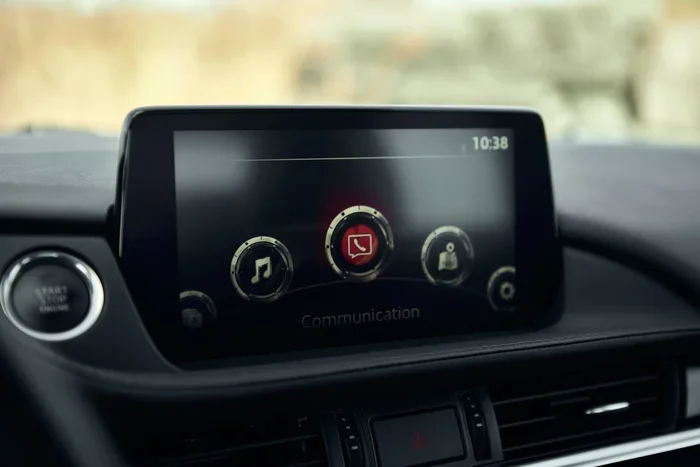
There is nothing more frustrating than staring at a frozen or blank screen while you are trying to navigate or play music in your Mazda 6. Your Mazda 6 infotainment system is the brain of your dashboard, and when it stops working properly, the whole driving experience takes a hit. The good news is that how to reset Mazda 6 screen is something you can do yourself at home. You do not need to be a tech expert or visit a dealership to fix the problem.
In this guide, we will walk you through every step of the process. From a quick soft reset to a full factory reset, we have got you covered. We will also look at common screen problems, what causes them, and how to prevent them in the future. By the end of this article, you will feel confident tackling any Mazda 6 screen frozen situation on your own.
The Mazda 6 has long been a favorite sedan for its sleek design, reliability, and modern tech features. The infotainment display controls your audio, navigation, phone connectivity, and vehicle settings. When that screen acts up, it can throw a wrench into your daily routine. But here is the thing, most screen issues are temporary and respond well to a simple reset. Let us dive in and show you exactly how to do it.
Key Takeaways
- A soft reset is the quickest fix for minor screen glitches and freezes on your Mazda 6.
- A hard reset clears deeper system errors and restores factory settings when needed.
- Knowing the difference between a soft and hard reset saves you time and prevents data loss.
- Common screen problems like flickering, black screens, and unresponsive touchscreens have simple solutions.
- Regular maintenance and software updates help prevent future screen issues on your Mazda 6.
- Seek professional help if the problem persists after multiple reset attempts.
📑 Table of Contents
Why Your Mazda 6 Screen Might Need a Reset
Before we get into the steps, it helps to understand why your screen might be acting up in the first place. The Mazda 6 infotainment system runs on software, just like your smartphone. And just like any electronic device, it can encounter bugs, lag, or temporary glitches. These issues do not always mean something is broken. Often, a simple reset clears the problem right up.
Common Causes of Mazda 6 Screen Problems
- Software glitches: The infotainment system can freeze after a software update or when too many apps are running at once.
- Power surges: Jump-starting your car or a weak battery can cause the screen to malfunction temporarily.
- Overheating: On hot days, the dashboard electronics can overheat, causing the screen to dim or go black.
- Loose connections: Vibrations from driving can sometimes loosen internal wiring connections to the display.
- Outdated software: Older Mazda 6 models may have software that needs refreshing to work properly.
Understanding the root cause helps you choose the right type of reset. A soft reset works for minor glitches, while a hard reset is better for deeper system errors. We will cover both methods in detail below.
How to Perform a Soft Reset on Your Mazda 6
A soft reset is the first thing you should try. It is quick, easy, and does not erase any of your settings or data. Think of it like restarting your phone when it starts running slow. A soft reset refreshes the system without going back to factory defaults.
Step-by-Step Soft Reset Instructions
- Turn off your Mazda 6 engine. Make sure the car is completely powered down. Put it in park and remove the key or press the start button to shut it off.
- Open the driver side door. This helps the system recognize that the car is in an off state.
- Wait for 60 seconds. This gives the system time to fully discharge any residual power. Count slowly to make sure you wait long enough.
- Close the door and start the engine. Turn the key or press the start button as you normally would.
- Check the screen. The infotainment display should reboot and return to normal within 30 to 60 seconds.
That is it. A soft reset takes less than two minutes and solves most minor screen issues. If your screen was frozen or showing strange icons, this method usually clears it right up. Many Mazda owners find that this simple trick fixes their Mazda 6 screen flickering problems almost immediately.
Quick Tip: If the soft reset does not work the first time, try it again. Sometimes the system needs two cycles to fully clear a glitch. Also, make sure your battery is in good condition. A weak battery can cause repeated screen problems even after a reset.
How to Do a Hard Reset on the Mazda 6 Screen
A hard reset is more powerful than a soft reset. It essentially restores the infotainment system to its original factory settings. You should use this method when a soft reset fails or when your screen is completely unresponsive. However, be aware that a hard reset will erase your saved preferences, Bluetooth pairings, and navigation history.
When to Use a Hard Reset
- Your screen remains black even after a soft reset.
- The touchscreen is completely unresponsive to any input.
- Error messages keep appearing on the display.
- The system freezes repeatedly and does not respond to any buttons.
- You are selling or giving away your Mazda 6 and want to clear all personal data.
Step-by-Step Hard Reset Instructions
- Start by performing a soft reset first. This ensures the system is fully powered down before the hard reset begins.
- Locate the reset button. On most Mazda 6 models, the reset button is a small pinhole on the face of the infotainment unit. It may be labeled “Reset” or hidden behind a small flap.
- Use a paperclip or SIM ejector tool. Gently insert the tool into the pinhole and press it for about 10 seconds.
- Wait for the system to reboot. The screen will go dark and then restart. This process can take 2 to 3 minutes.
- Reconnect your settings. Once the system is back online, you will need to reconnect your Bluetooth devices, set your preferred audio levels, and re-enter navigation home addresses.
The hard reset is a powerful tool for fixing stubborn Mazda 6 display problems. It clears out corrupted data and gives the system a fresh start. If your screen was showing static, weird colors, or constant error pop-ups, a hard reset should resolve the issue.
Expert Insight: Always write down your Bluetooth passwords and navigation preferences before performing a hard reset. This saves you the hassle of re-entering everything from scratch. Some owners also take a photo of their settings for quick reference.
Common Mazda 6 Screen Problems and How to Fix Them
Not all screen problems require a full reset. Some issues have simpler fixes that take just a few seconds. Let us look at the most common problems Mazda 6 owners face and the best ways to address them.
Black Screen
A black screen is one of the most common complaints. It can happen after a long drive, during cold weather, or after the car sits idle for a while. The first thing to do is check if the car is still running. Sometimes the screen simply dims to save power and a light tap on the touchscreen wakes it back up. If that does not work, try the soft reset method described above. A black screen that persists even after a reset could indicate a deeper hardware issue that needs professional attention.
Frozen or Unresponsive Screen
A frozen screen usually means the system has too many processes running or a software conflict has occurred. The soft reset is your best friend here. If the freeze is severe and you cannot even access the power menu, hold down the power button on the screen for 10 seconds to force a shutdown. Then start the car again. This is essentially a manual soft reset and works in most cases.
Screen Flickering
If your display flickers or flashes intermittently, the issue could be related to the wiring or the display connection. Start by checking that all cables behind the infotainment unit are secure. If the flickering continues after a reset, it may be a hardware problem. In that case, it is worth visiting a mechanic to inspect the connections. The cost of labor to diagnose and fix wiring issues can vary, so it helps to understand how much is labor to put a bumper on or similar repairs, as the labor rates for dashboard work are often comparable.
Touchscreen Calibration Issues
Sometimes the screen works fine visually, but your taps do not register in the right place. This is a calibration problem. On some Mazda 6 models, you can access a calibration tool through the settings menu. Navigate to Display Settings and look for a “Calibrate Touchscreen” option. If that is not available, a soft reset often recalibrates the touch sensors automatically.
When to Seek Professional Help for Your Mazda 6 Screen
Most screen issues respond well to a soft or hard reset. But there are times when DIY fixes are not enough. If you have tried both reset methods and your screen still does not work properly, it is time to bring in a professional. Persistent problems could signal a failing display unit, a faulty motherboard, or a deeper electrical issue in the vehicle.
Before you head to the dealership, consider the age and mileage of your Mazda 6. If your car has high mileage, it might be worth weighing the cost of a screen repair against other options. Understanding how much a brand new car costs and how long your current vehicle can last helps you make an informed decision. On average, a well-maintained Mazda 6 can go well over 200,000 miles with proper care, so investing in a screen repair often makes sense.
When you do visit a mechanic, ask them to explain the problem clearly. A good mechanic will walk you through the diagnosis and give you options. The cost of professional diagnostics typically ranges from $50 to $150, and this often gets credited toward any repair work. To get a sense of fair pricing, check how much do most mechanics make an hour in your area so you know what to expect.
If the issue turns out to be a hardware failure, the repair might involve replacing the entire infotainment unit. This is where the cost can climb, depending on your model year and whether you choose an OEM or aftermarket part. Always ask for a detailed estimate before approving any work.
Tips to Keep Your Mazda 6 Infotainment Running Smoothly
Prevention is always better than cure. Once you have your Mazda 6 screen working perfectly again, you want to keep it that way. A few simple habits can extend the life of your infotainment system and prevent future problems.
Keep Your Software Updated
Mazda regularly releases software updates that fix bugs and improve performance. Check your owner manual or visit a Mazda dealership to see if any updates are available for your model year. Keeping your system updated is one of the best ways to avoid screen glitches and freezing issues.
Avoid Overloading the System
The Mazda 6 infotainment system has limited processing power. If you install too many apps or connect an excessive number of Bluetooth devices, the system can slow down. Keep your app list minimal and disconnect devices you are not actively using.
Protect the Screen from Heat
Excessive heat can damage the display over time. On hot days, consider using a sunshade for your windshield. This keeps the dashboard cooler and protects the electronics inside the infotainment unit. If you live in a very hot climate, parking in the shade or a garage whenever possible helps a lot.
Clean the Screen Gently
Dust and grime can build up on the touchscreen and affect its responsiveness. Use a soft, microfiber cloth to clean the screen regularly. Avoid harsh chemicals or abrasive cleaners, as these can damage the touch layer. A slightly damp cloth works best for removing stubborn smudges.
Drive with Care
Vibrations from rough driving or poorly maintained roads can loosen internal connections over time. Avoid potholes when possible and drive smoothly. If you frequently drive on rough terrain, have a mechanic check the dashboard connections during routine maintenance visits. This is especially important if your car has been running for many years and you want to maximize how many miles a car can last.
Address Small Issues Early
Do not ignore small warning signs like occasional flickering or slight lag. These minor issues often point to bigger problems developing underneath. Addressing them early with a simple reset or software update can save you from a costly replacement later on. Think of it as regular maintenance for your digital dashboard.
Taking care of your Mazda 6 screen is just like taking care of any other part of your vehicle. Regular attention and simple maintenance go a long way in keeping everything running smoothly. Whether it is a quick soft reset or a full hard reset, knowing how to handle screen issues puts you back in control of your driving experience.
If you ever feel unsure about any step in the reset process, do not hesitate to consult your owner manual or reach out to a Mazda specialist. The Mazda 6 is a reliable car, and with the right care, its infotainment system will keep you connected, entertained, and informed for years to come. A well-functioning screen makes every drive more enjoyable, from your morning commute to long road trips.
Remember, the key to a healthy Mazda 6 is proactive care. Keep the software updated, protect the hardware, and reset the system whenever something feels off. These small habits add up and keep your car feeling like new. Happy driving, and here is to a crystal-clear screen on every journey ahead.
Frequently Asked Questions
How long does a Mazda 6 screen reset take?
A soft reset takes less than two minutes, while a hard reset can take up to five minutes including the reboot time. The actual process is quick, but you should wait at least 60 seconds between steps to ensure the system fully powers down. Most owners find the entire process takes less time than waiting for a mechanic appointment.
Will resetting my Mazda 6 screen delete my saved data?
A soft reset does not delete any data. It simply refreshes the system. However, a hard reset will erase all saved preferences, Bluetooth pairings, and navigation history. Always back up your important settings before performing a hard reset. Taking a few photos of your current settings can save you a lot of time when you need to reconnect everything.
Why does my Mazda 6 screen keep freezing after a reset?
If your screen continues to freeze after multiple resets, there may be a deeper software or hardware issue. Outdated software, a failing display, or loose internal connections could all be the culprit. In this case, it is best to visit a certified Mazda technician who can run a full diagnostic and identify the root cause.
Can I reset my Mazda 6 screen while driving?
No, you should always reset your screen when the car is parked and the engine is off. Performing a reset while driving is dangerous and can distract you from the road. Pull over to a safe location, turn off the engine, and then follow the reset steps. Your safety always comes first.
Do I need special tools to reset the Mazda 6 screen?
For a soft reset, you do not need any special tools at all. For a hard reset, you will need a paperclip or a SIM ejector tool to press the reset pinhole. Both items are common household items, so you likely already have what you need. No specialized equipment or software is required.
How often should I reset my Mazda 6 screen?
You should only reset your screen when you experience problems like freezing, flickering, or unresponsiveness. There is no need to reset it regularly as a preventive measure. Over-resetting can actually cause more issues by clearing data unnecessarily. Let problems guide you rather than setting a schedule.