How to Reset Maintenance Light After an Oil Change
Knowing how to reset maintenance light after an oil change is a simple skill every car owner should have. The maintenance light tells you when your vehicle is due for service, and resetting it after an oil change keeps your dashboard accurate and your car running smoothly. This guide covers every method, common mistakes, and brand-specific tips so you can handle the reset in minutes.
That little yellow or orange light on your dashboard just reminded you it is time for an oil change. You drove to the shop, got your oil changed, and now the light is still staring at you. It can be frustrating, right? The good news is that resetting the maintenance light is usually a quick and easy process. Whether you drive a Toyota, Honda, Ford, or Chevy, there is a straightforward way to clear that reminder. In this guide, we walk you through every method so you can handle the reset yourself without visiting a dealer or paying a mechanic.
The maintenance light is part of your car’s oil life system. It tracks your driving habits and reminds you when it is time for routine maintenance. After an oil change, the system needs to be updated. This is where the reset process comes in. Understanding how this works helps you stay on top of your car maintenance schedule and keeps your vehicle running at its best.
Key Takeaways
- Resetting the maintenance light is easy: Most vehicles let you reset it with a button on the dashboard or through the steering wheel controls.
- Three main methods work for most cars: The reset button method, the dashboard menu method, and the battery disconnect method.
- Always check your owner’s manual first: Every car brand has slightly different steps, and the manual gives you the exact procedure.
- Common mistakes can cause problems: Turning the key too early or skipping steps may prevent a successful reset.
- The maintenance light is different from the check engine light: Understanding this difference helps you respond correctly to each warning.
- Resetting after every oil change keeps your service schedule accurate: This simple habit prevents unnecessary trips to the mechanic.
📑 Table of Contents
- Why Does the Maintenance Light Come On?
- How to Reset Maintenance Light After an Oil Change
- Maintenance Light Reset by Car Brand
- Common Mistakes When Resetting the Maintenance Light
- When Should You Reset the Maintenance Light?
- Maintenance Light vs. Check Engine Light: What Is the Difference?
- Can You Reset the Maintenance Light Without an Oil Change?
- Expert Tips for Keeping Your Maintenance Light Accurate
- Final Thoughts
Why Does the Maintenance Light Come On?
The maintenance light is not a sign of a serious problem. It is simply a reminder that your vehicle is due for service. Most automakers set the light to trigger at specific intervals. These intervals are usually based on mileage or time. Here are the most common reasons the light activates:
- Miles on the odometer: Most cars trigger the light every 5,000 to 7,500 miles. This is the standard interval for a routine oil change.
- Time elapsed: Some vehicles use a time-based system. If six months pass, the light may come on even if you have not driven many miles.
- Driving conditions: Short trips, stop-and-go traffic, and extreme temperatures can shorten the interval. The oil life system adjusts the reminder based on these factors.
- Pending service: The light may indicate that other fluids or filters need attention, not just the engine oil.
It is important to note that the maintenance light is different from the check engine light. The check engine light signals a potential mechanical issue. The maintenance light is simply a service reminder. If you are unsure which light you are seeing, check the symbol on your dashboard. A wrench icon usually means maintenance is due, while an engine-shaped icon means the check engine light is active.
How to Reset Maintenance Light After an Oil Change
Now for the part you have been waiting for. Resetting the maintenance light after an oil change is a simple process. However, the exact steps depend on your vehicle make and model. Below, we cover the three most common methods. Pick the one that matches your car, and follow along step by step.
Method 1: Using the Reset Button
This is the most common method for most vehicles. The reset button is usually located on the dashboard or steering column. Here is how to do it:
- Turn the ignition to the “ON” position. Do not start the engine. Just turn the key or press the start button until the dashboard lights up.
- Locate the reset button. On many cars, this is a small button near the speedometer or on the steering wheel. It may be labeled “Reset” or have a small wrench icon.
- Press and hold the button. Hold it for about 10 to 15 seconds. You should see the maintenance light start to flash.
- Release the button. The light should turn off or reset.
- Turn the ignition off and then back on. This confirms the reset was successful. The light should stay off.
If the light does not turn off, try the process again. Make sure you are holding the button long enough. Some vehicles require you to hold the button for up to 20 seconds. Also, check that you are in the “ON” position and not the “START” position. The engine should not be running during this process.
Method 2: Through the Dashboard Menu
Many newer vehicles have digital displays that let you navigate through menus to reset the maintenance light. This method works for most late-model cars, including Toyota, Honda, and Ford models. Here is what to do:
- Press the menu or settings button on your steering wheel. This brings up the vehicle information screen.
- Navigate to the “Maintenance” or “Service” menu. Use the arrow buttons to scroll through the options.
- Select “Reset Maintenance” or “Oil Life Reset.” This option may be buried a few menus deep, so be patient.
- Press and hold the “OK” or “Enter” button. Hold it for several seconds until the display shows the reset is complete.
- Exit the menu and turn the ignition off. Start the car again to confirm the light is off.
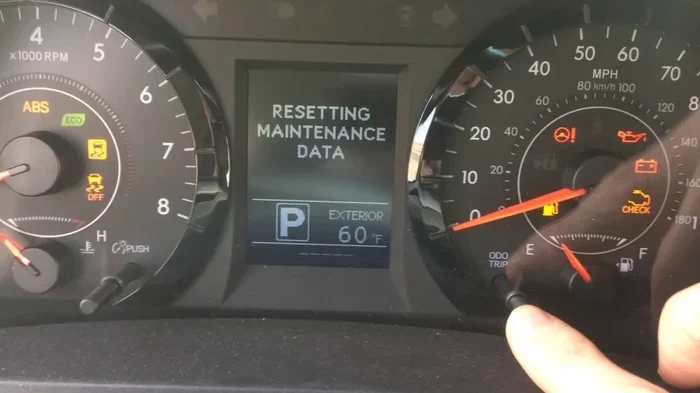
This method works well for vehicles with information displays. If you are unsure where to find the menu, consult your owner’s manual. The manual will show you the exact path for your specific model. For example, Toyota models often require you to press the trip button while turning the key to “ON.”
Method 3: Disconnecting the Battery
This method is a last resort. It works for most vehicles but should be used carefully. Disconnecting the battery clears all stored codes and settings, including the maintenance light. Here is how to do it safely:
- Turn off the engine and all electronics. Make sure the radio, lights, and air conditioning are off.
- Open the hood and locate the battery. The battery is usually in the front of the engine bay.
- Disconnect the negative terminal first. Use a wrench to loosen the nut on the negative cable. Lift the cable off the battery post.
- Wait 10 to 15 minutes. This allows the car’s computer to fully reset.
- Reconnect the negative terminal. Place the cable back on the post and tighten the nut.
- Start the car and check the dashboard. The maintenance light should be off.
Be careful when disconnecting the battery. Always remove the negative terminal first to avoid short circuits. If you are not comfortable working with the battery, consider using one of the other methods. Also, keep in mind that disconnecting the battery may reset your radio presets, clock, and other settings.
Maintenance Light Reset by Car Brand
Every car brand has its own reset procedure. While the general methods above work for most vehicles, some brands have unique steps. Here is a quick overview of how to reset the maintenance light for popular brands:
- Toyota: Turn the key to “ON.” Press and hold the trip button until the maintenance light flashes. Release the button and turn the key off.
- Honda: Turn the key to “ON.” Press the trip button repeatedly until the maintenance light resets. Some models require you to hold the trip button for 10 seconds.
- Ford: Use the steering wheel controls to navigate to the vehicle information menu. Select “Maintenance” and then “Reset.”
- Chevrolet: Turn the key to “ON.” Press the trip button on the dashboard until the maintenance light resets. Some models use the steering wheel arrows.
- Nissan: Turn the key to “ON.” Press and hold the odometer button until the light resets.
If your brand is not listed here, the owner’s manual will have the exact procedure. You can also search online for your specific model and year. Most car forums and video tutorials walk you through the process step by step.
For those who prefer professional service, a quick oil change at a Jiffy Lube or similar quick-lube shop often includes a maintenance light reset as part of the service. This is a convenient option if you do not want to do it yourself. Many dealerships also offer this service, and some even provide free oil changes at Toyota as part of their maintenance programs.
Common Mistakes When Resetting the Maintenance Light
Even though resetting the maintenance light is simple, mistakes can happen. Here are the most common errors and how to avoid them:
- Turning the key to “START” instead of “ON”: The reset process only works in the “ON” position. If you start the engine, the procedure will not work. Always turn the key just until the dashboard lights up.
- Not holding the button long enough: Some vehicles require you to hold the reset button for 15 to 20 seconds. If you release too early, the light will not reset. Be patient and count to 20.
- Resetting before the oil change is complete: Make sure the new oil is fully installed and the oil filter is in place before resetting. Resetting too early can throw off your oil life system.
- Skipping the confirmation step: After resetting, always turn the ignition off and back on to confirm the light is off. If it is still on, repeat the process.
- Ignoring other warning lights: The maintenance light is a service reminder. If you have other lights on, such as the check engine light, those need separate attention. A bad battery can sometimes trigger warning lights, so it is worth checking your battery health if lights persist after the reset.
Another mistake people make is not checking their oil level after the change. Low oil can cause serious engine damage over time. If you have ever wondered whether you can add oil to your car if it is low, the answer is yes. You should always check the oil level with the dipstick after an oil change to make sure everything is at the right level.
When Should You Reset the Maintenance Light?
The maintenance light should be reset after every oil change or service interval. This keeps your service records accurate and ensures you do not miss future maintenance. Here is a simple timeline to follow:
- After every oil change: Reset the light immediately after the new oil is installed. This tells the car’s computer that the service has been completed.
- After other maintenance services: If you had a tire rotation, brake inspection, or fluid change, reset the light to track the service.
- When the light comes on unexpectedly: If the light comes on between scheduled services, check your oil level first. Low oil can trigger the light.
- After a battery disconnect: If you disconnected the battery for any reason, the maintenance light may need to be reset.
Keeping a maintenance log helps you stay organized. Write down the date and mileage of each oil change. This makes it easy to track when the next service is due. Many owners also keep a sticky note on the inside of their glove box with the last service date. This simple habit can save you time and money at the shop.
Maintenance Light vs. Check Engine Light: What Is the Difference?
It is easy to confuse the maintenance light with the check engine light, but they serve different purposes. The maintenance light is a service reminder. It tells you it is time for routine maintenance like an oil change. The check engine light signals a potential problem with the engine or emissions system.
If the maintenance light is on, you can usually drive safely to your next service appointment. If the check engine light is on, you should have the vehicle inspected as soon as possible. A flashing check engine light means you should stop driving immediately and seek help.
Sometimes the two lights can be related. For example, a loose gas cap can trigger the check engine light. A dirty air filter can also cause warning lights to appear. If you notice the maintenance light is on and your car feels off, it is worth having a mechanic check both systems. A dirty air filter can cause a range of issues, and keeping up with routine maintenance helps prevent unexpected problems.
Can You Reset the Maintenance Light Without an Oil Change?
Technically, yes. You can reset the maintenance light at any time. However, this is not recommended. The maintenance light exists to remind you of important service intervals. Resetting it without actually performing the oil change means you are ignoring your car’s needs.
If you reset the light without changing the oil, the oil life system will continue to track your driving. Eventually, the light will come back on. This creates a cycle of false resets that can lead to neglected maintenance. Over time, skipping oil changes can cause engine wear, reduced fuel efficiency, and costly repairs.
If you have been putting off an oil change, now is the time to schedule one. Many quick-lube shops make the process fast and affordable. You can even negotiate the price of an oil change at some independent shops. It never hurts to ask for a better rate, especially if you are a regular customer.
Expert Tips for Keeping Your Maintenance Light Accurate
Keeping your maintenance light accurate is about more than just resetting it. Here are some expert tips to help you stay on top of your vehicle’s service needs:
- Reset the light only after the service is complete: Never reset the light before the oil and filter are actually changed. This keeps your service records honest.
- Check your oil level regularly: Between oil changes, check the oil level at least once a month. Low oil is one of the most common causes of the maintenance light coming on.
- Use the right oil for your vehicle: Check your owner’s manual for the recommended oil weight and type. Using the wrong oil can affect the oil life system’s accuracy.
- Keep a maintenance log: Write down every oil change, including the date, mileage, and type of oil used. This helps you track your service intervals over time.
- Ask the mechanic to reset the light: If you get your oil changed at a shop, ask them to reset the maintenance light as part of the service. Most shops will do this for free.
For those who drive Toyotas, you might also wonder if you can get your Lexus oil change at a Toyota dealer. The answer is yes in most cases. Toyota and Lexus share the same service network, so you can often use Toyota service centers for Lexus vehicles. This can save you money and time, especially if you are already familiar with a Toyota service center.
Final Thoughts
Resetting the maintenance light after an oil change is one of those small tasks that makes a big difference. It keeps your dashboard accurate, your service schedule on track, and your car running smoothly. The process is simple, takes just a few minutes, and can be done at home with no special tools.
Remember to always reset the light after your oil change is fully complete. Use the method that works best for your vehicle, and double-check that the light is off before you drive away. If the light keeps coming back after a reset, it may be a sign that the oil life system needs professional attention. In that case, a visit to your mechanic or dealership is a good idea.
Staying on top of your vehicle’s maintenance reminders is one of the best things you can do as a car owner. It saves you money, prevents breakdowns, and keeps your car running strong for years to come. So the next time that maintenance light comes on, do not panic. Grab your owner’s manual, follow the steps in this guide, and get that light cleared in no time.
Frequently Asked Questions
Can I reset the maintenance light myself, or do I need a mechanic?
Yes, you can reset the maintenance light yourself in most cases. The process is simple and usually involves pressing a button on the dashboard or navigating through the steering wheel controls. You do not need any special tools or mechanical knowledge. If you are unsure, your owner’s manual will walk you through the exact steps for your vehicle.
What happens if I reset the maintenance light without changing the oil?
Resetting the light without changing the oil clears the reminder, but it does not change the oil life system’s tracking. The light will come back on once the system determines another service interval has passed. This can lead to a cycle of resets without actual maintenance, which is harmful to your engine over time.
How long does it take to reset the maintenance light?
The reset process typically takes less than two minutes. Whether you use the reset button method or the dashboard menu method, the entire procedure is quick and straightforward. The only thing that takes longer is finding the right method for your specific vehicle model.
Will resetting the maintenance light clear the check engine light?
No, the maintenance light and the check engine light are separate. Resetting the maintenance light does not affect the check engine light. If the check engine light is on, it signals a different issue that requires diagnostic testing. A check engine light may indicate problems with sensors, emissions, or engine components that need professional attention.
Do I need to reset the maintenance light after every oil change?
Yes, you should reset the maintenance light after every oil change. This updates the oil life system and ensures the next service reminder is accurate. Most oil change shops will reset the light for you as part of the service. If you change the oil yourself, make sure to reset the light before you drive away.
What if the maintenance light stays on after I reset it?
If the light stays on after a reset, try the process again and make sure you are following the correct steps for your vehicle. Check that you held the button long enough and that you were in the “ON” position. If the light persists, it could indicate a deeper issue with the oil life system or another component. In that case, a visit to a mechanic or dealership is recommended to run a diagnostic check.
=== CONCLUSION ===
Learning how to reset maintenance light after an oil change is a valuable skill for every car owner. It saves time, money, and trips to the mechanic. With the three methods covered in this guide, you can handle the reset quickly and confidently. Always remember to reset the light only after the oil change is complete, and keep your maintenance log up to date. Your car will thank you with better performance and fewer surprises. So the next time that maintenance light comes on, you will know exactly what to do.