How Far Away Does Toyota Remote Connect Really Work
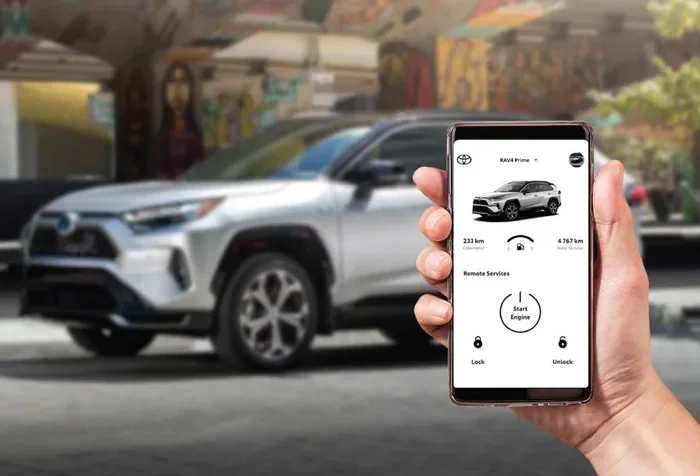
Toyota Remote Connect works through a cellular network, so the distance depends on your phone and cell signal rather than a fixed range. In most cases, you can control your Toyota from anywhere with an internet connection, whether you are across town or in another state. This guide covers the real-world range, key features, setup steps, and common limitations of Toyota Remote Connect.
Have you ever wondered how far away you can actually be when using Toyota Remote Connect? Maybe you are sitting in a coffee shop a few blocks away and want to start your car before you walk out. Or perhaps you are heading to the airport and need to lock up your vehicle from a distance. The question of range comes up a lot, and the answer might surprise you.
Toyota Remote Connect is a smart connectivity system built into many Toyota models. It lets you control certain features of your car using your smartphone. But unlike a traditional key fob that uses radio signals with a limited range, Toyota Remote Connect works through cellular networks and the internet. This means the distance is not really measured in feet or miles. Instead, it depends on your phone’s data connection and Toyota’s cloud servers.
In this article, we will break down everything you need to know about Toyota Remote Connect range. We will cover how the system works, what features are available, how far you can actually go, and what limits you might run into. Whether you already own a Toyota or are thinking about buying one, this guide will give you a clear picture of what Toyota Remote Connect can do for you.
Key Takeaways
- No Fixed Distance Limit: Toyota Remote Connect works as long as your phone has a cellular or Wi-Fi connection, not a set number of feet or miles.
- Cellular Network Is Key: The system relies on Toyota’s cloud servers and your phone’s data connection to send commands to your vehicle.
- Features Include Remote Start, Lock/Unlock, and More: You can access a wide range of functions from your smartphone through the Toyota app.
- Subscription May Be Required: Some Toyota Remote Connect features need an active subscription plan to work properly.
- Signal Strength Matters: Weak cell coverage can delay or prevent commands from reaching your car.
- Works Globally With Data: As long as you have data, you can connect to your Toyota from virtually anywhere in the world.
📑 Table of Contents
- What Is Toyota Remote Connect?
- How Far Away Can Toyota Remote Connect Reach?
- Features Available Through Toyota Remote Connect
- Toyota Remote Connect vs. Traditional Key Fob
- Subscription and Connectivity Requirements
- Common Issues and Troubleshooting Tips
- Tips to Get the Most Out of Toyota Remote Connect
- Final Thoughts
What Is Toyota Remote Connect?
Toyota Remote Connect is a telematics service that links your Toyota vehicle to the internet. It uses a built-in modem and cellular connection inside the car to communicate with Toyota’s servers. From there, you can send commands through the Toyota app on your phone. The system is part of Toyota’s broader connected car ecosystem, which aims to make your driving experience more convenient and connected.
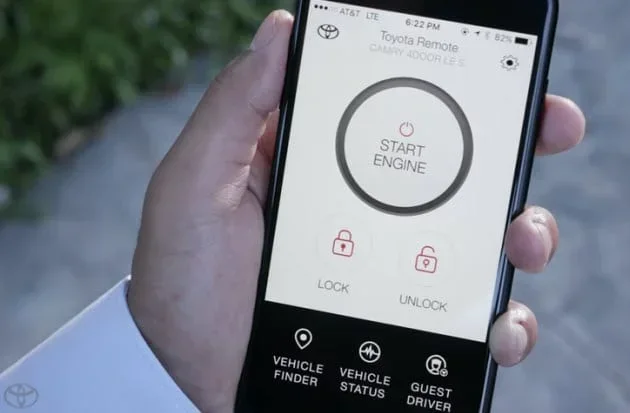
The app gives you access to a bunch of useful features. You can remote start your engine, lock or unlock the doors, honk the horn, flash the lights, and even check your vehicle’s status. Some newer Toyota models also support climate control pre-conditioning, so you can cool down or warm up the cabin before you get in. All of this happens through a secure cloud connection, which is why the range is essentially unlimited as long as you have data.
How Does Toyota Remote Connect Work?
The system works in a simple three-step process. First, you open the Toyota app on your phone and send a command. Second, that command travels through the internet to Toyota’s cloud servers. Third, the servers relay the command to your vehicle’s onboard modem, which then carries out the action. The whole process usually takes just a few seconds.
Because everything runs through the cloud, your phone does not need to be anywhere near the car. You could be at home, at work, or even on the other side of the country. As long as both your phone and the car have active data connections, Toyota Remote Connect will function. This is a big difference from traditional keyless entry systems, which rely on short-range radio frequency signals.
How Far Away Can Toyota Remote Connect Reach?
The honest answer is that there is no set distance limit for Toyota Remote Connect. Unlike a key fob, which typically works within about 30 to 60 feet, the remote connect system uses cellular networks. That means it can work from just a few blocks away or thousands of miles away. The real factor is not distance but connectivity.
What Affects the Range of Toyota Remote Connect?
Several factors can influence how well Toyota Remote Connect works from a distance. Understanding these can help you avoid frustration and get the most out of the system.
- Cellular Signal Strength: If your car’s onboard modem has a weak signal, commands may take longer to process or may fail altogether. This is the most common reason for connectivity issues.
- Phone Data Connection: Your phone needs a stable internet connection to send commands. If you are in an area with poor Wi-Fi or no cellular data, the app will not work.
- Toyota Server Status: Sometimes Toyota’s servers experience downtime or maintenance. During these periods, remote features may be temporarily unavailable.
- Vehicle Modem Status: The car’s built-in modem must be active and subscribed to a data plan. Some older models or trims may not have this capability.
- App Version: Using an outdated version of the Toyota app can cause bugs or connection problems. Always keep the app updated.
Real-World Range Examples
Let us look at some real-world scenarios to make this clearer. If you are at a shopping mall a few miles from your parked Toyota, you can easily remote start the car. If you are at the airport 50 miles away, you can still lock the doors or check the vehicle status. Some Toyota owners have reported using Toyota Remote Connect while traveling internationally, as long as both the car and phone had data access.
The key takeaway is that Toyota Remote Connect is not limited by physical distance in the way a key fob is. It is limited by data connectivity, which is available in most populated areas around the world.
Features Available Through Toyota Remote Connect
Toyota Remote Connect offers a solid set of features that make owning a Toyota more convenient. Here is a breakdown of what you can typically do with the system.
Remote Start and Stop
This is one of the most popular features. You can start your Toyota’s engine from your phone, letting the car warm up or cool down before you get in. In colder climates, this is a game-changer during winter mornings. Some models also allow you to stop the engine remotely, which is handy if you accidentally left it running.
Lock and Unlock Doors
Forgot your keys inside the car? No problem. With Toyota Remote Connect, you can lock or unlock the doors from your phone. This works even if you are not near the vehicle. It is a great feature for parents, delivery drivers, or anyone who frequently locks themselves out.
Vehicle Status Check
You can check important details about your car right from the app. This includes fuel level, odometer reading, tire pressure, and maintenance alerts. Some owners pair this with regular Toyota maintenance routines to stay on top of service schedules.
Climate Control Pre-Conditioning
On hot or cold days, you can pre-condition the cabin before you arrive. This feature works especially well with hybrid and electric Toyota models, where battery preconditioning can improve overall efficiency.
Horn and Lights
If you parked in a large lot and cannot find your car, you can use the app to honk the horn and flash the lights. A simple but very useful feature that saves time and frustration.
Toyota Remote Connect vs. Traditional Key Fob
It is helpful to compare Toyota Remote Connect with a traditional key fob to understand the real advantage. A key fob uses radio frequency signals that typically work within a range of 30 to 60 feet. The signal weakens with distance and can be blocked by buildings, walls, and other obstacles.
Toyota Remote Connect, on the other hand, uses cellular networks and the internet. This means the range is not physically limited by distance or obstacles. You can control your car from across the city or across the country. The trade-off is that it requires a data connection and, in many cases, an active subscription plan.
| Feature | Key Fob | Toyota Remote Connect |
|---|---|---|
| Range | 30-60 feet | Unlimited (data dependent) |
| Connection Type | Radio Frequency | Cellular / Internet |
| Remote Start | Yes (limited) | Yes (full featured) |
| Vehicle Status Check | No | Yes |
| Subscription Required | No | Yes (varies by plan) |
| Works Globally | No | Yes (with data) |
Subscription and Connectivity Requirements
One important thing to know about Toyota Remote Connect is that it often requires a subscription. Toyota offers different plans that provide varying lengths of access to connected services. Some new Toyota vehicles come with a free trial period, but after that, you will need to pay for continued access.
If you are curious about using Toyota connectivity features without a paid plan, you can check our guide on can I use Toyota Connect without a subscription for more details. The short answer is that basic features may still work, but many of the remote functions require an active subscription.
The subscription typically covers the embedded cellular modem in the car. This modem is what allows the vehicle to communicate with Toyota’s servers. Without an active data plan on the modem, Toyota Remote Connect features will not work, regardless of how close or far you are from the vehicle.
Common Issues and Troubleshooting Tips
Like any technology, Toyota Remote Connect can sometimes experience issues. Here are some common problems and quick fixes.
Commands Not Going Through
If your commands are not reaching the car, the first thing to check is your phone’s data connection. Try switching between Wi-Fi and cellular data to see if that helps. Next, check the Toyota app for any available updates. An outdated app can cause connection problems.
Delayed Response Times
Slow response times are often caused by weak cellular signals at the vehicle’s location. If your car is parked in a garage or underground lot, the modem may struggle to connect. Moving to an area with better coverage usually resolves this issue.
App Won’t Connect to Toyota Servers
Sometimes the problem is on Toyota’s end. Server maintenance or outages can temporarily disrupt service. In these cases, waiting a short while and trying again usually fixes the problem. You can also check Toyota’s official status page or community forums for updates.
Vehicle Not Responding to Commands
If the car itself is not responding, make sure the vehicle’s modem is active. Check the dashboard for any warning lights related to the connectivity system. A quick restart of the infotainment system can also help reset the connection.
Expert Insight
Many Toyota owners do not realize that Toyota Remote Connect depends on both the car’s internal modem and your phone’s data plan. Keeping both updated and ensuring a strong signal on both ends will give you the best experience. Think of it like any other app that relies on cloud services, it is only as good as the connection on both sides.
Tips to Get the Most Out of Toyota Remote Connect
Want to make the most of Toyota Remote Connect? Here are some practical tips to keep everything running smoothly.
- Keep the App Updated: Toyota regularly releases app updates that improve performance and add new features. Check for updates at least once a month.
- Maintain Your Subscription: Make sure your Toyota connectivity subscription is active. A lapsed subscription will disable remote features.
- Park in Areas with Good Coverage: If you regularly park in areas with weak cell signals, consider parking closer to a window or outside where the modem can connect more easily.
- Use Wi-Fi When Available: If you are at home or work, connecting your phone to Wi-Fi can reduce data usage and sometimes provide a more stable connection.
- Check Vehicle Status Regularly: Use the app to check on your vehicle’s health, including fuel level and maintenance alerts. This helps you stay ahead of potential issues.
- Set Up Notifications: Enable push notifications in the app so you are alerted to any issues or completed actions right away.
For owners who also care about keeping their car looking great, you might be interested in learning about how long a car wrap lasts as a way to protect and personalize your Toyota’s exterior.
Final Thoughts
Toyota Remote Connect is a powerful and convenient system that brings a lot of value to Toyota owners. The range is not limited by distance in the traditional sense. Instead, it depends on data connectivity, which is available almost everywhere today. Whether you are a few blocks away or traveling across the country, you can stay connected to your vehicle with just a few taps on your phone.
The key to getting the most out of Toyota Remote Connect is understanding how it works and what it needs to function. Keep your subscription active, maintain a good data connection, and stay on top of app updates. With these simple steps, you can enjoy all the benefits of connected car technology without worrying about distance.
If you are new to Toyota’s connected services, now is a great time to explore what Toyota Remote Connect has to offer. The features are designed to make your life easier, your car safer, and your driving experience more enjoyable. Give it a try and see how much convenience a few simple apps can bring to your daily routine.
Frequently Asked Questions
How far can Toyota Remote Connect work from the vehicle?
Toyota Remote Connect has no fixed distance limit. It works as long as both your phone and the vehicle have active data connections. You can use it from across town or across the country.
Do I need a subscription to use Toyota Remote Connect?
In most cases, yes. Toyota offers subscription plans that cover the embedded cellular modem in your vehicle. Some new Toyotas come with a free trial, but continued use usually requires a paid plan.
Can I use Toyota Remote Connect outside of the United States?
Yes, you can use Toyota Remote Connect internationally as long as your phone has a data connection and the vehicle’s modem is active. The system works through the cloud, so physical location does not matter.
What happens if my phone loses signal while using Toyota Remote Connect?
If your phone loses signal, the command will not be sent to Toyota’s servers. Once your phone regains data connectivity, you can try sending the command again. The car’s modem also needs a signal to receive the command.
Can I remote start my Toyota from a long distance?
Yes, you can remote start your Toyota from a long distance using Toyota Remote Connect. The command is sent through the internet to Toyota’s servers and then to your vehicle, regardless of the physical distance between you and the car.
Is Toyota Remote Connect available on all Toyota models?
Toyota Remote Connect is available on many newer Toyota models, but not all trims and years include the feature. Check your specific model and trim to confirm availability, or consult your local Toyota dealer for details.