How Do You Manually Reset the Oil Light on Your Vehicle
Learning how to manually reset the oil light is a simple skill every driver should have. Whether your oil change light is stuck on after an oil filter replacement or you just completed a DIY oil change, resetting the maintenance indicator takes only a few minutes. This guide walks you through the exact steps for different vehicle makes and models, so you can clear that annoying dashboard symbol and keep track of your service interval with confidence.
That little yellow or red symbol on your dashboard can really get on your nerves. You just got your oil changed, but the oil change light is still staring you in the face every time you start the car. It is frustrating, right? The good news is that you do not need to visit a mechanic just to clear it. In most cases, you can handle this yourself in under five minutes.
Knowing how to manually reset the oil light saves you time and money. It also gives you a better understanding of your vehicle’s maintenance schedule. Whether you drive a Toyota, Honda, Ford, or any other brand, the process is straightforward once you know what buttons to press and in what order.
This guide covers everything you need to know. We will walk you through the general steps, brand-specific procedures, and common pitfalls to avoid. By the end, you will feel confident resetting your dashboard warning light without any hassle.
Key Takeaways
- Resetting the oil light is easy: Most vehicles use a combination of the trip meter, ignition, and steering wheel buttons to clear the warning.
- Know your model: Different car brands like Toyota, Ford, and Honda have slightly different reset procedures, so always check your owner’s manual first.
- Don’t ignore the light: The oil service indicator exists to remind you about oil filter replacement and regular vehicle maintenance.
- Common mistakes happen: Holding buttons too short or resetting before the oil change can cause the light to return quickly.
- Professional help is available: Many dealerships offer free oil changes that include resetting the light for you.
- Track your maintenance: Keeping a log of your oil change frequency helps you stay ahead of the next service reminder.
📑 Table of Contents
- What Does the Oil Light Actually Mean?
- How to Manually Reset the Oil Light: General Steps
- Brand-Specific Reset Procedures
- When Should You Reset the Oil Light?
- Common Mistakes When Resetting the Oil Light
- Can You Reset the Oil Light Without Changing the Oil?
- Tips to Keep Your Oil Light from Coming Back Too Soon
- When to See a Professional About Your Oil Light
- Final Thoughts
What Does the Oil Light Actually Mean?
Before we dive into the reset process, let us talk about what the light is trying to tell you. Many people confuse the oil change reminder with an oil pressure warning. These are two different things, and understanding the difference matters.
Oil Change Reminder vs. Oil Pressure Warning
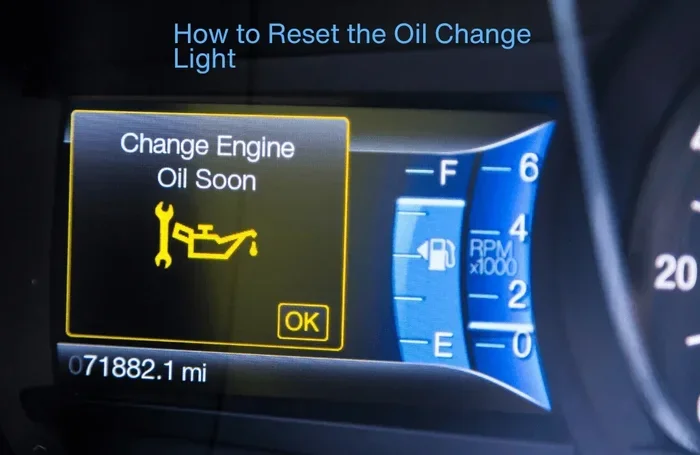
The oil service indicator is a maintenance reminder. It tracks your mileage and time since the last service. When it pops up, it simply means it is time for an oil filter replacement and fresh oil. This light is not an emergency.
On the other hand, an oil pressure warning is a red symbol that usually looks like an oil can with a drip. This one is serious. It means your engine has low oil pressure, which can cause major damage if you ignore it. If you see this red light, pull over safely and check your oil level immediately.
For the purpose of this guide, we are focusing on the maintenance reminder. That is the yellow or orange light that says it is time for your next oil change interval. It is a routine alert, not a sign of engine trouble.
How to Manually Reset the Oil Light: General Steps
Most modern vehicles follow a similar reset process. The exact button combination varies, but the general idea is the same. You need to access the trip meter or service menu on your dashboard display, then hold or press the right buttons to clear the reminder.
Step 1: Turn the Ignition to the On Position
Do not start the engine yet. Just turn your key to the “On” or “Accessory” position. On push-button start vehicles, press the start button without stepping on the brake. You want the dashboard lights to come on, but the engine should stay off.
This step is important because the dashboard symbols need power to respond to your reset inputs. If the engine is running, some vehicles will not let you access the reset menu.
Step 2: Locate the Trip Meter or Info Button
Find the button that controls your trip odometer. On most cars, this is a button on the steering wheel or the dashboard cluster. Press it until you see the trip mileage or the service reminder displayed on the screen.
If your vehicle has a digital display, you might need to scroll through menu options. Look for words like “Service,” “Maintenance,” or “Oil Life.” Use the arrow buttons on your steering wheel to navigate.
Step 3: Hold the Reset Button
Once you see the oil change light or the service interval reading on screen, press and hold the reset button. Usually, this is the same button you use to reset the trip meter. Hold it for about 10 to 15 seconds.
You should see the display flash, change, or go back to zero. That means the reset worked. Release the button and then turn the ignition off.
Step 4: Start the Engine to Confirm
Turn the key to start the engine or press the start button. Check your dashboard. The maintenance light should be off now. If it is still on, repeat the process and make sure you held the button long enough.
Some vehicles require you to do this process twice for it to fully take effect. Do not worry if it does not work the first time. Just repeat steps 1 through 4.
Brand-Specific Reset Procedures
Every car maker has its own way of handling the oil service indicator. While the general steps above apply to most vehicles, some brands have unique procedures. Here is a closer look at how to reset the light on popular makes.
How to Reset the Oil Light on a Toyota
Toyota vehicles are some of the most common on the road, and the reset process is fairly simple. With the ignition in the “On” position, press the trip meter reset button until you see the maintenance code on the display. Then, hold the same button for more than 5 seconds. The code should reset to zero, and the light will turn off.
If you own a newer Toyota with a touchscreen display, you may need to go into the vehicle settings menu. Look for “Maintenance” or “Service” and follow the on-screen prompts to clear the reminder. This is especially common on models like the Toyota Camry and RAV4.
How to Reset the Oil Light on a Ford
Ford vehicles use a slightly different approach. Turn the ignition to “On” without starting the engine. Use the steering wheel controls to navigate to the “Settings” menu, then find “Vehicle Information” and “Maintenance.” From there, you can select “Oil Life” and choose “Reset.”
On older Ford models without a digital display, the process involves pressing and holding the trip reset button on the dashboard. Hold it for about 10 seconds until the light flashes and then turns off.
How to Reset the Oil Light on a Honda
Honda makes it easy to reset the oil change reminder. With the engine off, press the “Select/Reset” knob on the dashboard until you see the maintenance code. Then, hold the knob down for about 10 seconds. The code should reset, and the light will go off when you start the engine next.
Honda Civic and Accord owners can also use the steering wheel controls on newer models. The process is similar: navigate to the maintenance menu and hold the reset button until the display updates.
When Should You Reset the Oil Light?
Timing matters when it comes to resetting your oil service indicator. You should only clear the light after you have actually completed the oil change. Resetting it before you add fresh oil defeats the whole purpose of the reminder system.
Here are the right times to reset:
- After an oil change: Once you have drained the old oil, replaced the oil filter, and filled up with new oil, go ahead and reset the light.
- After an oil top-off: If you only needed to add oil between changes, some drivers like to reset the reminder to track the next service.
- After purchasing a used car: If you do not know when the last oil change happened, it is smart to reset the light right after you get the vehicle serviced.
One thing to keep in mind: if you are wondering whether you can go two years without an oil change, the answer depends on your vehicle and driving conditions. Most modern cars use an oil life monitoring system that calculates when you actually need service based on driving habits. But resetting the light should always come after real maintenance.
Common Mistakes When Resetting the Oil Light
Even though the process is simple, people make mistakes all the time. Here are the most common errors and how to avoid them.
Resetting Too Early
The biggest mistake is resetting the light before the oil change is actually done. If you clear the reminder but still have old oil in the engine, you are just hiding the problem. The light will come right back once the system recalculates your oil change interval.
Not Holding the Button Long Enough
Many drivers tap the reset button once or twice and get frustrated when nothing happens. You need to hold it steadily for 10 to 15 seconds. A quick tap will not do the job. Set a mental timer if you need to.
Ignoring the Owner’s Manual
Your owner’s manual is the best resource for your specific vehicle. It contains the exact reset procedure and any quirks unique to your model. Skipping this step can lead to confusion, especially if your vehicle has a non-standard process.
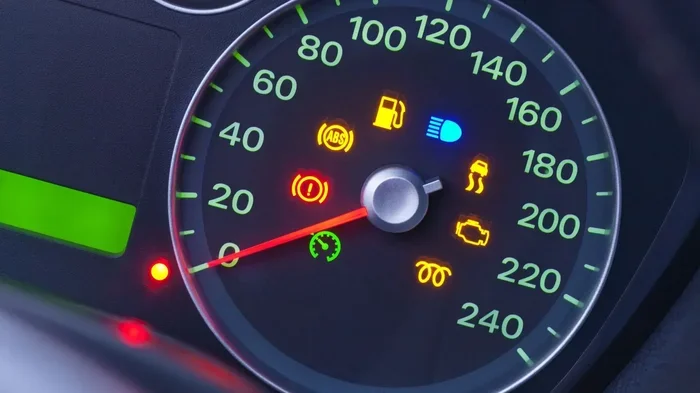
Confusing the Oil Light with Other Warnings
Dashboards have a lot of symbols, and it is easy to mix them up. Make sure you are resetting the right light. The oil change reminder usually looks like a yellow or orange oil can symbol. If your light is red or looks different, it might be a more serious warning that needs immediate attention.
Can You Reset the Oil Light Without Changing the Oil?
Technically, yes. You can reset the maintenance indicator at any time by following the steps above. But should you? That is a different question entirely.
Resetting the light without actually changing the oil is like silencing your alarm clock without getting out of bed. The reminder exists for a reason. Oil breaks down over time and loses its ability to lubricate your engine properly. Ignoring the oil change frequency recommended by your manufacturer can lead to increased engine wear and costly repairs down the road.
If you have not changed your oil yet but want to clear the light temporarily, think again. It is always better to stay on top of your vehicle maintenance. And if cost is a concern, remember that you can often negotiate the price of an oil change at many service centers. Do not let budget worries keep you from proper maintenance.
Also, if you are someone who prefers professional service, many dealerships provide free oil changes as part of routine visits. They will also reset the light for you, so you do not even have to do it yourself.
Tips to Keep Your Oil Light from Coming Back Too Soon
Once you have successfully reset the oil change light, you want to keep it off until the next service is actually due. Here are some practical tips to help you do that.
- Keep a maintenance log: Write down every oil change date and mileage. This helps you track your service interval and know when the light will likely come on next.
- Use the right oil: Always use the oil grade recommended by your manufacturer. Wrong oil can trigger false warnings and affect your engine performance.
- Check your oil regularly: Get in the habit of checking your oil level once a month. This takes two minutes and helps you catch low oil before it becomes a bigger problem.
- Don’t ignore other dashboard symbols: If you notice other dashboard indicators alongside the oil light, have your vehicle inspected. Multiple warnings can point to a bigger issue.
- Follow the recommended oil filter replacement schedule: A clogged oil filter can cause low oil pressure and trigger warnings even when your oil level is fine.
- Ask your mechanic to reset it: If you are not comfortable doing it yourself, any mechanic or service advisor can reset the light in under a minute during your oil change service.
When to See a Professional About Your Oil Light
Most of the time, resetting the oil light is a simple DIY task. But there are situations where professional help is the right call.
If the light keeps coming back shortly after you reset it, something might be wrong. This could indicate an oil leak, a faulty sensor, or a problem with your vehicle’s oil life monitoring system. In these cases, it is worth visiting a trusted mechanic to run diagnostics.
Similarly, if your oil pressure warning (the red light) stays on, do not try to reset it. That light is telling you something is seriously wrong with your engine. Pull over safely and get your vehicle towed to a service center.
For regular maintenance reminders, resetting the light yourself is perfectly fine. But if you are ever unsure about what a dashboard symbol means, it is always better to ask a professional. A quick check can save you from expensive repairs later on.
Final Thoughts
Knowing how to manually reset the oil light is one of those small skills that makes you a more confident driver. It takes just a few minutes, and you do not need any special tools. Whether you use the trip meter button, the steering wheel controls, or the infotainment system, the process is straightforward once you know the steps for your specific vehicle.
Remember to only reset the light after you have actually completed your oil change. Stay on top of your oil change interval and keep track of your maintenance schedule. Your engine will thank you for it, and you will avoid unnecessary trips to the shop.
The next time that yellow or orange light pops up on your dashboard, do not panic. Grab your owner’s manual, follow the steps in this guide, and clear that reminder in no time. And if you ever need professional help, a quick visit to your local service center can handle everything from oil changes to resetting your service reminder.
Frequently Asked Questions
Can I reset the oil light myself without going to a mechanic?
Yes, absolutely. Most vehicles allow you to reset the oil change light using the trip meter or dashboard buttons. The process usually takes less than five minutes and does not require any special tools or mechanical knowledge.
Why does my oil light keep coming back after I reset it?
If the light returns shortly after resetting, it could mean the oil change was not fully completed, the oil level is low, or there is a sensor issue. Make sure you have fresh oil and a new oil filter installed. If the problem continues, have a mechanic check your oil pressure sensor.
Is it safe to drive with the oil change light on?
Driving with the oil service indicator on is generally safe in the short term, but you should not delay your oil change for too long. The light is a reminder that your oil change interval has been reached, and ignoring it for extended periods can lead to engine wear.
How often should I reset my oil light?
You should only reset the light after each oil change. The frequency depends on your vehicle and driving habits. Many modern cars use an oil life monitoring system that calculates the interval automatically, typically ranging from 5,000 to 10,000 miles.
What is the difference between the oil change light and the check engine light?
The oil change light is a maintenance reminder for your next oil filter replacement and service. The check engine light indicates a potential problem with your engine or emissions system. They serve different purposes, and the reset process for each is different.
Do I need to reset the oil light after every oil change?
Yes, resetting the maintenance indicator after every oil change ensures the system tracks your next service accurately. If you skip resetting, the light will stay on and your service interval tracking will be off.
=== CONCLUSION ===
Resetting your oil change light manually is a quick and easy task that saves you time and money. By following the steps outlined in this guide, you can clear the dashboard warning light on almost any vehicle model. Remember to always reset the light after completing your oil change, and never ignore the reminder for too long.
Keep these car maintenance tips in mind, stay on top of your oil change frequency, and your vehicle will run smoothly for years to come. If you ever feel unsure, do not hesitate to consult your owner’s manual or visit a professional. Taking care of these small tasks now prevents bigger problems later.