Does the Toyota Highlander Have Bluetooth Connectivity
Yes, the Toyota Highlander has Bluetooth connectivity in most modern model years. This feature allows drivers to make hands-free calls, stream music, and access smartphone apps wirelessly. Whether you own a 2015, 2020, or 2024 model, Bluetooth is a standard or available tech feature that enhances your driving experience.
Does the Toyota Highlander have Bluetooth? If you are asking this question, you are not alone. Thousands of drivers look up this exact topic every month. The short answer is yes. Most Toyota Highlanders come with Bluetooth connectivity built right in. But the details matter a lot. Different model years, trim levels, and packages all affect what Bluetooth features you get. In this guide, we will walk you through everything you need to know. We will cover how to pair your phone, what features Bluetooth unlocks, and which model years support it. By the end, you will have a clear picture of what to expect.
Bluetooth in a car is not just a nice-to-have anymore. It has become a basic expectation. People want to stream music, take calls, and use navigation apps without digging through wires. The Toyota Highlander is one of the most popular SUVs on the road, and Toyota knows this. That is why they have made Bluetooth a core part of the Highlander experience for many years. Whether you are buying a used model or shopping for a new one, understanding the Bluetooth setup can save you time and frustration.
Key Takeaways
- Bluetooth is standard: Most Toyota Highlanders from 2013 onward come with Bluetooth built in.
- Hands-free calling is a breeze: You can make and receive calls without touching your phone.
- Audio streaming works well: Stream music, podcasts, and audiobooks through your car speakers.
- Pairing is simple: The process takes just a few minutes and works with both iPhone and Android.
- Multiple devices can connect: You can pair more than one phone to the system.
- Older models may need an adapter: Pre-2013 models might require a Bluetooth receiver add-on.
- Android Auto adds more: Some Highlanders support Android Auto through Bluetooth for extra features.
📑 Table of Contents
- Bluetooth Availability Across Toyota Highlander Model Years
- How to Pair Your Phone with Toyota Highlander Bluetooth
- What Bluetooth Features Does the Toyota Highlander Offer?
- Toyota Highlander Bluetooth vs. Other Connectivity Options
- Common Bluetooth Issues and How to Fix Them
- Does Every Toyota Highlander Have Bluetooth?
- Expert Tips for Getting the Most Out of Toyota Highlander Bluetooth
- Can You Use Toyota App Features Through Bluetooth?
- Conclusion
Bluetooth Availability Across Toyota Highlander Model Years
Not every Toyota Highlander is the same when it comes to Bluetooth. The feature has evolved over the years. Let us break down what you can expect from different generations of the Highlander.
2013 and Newer Models
If your Toyota Highlander is from 2013 or later, you are in good shape. Bluetooth came standard on most trims starting with the 2013 model year. This includes the basic LE trim, which means even the entry-level Highlander offers wireless connectivity. You get hands-free calling and audio streaming as standard features. This was a big step forward for Toyota. Before 2013, Bluetooth was often reserved for higher trims or optional packages.
The 2013 to 2019 Highlanders use Toyota’s basic audio system. It supports Bluetooth pairing with up to five devices. You can switch between connected phones easily. The range is solid, typically around 30 feet from the vehicle. This covers most everyday use cases, like sitting in the driver seat with your phone in your pocket or on the console.
2020 and Newer Models
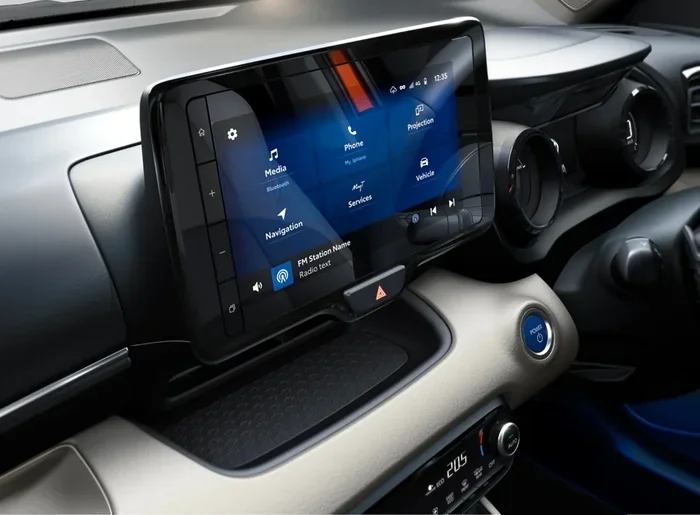
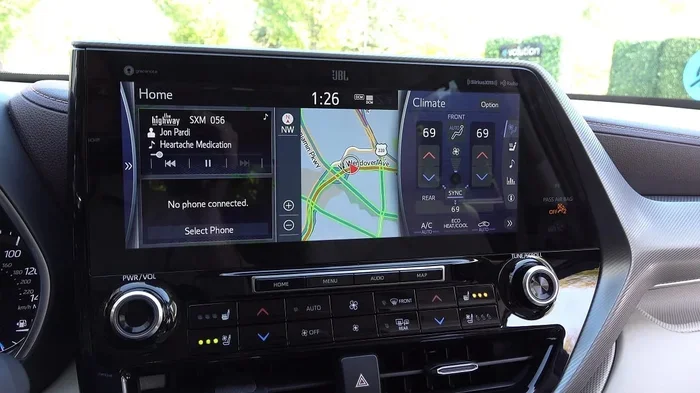
The 2020 Toyota Highlander brought a major update to the interior. Toyota redesigned the infotainment system with a bigger touchscreen. Bluetooth connectivity improved as well. The new system supports Bluetooth 5.0, which offers a stronger and more stable connection. Audio quality also got better. You will notice less static and clearer sound when streaming music.
Toyota also added wireless Apple CarPlay and Android Auto support on higher trims. This means you can connect your phone without even plugging in a cable. The 2020, 2021, 2022, 2023, and 2024 models all carry this improvement. If you are shopping for a newer Highlander, you will find Bluetooth is deeply integrated into the overall tech experience.
How to Pair Your Phone with Toyota Highlander Bluetooth
Pairing your phone to the Toyota Highlander Bluetooth system is straightforward. Toyota designed the process to be user-friendly. Here is a step-by-step guide that works for most model years.
Step-by-Step Pairing Process
- Turn on your Bluetooth: Go to your phone settings and make sure Bluetooth is enabled.
- Start the Highlander: Press the start button or turn the key to power on the vehicle.
- Access the audio menu: Press the “Audio” or “Setup” button on the touchscreen or audio controls.
- Select Bluetooth: Choose the Bluetooth settings option from the menu.
- Search for devices: The system will scan for nearby Bluetooth devices.
- Select your phone: Find your phone name on the list and tap it.
- Confirm the pairing: You may see a passkey on the screen. Enter it on your phone to confirm.
- Test the connection: Play some music or make a test call to make sure everything works.
The entire process usually takes about two minutes. Once your phone is paired, the Highlander will remember it. The next time you get in the car, the connection should happen automatically as long as your phone Bluetooth is turned on.
Tips for a Smooth Pairing Experience
- Keep your phone close: Place it on the center console during pairing for the best signal.
- Restart both devices: If pairing fails, turn Bluetooth off and back on for both the phone and the car.
- Delete old pairings: If you are having trouble, remove old Bluetooth connections from the car’s memory and try again.
- Update your phone software: An outdated phone operating system can cause connection issues.
What Bluetooth Features Does the Toyota Highlander Offer?
Bluetooth in the Toyota Highlander is not just about making phone calls. Toyota packed several useful features into the system. Here is what you can do with Bluetooth connectivity in your Highlander.
Hands-Free Calling
This is the most basic and important feature. With Bluetooth, you can make and receive phone calls without touching your phone. The car uses its built-in microphone and speakers. You can hear the caller through the car audio system, and the other person hears you through the dashboard microphone. This is a huge safety benefit. It keeps your hands on the wheel and your eyes on the road. Many states now have laws against holding your phone while driving, so this feature is essential.
Audio Streaming
Audio streaming lets you play music, podcasts, and audiobooks from your phone through the car speakers. You can use Spotify, Apple Music, Pandora, or any other audio app on your phone. The sound comes through the Highlander’s audio system, which sounds much better than phone speakers. This feature works in the background, so you can still use navigation apps while music plays.
Contact Syncing
When you pair your phone, the Highlander can sync your phone contacts. This makes it easy to find and call people using the car’s interface. You can search by name or scroll through the list. Some model years also support voice command calling, so you can say “Call Mom” and the system dials her for you.
Multiple Device Pairing
The Toyota Highlander Bluetooth system can remember multiple phones at once. This is great for families. You can pair a spouse’s phone and your phone to the same vehicle. When you get in the car, the system can automatically connect to the last phone used. You can also manually switch between devices through the audio settings menu.
Toyota Highlander Bluetooth vs. Other Connectivity Options
Bluetooth is not the only way to connect your phone to the Toyota Highlander. Toyota offers several other connectivity options. Understanding the differences helps you get the most out of your vehicle.
USB Connection
USB cables provide a wired connection between your phone and the car. This method offers a more stable connection than Bluetooth. You also get faster charging through a USB port. However, a wire can be annoying. It limits how you position your phone and creates clutter in the cabin. Many drivers prefer Bluetooth for its convenience, even if USB is more reliable for certain tasks.
Apple CarPlay and Android Auto
Toyota has added Apple CarPlay and Android Auto support to newer Highlanders. These systems mirror your phone’s interface on the car screen. They offer a more seamless experience than standard Bluetooth alone. Some 2020 and newer Highlanders support wireless Apple CarPlay and Android Auto. This means you get all the benefits of these systems without a single cable. You can access navigation, messages, and music directly from the car’s touchscreen.
For those who want even more connectivity, you might want to check if Android Auto works through Bluetooth in Toyota vehicles. This is a great resource for understanding the full range of wireless connectivity options available.
Bluetooth vs. Wired: A Quick Comparison
| Feature | Bluetooth | USB Cable |
|---|---|---|
| Convenience | Very high | Low |
| Connection Stability | Good | Excellent |
| Phone Charging | No | Yes |
| Audio Quality | Good | Very Good |
| Hands-Free Calls | Yes | Yes |
| Multiple Devices | Yes | No |
Common Bluetooth Issues and How to Fix Them
Bluetooth technology is reliable, but it is not perfect. Every driver runs into connection problems at some point. Here are the most common issues Toyota Highlander owners face and how to solve them.
Phone Will Not Pair
If your phone will not connect, start by checking the basics. Make sure Bluetooth is turned on for both the phone and the car. Restart both devices. If that does not work, delete the car’s Bluetooth memory and try pairing again. Sometimes old pairing data gets corrupted and causes problems. A fresh start usually fixes this.
Audio Keeps Cutting Out
Intermittent audio drops are frustrating. This usually happens when your phone is too far from the car or when there are physical barriers between them. Keep your phone in a central location, like the center console or a mount on the dashboard. Other electronic devices can also interfere with Bluetooth signals. Try turning off nearby devices to see if that helps.
Voice Quality Is Poor
If the person on the other end of a call says you sound muffled, the microphone might be the issue. Dust or debris can block the microphone port on the dashboard. Wipe it gently with a soft cloth. You can also try adjusting the microphone sensitivity in the car’s Bluetooth settings menu.
Bluetooth Won’t Connect After a Software Update
Sometimes a phone software update can reset Bluetooth settings. This is normal. Simply go through the pairing process again. On the car side, you may need to reset the infotainment system. Turn the car off, wait 30 seconds, and turn it back on. This clears minor software glitches.
Does Every Toyota Highlander Have Bluetooth?
Here is an important detail not everyone knows. Not every Toyota Highlander has Bluetooth. The feature depends on the model year and trim level. Older Highlanders, particularly those from 2005 to 2012, may not have Bluetooth as standard. Some of these models offered it as part of an optional audio package, but many base trims did not include it at all.
If you own an older Highlander without Bluetooth, do not worry. You have options. You can install an aftermarket Bluetooth adapter. These devices plug into the car’s audio system and add wireless connectivity. They are affordable and easy to install. Some adapters even support hands-free calling and audio streaming. You can find them at most auto parts stores or online. Just make sure to check compatibility with your specific Highlander model before buying.
For a quick comparison, you might also be interested in whether 2012 Honda Civics have Bluetooth to see how different brands handled Bluetooth availability in that era.
Expert Tips for Getting the Most Out of Toyota Highlander Bluetooth
Bluetooth is simple to use, but a few expert tips can make your experience even better. Here are some insights from seasoned Toyota Highlander owners and automotive tech experts.
Keep Your Car’s Software Updated
Toyota occasionally releases software updates for the infotainment system. These updates can improve Bluetooth performance and fix known issues. Check with your Toyota dealer to see if any updates are available for your model. Some updates can even add new features to older Highlanders.
Use the Right Bluetooth Profile
Bluetooth uses different profiles for different tasks. The Hands-Free Profile handles calls, while the Advanced Audio Distribution Profile handles music streaming. Most cars support both. If you notice that calls work but music does not, check the Bluetooth settings on your phone to make sure the correct profiles are enabled.
Set Up a Dedicated Driving Profile
Many smartphones allow you to create a driving profile. This profile can automatically enable Bluetooth, turn on do-not-disturb mode, and launch your music app when you get in the car. Setting this up takes just a few minutes but saves you from doing it manually every time.
Name Your Devices Clearly
If you pair multiple phones, give each device a clear name in the car’s Bluetooth settings. This makes it easy to identify which phone is connected at a glance. Use names like “My iPhone” or “Wife’s Samsung” to avoid confusion.
Can You Use Toyota App Features Through Bluetooth?
Toyota offers a mobile app that connects to your vehicle. Through the app, you can remote start the car, check fuel levels, and locate your vehicle. Bluetooth plays a role in some of these features, but not all of them. The Toyota app primarily uses cellular data and Wi-Fi for communication with the car. However, Bluetooth can serve as a secondary connection method for certain functions.
If you want to learn more about what the Toyota app can do, check out this guide on using the Toyota app without a subscription. It covers the app’s full range of features and connectivity options.
Conclusion
So, does the Toyota Highlander have Bluetooth? The answer is a clear yes for most model years. From 2013 onward, Bluetooth is a standard feature that comes with hands-free calling, audio streaming, and contact syncing. Newer models from 2020 onward offer even better Bluetooth performance with improved range and audio quality. Whether you use it for calls during your daily commute or for streaming your favorite playlist on road trips, Bluetooth makes the Toyota Highlander a more connected and convenient vehicle.
If you own an older model, aftermarket adapters can bring Bluetooth functionality to your car. And if you are shopping for a new one, you can expect a seamless wireless experience right out of the box. Bluetooth is just one piece of the Toyota Highlander’s tech puzzle, but it is one of the most used features every single day. Take a few minutes to set it up properly, and you will wonder how you ever drove without it.
Remember to keep your phone updated, maintain your car’s Bluetooth memory, and explore the full range of connectivity options available. The Toyota Highlander was built to keep you connected, and Bluetooth is at the heart of that experience.
Frequently Asked Questions
Which Toyota Highlander model years have Bluetooth?
Most Toyota Highlanders from 2013 onward come with Bluetooth as a standard feature. Some 2010 to 2012 models may have it as part of an optional package. If you own a model older than 2010, Bluetooth may not be available without an aftermarket adapter.
Can I connect more than one phone to my Toyota Highlander Bluetooth?
Yes, the Toyota Highlander Bluetooth system can store multiple paired devices. You can pair up to five phones at once. The system will automatically connect to the last phone used, or you can manually switch between devices in the Bluetooth settings menu.
Why is my Bluetooth not connecting to my Toyota Highlander?
Several things can cause this. Try restarting both your phone and the car’s infotainment system. Make sure Bluetooth is turned on for both devices. If the problem persists, delete the existing pairing from both the phone and the car, then try pairing again from scratch.
Can I stream music through Bluetooth on my Toyota Highlander?
Yes, audio streaming is a standard Bluetooth feature on the Toyota Highlander. You can stream music from apps like Spotify, Apple Music, or Pandora through your car speakers. Just make sure the audio streaming option is enabled in your phone’s Bluetooth settings.
Does the Toyota Highlander support wireless Apple CarPlay and Android Auto?
Some 2020 and newer Toyota Highlanders support wireless Apple CarPlay and Android Auto. This feature is typically available on higher trims. Check your specific model’s features or consult your dealer to confirm wireless compatibility.
Can I make hands-free calls using Toyota Highlander Bluetooth?
Absolutely. Hands-free calling is one of the core Bluetooth features on the Toyota Highlander. The car uses its built-in microphone and speakers, so you can make and receive calls without ever touching your phone. This is both convenient and safer while driving.