How Long To Disconnect Toyota Battery To Reset Computer
Disconnecting your Toyota battery for 15 to 30 minutes is typically enough to reset the car computer. This simple process clears error codes, resets the ECU, and can even improve fuel efficiency. We will walk you through the exact steps, timing, and safety precautions for a Toyota battery reset that actually works.
Have you ever wondered how long to leave your Toyota battery disconnected to reset the computer? Maybe your check engine light is on, or your Toyota just feels a little off. A battery disconnect reset is one of the simplest and most affordable fixes you can try at home.
This guide covers everything you need to know about resetting your Toyota computer. We will talk about the right timing, the exact steps, and what happens after you reconnect the battery. Whether you own a Camry, RAV4, or Tacoma, this guide applies to most Toyota models.
The process is straightforward, but the timing matters. Leave it disconnected too short, and the reset may not fully complete. Leave it too long, and you risk losing more settings than needed. Let us dive into the details so you can get it right the first time.
Key Takeaways
- 15 to 30 minutes is the sweet spot: Most Toyota models need at least 15 minutes with the battery disconnected for a full computer reset.
- Safety comes first: Always disconnect the negative terminal first and reconnect it last to avoid electrical shorts.
- A Toyota battery reset clears stored error codes: This includes check engine lights, service lights, and adaptive ECU memory.
- You may need to relearn some settings: Radio presets, clock, and power window calibration may reset after disconnecting the battery.
- Drive for 50 to 100 miles after resetting: This allows the Toyota ECU to fully relearn your driving habits and adapt properly.
- Never disconnect the battery while the engine is running: This can damage sensitive electronic components in your Toyota.
📑 Table of Contents
- Why Reset Your Toyota Computer?
- How Long to Disconnect Toyota Battery to Reset Computer
- Step-by-Step Guide to Disconnecting Your Toyota Battery
- What Happens When You Disconnect the Toyota Battery
- Safety Tips for Disconnecting Your Toyota Battery
- Common Mistakes to Avoid When Resetting Your Toyota Computer
- When to See a Professional Instead
- Frequently Asked Questions
- Final Thoughts
Why Reset Your Toyota Computer?
Your Toyota has an electronic control unit, or ECU, that manages many systems in the vehicle. This computer monitors engine performance, fuel injection, emissions, and more. Over time, it stores data and adapts to your driving style. Sometimes, this stored data causes problems.
Common Signs You Need a Computer Reset
- Check engine light stays on: Even after you fix the underlying issue, the light may not turn off.
- Rough idling or stalling: The ECU may have learned incorrect fuel trim values.
- Poor fuel economy: Adaptive settings may have drifted over time.
- Transmission shifting issues: The transmission control module may need a fresh start.
- After a repair: Clearing codes after fixing a problem helps confirm the repair worked.
Resetting the computer clears these adaptive memories. It gives your Toyota a clean slate. Think of it like restarting your phone when it starts acting glitchy. Sometimes a fresh start is all you need.
If you also need to clear a service light after resetting, you can check our guide on how to clear your service light for additional tips.
How Long to Disconnect Toyota Battery to Reset Computer
The answer depends on your Toyota model and what you are trying to reset. Here is a general breakdown of the timing you should follow.
Minimum Time: 15 Minutes
For most Toyota vehicles, 15 minutes is the minimum time needed. This allows the ECU to fully discharge its capacitors. Capacitors store small amounts of electrical energy. Until they drain completely, the computer may not fully reset.
During this time, the ECU erases stored fault codes and adaptive learning data. The car clock and radio presets will also reset. This is normal and expected.
Recommended Time: 30 Minutes
For a thorough reset, we recommend leaving the battery disconnected for 30 minutes. This ensures every module in the vehicle fully powers down. Some Toyotas have multiple computers that need time to reset.
A 30-minute disconnect works well for:
- Clearing stubborn check engine lights
- Resetting the ECU after a battery replacement
- Fixing minor electrical gremlins
- Relearning fuel trim values from scratch
Extended Disconnect: 60 Minutes
In rare cases, you may want to leave the battery disconnected for a full hour. This is usually only needed for older Toyota models or when dealing with persistent electrical issues. Going beyond 30 minutes rarely causes problems, but it does reset more settings.
Step-by-Step Guide to Disconnecting Your Toyota Battery
Follow these steps carefully to reset your Toyota computer safely. Do not rush through the process. Taking your time prevents mistakes and keeps your vehicle safe.
Step 1: Gather Your Tools
You only need a few basic tools. Most Toyota owners already have these in their garage.
- 10mm or 12mm wrench: Most Toyota battery terminals use these sizes.
- Battery terminal cleaner: A wire brush helps clean corrosion off the terminals.
- Safety gloves and glasses: Protect your hands and eyes from battery acid.
- Memory saver (optional): This device keeps your radio and clock settings intact.
Step 2: Turn Off the Engine and All Electronics
Park your Toyota on a flat surface. Turn the ignition off. Make sure all lights, the radio, and the air conditioning are off. This prevents electrical surges when you disconnect the battery.
Never disconnect the battery while the engine is running. Doing so can spike the electrical system and damage sensitive components like the alternator or voltage regulator.
Step 3: Disconnect the Negative Terminal First
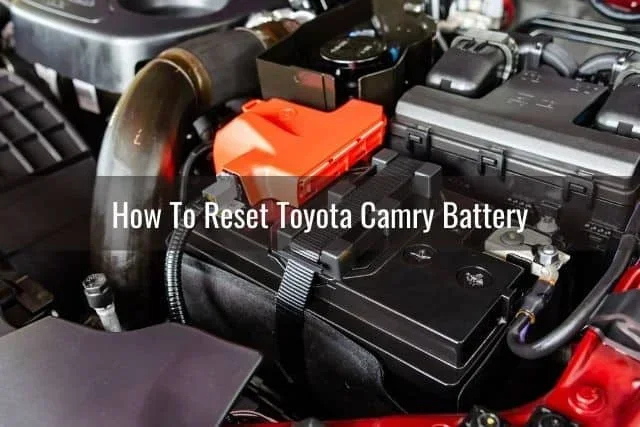
Always disconnect the negative terminal first. The negative terminal is marked with a minus sign (-). It is usually the black cable.
Use your wrench to loosen the nut on the negative terminal clamp. Once loose, carefully lift the cable off the battery post. Tuck the cable away from the battery so it cannot accidentally touch the terminal.
Why negative first? Disconnecting the negative terminal breaks the ground connection. This prevents accidental short circuits. If you disconnect the positive terminal first, a wrench touching metal parts of the car can create a spark.
Step 4: Wait the Required Time
Set a timer for 15 to 30 minutes. Go do something else while you wait. This is the period where the ECU fully discharges and resets.
Do not reconnect the battery early. The capacitors need time to drain completely. If you reconnect too soon, the reset may not take effect.
Step 5: Reconnect the Battery
After waiting, it is time to reconnect. Always reconnect the positive terminal first. The positive terminal is marked with a plus sign (+). It is usually the red cable.
Place the positive cable back on the battery post. Tighten the nut securely. Then reconnect the negative terminal and tighten it as well.
Why positive first on reconnect? Reconnecting positive first ensures the electrical system powers up in the correct order. It reduces the risk of sparks near the battery, where hydrogen gas could be present.
Step 6: Start the Engine and Check Your Toyota
Turn the ignition on and start the engine. You may notice a few things right away.
- The check engine light may stay on for a few seconds. This is normal.
- The radio will be blank. You will need to reprogram your presets.
- The clock will reset to 12:00. You will need to set the time again.
- The power windows may need recalibration. Try rolling each window up and down fully.
Drive your Toyota for at least 50 to 100 miles after the reset. This gives the ECU time to relearn your driving patterns. The engine idle should smooth out, and fuel economy should improve.
If you need to reset your maintenance required light after the battery disconnect, our guide on how to reset your maintenance required light has you covered.
What Happens When You Disconnect the Toyota Battery
Understanding what actually happens during a battery disconnect helps you know what to expect. Let us break down the effects on different systems.
ECU Reset
The engine control unit stores fuel trim values based on your driving habits. Over thousands of miles, the ECU adapts to your style. A battery disconnect wipes this adaptive memory. The ECU starts fresh with default values.
This is helpful when you have replaced parts like oxygen sensors or the throttle body. The ECU needs to relearn the new components from scratch.
Error Codes and Check Engine Light
All stored diagnostic trouble codes get erased when you disconnect the battery. The check engine light should turn off after the reset. If it comes back on, there may be an ongoing issue that needs further diagnosis.
Keep in mind that some codes may return if the underlying problem was not fixed. The reset simply clears the stored data. It does not fix the actual mechanical problem.
Other Systems Affected
Several other systems reset when you disconnect the battery:
- Radio and infotainment: Presets and pairing information may be lost.
- Power windows: Auto-up/auto-down calibration may need to be relearned.
- Power mirrors: Memory positions may reset.
- Anti-theft system: Some Toyotas require a relearn procedure after a battery disconnect.
- Clock and date settings: These will reset to default.
Most of these are easy to reconfigure. The power window relearn process is the most involved. You simply hold the window switch in the up position for a few seconds after the window is fully closed.
Safety Tips for Disconnecting Your Toyota Battery
A battery disconnect is a simple procedure, but safety should always come first. Follow these precautions to protect yourself and your Toyota.
Wear Protective Gear
Always wear safety glasses and insulated gloves. Battery acid can cause burns. A spark near the battery could ignite hydrogen gas, which batteries naturally produce.
Work in a Well-Ventilated Area
Never work on your battery in an enclosed space. Hydrogen gas is flammable and odorless. A garage with the door open is ideal.
Keep Metal Tools Away from Both Terminals
Do not let your wrench or any metal tool touch both the positive and negative terminals at the same time. This creates a short circuit. A short circuit can melt tools, damage wiring, or even cause a fire.
Do Not Disconnect the Battery in Cold or Wet Conditions
Moisture increases the risk of electrical shorts. Wait for dry conditions if possible. Cold weather also makes batteries more fragile and prone to damage.
Check for a Memory Saver
If you want to preserve your radio presets and other settings, use a memory saver device. This small gadget plugs into the OBD-II port and provides a small amount of power while the battery is disconnected.
Some Toyota dealerships and auto parts stores carry memory savers. They are inexpensive and worth the investment if you want to avoid reconfiguring everything after the reset.
Common Mistakes to Avoid When Resetting Your Toyota Computer
Even a simple procedure like a battery disconnect can go wrong if you are not careful. Here are the most common mistakes people make.
Disconnecting for Too Short a Time
Some people disconnect the battery for only two or three minutes. This is not long enough for the ECU to fully reset. The capacitors may still hold a charge, and the adaptive memory may not fully clear.
Always wait at least 15 minutes. Thirty minutes is better for a complete reset.
Reconnecting the Battery Too Soon After a Repair
If you just replaced a part, wait at least 15 minutes after reconnecting the battery before starting the engine. This gives the new component time to initialize properly with the ECU.
Forgetting to Relearn Power Window Calibration
After a battery disconnect, power windows lose their auto-up/auto-down calibration. If you do not relearn this, the auto-stop feature may not work. Each window needs to be fully raised and then fully lowered with the switch held for a few extra seconds.
Ignoring the Check Engine Light After Reset
If the check engine light comes back on shortly after the reset, do not ignore it. This means there is still an active problem. A reset clears the light, but it does not fix the root cause.
For persistent check engine lights, a proper diagnostic scan is needed. You can use an OBD-II scanner to read the codes yourself, or visit a mechanic.
Not Driving Enough After the Reset
The ECU needs time to relearn after a reset. If you only drive a few miles, the adaptive values will not fully update. Drive at least 50 to 100 miles after the reset for the best results.
When to See a Professional Instead
A battery disconnect reset works for many common issues. But some problems need professional attention. Here are signs that you should take your Toyota to a mechanic instead of trying a DIY reset.
- The check engine light returns immediately after the reset.
- You have multiple warning lights on the dashboard.
- The Toyota will not start after reconnecting the battery.
- You hear clicking sounds when turning the key.
- The battery is more than three years old and may need replacement.
If your Toyota battery is old, a reset will not solve the problem. A weak battery cannot hold a charge, and no amount of disconnecting will fix that. Consider a battery diagnostic if you suspect your battery is failing.
Also, if you accidentally hooked your battery up backwards, do not attempt a reset yourself. Reverse polarity can cause serious damage. Have a professional inspect the electrical system first.
Frequently Asked Questions
Can I reset my Toyota computer by disconnecting the battery for just 5 minutes?
Five minutes is usually not enough time for a full reset. The ECU and its capacitors need at least 15 minutes to fully discharge. For best results, disconnect the battery for 15 to 30 minutes to ensure all stored data is cleared.
Will disconnecting the Toyota battery erase my radio presets?
Yes, disconnecting the battery will reset your radio presets, clock, and other personal settings. This is normal. If you want to keep these settings, use a memory saver device that plugs into the OBD-II port while the battery is disconnected.
How long should I drive after resetting my Toyota computer?
Drive your Toyota for at least 50 to 100 miles after the reset. This allows the ECU to fully relearn your driving habits and adapt the fuel trim and idle settings properly. Short trips right after a reset may not give the computer enough time to recalibrate.
Can I disconnect just one battery terminal to reset the computer?
Yes, disconnecting only the negative terminal is enough to reset the Toyota computer. Always disconnect the negative terminal first for safety. This breaks the ground connection and allows the ECU to discharge fully.
Will a battery reset fix a check engine light permanently?
A battery reset clears the stored codes, but it does not fix the underlying problem. If the issue that triggered the check engine light is still present, the light will come back on. Always diagnose and repair the root cause before resetting the computer.
Is it safe to disconnect the Toyota battery every month?
Occasional battery disconnects are safe, but doing it too frequently is not recommended. Frequent disconnects can wear out the battery and reset adaptive learning more often than necessary. Only disconnect the battery when you have a specific reason, such as clearing codes or after a repair.
Final Thoughts
Resetting your Toyota computer by disconnecting the battery is a simple, effective, and free fix. The key is knowing how long to leave the battery disconnected. For most Toyota models, 15 to 30 minutes is the perfect amount of time. This gives the ECU enough time to fully reset without causing unnecessary side effects.
Always follow the safety steps. Disconnect the negative terminal first, wait the right amount of time, and reconnect the positive terminal first. After the reset, drive your Toyota for at least 50 to 100 miles so the computer can relearn your driving patterns.
A Toyota battery disconnect reset can solve many common issues, from check engine lights to rough idling. It is a great first step before taking your car to a mechanic. With the right timing and careful execution, you can save time and money right in your own driveway.
Remember, a battery reset is not a magic fix. It clears stored data and gives your Toyota a fresh start. If problems persist after the reset, it is time to dig deeper into the diagnosis. But for many Toyota owners, a simple battery disconnect is all it takes to get things running smoothly again.