How Do You Turn Off BSM on a Toyota Camry Right Now
How Do You Turn Off BSM on a Toyota Camry — you can do it quickly through your vehicle’s settings menu or dashboard display. The blind spot monitor (BSM) is a helpful safety feature, but there are valid reasons to disable it, such as avoiding false alerts during lane changes or towing. In just a few taps, you’ll have full control over this Toyota Camry convenience feature.
How Do You Turn Off BSM on a Toyota Camry Right Now
Have you ever been driving your Toyota Camry and noticed that annoying BSM light on the dashboard? Maybe it keeps beeping when you change lanes, or perhaps the system is giving you false alerts. Whatever the reason, learning how to turn off BSM on a Toyota Camry is something a lot of drivers need but rarely find clear instructions for. In this guide, I will walk you through every method step by step so you can disable the blind spot monitor quickly and safely.
The BSM Toyota Camry system is designed to keep you safe. It uses sensors on the rear bumper to detect vehicles in your blind spots. But there are situations where you might want to turn off BSM. Maybe you are towing a trailer and the sensors keep triggering. Or perhaps you are driving in heavy traffic and the alerts are distracting. Whatever your reason is, this guide covers it all.
Below you will find detailed instructions for different Camry model years, including the Toyota Camry 2018, Toyota Camry 2019, Toyota Camry 2020, Toyota Camry 2021, and Toyota Camry 2022 models. I will also cover what happens when you disable the system, common mistakes people make, and tips to avoid false alerts without fully turning the feature off.
Key Takeaways
- Access the infotainment settings menu to disable BSM quickly without any tools.
- BSM can be turned off in just a few taps on your screen.
- You can re-enable BSM anytime by reversing the same simple steps.
- Disconnecting your battery resets BSM settings back to factory defaults.
- Some Camry trims have a dedicated BSM toggle button on the steering wheel.
- Disabling BSM removes a key driver assistance safety feature from your vehicle.
- Always check your owner’s manual for model-specific BSM instructions and locations.
📑 Table of Contents
What Is BSM on a Toyota Camry?
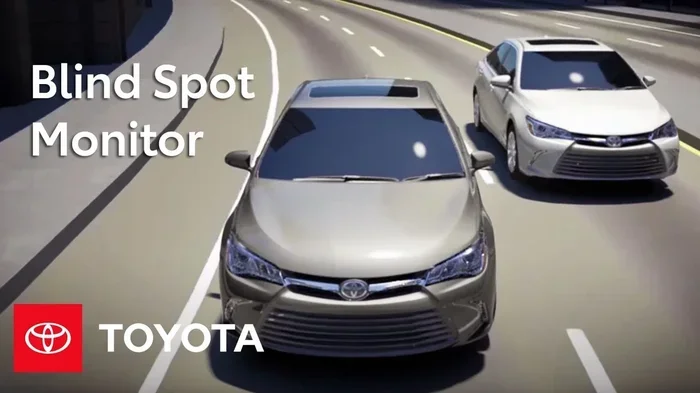
Before you learn how to disable BSM, it helps to understand what the system does. BSM stands for Blind Spot Monitor. It is a safety feature that uses radar sensors to detect other vehicles in your blind spots when you signal to change lanes.
How the BSM System Works
The Toyota Camry BSM system relies on sensors mounted near the rear bumper. These sensors scan the areas to the left and right of your vehicle. When a vehicle enters your blind spot, the system gives you a visual alert on the side mirror. In some cases, you will also hear an audible warning.
Here are the key components of the BSM system:
- Radar sensors mounted on both rear quarter panels
- Dashboard warning lights on the instrument cluster
- Mirror indicators on the left and right side mirrors
- Audible alerts that sound when you activate the turn signal
Why Drivers Want to Turn Off BSM
There are several reasons drivers look for ways to turn off blind spot monitor on their Camry. Some of the most common reasons include:
- False alerts when driving near guardrails or metal structures
- Trailer towing where the sensors get confused by the trailer width
- Heavy traffic causing constant beeping that becomes distracting
- Sensor damage from road debris or parking incidents
- Custom setups where drivers prefer other safety methods
It is important to know that turning off BSM does not turn off other safety systems like lane departure warning or pre-collision braking. These work independently. If you are dealing with issues related to other Toyota safety features, you might also want to check how to manually turn off traction control on your Toyota.
How to Turn Off BSM on a Toyota Camry
Now let us get to the main part. Turning off BSM on a Toyota Camry is actually pretty straightforward. The exact steps depend on your model year and trim level. I will cover the most common methods below.
Method 1: Using the BSM Toggle Button
Most Toyota Camry models from 2018 onward have a dedicated BSM button. Here is how to use it:
- Start your Camry and let it idle
- Look at the steering wheel area for the BSM button
- The button is usually located on the left side of the steering column
- Press the button once to turn off the system
- Check the dashboard display for a confirmation message
When BSM is off, you should see the blind spot warning light on the instrument cluster turn off as well. Some models show a message that says “Blind Spot Monitor Off” on the multi-information display.
Method 2: Through the Vehicle Settings Menu
On newer Camry models, you might need to access the settings menu to disable BSM. Follow these steps:
- Press the Settings button on the touchscreen
- Navigate to the Vehicle Settings menu
- Look for the Safety or Driver Assistance section
- Find the Blind Spot Monitor option
- Toggle it off
- Confirm your selection when prompted
This method works well on the Toyota Camry 2020 and later models with the upgraded touchscreen interface. If you have trouble finding the setting, try using the search function in the menu. Just type “blind spot” and it should pull up the right option.
Method 3: Using the Multi-Function Display Controls
Some Camry models use the steering wheel controls and the instrument cluster display to access BSM settings. Here is the process:
- Press the Menu button on the steering wheel
- Scroll to the Vehicle settings tab
- Select Driver Assistance
- Find Blind Spot Monitor
- Switch it to Off
This method is common on Toyota Camry 2018 and Toyota Camry 2019 models that do not have the full touchscreen interface.
BSM Settings by Toyota Camry Model Year
Different model years have slightly different ways to access and disable the BSM system. Here is a quick reference table to help you find the right method for your specific Camry.
| Model Year | BSM Button Location | Menu Access Available | Difficulty Level |
|---|---|---|---|
| Toyota Camry 2018 | Left steering column area | Yes, limited options | Easy |
| Toyota Camry 2019 | Left steering column area | Yes, basic settings | Easy |
| Toyota Camry 2020 | Left steering column or touchscreen | Full settings menu | Easy |
| Toyota Camry 2021 | Touchscreen settings | Yes, detailed options | Easy |
| Toyota Camry 2022 | Touchscreen settings | Yes, full customization | Very Easy |
| Toyota Camry 2023 | Touchscreen settings | Yes, full customization | Very Easy |
As you can see from the table, the process has gotten simpler with each new model year. If you are driving a Toyota Camry 2022 or Toyota Camry 2023, you should have no trouble finding the BSM toggle in the settings menu.
It is worth noting that some trim levels may have slightly different interfaces. The XSE and TRD trims, for example, have sportier dashboards but the BSM controls work the same way. If you are interested in how long your Camry can last with proper maintenance, check out this guide on Can A Toyota Camry Last 500 Miles.
What Happens When You Turn Off BSM?
Many drivers worry about safety implications when they disable BSM on their Toyota Camry. Let me be clear about what changes and what does not.
Safety Features That Stay Active
When you turn off the blind spot monitor, several other safety systems remain fully operational:
- Pre-Collision System with pedestrian detection
- Lane Departure Alert with steering assist
- Adaptive Cruise Control
- Automatic High Beams
- Forward Collision Warning
So even with BSM disabled, your Camry still has robust safety protections. The blind spot monitor is just one layer of the overall safety system.
Safety Features That Turn Off
When BSM is off, these specific alerts will not work:
- Visual warnings in the side mirrors
- Audible beeps when signaling to change lanes
- Dashboard BSM warning lights
This means you will need to rely more on your own mirrors and shoulder checks when changing lanes. If you are used to the BSM alerts, it might take a few days to adjust. Always remember to check your mirrors thoroughly before merging or changing lanes.
If you also need to manage other steering-related features on your Toyota, you can learn how to turn off steering assist in a Toyota through our detailed guide.
Common Mistakes When Disabling BSM
Over the years of helping drivers with their Toyota Camry questions, I have seen some common mistakes. Here are the ones you should avoid:
Mistake 1: Confusing BSM with Other Warning Lights
Many drivers see a warning light on the dashboard and assume it is the BSM light when it is actually a different system. The BSM warning icon looks like a car with curved lines on both sides. If you are unsure about what a warning light means, it is always a good idea to consult your owner’s manual or check the Toyota app.
Mistake 2: Not Re-Enabling BSM After Towing
If you turned off BSM because you were towing a trailer, make sure you turn it back on when you remove the trailer. The sensors are especially useful when you are pulling a wide load that extends beyond your normal rear profile.
Mistake 3: Ignoring Sensor Obstructions
Sometimes the BSM light comes on because the sensors are dirty or blocked. Before you turn off blind spot monitor, try cleaning the sensor areas on the rear bumper. A simple wipe-down can often fix false alerts without needing to disable the system entirely.
Mistake 4: Forgetting to Reset After Service
If you recently had service work done on your Camry, the BSM system might need to be reset. After any rear bumper work or sensor replacement, check that BSM is functioning properly before relying on it again.
Tips to Reduce BSM False Alerts Without Turning It Off
Not everyone wants to fully disable BSM. Sometimes you just want fewer false alerts. Here are some practical tips:
- Keep sensors clean — Wipe the rear bumper sensor areas regularly
- Adjust your driving speed — BSM is more sensitive at lower speeds in heavy traffic
- Avoid parking near metal poles — These can trigger the sensors
- Check for aftermarket accessories — Tow mirrors or bike racks can interfere with sensors
- Update your software — Toyota occasionally releases updates that improve BSM accuracy
If you are dealing with a BSM issue that keeps coming back, you might also want to check if your maintenance light is interfering with system diagnostics. Here is our guide on how to get the maint reqd light off if that is something you are dealing with alongside the BSM concern.
When Should You Keep BSM Enabled?
Even though I have shown you how to turn off BSM on a Toyota Camry, I want to be honest about when you should keep it on. The BSM system provides real value in many driving situations:
- Highway driving where lane changes are frequent
- Urban driving with heavy traffic and many lane changes
- Rush hour commutes where vehicles merge frequently
- Driving in unfamiliar areas where traffic patterns are unpredictable
- Night driving when visibility is reduced
The BSM system is especially helpful for newer drivers or anyone who is not fully comfortable with lane changes. If you fall into any of these categories, I would recommend keeping BSM enabled and using the tips above to reduce false alerts instead of fully disabling the system.
Toyota designed the Camry BSM system with safety as the top priority. The fact that you can turn it off when needed gives you flexibility, but the system is there for a reason. If you are curious about other Toyota Camry features or want to explore how the vehicle handles different situations, check out our article on using diesel injector cleaner for related vehicle maintenance tips.
Final Thoughts
So there you have it. Turning off BSM on a Toyota Camry is a simple process that most drivers can do in under a minute. Whether you use the dedicated button on the steering column, the touchscreen settings menu, or the multi-function display controls, the steps are clear and easy to follow.
Just remember to re-enable BSM when you no longer need it disabled. The blind spot monitor is one of those safety features that can genuinely help prevent accidents, especially during lane changes on busy roads. If your BSM issues persist even after following these steps, it might be worth visiting a Toyota dealer to check the sensors and system diagnostics.
I hope this guide has been helpful in showing you exactly how to turn off BSM on a Toyota Camry. Drive safe, stay aware, and enjoy the confidence that comes from knowing your vehicle is set up the way you want it.
Frequently Asked Questions
How Do You Turn Off BSM on a Toyota Camry?
To turn off the Blind Spot Monitor on a Toyota Camry, locate the BSM button near the steering wheel, usually on the left side of the instrument cluster. Press and hold the button for a few seconds until the BSM indicator light on the dashboard turns off. Keep in mind that the exact button location may vary slightly depending on your Camry model year.
Can You Temporarily Disable BSM on a Toyota Camry?
Yes, you can temporarily disable the Blind Spot Monitor by pressing the BSM toggle button, which is typically found on the left side of the dash near the turn signal lever. The system will remain off until you manually turn it back on or restart the vehicle. This is useful if you find the alerts distracting during certain driving conditions.
Where Is the BSM Button Located on a Toyota Camry?
The BSM button on most Toyota Camry models is located on the left side of the instrument panel, close to the steering column and turn signal controls. It usually has an icon that looks like a car with curved lines on both sides representing the blind spots. If you are having trouble finding it, check your owner’s manual for the exact location for your specific model year.
Why Does My Toyota Camry BSM Keep Turning Back On?
The Blind Spot Monitor on a Toyota Camry may reactivate automatically after you restart the engine, as the system defaults to the on position each time the car starts. Some models also have settings that re-enable BSM after a certain period of driving. To keep it off, you will need to manually press the BSM button again after each ignition cycle.
Does Turning Off BSM Affect Other Safety Features on a Toyota Camry?
No, turning off the Blind Spot Monitor does not disable other safety systems like lane departure alert or pre-collision braking on a Toyota Camry. Each safety feature operates independently, so disabling BSM only stops the blind spot warnings. Your vehicle will still have full access to all other active safety technologies.
How Do You Reset the BSM System After Turning It Off on a Toyota Camry?
To reset the BSM system, simply turn the vehicle off and then restart it while pressing the BSM button to reactivate the feature. You should see the BSM indicator light on the dashboard come back on, confirming the system is active again. If the system does not reset properly, try disconnecting the battery for a few minutes and reconnecting it.