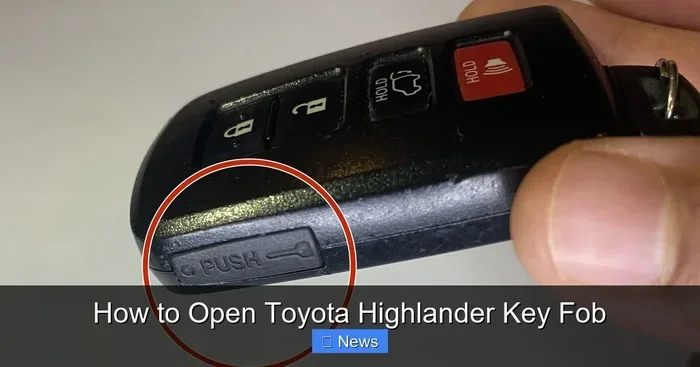
How Do I Open a Toyota Key Fob Simple Easy Fix Guide
Opening a Toyota key fob is easier than most people think. This guide walks you through every step, from prying open the case to replacing the battery and fixing common problems. You will learn the tools you need, the right technique, and how to avoid damaging your Toyota key fob in the process.
Have you ever stood by your Toyota car, ready to go, and realized your Toyota key fob just would not open? Maybe the buttons stopped responding, or the remote range got really short. Before you call a dealer or spend money on a replacement, here is the truth: in most cases, you just need to open that little fob and swap the battery.
This guide shows you exactly how to open a Toyota key fob the easy way. We cover every Toyota model, the tools you need, and the step-by-step process so you do not have to guess. Whether you drive a Toyota RAV4, a Toyota Camry, or any other Toyota model, this guide has you covered.
You will also learn how to troubleshoot common problems, replace the battery correctly, and avoid mistakes that damage your Toyota smart key. Let us get into it.
Key Takeaways
- You only need a small flathead screwdriver or a coin to open most Toyota key fobs without any special tools.
- Replacing the battery is the most common reason people need to open their Toyota key fob in the first place.
- Forcing the case open can cause damage, so always use gentle pressure and the right technique.
- A dead battery is the number one cause of a Toyota key fob not working, and a fresh CR2032 battery usually fixes it.
- Knowing how your specific Toyota model’s key fob works helps you avoid mistakes and saves time.
- Regular maintenance every 12 months keeps your Toyota smart key working reliably for years.
📑 Table of Contents
- Why You Need to Know How to Open Your Toyota Key Fob
- Tools You Need to Open a Toyota Key Fob
- How to Open a Toyota Key Fob Step by Step
- Common Toyota Key Fob Problems and How to Fix Them
- Toyota Key Fob Battery Replacement Tips
- How Often Should You Replace Your Toyota Key Fob Battery
- When to Seek Professional Help
- How to Keep Your Toyota Key Fob in Great Shape
- Key Takeaways
- Frequently Asked Questions
Why You Need to Know How to Open Your Toyota Key Fob
Your Toyota key fob is a small but mighty device. It lets you lock, unlock, and even start your car without touching the key directly. But like all battery-powered devices, the Toyota remote key eventually needs attention. Here is why knowing how to open it matters:
- Battery replacement is the most common reason. A dead key fob battery means your remote stops working, and you might get locked out.
- Button problems happen over time. Dirt, moisture, or worn contacts can make buttons stick or stop working.
- Water damage can get inside the fob. Opening it lets you dry things out before the damage gets worse.
- Programming or resetting sometimes requires you to access the internal components of your Toyota push button start key.
- Cost savings. You can fix most issues yourself instead of paying a dealer or locksmith hundreds of dollars.
Most Toyota key fobs use a common CR2032 coin battery. This battery lasts about two to three years under normal use. When it starts to die, you will notice the Toyota key fob range getting shorter or buttons becoming less responsive. That is your signal to open it up and replace the battery.
Tools You Need to Open a Toyota Key Fob
Good news: you do not need fancy tools. Most people already have everything at home. Here is what you need:
- A small flathead screwdriver or a thin plastic pry tool. This is the main tool for popping open the fob case.
- A CR2032 battery. This is the standard battery used in most Toyota key fobs. You can find one at any grocery store or pharmacy.
- A clean cloth. This helps you wipe down the inside of the fob before putting it back together.
- A coin. In some Toyota models, a quarter or a small coin works just as well as a screwdriver to twist open the key blade cover.
- Good lighting. You want to see what you are doing, especially when prying the case apart.
Pro tip: avoid using metal tools that can scratch the fob casing. A plastic pry tool works great and protects the finish of your Toyota remote key. If you do not have one, a butter knife wrapped in a soft cloth also works in a pinch.
How to Open a Toyota Key Fob Step by Step
Now for the part you have been waiting for. Opening a Toyota key fob is straightforward once you know the right method. Different Toyota models have slightly different fob designs, but the general process is very similar. Let us walk through it.
Step 1: Remove the Key Blade (If Applicable)
Many Toyota key fobs have a hidden mechanical key blade inside. To access it, look for a small button or slider on the side of the fob. Press or slide it, and the key blade pops out. This step is important because the key blade often covers the seam where the fob case opens.
Once the key blade is out, set it aside in a safe place. You will see a small seam or gap along the edge of the fob. This is where you will start prying.
Step 2: Find the Seam and Start Prying
Hold the fob with the buttons facing down. Look for the thin gap where the two halves of the case meet. Insert your flathead screwdriver or plastic pry tool into that gap. Go slowly and gently. You should feel the clip release as you work around the edge.
Do not force it. Toyota key fob cases are held together with small plastic clips. If you use too much pressure, you can break those clips. Work your way around the entire edge until the top half of the case lifts off.
If you are wondering how this compares to opening other types of keys, check out our guide on how do you pop a key for more useful techniques.
Step 3: Lift the Case and Inspect the Inside
Once the case is open, you will see the circuit board, the battery, and the buttons on the inside. The battery is usually held in place by a small metal clip or a plastic tab. Take a moment to look at the battery orientation. Note which side faces up. This matters when you put the new battery in.
Look for any signs of damage or corrosion. If you see green or white buildup on the battery contacts, gently clean it with a dry cloth. If the circuit board looks damaged or has burn marks, you may need professional help.
Step 4: Replace the Battery
Now it is time to swap in the new battery. Use your screwdriver or a plastic tool to gently lift the old battery out. Make sure you remove it completely. Then, place the new CR2032 battery in the same orientation as the old one. The positive side (marked with a plus sign) usually faces up.
Press the battery down gently until it sits flat. The metal clip should hold it in place. Do not force the battery. It should snap in with very little effort.
After replacing the battery, test the fob before closing the case. Press any button and check if the car responds. If it does, you are good to go. If not, double-check the battery orientation and make sure the battery is seated properly.
Step 5: Close the Case
Line up the two halves of the fob case. Press them together firmly but gently. You should hear the clips click into place. Make sure there are no gaps or uneven edges. If the case does not sit flush, open it back up and check for any debris or misaligned parts.
Slide the key blade back in if your fob has one. Your Toyota key fob should now be fully functional again.
Common Toyota Key Fob Problems and How to Fix Them
Opening your Toyota key fob is only half the battle. Sometimes, the problem is not just the battery. Here are the most common issues and how to fix them.
The Fob Buttons Are Sticky or Unresponsive
If the buttons feel gummy or do not press properly, dirt and grime have probably built up inside. Take a cotton swab dipped in a tiny amount of rubbing alcohol and gently clean around each button. Let it dry completely before putting the case back together. This simple fix resolves the problem in most cases.
The Fob Works But the Car Does Not Respond
This can happen if the Toyota key fob needs to be reprogrammed. Sometimes, after a battery change, the fob loses its pairing with the car. Try holding the fob close to the push button start and pressing the start button. If that does not work, you may need to reprogram the fob. Check out our article on can a Toyota key be reprogrammed for detailed instructions.
The Fob Stopped Working After Getting Wet
If your Toyota remote key got wet, open it up immediately and remove the battery. Let all the parts air dry completely before putting a new battery in. Do not use a hair dryer on high heat, as this can damage the circuit board. If the fob still does not work after drying, the circuit board may need replacement.
The Key Fob Range Is Getting Shorter
A shortening range is a classic sign of a dying battery. The signal weakens as the battery loses charge. Replace the battery and the range should return to normal. If it does not, the fob antenna in your car might be the issue, which requires a different fix.
Toyota Key Fob Battery Replacement Tips
Replacing the battery in your Toyota key fob is simple, but a few tips can make the process even smoother. Here are some things to keep in mind:
- Always use a fresh CR2032 battery. Cheap or old batteries from the back of a drawer may not work reliably. Buy from a reputable brand like Energizer or Duracell.
- Do not touch the circuit board with your fingers. Oils from your skin can corrode the contacts over time. If you need to hold the board, touch the edges only.
- Keep the old battery for reference. Note the voltage and orientation before you discard it. This helps you install the new battery correctly.
- Work on a soft surface. A towel or cloth prevents the small parts from rolling away and protects the fob from scratches if you drop it.
- Dispose of old batteries properly. Do not throw them in the regular trash. Many stores have battery recycling bins.
Most Toyota key fobs also work with models like the Toyota RAV4 key fob, Toyota Camry key fob, and Toyota Highlander key fob. The battery type and opening method are generally the same across these models, so the steps above apply to most Toyota vehicles.
If you drive a Toyota and rely on the keyless entry system, you should also know that you can still drive your Toyota even without the key fob in some situations. Learn more in our guide on can I drive my Toyota without the key fob.
How Often Should You Replace Your Toyota Key Fob Battery
A Toyota key fob battery typically lasts between two and three years. However, this depends on how often you use the fob and the distance between you and the car. If you live far from your car and the fob has to work harder to send a signal, the battery may drain faster.
Here are some signs your battery is about to die:
- The fob range gets shorter. You have to stand closer to the car for it to unlock.
- Buttons respond slowly. There is a delay between pressing the button and the car reacting.
- The push button start does not recognize the fob. This is especially noticeable in cold weather when the battery is already under stress.
- The dashboard shows a low battery warning. Some newer Toyota models alert you when the key fob battery is low.
Replacing the battery before it fully dies prevents you from getting stranded. Make it a habit to replace the battery once a year or at the first sign of weakness. This keeps your Toyota smart key working at full performance.
When to Seek Professional Help
Most Toyota key fob issues can be fixed at home with a new battery and a screwdriver. But there are times when professional help is the right call. Here is when to consider it:
- The circuit board is damaged. If you see burn marks, cracked components, or corrosion that will not clean off, a professional can repair or replace the board.
- The fob still does not work after a battery change. This could indicate a deeper issue with the fob or the car’s receiver system.
- You need to reprogram the fob. Some Toyota models require dealer-level equipment to reprogram the Toyota remote key after a battery change or fob replacement.
- The key blade is broken or stuck. If the mechanical key inside the fob is damaged, a locksmith can help you get a replacement.
Dealers and locksmiths can also help with Toyota key fob programming if you need a new fob altogether. While buying a replacement fob from the dealer can be expensive, it ensures full compatibility and warranty coverage.
How to Keep Your Toyota Key Fob in Great Shape
Prevention is always better than repair. Here are simple habits that extend the life of your Toyota key fob:
- Keep the fob dry. Moisture is the enemy of electronics. Do not leave your fob in the rain or near liquids.
- Store it properly. Keep the fob in your pocket or a dedicated tray. Avoid throwing it loose in a bag where it can get crushed or hit by other objects.
- Replace the battery on a schedule. Do not wait until the fob stops working. A yearly battery change keeps everything running smoothly.
- Clean the buttons gently. Use a soft cloth with a tiny bit of rubbing alcohol to wipe down the buttons and the fob surface.
- Avoid extreme temperatures. Leaving the fob in a hot car or in freezing weather can shorten the battery life and damage the internal components.
These simple steps take only a few minutes but save you from headaches down the road. A well-maintained Toyota key fob works reliably for years.
Key Takeaways
- Opening a Toyota key fob requires only a flathead screwdriver or plastic pry tool. You do not need expensive equipment.
- The most common reason to open a Toyota key fob is to replace the CR2032 battery. This fixes most issues with unresponsive buttons and short range.
- Go slowly when prying the case open. Toyota fob cases use plastic clips that can break if you force them.
- Clean the inside gently before reassembling. Remove any dirt or corrosion from the battery contacts for the best connection.
- Replace the battery every two to three years to prevent unexpected failures and keep your Toyota push button start system working smoothly.
- Seek professional help if the circuit board is damaged or if the fob needs reprogramming after a battery change.
Frequently Asked Questions
What type of battery does a Toyota key fob use?
Most Toyota key fobs use a CR2032 battery. This is a common 3-volt coin battery that you can find at any grocery store, pharmacy, or electronics shop. Always check your Toyota owner’s manual to confirm the exact battery type for your specific model.
Can I open my Toyota key fob without a screwdriver?
Yes. A small coin or a plastic spudger works just as well as a screwdriver for most Toyota key fobs. The key is to use something thin and flat to slide into the seam where the two halves of the fob meet. Avoid using sharp metal tools that could scratch or damage the case.
Why does my Toyota key fob stop working after I replace the battery?
This usually means the battery is not installed correctly. Check that the positive side faces up and that the battery is fully seated in the compartment. If the battery is installed correctly and the fob still does not work, the fob may need to be reprogrammed or the circuit board could be damaged.
How do I know when to replace my Toyota key fob battery?
Look for signs like reduced range, slow button response, or a warning light on your dashboard. Most Toyota owners replace the battery every two to three years as a preventive measure. If you notice any of these symptoms, opening the fob and checking the battery is the first step.
Can I drive my Toyota if the key fob battery dies?
In most Toyota models, you can still start the car even with a dead key fob battery. Hold the fob directly against the push button start, and the car should recognize it. Some models also have a backup mechanical key hidden inside the fob that you can use to unlock the doors manually.
How much does it cost to replace a Toyota key fob battery?
A CR2032 battery costs just a few dollars at most stores. The real cost is your time, which is only about five to ten minutes. This makes battery replacement one of the cheapest and easiest car maintenance tasks you can do yourself.