Simple Steps to Enter the Radio Code on a Honda Civic
Entering the radio code on a Honda Civic is a straightforward process that anyone can do at home. You just need your radio code, the serial number, and a few minutes of your time. This guide walks you through every step, from finding your code to successfully unlocking your car stereo. We also cover common problems and tips to prevent future lockouts.
Have you ever turned the key in your Honda Civic and seen a strange code blinking on the radio display? It can feel frustrating, especially when you just want to hear your favorite music. But here is the good news. Entering the radio code on a Honda Civic is much simpler than most people think. You do not need to be a mechanic or a tech expert. With the right steps and a little patience, you can have your car audio system up and running in just a few minutes. This guide gives you everything you need. We explain how to find your code, how to enter it correctly, and what to do if things go wrong. By the end, you will feel confident handling this common Honda Civic situation on your own.
The radio lockout on a Honda Civic is a security feature. It is designed to protect your car audio system from theft. When the battery dies or gets disconnected, the system activates and asks for a code. This keeps thieves from stealing and using your stereo in another vehicle. While it is annoying when it happens to you, it is actually a great feature. The key is knowing how to work with it. That is exactly what this article teaches you. We also share practical tips and real-world advice that make the whole process smooth and stress-free.
Key Takeaways
- Finding your code is easy: Check the owner’s manual, the radio serial number, or contact your Honda dealership.
- The process takes minutes: You just need to press and hold the CODE button and enter digits using preset buttons.
- Wrong entries have limits: Too many failed attempts can lock the radio further, so be careful.
- Write your code down: Keeping a record of your radio code prevents future headaches.
- Professional help is always available: A Honda dealership or auto audio shop can assist if you are stuck.
- Prevention is simple: Store your serial number and code in a safe place for easy access later.
📑 Table of Contents
- What Is a Honda Civic Radio Code and Why Does It Matter?
- How to Find Your Honda Civic Radio Code
- Step-by-Step Guide to Enter the Radio Code on a Honda Civic
- Common Problems When Entering the Radio Code
- Tips to Prevent Radio Code Lockouts
- When to Seek Professional Help for Honda Civic Radio Issues
- How Your Car Audio System Fits Into Overall Vehicle Care
- Final Thoughts on Entering the Radio Code on Your Honda Civic
What Is a Honda Civic Radio Code and Why Does It Matter?
A Honda Civic radio code is a unique number that unlocks your car stereo after a power loss. Think of it like a password for your car audio system. Every Honda Civic has one. It is tied to the specific radio unit installed in your vehicle. Without the correct code, the radio will not play. You will only see a blank screen or a flashing display.
This system is part of Honda’s anti-theft radio design. It is not a flaw. It is a built-in security measure. When someone disconnects your battery or pulls out your radio, the code prevents them from using it. This makes Honda Civics less attractive targets for car thieves. For you as the owner, it means you need to keep your code safe and accessible.
How the Anti-Theft System Works
The Honda Civic anti-theft radio system is smart but simple. Here is how it works in everyday terms.
- When you disconnect the battery or it dies completely, the radio loses power.
- When power returns, the radio enters lockout mode.
- A code prompt appears on the digital display.
- You must enter the correct code to unlock the stereo.
- If the wrong code is entered too many times, the system goes into a deeper lockout.
Understanding this process helps you stay calm when it happens. It is not a broken radio. It is a security feature doing its job. Your task is simply to provide the right code. And that is what the rest of this guide covers.
How to Find Your Honda Civic Radio Code
Before you can enter the code, you need to find it. There are several ways to do this. Most Honda Civic owners can locate their code without much effort. The method you choose depends on what resources you have available. Let us walk through each option.
Check the Owner’s Manual First
Your owner’s manual is the first place to look. Honda includes the radio code in the manual for most model years. Flip through the pages until you find the section about the audio system or radio. The code is often printed on a card or sticker inside the manual sleeve. Some owners peel off this card and lose it over the years. If you still have your manual, check it carefully.
Locate the Radio Serial Number
If the manual is missing, you can find the serial number on the radio unit itself. Follow these steps to locate it.
- Turn off the ignition and remove the key.
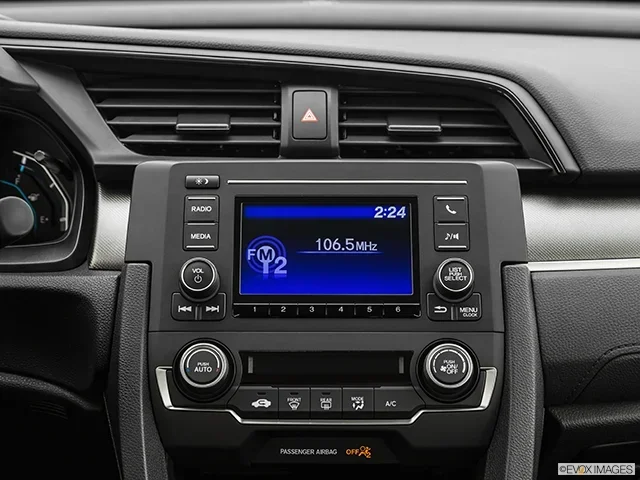
- Press and hold the 1 and 6 buttons on the radio simultaneously.
- Turn the ignition to the ON position without starting the engine.
- The radio display will show a two-letter prefix followed by numbers.
- Write down this code exactly as it appears.
This serial number is your key to retrieving the radio code. You can use it to look up the code online or provide it to a Honda dealership. The serial number is unique to your radio unit, so it works every time.
Contact a Honda Dealership
If you cannot find the code or serial number, your Honda dealership can help. Bring your vehicle identification number and proof of ownership. The dealership can look up your radio code in their system. This is a reliable option, though it may take a little time. Some dealerships provide this service for free. Others may charge a small fee. It is always worth calling ahead to ask.
You can also use online radio code generators. These tools let you enter your serial number and receive the code instantly. Just make sure you use a reputable site. And remember that the code you receive should match your specific radio model.
Step-by-Step Guide to Enter the Radio Code on a Honda Civic
Now that you have your code, it is time to enter it. The process is simple and follows a clear sequence. Make sure you are in a safe, parked location before you begin. You will need your ignition key and the radio code ready.
Step 1: Turn on the Ignition
Insert your key into the ignition switch and turn it to the ON position. Do not start the engine. You just need the radio to have power. The radio display should light up. If you see a code prompt or a series of dashes, you are ready for the next step.
Step 2: Press and Hold the CODE Button
Locate the CODE button on your Honda Civic radio. It is usually on the left side of the unit. Press and hold this button for about two seconds. The display will change. You should see the word CODE appear or a blinking cursor show up. This tells you the radio is ready to accept your code.
Step 3: Enter the Code Using Preset Buttons
Use the preset buttons (1, 2, 3, 4, 5, 6) to enter each digit of your code. For example, if your code is 3-4-5-6, you press preset button 3, then 4, then 5, then 6. Each press should register a digit on the display. Go slowly and make sure each number is correct before moving to the next one.
Step 4: Confirm the Code
After entering all the digits, press and hold the CODE button again. The radio should unlock and return to normal operation. You will see the radio frequency or your last station on the display. If the code is correct, you are all set. If not, the display will show an error, and you will need to try again.
Remember that you usually get only a few attempts before the system locks you out for a period of time. So take your time and double-check each digit. Accuracy matters more than speed here.
What If You Enter the Wrong Code?
Making a mistake is normal. But entering the wrong code too many times can cause problems. Most Honda Civic radios allow three to five attempts before a time lockout kicks in. During this lockout period, you cannot try again. You must wait for the timer to expire, which can take anywhere from one minute to over an hour depending on the model year.
If this happens, do not panic. Simply turn off the ignition and wait. When the lockout period ends, try again with the correct code. This is why it is so important to have your code written down and stored safely before you need it.
Understanding the Display Messages
The radio display on a Honda Civic gives you helpful clues. Here is what common messages mean.
- CODE: The radio is waiting for you to enter the code.
- — or blank screen: The radio is in standby mode.
- SEC: The system is in a security lockout period.
- Error or beeping: The code you entered was incorrect.
Knowing what these messages mean helps you respond correctly. It also reduces frustration when the process takes longer than expected.
Common Problems When Entering the Radio Code
Even with the right code, you may run into issues. These problems are common and usually easy to fix. Let us look at the most frequent ones.
One common issue is the radio display not showing the CODE prompt. This usually happens when the ignition is not in the right position. Make sure you are in the ON position, not the ACC position. The radio needs full power to enter code mode.
Another problem is the radio not responding to button presses. Try pressing the buttons more firmly. Sometimes the buttons are sticky or unresponsive after a battery disconnect. Cleaning the buttons gently with a soft cloth can help.
If the radio still does not unlock after entering the correct code, the code itself may be wrong. This happens when owners mix up codes from different vehicles or use an incorrect serial number lookup. Double-check that the code matches your serial number exactly.
Some owners report that the radio works fine but the display shows strange characters after entering the code. This is usually a temporary glitch. Turn the radio off and back on. The display should return to normal.
For owners who have modified their car audio system, the original radio code may not work. Aftermarket radios or replaced units have different codes. In these cases, you need the code for the new radio, not the original one.
Tips to Prevent Radio Code Lockouts
Prevention is always better than cure. Taking a few simple steps now can save you from the headache of a radio lockout later. Here are the best practices every Honda Civic owner should follow.
Write Down Your Code and Store It Safely
As soon as you get your radio code, write it down. Keep it in your owner’s manual or in a safe place at home. Some owners take a photo of the code with their phone. Others write it on a small card and keep it in the glovebox. Whatever method you choose, make sure it is somewhere you can find it when you need it.
Keep the Serial Number Handy
Your radio serial number is just as important as the code itself. Write both down together. If you ever need to retrieve the code again, having the serial number saves you time and effort.
Avoid Unnecessary Battery Disconnects
Every time you disconnect your battery, the radio lockout activates. If you are doing Honda Civic maintenance that requires a battery disconnect, be prepared to enter the code when you reconnect. Plan ahead and have your code ready before you start any work.
Also, if you notice your battery is dying frequently, address the issue quickly. A dead battery means a radio lockout. Keeping your battery in good condition prevents this from happening unexpectedly.
Use a Memory Saver Device
A memory saver device keeps power flowing to your car’s electronics when you disconnect the battery. This prevents the radio lockout from activating in the first place. These devices are inexpensive and easy to use. They plug into the OBD-II port or attach directly to the battery. If you do regular Honda Civic maintenance or work on your car frequently, a memory saver is a smart investment.
When to Seek Professional Help for Honda Civic Radio Issues
Most radio code entries go smoothly. But sometimes you need professional help. Knowing when to call in the experts saves you time and prevents mistakes.
Visiting a Honda Dealership
If you have tried everything and the radio still will not unlock, visit your Honda dealership. They have the tools and expertise to retrieve your code and unlock the radio. Bring your proof of ownership and vehicle registration. The process is quick and usually straightforward. Most dealerships handle radio lockouts regularly, so you will be in good hands.
If you are comparing ownership experiences, you might wonder about other brands. For example, many owners ask Are Toyotas Difficult to Work On because they want to understand how different brands compare in terms of owner-friendly maintenance. The good news is that Honda Civics are generally just as easy to work on as Toyota vehicles when it comes to basic tasks like radio code entry.
Independent Auto Audio Shops
Independent auto audio shops are another great option. They often specialize in car stereo systems and can handle radio lockouts efficiently. They may also offer upgrades or replacements if your radio is old or damaged. Just make sure the shop has experience with Honda vehicles. A knowledgeable technician can get your radio working quickly and correctly.
When the Radio Unit Itself Needs Replacement
In rare cases, the radio unit itself may be faulty. If the display is cracked, buttons are not working, or the unit does not respond at all, replacement may be necessary. A Honda dealership can order the correct replacement unit. An independent shop can also install aftermarket options if you prefer an upgrade.
When replacing a radio, always ask the technician to provide your new radio code. Store it safely this time. This small step prevents future lockouts and keeps your car audio system running smoothly.
How Your Car Audio System Fits Into Overall Vehicle Care
Your Honda Civic is more than just a way to get from point A to point B. It is a machine with many interconnected systems. The radio is one small part of a larger whole. Taking care of your car audio system is part of overall vehicle care. Just like you check your oil and tire pressure regularly, keeping your radio unlocked and functional is part of the ownership experience.
Beyond the radio, many Honda Civics come equipped with modern infotainment features. These systems add convenience and enjoyment to your daily drives. For those interested in exploring other car technology features, many owners also want to change the voice on Toyota Navigation systems, showing how car audio customization spans across different brands and models. The principles are similar, and understanding your own system first makes learning about others easier.
Protecting your car’s systems also protects its value. A well-maintained Honda Civic with a working radio and clean interior holds its value better. Whether you plan to keep your car for years or sell it eventually, these small details matter. Think of the radio code as just one piece of the puzzle that keeps your vehicle running at its best.
Final Thoughts on Entering the Radio Code on Your Honda Civic
Entering the radio code on a Honda Civic does not have to be a stressful experience. With the right preparation and a little knowledge, you can handle it confidently. Remember to find your code first, follow the steps carefully, and avoid too many wrong attempts. Keep your serial number and code stored safely for future reference.
If you ever feel stuck, your Honda dealership or a trusted auto audio shop is always ready to help. These professionals deal with radio lockouts every day. They can get your stereo working again in no time. The most important thing is to stay patient and work through the process methodically.
Your Honda Civic is a reliable, well-built vehicle. The radio code lockout is just a small security feature in an otherwise smooth-running machine. By following this guide, you have the tools and knowledge to handle it like a pro. Keep this article bookmarked for future reference, and enjoy your music on every drive.
Frequently Asked Questions
How do I find the radio code for my Honda Civic?
You can find the radio code in your owner’s manual, by looking up the radio serial number, or by contacting your Honda dealership. The serial number is displayed on the radio screen when you press and hold the 1 and 6 buttons with the ignition on. Use this serial number to retrieve your code online or from a dealer.
What do I do if I enter the wrong radio code too many times?
If you enter the wrong code too many times, the radio will enter a time lockout period. During this time, you cannot try again. Turn off the ignition and wait for the lockout timer to expire, which can take anywhere from a few minutes to over an hour. Then try entering the correct code again.
Can I enter the radio code without the ignition in the ON position?
No, you must have the ignition in the ON position for the radio to accept the code. The radio display needs power to show the CODE prompt and register your button presses. Simply turning the key to ON without starting the engine is enough.
Will disconnecting the battery reset the radio code?
No, disconnecting the battery does not reset the radio code. Instead, it activates the anti-theft lockout. After reconnecting the battery, you will need to enter the correct code to unlock the radio. This is by design to prevent theft.
How long does it take to enter the radio code on a Honda Civic?
The actual process takes less than a minute once you have your code. Finding the code beforehand may take a few extra minutes if you need to look up the serial number or contact a dealership. Having your code ready before you start makes the whole process quick and easy.
What if my Honda Civic radio still does not unlock after entering the correct code?
If the radio does not unlock after entering the correct code, the code may not match your specific radio unit. Double-check that the serial number you used to retrieve the code matches the one displayed on your radio. If the problem persists, visit a Honda dealership or auto audio shop for professional assistance.
=== CONCLUSION ===
Entering the radio code on a Honda Civic is a simple process once you know the steps. Find your code using the owner’s manual or serial number, then follow the button sequence to unlock your stereo. Avoid common mistakes like rushing through the entry or making too many wrong attempts. Store your code and serial number safely to prevent future lockouts. With the right approach, you can keep your Honda Civic radio working perfectly for years to come.