How to Add Navigation to an Infiniti QX60 Complete Guide
Adding navigation to an Infiniti QX60 is easier than you think. Whether your QX60 came without a built-in GPS system or you want to upgrade an older unit, there are several reliable paths to get turn-by-turn directions on your dashboard. This guide covers OEM navigation packages, aftermarket head units, smartphone integration, and installation tips so you can choose the best option for your budget and driving needs.
Adding navigation to an Infiniti QX60 can transform how you drive. Whether you navigate city streets or take long road trips, having GPS guidance on your dashboard makes every journey smoother. The good news is that there are multiple ways to get navigation working on your QX60, regardless of the model year or trim level you own.
This guide walks you through every option available. We will cover factory-installed systems, aftermarket upgrades, and smartphone-based solutions. By the end, you will know exactly which path fits your needs and budget.
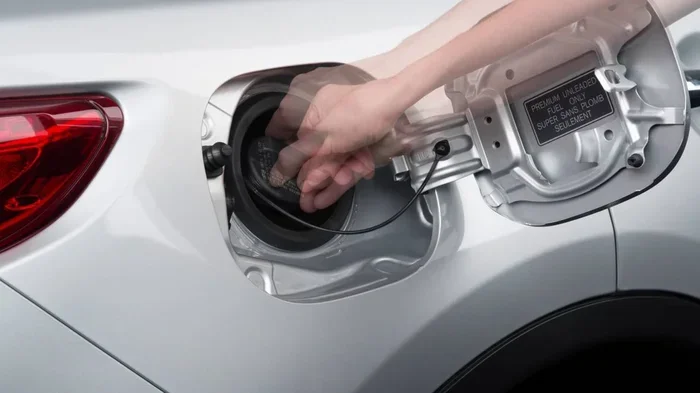
Regular gas compatibility is another important consideration for QX60 owners. Before investing in navigation upgrades, make sure your vehicle runs on the right fuel type.
The Infiniti QX60 is a popular three-row luxury SUV. It offers comfort, space, and a refined driving experience. However, not every QX60 trim comes with a built-in navigation system standard. Lower trims may include only a basic infotainment setup with a small screen and no GPS capability. This can leave drivers wanting more, especially if they frequently travel to unfamiliar areas.
Navigation adds real value to your daily driving experience. It provides turn-by-turn directions, live traffic updates, and destination search. For families who road trip often or commuters who navigate complex city routes, having a reliable GPS system is essential. The right navigation setup also boosts resale value, since many buyers look for this feature when shopping for a used luxury SUV.
Key Takeaways
- OEM Navigation Package: The factory-installed navigation system offers seamless integration with your QX60’s infotainment and display.
- Aftermarket Head Units: Brands like Garmin, Pioneer, and Alpine offer powerful upgrades with larger screens and more features.
- Smartphone Integration: Apple CarPlay and Android Auto provide free, up-to-date navigation without extra hardware costs.
- Professional vs. DIY Installation: Professional installation ensures clean wiring and warranty protection, while DIY saves money.
- Map Updates Matter: Keeping your navigation maps current ensures accurate routing and traffic data.
📑 Table of Contents
- Understanding the Infiniti QX60 Infotainment System
- Option 1: OEM Navigation Upgrade Package
- Option 2: Aftermarket Navigation Head Units
- Option 3: Smartphone-Based Navigation
- Option 4: Portable GPS Devices
- Choosing the Right Navigation Option for Your QX60
- Common Mistakes to Avoid
- Expert Tips for Getting the Most Out of Your QX60 Navigation
- Final Thoughts
Understanding the Infiniti QX60 Infotainment System
Before adding navigation, it helps to understand what your QX60 already has. Infiniti has used different infotainment systems across model years. Knowing your current setup determines the best upgrade path.
Factory Infotainment Options
Older QX60 models (2013-2020) came with an Infiniti InTouch system. This system included a basic radio, Bluetooth connectivity, and a small display screen. Higher trims offered an optional navigation package that added a larger screen, GPS receiver, and map software. The factory navigation system was reliable but had limitations. Map updates were expensive, and the interface felt dated compared to modern standards.
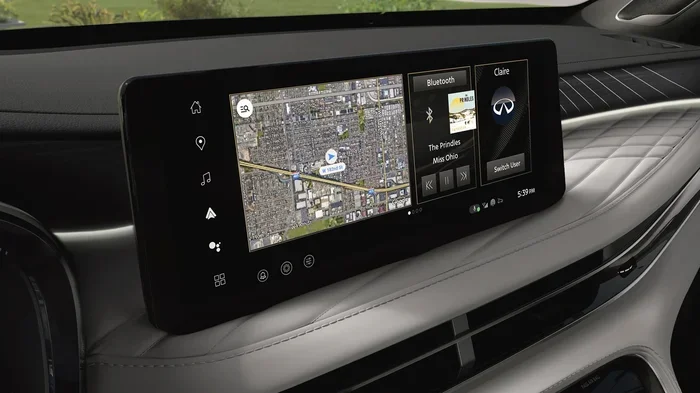
Newer QX60 models (2021 and later) feature an updated Infiniti InTouch suite. The standard system includes a larger touchscreen, wireless Apple CarPlay, and Android Auto. Even with these upgrades, the built-in navigation features remain basic. Many owners find that the map interface and routing options do not match dedicated GPS units or smartphone apps.
Identifying Your Current System
To determine what you have, look at your center console display. Check the screen size and menu options. If you see a “Navigation” option in the main menu, your vehicle may already have a GPS system installed. You can also check your owner’s manual or look up your vehicle identification number (VIN) on the Infiniti website. This tells you exactly which features came with your vehicle from the factory.
Option 1: OEM Navigation Upgrade Package
The OEM navigation package is the most seamless way to add GPS to your QX60. This factory-approved option integrates directly with your vehicle’s systems.
What the OEM Package Includes
The OEM navigation package typically includes a larger touchscreen display, a GPS antenna, updated map software, and a dedicated navigation computer. The system communicates with your vehicle’s audio and display systems. It provides voice-guided directions, points of interest search, and route planning. Because it is factory-designed, the interface matches your QX60’s dashboard perfectly.
If you are considering ordering this package, ordering lead times can vary depending on dealer availability and shipping logistics.
Pros and Cons of OEM Navigation
- Pros: Seamless integration, factory warranty coverage, clean installation, and consistent interface with the rest of the vehicle.
- Cons: Higher cost, limited map update options, older software on pre-owned vehicles, and fewer features compared to modern aftermarket units.
Cost Considerations
OEM navigation packages can cost between $1,500 and $3,500 depending on the model year and dealer. For new vehicles, adding the package at the time of purchase is often cheaper. For used QX60 models, retrofitting the OEM system requires purchasing the hardware and having a dealer or specialist install it. The cost of a brand new car with navigation included may also be worth comparing if the upgrade cost approaches the vehicle’s value.
Option 2: Aftermarket Navigation Head Units
Aftermarket head units are one of the most popular ways to add navigation to a QX60. These standalone GPS receivers replace your factory radio and offer advanced features.
Top Brands for Aftermarket Navigation
Several brands stand out in the aftermarket navigation space. Garmin offers reliable units with excellent map accuracy and traffic updates. Pioneer provides large touchscreen displays with intuitive interfaces. Alpine units deliver strong audio quality alongside navigation features. Each brand has different strengths, so choosing the right one depends on your priorities.
Features to Look For
When shopping for an aftermarket unit, consider these features:
- Screen Size: Larger screens (7 to 10 inches) improve visibility and ease of use.
- Map Software: Look for units with lifetime map updates and live traffic data.
- Connectivity: Bluetooth, Wi-Fi, and USB ports allow for music streaming and device charging.
- Apple CarPlay and Android Auto: These features let you use your phone’s navigation apps on the car’s display.
- Voice Control: Hands-free operation keeps your eyes on the road.
Installation Process
Installing an aftermarket head unit involves removing the factory radio, wiring the new unit into your vehicle’s electrical system, and mounting the display. For those comfortable with basic car electronics, a DIY installation is possible. However, professional installation is recommended for a clean, safe setup. A professional installer ensures proper wiring, antenna connection, and integration with your QX60’s existing systems.
Option 3: Smartphone-Based Navigation
Smartphone navigation apps offer the simplest and most affordable way to get GPS on your QX60. Apps like Google Maps, Waze, and Apple Maps provide reliable directions without any extra hardware.
Using Apple CarPlay and Android Auto
Modern QX60 models support Apple CarPlay and Android Auto wirelessly. These systems mirror your phone’s screen onto the car’s display. You can use any navigation app installed on your phone directly through your vehicle’s touchscreen. The maps stay up to date because they pull data from your phone’s cellular connection.
Benefits of Smartphone Navigation
- Free: Most navigation apps cost nothing to use.
- Always Current: Maps update automatically through your phone’s data connection.
- Familiar Interface: You already know how to use the app on your phone.
- No Extra Hardware: No need to purchase or install additional equipment.
Limitations
Smartphone navigation does have drawbacks. It relies on your phone’s data plan and signal strength. In areas with poor cellular coverage, maps may not load properly. Screen brightness and visibility in direct sunlight can also be an issue. Additionally, using your phone while driving can be distracting if you do not set up the route before starting your trip.
Option 4: Portable GPS Devices
Portable GPS units are a standalone alternative to built-in systems. Devices from Garmin and TomTom mount on your dashboard or windshield and provide full navigation features.
When a Portable GPS Makes Sense
Portable GPS units work well if you want flexibility. You can move the device between vehicles or use it for walking directions outside the car. They often have better map databases than older built-in systems. If you drive a QX60 that does not have any navigation capability, a portable unit is a quick and easy solution.
Drawbacks to Consider
Portable devices require a windshield mount, which can block your view. They also need regular charging and may not integrate with your car’s audio system. The smaller screens can be harder to read while driving compared to a built-in display.
Choosing the Right Navigation Option for Your QX60
Selecting the best navigation solution depends on several factors. Consider your budget, how often you use GPS, and your comfort level with technology.
Budget Comparison
| Option | Approximate Cost | Installation Complexity |
|---|---|---|
| OEM Navigation Package | $1,500 – $3,500 | Low (dealer installation) |
| Aftermarket Head Unit | $300 – $1,200 | Moderate (DIY or professional) |
| Smartphone Navigation | Free (app only) | Very Low (just connect phone) |
| Portable GPS Device | $100 – $400 | Very Low (mount and power) |
For most QX60 owners, smartphone navigation through proper device settings and CarPlay or Android Auto offers the best value. It costs nothing extra and provides the most up-to-date maps available.
Long-Term Value
Think about how long you plan to keep your QX60. If you own the vehicle for many years, investing in a quality aftermarket head unit or OEM system pays off. If you only keep the car for a few years, smartphone navigation or a portable device may be the smarter choice.
Maintenance and Updates
Keeping your navigation system current is important. Factory OEM systems often require paid map updates from the dealer. Aftermarket units usually offer free lifetime map updates. Smartphone apps update automatically as long as you have a data connection. Regular updates ensure accurate routing and help you avoid road closures or construction detours.
Common Mistakes to Avoid
- Skipping Professional Installation: Improper wiring can damage your vehicle’s electrical system. Always have a professional handle complex installations.
- Ignoring Map Updates: Outdated maps lead to incorrect directions and wasted time. Update your maps regularly.
- Choosing Based on Price Alone: The cheapest option may lack features you need. Balance cost with functionality.
- Overlooking Compatibility: Not all head units fit every QX60 model year. Verify compatibility before purchasing.
- Neglecting to Test Before Final Installation: Always test the unit before securing it permanently in your dashboard.
Expert Tips for Getting the Most Out of Your QX60 Navigation
- Set Your Home Location: Most GPS systems let you save your home address for quick route access.
- Use Voice Commands: Minimize distractions by using voice prompts to enter destinations while driving.
- Download Offline Maps: For areas with weak cell service, download maps in advance to avoid losing directions.
- Keep Your Phone Charged: If you rely on smartphone navigation, use a car charger to prevent battery drain.
- Explore Points of Interest: Navigation systems can find gas stations, restaurants, and attractions along your route.
Proper maintenance of your vehicle goes hand in hand with navigation upgrades. Regular oil changes and maintenance keep your QX60 running smoothly so you can enjoy your upgraded navigation system for years to come.
Final Thoughts
Adding navigation to an Infiniti QX60 is a worthwhile investment that enhances your daily driving and road trips. Whether you choose an OEM package, an aftermarket head unit, smartphone integration, or a portable GPS device, each option has clear advantages. The best choice depends on your budget, your vehicle’s current setup, and how you use navigation in your daily life.
Take time to evaluate your options carefully. Consider both upfront costs and long-term value. A well-chosen navigation system makes every drive more confident and enjoyable.
For owners wondering about fuel requirements, check out our guide on using regular gas in an Infiniti QX60 to make sure your vehicle is running on the right fuel before you invest in any upgrades.
Frequently Asked Questions
Can I add navigation to any Infiniti QX60 model year?
Yes, you can add navigation to virtually any QX60 model year. Options include OEM retrofit kits, aftermarket head units, and smartphone-based solutions. The best choice depends on your specific model year and current infotainment setup.
How much does it cost to add navigation to an Infiniti QX60?
Costs range from free (smartphone apps) to over $3,500 (OEM package). Aftermarket head units typically cost between $300 and $1,200 including installation. Smartphone navigation is the most affordable option.
Is it better to use Apple CarPlay or a built-in navigation system?
Apple CarPlay offers more up-to-date maps and free app options compared to most built-in systems. However, a built-in system provides a more integrated look and does not rely on your phone’s data connection. Many QX60 owners use both for different situations.
Can I install a navigation head unit myself?
DIY installation is possible if you have basic automotive electronics experience. You will need wiring harness adapters and dash kit tools. For a clean and safe installation, professional installation is recommended, especially for wiring and antenna connections.
How often do I need to update navigation maps?
OEM systems typically require updates every 1 to 2 years, often at a cost. Aftermarket units with lifetime map updates provide free annual updates. Smartphone apps update automatically through cellular data whenever you connect to the internet.
Will adding navigation void my Infiniti warranty?
Installing an aftermarket head unit may affect your warranty if it causes damage to your vehicle’s electrical system. OEM navigation packages installed by a dealer do not void your warranty. Always check with your dealer before making any modifications.
=== CONCLUSION ===
Adding navigation to your Infiniti QX60 opens up new possibilities for confident, stress-free driving. You now have multiple paths to choose from, whether you prefer the seamless factory look of an OEM system, the feature-rich experience of an aftermarket head unit, or the simplicity of smartphone navigation. Each option delivers reliable GPS guidance tailored to different budgets and preferences. Take action today and pick the solution that works best for your QX60 and your driving lifestyle.