How Much Does It Take to Replace a Car Key Battery
Replacing a car key battery typically costs between $5 and $25 for the battery itself, with dealership services ranging from $20 to $75. Most drivers can handle the replace a car key battery process at home in under five minutes using common tools. This guide covers every cost scenario, battery type, and step-by-step method so you are never left with a dead remote.
Your car key fob stops working right when you are rushing out the door. You press the button, and nothing happens. The first thought that hits most people is simple: how much does it take to replace a car key battery? The good news is that this is one of the easiest and cheapest maintenance tasks you will ever handle.
A key fob battery replacement usually costs just a few dollars if you do it yourself. Even if you choose to visit a dealership, the total expense rarely exceeds $75. In this guide, we walk through every cost scenario, every battery type, and every step you need to know. By the end, you will feel confident tackling the job on your own or making the right choice for professional help.
Key Takeaways
- Battery cost is low: Most key fob batteries cost between $5 and $25, making replacement one of the cheapest car maintenance tasks.
- Dealership vs. DIY: You can replace the battery yourself at home, but dealerships offer free or low-cost options depending on your vehicle.
- Battery types matter: CR2032 and CR2025 are the most common batteries used in car key fobs.
- Know the signs: Weak signal range and intermittent remote function are clear indicators that your key battery needs replacing.
- Post-replacement steps: After swapping the battery, you may need to reset or reprogram your key fob to restore full function.
- Driving with a dead battery: You can usually still drive your car even if the key fob battery dies, but convenience is lost.
📑 Table of Contents
- How Much Does It Cost to Replace a Car Key Battery?
- What Battery Does Your Car Key Fob Use?
- Step-by-Step Guide to Replace a Car Key Battery
- When Should You Replace Your Car Key Battery?
- Can You Still Drive Your Car If the Key Fob Battery Dies?
- What to Do After Replacing Your Key Fob Battery
- Common Mistakes When Replacing a Car Key Battery
- Expert Tips to Extend Your Key Fob Battery Life
- When to Seek Professional Help
- Final Thoughts
How Much Does It Cost to Replace a Car Key Battery?
The cost to replace a car key battery depends on several factors. Where you go, what type of key fob you have, and which battery your fob uses all play a role. Let us break down the real numbers so there are no surprises.
DIY Replacement Cost
If you buy the battery yourself and swap it at home, you will spend between $5 and $10 on the battery. CR2032 batteries are the most common and widely available at grocery stores, pharmacies, and online retailers. Some key fobs use CR2025 or CR2016 batteries, which cost a similar amount.
You do not need any special tools. A small flathead screwdriver or a coin usually does the trick. The entire process takes about three to five minutes. This is hands-down the most affordable way to handle a dead key fob battery.
Dealership Replacement Cost
Visiting a dealership for key battery replacement costs more, but it offers peace of mind. Most dealerships charge between $20 and $75 for the service. Some dealerships, however, replace key batteries for free, especially if you bought the vehicle from them or are within the warranty period.
It is always worth calling your dealer first. You might be surprised to learn that the service is complimentary. Even if there is a fee, the cost is still modest compared to most car repairs.
Third-Party Locksmith Cost
Mobile locksmiths and auto parts stores also offer key fob battery replacement services. Expect to pay between $10 and $30. Locksmiths are especially useful if your key fob is a newer smart key model that requires more careful handling during the battery swap.
| Replacement Method | Typical Cost Range | Time Required |
|---|---|---|
| DIY at Home | $5 – $10 | 3-5 minutes |
| Dealership | $20 – $75 | 15-30 minutes |
| Mobile Locksmith | $10 – $30 | 10-20 minutes |
| Auto Parts Store | $10 – $25 | 10-15 minutes |
What Battery Does Your Car Key Fob Use?
Not all key fobs use the same battery. Knowing which battery your remote needs is the first step before you attempt any replacement. Using the wrong battery can damage the fob or cause it to malfunction.
CR2032 Battery
The CR2032 is the most widely used battery in car key fobs. It is a 3-volt lithium coin cell battery found in vehicles from brands like Ford, Chevrolet, Honda, Toyota, and many others. These batteries last between two and four years under normal use.
CR2025 Battery
The CR2025 is slightly thinner than the CR2032 but works the same way. Some luxury vehicles and newer models use this battery. It is also a 3-volt lithium coin cell, and the cost is nearly identical to the CR2032.
CR2016 Battery
The CR2016 is even thinner and less common. You will find it in compact key fobs from certain European and Asian manufacturers. It is also a 3-volt battery, but its smaller size means it may need replacing more frequently.
Step-by-Step Guide to Replace a Car Key Battery
Replacing the battery in your car key is simple. You do not need any technical experience or specialized tools. Follow these steps and you will be back on the road in minutes.
Step 1: Identify the Key Fob Type
Before you start, figure out what kind of key fob you have. Most modern remotes have a small seam or groove where the two halves of the fob meet. Older models may have a visible screw on the back. Knowing your fob type helps you choose the right opening method.
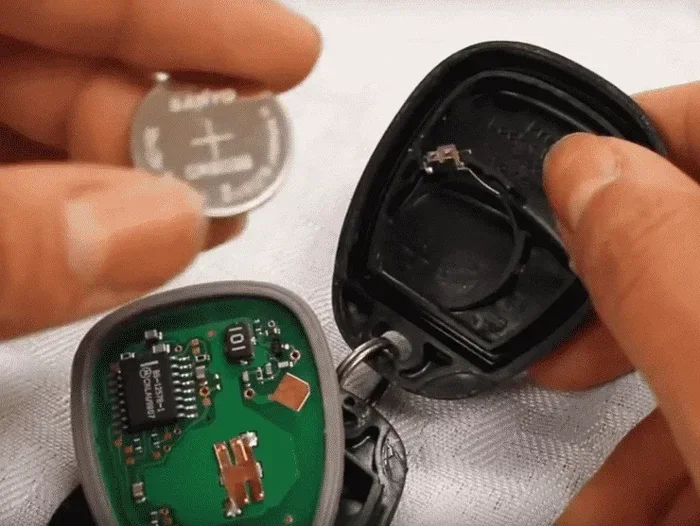
Step 2: Open the Key Fob
Use a small flathead screwdriver or a coin to pry open the fob. Insert the tool into the seam and gently twist. Work around the edges until the two halves separate. Be careful not to use too much force, as the plastic clips can break.
Step 3: Remove the Old Battery
Look at how the old battery sits inside the compartment. Note which side faces up. Most batteries pop out with a gentle push from the other side. Use a non-metallic tool like a plastic spudger or a toothpick to push the battery out safely.
Step 4: Insert the New Battery
Place the new battery in the same orientation as the old one. The positive side (marked with a +) usually faces up. Press the battery firmly into place until it clicks or sits snugly.
Step 5: Snap the Fob Back Together
Align the two halves of the fob and press them together until the clips lock. Test the remote by standing close to your car and pressing the unlock button. If the car responds, you have successfully completed the replacement.
Quick Tip: If the remote does not work after replacing the battery, try standing closer to the car and pressing the button multiple times. Some fobs need a moment to reconnect with the vehicle’s receiver system.
When Should You Replace Your Car Key Battery?
Most people do not think about their key fob battery until it stops working entirely. Recognizing the early warning signs can save you from being locked out of your car unexpectedly.
Reduced Signal Range
One of the earliest signs of a weakening battery is a shorter operating range. If you used to unlock your car from 30 feet away and now you need to stand right next to it, the battery is likely dying. This is a clear signal that it is time to replace a car key battery.
Intermittent Remote Function
If your key fob works sometimes but not others, the battery is on its way out. Intermittent function happens when the battery voltage drops below the level needed for a consistent signal. Do not ignore this symptom, as it will only get worse over time.
Warning Light on the Dashboard
Some vehicles display a warning light when the key fob battery is low. Check your owner’s manual to see if your car has this feature. If you see a battery icon or a key symbol on the dashboard, schedule a battery replacement soon.
How Long Does a Key Fob Battery Last?
A typical car key fob battery lasts between two and four years. However, usage patterns affect battery life. If you use your remote frequently or live in a cold climate, the battery may drain faster. Keeping a spare battery in your glove box is a smart habit that prevents unexpected failures.
Can You Still Drive Your Car If the Key Fob Battery Dies?
A common concern among drivers is whether a dead key fob battery means they cannot drive the car. The answer is almost always no. Most vehicles have a backup method to start the engine even when the remote is completely dead.
For push-button start vehicles, manufacturers design a backup process. You typically need to hold the key fob directly against the start button or place it in a specific location inside the cabin. The car’s antenna receives the signal from the fob even with a dead battery, as long as the fob is close enough.
For traditional key ignition vehicles, you can insert the physical key into the ignition slot. The key blade is always present in modern key fobs, even if you rarely use it. This means a dead battery does not leave you stranded.
That said, you lose the convenience of remote locking, trunk release, and panic alarm functions when the battery dies. If you frequently rely on these features, replacing the battery promptly is well worth the effort.
Also worth noting: if you are dealing with a situation where the battery has been dead for a while, you might wonder whether you can you drive a car if the key fob battery dies for extended periods. The short answer is yes, your vehicle will still function normally with the physical key or the backup start method.
What to Do After Replacing Your Key Fob Battery
Swapping in a new battery is only half the job. There are a few post-replacement steps that ensure everything works correctly. Many drivers skip these steps and then wonder why the remote still does not function properly.
Reset the Key Fob
After inserting the new battery, some key fobs need a reset. To do this, stand close to your car and press and hold both the lock and unlock buttons simultaneously for about five seconds. The doors should lock and unlock, confirming the fob has reconnected.
Reprogram if Necessary
In rare cases, especially with newer smart key systems, the fob may need reprogramming after a battery change. Check your owner’s manual for the specific reprogramming steps for your vehicle. Most manufacturers keep the process simple and straightforward.
Test All Functions
Once the new battery is in, test every function. Lock the doors, unlock the doors, open the trunk, and activate the panic alarm. Make sure the car responds from the same distance it did before the battery died. This confirms the replacement was successful.
If you are unsure whether you need to take any additional steps after the swap, check out our detailed guide on what to do after replacing a key fob battery for vehicle-specific instructions.
Common Mistakes When Replacing a Car Key Battery
Even though replacing a key fob battery is straightforward, people still make avoidable mistakes. Here are the most common errors and how to prevent them.
- Using the wrong battery type: Always double-check your owner’s manual or the existing battery label before purchasing a replacement. A CR2032 will not work if your fob requires a CR2025.
- Forcing the fob open: Plastic clips break easily. Use gentle pressure and work the seam slowly. If the fob does not open with minimal force, look for a hidden screw or a different opening point.
- Installing the battery backwards: The positive and negative sides must face the correct direction. If the battery is inserted upside down, the fob will not power on and you may damage the circuit board.
- Touching the battery with bare hands: Oils from your skin can corrode the battery contacts. Use gloves or handle the battery by its edges only.
- Ignoring the reset step: Some fobs will not reconnect to the car automatically after a battery change. Always perform the reset procedure to avoid frustration later.
These small mistakes can lead to bigger problems. Taking a few extra seconds to be careful saves time and money in the long run.
Expert Tips to Extend Your Key Fob Battery Life
You do not have to replace your key fob battery every two years if you take proper care of it. A few simple habits can significantly extend battery life and keep your remote working reliably.
- Avoid extreme temperatures: Leaving your key fob in a hot car or exposed to freezing weather drains the battery faster. Keep the fob in a pocket or bag when possible.
- Do not press buttons unnecessarily: Every button press uses a small amount of battery power. Only press buttons when you actually need the fob to respond.
- Store the fob away from other electronics: Electronics that emit strong signals can interfere with the fob and cause it to draw more power than necessary.
- Replace both batteries at once: If your vehicle has two key fobs, replace the batteries in both at the same time. This ensures consistent performance and saves you from doing the job twice.
- Buy quality batteries: Name-brand batteries like Duracell and Energizer last longer and perform more reliably than cheap generic alternatives.
Following these tips keeps your key fob battery replacement interval at a minimum. You will spend less time worrying about your remote and more time enjoying the convenience it provides.
When to Seek Professional Help
Most key battery replacement jobs are simple enough for any driver to handle. However, there are situations where professional help makes sense.
If your key fob has a damaged casing, cracked buttons, or water damage, replacing the battery alone will not fix the problem. In these cases, a dealership or locksmith can assess the damage and recommend the right solution. Some modern smart key fobs also have sealed batteries that are not user-replaceable, which means a professional must handle the swap.
If you are uncomfortable opening your fob or if the fob still does not work after a battery replacement, visit your dealership or a trusted locksmith. They have the tools and expertise to diagnose deeper issues. You can also check whether the dealership can change your key fob battery for a reasonable fee or even for free, depending on your vehicle and warranty status.
Final Thoughts
Replacing a car key battery is one of the simplest and most affordable maintenance tasks you will ever do. Whether you choose to handle it yourself for a few dollars or visit a dealership for a small service fee, the process is quick and straightforward. A dead key fob battery does not have to disrupt your day, and with the right knowledge, you can solve the problem in minutes.
Remember to keep spare batteries on hand, know your fob type, and follow the post-replacement steps to ensure everything works perfectly. Your key fob is a small component that plays a huge role in daily driving convenience. Taking care of it with a timely battery swap keeps everything running smoothly.
Now that you know exactly how much it takes to replace a car key battery and how to do it, you are fully prepared for the next time your remote stops working. Do not wait until you are locked out. Grab a replacement battery today and stay ahead of the problem.
Frequently Asked Questions
How much does it cost to replace a car key battery at a dealership?
Dealerships typically charge between $20 and $75 for a key fob battery replacement. However, many dealerships offer this service for free, especially if you purchased the vehicle from them or are within the warranty period. Always call ahead to confirm pricing before visiting.
Can I replace my car key battery myself?
Yes, replacing a car key battery yourself is simple and takes only a few minutes. You need a replacement battery, which costs between $5 and $10, and a small flathead screwdriver or coin to open the fob. Most drivers find the DIY approach convenient and cost-effective.
What type of battery does a car key fob use?
Most car key fobs use a CR2032 battery, which is a 3-volt lithium coin cell. Some models use CR2025 or CR2016 batteries. Check your owner’s manual or the existing battery label to confirm the correct type for your specific fob.
How long does a car key battery last?
A car key fob battery typically lasts between two and four years. Heavy usage, extreme temperatures, and frequent button presses can shorten battery life. Keeping a spare battery in your glove box helps you avoid being caught off guard.
Can I still drive my car if the key fob battery dies?
Yes, you can still drive your car with a dead key fob battery. Most vehicles have a backup start method, such as holding the fob against the push-button start or using the physical key blade inserted into the ignition. The car’s systems still recognize the fob even without a working battery.
What should I do after replacing my key fob battery?
After replacing the battery, reset the key fob by pressing and holding the lock and unlock buttons for about five seconds while standing close to your car. Test all remote functions including locking, unlocking, trunk release, and the panic alarm. If the fob does not respond, consult your owner’s manual for reprogramming steps.