How to Reset BMW 328i Brake Light Without a Mechanic
Resetting your BMW 328i brake light is easier than you think, and you do not need to visit a mechanic. This guide walks you through the BMW brake light reset process step by step, so you can fix the issue at home and save money. Whether the light is caused by a brake pad sensor, low brake fluid level, or a simple bulb change, you will find the solution here.
The BMW 328i brake light can stay on for many reasons, and it is not always a serious problem. If you see that red warning on your dashboard, you might worry about expensive repairs. The good news is that you can often fix this issue yourself without spending a dime on a mechanic. This guide shows you exactly how to reset BMW 328i brake light warnings using simple tools and clear steps. By the end, you will know what causes the light, how to fix it, and how to prevent it from coming back.
So your BMW 328i is telling you something is wrong with the brakes. That red or yellow light on the dashboard can be scary, especially if you are not sure what it means. Many drivers panic when they see a brake system warning on their dash. But here is the truth. Most of the time, the fix is simple and does not require a trip to the shop.
You might be wondering why the light came on in the first place. Sometimes it is a loose connection. Other times, it is a worn brake pad or low brake fluid. Whatever the reason, understanding the cause is the first step to solving the problem. This article will help you do just that.
We will cover everything from the most common causes to the exact steps you need to take. You will also learn when it is smart to call a professional. Let us get started.
Key Takeaways
- DIY Reset Is Possible: You can reset your BMW 328i brake light at home with basic tools and clear instructions.
- Common Causes Are Fixable: Low brake fluid, worn pads, or a loose bulb are the most frequent culprits.
- An OBD Scanner Helps: Using a BMW diagnostic tool makes clearing the warning light quick and accurate.
- Know When to Call a Pro: Some brake issues need professional attention, especially if the light returns after resetting.
- Prevention Saves Money: Regular BMW maintenance keeps your brake system healthy and avoids future warning lights.
- Reset Takes Minutes: Most resets can be done in under 30 minutes if you follow the right steps.
📑 Table of Contents
Understanding Your BMW 328i Brake Light System
Your BMW 328i uses a network of BMW electronic systems to monitor the health of your brakes. These systems are designed to keep you safe by alerting you the moment something goes wrong. The brake warning light on your dashboard is part of this safety network. It communicates through sensors placed throughout your braking system.
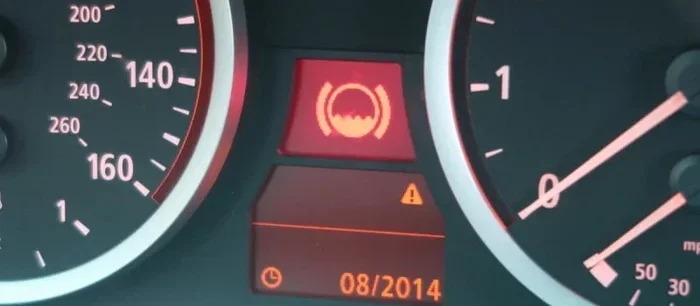
What the Brake Warning Light Means
The brake warning light can look different depending on what is triggering it. Sometimes it is a red circle with an exclamation mark. Other times it shows as a yellow or amber symbol. A red light usually means the issue is urgent. A yellow light often means something needs attention soon but is not an emergency.
Just like when a check engine light goes off by itself, your brake warning light can also turn on and off without an obvious reason. This happens when a sensor detects a temporary issue. The light may go away on its own, but it is still a sign that something needs checking.
How BMW Electronic Systems Monitor Your Brakes
Your BMW uses sensors to track brake fluid level, brake pad thickness, and handbrake status. These sensors send data to the car’s central computer. When a value falls outside the safe range, the computer triggers the warning light. This is part of the BMW 328i maintenance system designed to keep your car running safely.
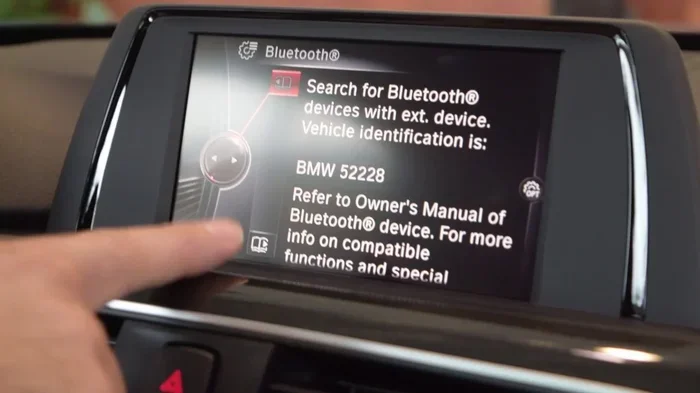
The BMW iDrive system also plays a role. It displays warnings and messages on your dashboard screen. Understanding how these systems work helps you troubleshoot more effectively. You will know what to look for and what each warning really means.
Common Reasons the Brake Light Stays On
Several things can cause your BMW 328i warning light to stay illuminated. Knowing the root cause helps you choose the right fix. Here are the most common reasons drivers see their brake light come on.
Low Brake Fluid Level
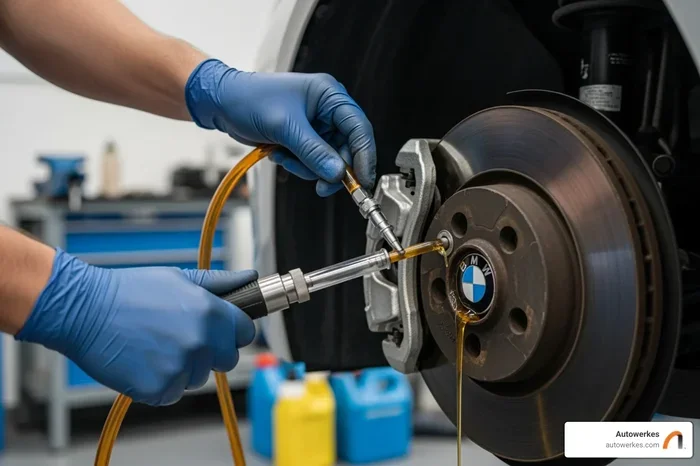
Brake fluid is the lifeblood of your braking system. When the level drops too low, your car warns you immediately. This can happen because of a leak or normal wear over time. Check your brake fluid reservoir under the hood. If the level is below the minimum mark, top it off with the correct fluid type for your BMW.
Low fluid often means your brake pads are wearing down. As pads thin out, more fluid moves into the calipers, dropping the reservoir level. So a low fluid warning often goes hand in hand with the need for brake pad replacement.
Worn Brake Pads and Sensors
Your BMW 328i has brake pad sensors built into the brake pads. These sensors are called brake wear indicators. When the pads wear down to a dangerous level, the sensor touches the rotor and triggers the warning light. This is your car telling you it is time for new pads.
If you recently replaced your brake pads, the old sensor may not have been reset. This is a very common reason the light stays on after pad replacement. You may need to install a new sensor or reset the system manually.
Handbrake Issues
This one sounds obvious, but it happens all the time. If your handbrake is not fully released, the brake warning light will stay on. Sometimes the handbrake sensor gets stuck or dirty. Try releasing the handbrake completely and see if the light goes off. If it does not, the sensor itself may need cleaning or replacement.
Faulty Brake Light Switch
The brake light switch is a small part located near the brake pedal. It turns on your taillights when you press the brake. If this switch fails, it can trigger the dashboard warning. A bad switch is an easy fix and usually does not cost much. You can check it yourself with a simple multimeter test.
Electrical and Battery Problems
Sometimes the issue is not with the brakes at all. A bad battery can cause warning lights to appear across your dashboard. If your BMW battery is weak or old, voltage fluctuations can trick sensors into thinking there is a brake problem. This is one of the trickier causes of troubleshooting brake lights because it does not point directly to the brake system.
Tools You Need to Reset the Brake Light
Before you start the reset process, make sure you have the right tools on hand. Most of these items are affordable and easy to find at any auto parts store.
Basic Tools for the Job
- OBD Scanner: This is the most important tool for resetting warning lights on a BMW. A basic OBD scanner can read and clear error codes from your car’s computer.
- Brake Fluid: Keep the correct type of brake fluid for your BMW 328i on hand. Check your owner’s manual for the exact specification.
- Socket Set: You may need to remove a tire or access panel to reach the brake pad sensor.
- Multimeter: Useful for testing electrical connections and the brake light switch.
- Clean Cloth: For wiping down sensors and connections before resetting.
- Safety Glasses and Gloves: Always protect yourself when working on brake systems.
Using an OBD Scanner for BMW Diagnostics
An OBD scanner plugs into the diagnostic port under your dashboard. Once connected, it reads the error codes stored in your BMW’s computer. These codes tell you exactly what triggered the brake warning light. After noting the code, you can clear it with the scanner.
If you want to dig deeper into your BMW’s issues, you can run diagnostics without a check engine light using the same tools. Many OBD scanners designed for BMWs can access the full brake system diagnostics. This gives you a much clearer picture of what is going on.
You do not need an expensive professional-grade scanner. A mid-range consumer OBD scanner works perfectly for most BMW brake service resets. Look for one that supports BMW-specific protocols for the best results.
How to Reset BMW 328i Brake Light: A Step-by-Step Guide
Now that you understand the system and have your tools ready, let us walk through the actual reset process. Follow these steps carefully for the best results.
Step 1: Check the Brake Fluid and Pads
Start by checking your brake fluid level. Open the hood and locate the brake fluid reservoir. The fluid should be between the minimum and maximum marks. If it is low, add the correct type of fluid recommended for your BMW 328i.
Next, inspect your brake pads. You can often see the pad thickness through the wheel spokes. If the pads look thin or worn, they need to be replaced before you reset the light. Resetting the light on worn pads will just cause it to come back on again.
Also check for any visible leaks around the brake lines and calipers. If you see fluid leaking, do not reset the light. Address the leak first to ensure your safety.
Step 2: Inspect the Brake Light Bulbs
Open your trunk and check the brake light bulbs. A burned-out bulb can sometimes trigger the dashboard warning. Remove the bulb holder and inspect each bulb. Replace any bulbs that are dim or not working. This is one of the simplest fixes and often overlooked.
Step 3: Clear the Warning with the iDrive System
Your BMW’s iDrive system has a built-in function to clear certain warnings. Turn on your ignition without starting the engine. Navigate to the vehicle status menu on the iDrive display. Look for the service or maintenance menu. From there, you may find an option to reset the brake pad monitor or clear the warning message.
Not all BMW 328i models have this feature in the same menu location. Check your owner’s manual for the exact path. Some models require you to hold a button for several seconds to confirm the reset.
Step 4: Use an OBD Scanner to Reset the Light
If the iDrive method does not work, plug your OBD scanner into the diagnostic port. The port is usually located under the dashboard on the driver’s side. Turn on the ignition and follow the scanner prompts.
Select “Read Codes” to see what error codes are stored. Write them down so you can reference them later. Then select “Clear Codes” to reset the system. Turn the ignition off, wait 30 seconds, and turn it back on. The brake warning light should now be off.
If you are new to using an OBD scanner, think of it like resetting your own TPMS sensor. The process is similar and very manageable once you get the hang of it. Many online tutorials walk you through the exact steps for your specific BMW model.
Step 5: Test Drive and Verify
After resetting the light, take your BMW for a short test drive. Press the brake pedal gently and check that the light stays off. If the light returns, there is still an underlying issue that needs to be addressed. Do not keep resetting the light without fixing the root cause.
When You Should See a Mechanic Instead
While many brake light resets can be done at home, there are situations where professional help is the right choice. Knowing when to call a mechanic saves you time and keeps you safe on the road.
If the brake warning light comes back immediately after you reset it, something deeper is going on. This could indicate a serious brake fluid leak, a failing ABS module, or a problem with the brake system warning sensors. These issues require professional diagnostic equipment and expertise.
You should also see a mechanic if you notice any of the following symptoms along with the brake light:
- The brake pedal feels spongy or goes to the floor.
- You hear grinding or squealing sounds when braking.
- The car pulls to one side when you apply the brakes.
- The ABS light is also illuminated on the dashboard.
- You smell burning near the wheels after driving.
These signs point to brake problems that are not safe to ignore. A qualified BMW mechanic can run a full BMW diagnostic tool scan and identify issues that a basic OBD scanner might miss. For complex BMW maintenance tasks, professional help is always the safer choice.
Tips to Keep Your BMW Brake System Healthy
Prevention is the best way to avoid dealing with brake warning lights in the future. A little regular care goes a long way toward keeping your BMW 328i braking system in top shape.
Regular Brake Pad Replacement Schedule
BMW recommends replacing brake pads every 30,000 to 50,000 miles, depending on your driving habits. If you drive mostly in the city with lots of stop-and-go traffic, your pads will wear faster. Keep track of your mileage and plan for pad replacements before they reach the wear indicator. This prevents the warning light from triggering in the first place.
Monitoring Brake Fluid Levels
Check your brake fluid level at least once a month. Brake fluid absorbs moisture over time, which can reduce its effectiveness. If the fluid looks dark or brown instead of clear or light yellow, it is time for a fluid change. Fresh brake fluid keeps your braking system responsive and reliable.
Similar to how you might reset your own TPMS sensor at home, resetting the brake light is a task you can handle yourself with the right knowledge and tools. Regular BMW 328i maintenance checks make these tasks much easier and less intimidating over time.
Keep Your Wiring and Connectors Clean
Corrosion on brake sensor connectors is a common cause of false warning lights. Periodically check the wiring harnesses near your brakes for any signs of rust or damage. A clean, dry connection ensures your sensors communicate properly with the car’s computer. A simple spray of electrical contact cleaner can prevent many sensor-related issues.
Address Warning Lights Promptly
Do not ignore warning lights, even if they seem minor. A small issue today can become a big repair tomorrow. When your dashboard warning comes on, investigate it soon. The longer you wait, the more potential damage can occur to your braking system.
Conclusion
Resetting your BMW 328i brake light without a mechanic is entirely doable with the right knowledge and tools. Start by identifying the cause of the warning. Check your brake fluid, pads, bulbs, and handbrake. Use an OBD scanner to clear the codes and reset the system. Always verify the fix with a test drive.
Remember that the brake warning light exists to protect you. If the light keeps coming back, do not ignore it. Some issues need the expertise of a professional BMW mechanic. But for simple resets and routine maintenance, you now have everything you need to handle the job yourself.
Take pride in knowing you saved money and learned something new about your BMW. Keep this guide handy for future reference, and your BMW 328i maintenance will be much easier going forward. Your brakes are the most important safety system in your car, so keep them in great shape.
Frequently Asked Questions
Can I drive my BMW 328i with the brake warning light on?
It is not recommended. The brake warning light indicates a potential problem with your braking system. Driving with compromised brakes is dangerous. If the light is on, check your brake fluid level and brake pads first. If everything looks normal, drive carefully to a safe location and get the issue diagnosed.
How much does it cost to reset a BMW brake light at a shop?
Most BMW dealerships and independent shops charge between $100 and $200 for a brake light reset. This includes the diagnostic scan and any necessary repairs. Doing it yourself with an OBD scanner costs almost nothing after the initial tool purchase, which makes DIY the smarter choice for simple resets.
Why does my BMW 328i brake light come back after resetting?
If the light returns after a reset, the underlying problem was not fully resolved. Common reasons include worn brake pads that still need replacing, a slow brake fluid leak, or a faulty sensor. The OBD scanner error codes you recorded before resetting will help you pinpoint the exact cause the second time around.
Do I need a special OBD scanner for BMW brake resets?
A standard OBD scanner works for most basic resets. However, a BMW-specific scanner or one that supports BMW protocols will give you access to more detailed brake system codes. These scanners are not expensive and are worth the investment if you plan to do regular BMW maintenance at home.
How often should I check my brake fluid in a BMW 328i?
You should check your brake fluid at least once a month and before any long trips. BMW recommends a full brake fluid flush every two years or 30,000 miles, whichever comes first. Regular checks help you catch low fluid levels early before they trigger the dashboard warning light.
Can a dead key fob battery cause the brake light to come on?
While a dead key fob battery can cause various warning lights on your dashboard, it is unlikely to trigger the brake warning light directly. However, electrical issues from a weak battery can cause sensor malfunctions that might indirectly affect the brake system. If your brake light is on and your key fob battery is dead, replace the fob battery first and see if the brake light clears.