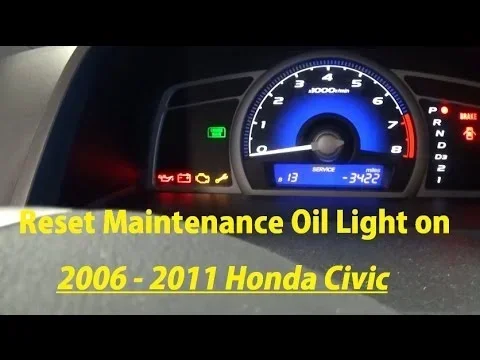
How to Reset the Honda Civic Oil Light the Easy Way
Resetting the Honda Civic oil light is a quick DIY task you can do at home in under five minutes. Whether you just changed the oil or the light is stuck on, this guide walks you through the exact steps for every model year. No special tools are needed, and you will save time and money by handling it yourself.
That little oil can icon on your dashboard can really get under your skin. It flashes or stays solid, and suddenly your nice drive turns into a worry session. If you own a Honda Civic, you are not alone. Plenty of drivers face this exact situation, and the good news is that resetting the Honda Civic oil light is usually a simple fix you can handle yourself.
In this guide, we walk you through every step in plain language. No jargon, no confusing diagrams, just clear instructions that work. We also cover why the light comes on in the first place, what to do if it will not reset, and a few tips to keep your oil system running strong. By the end, you will feel confident tackling this job on your own.
Before we dive in, let us quickly talk about what the oil light actually means. Many people confuse it with other dashboard warnings, but the oil maintenance light specifically tells you it is time for an oil change or that the system needs to be reset after service. It is not always a sign of low oil pressure, though that is a different story we will touch on later.
Key Takeaways
- Easy DIY Fix: You can reset the Honda Civic oil light yourself without visiting a mechanic.
- Model Year Matters: The reset process differs slightly depending on your Honda Civic year and trim.
- No Special Tools Required: Just your steering wheel controls or a few button presses on the dashboard.
- Quick Process: Most resets take less than five minutes to complete.
- Know When to Seek Help: Some oil light issues signal real problems that need professional attention.
- Prevention Tips: Regular oil changes and proper maintenance keep the light from coming back.
📑 Table of Contents
- Why Does the Honda Civic Oil Light Come On?
- How to Reset the Honda Civic Oil Light Step by Step
- Different Methods for Different Model Years
- Common Mistakes When Resetting the Oil Light
- When to See a Mechanic Instead
- Tips for Keeping Your Honda Civic’s Oil System Healthy
- Frequently Asked Questions
- Conclusion
Why Does the Honda Civic Oil Light Come On?
The oil light on your Honda Civic serves as a maintenance reminder more than anything else. It is part of the Honda Maintenance Minder system, which tracks your driving habits and engine runtime to estimate when the next oil change is due. When the system determines the interval has been reached, it triggers the light to remind you.
Here are the most common reasons the light activates:
- Scheduled oil change interval reached: Your Honda tracks miles since the last service and lights up when it is time.
- Oil life percentage hit zero: The system counts down from 100% oil life to 0%, and the light appears at 0%.
- Reset not performed after previous service: If the last oil change was done but the system was not reset, the light carries over.
- Oil level sensor trigger: In some cases, a low oil level can activate the warning.
- Sensor or wiring issue: Rarely, a faulty sensor or loose connection causes a false reading.
Understanding the root cause helps you know whether a simple reset will solve the problem or if something deeper is going on. Most of the time, it is just the system doing its job and asking for fresh oil.
Oil Change Light vs. Oil Pressure Warning
It is important to know the difference between the two. The oil change reminder is usually a yellow or orange oil can icon. It is a service indicator, not an emergency. The oil pressure warning, on the other hand, is often red and shaped like an oil can with a drop. If that red light comes on, pull over immediately. That is a serious issue that needs urgent attention.
How to Reset the Honda Civic Oil Light Step by Step
Now for the part you came here for. The reset process is straightforward, but the exact steps depend on your model year. We have broken it down into the most common methods below.
Method 1: Using the Steering Wheel Controls (2016 and Newer Models)
If you have a newer Honda Civic, the reset is done through the steering wheel buttons and the dashboard display. Here is how to do it:
- Turn the ignition to the ON position. Do not start the engine. Just push the start button once or turn the key to ON.
- Press the MENU button on the left steering wheel. This brings up the main settings menu on the instrument display.
- Scroll to the Vehicle Settings option. Use the up and down arrows to navigate.
- Select Oil Life Reset. Press the ENTER button to open the reset option.
- Scroll to Yes and confirm. Press ENTER again, and the system will reset the oil life indicator to 100%.
- Turn the ignition off and then back on. This confirms the reset was successful.
That is it. The Honda Civic oil light should now be off, and your oil life counter will show a full reading. This method works for most 2016 to 2024 Honda Civic models.
Method 2: Using the Instrument Panel Buttons (2012 to 2015 Models)
For slightly older Civics, the process uses the trip meter and steering wheel controls:
- Turn the ignition to ON. Again, do not start the engine.
- Press and hold the TRIP button on the instrument panel. This is usually located on the steering wheel or the dashboard itself.
- While holding the button, turn the ignition to OFF and then back to ON.
- Continue holding the TRIP button for about 10 seconds. You should see the oil life indicator start to flash.
- Release the TRIP button. The light should now be off, and the oil life will reset.
This method is slightly different but works just as well. If the light does not go out the first time, try the process again. Sometimes it takes two attempts.
Method 3: The Older Button Method (Pre-2012 Models)
For early Honda Civics, the process is even simpler:
- Locate the oil reset button. It is usually found near the speedometer or on the left side of the steering column.
- Turn the ignition to ON (do not start the engine).
- Press and hold the reset button for 10 to 15 seconds.
- The oil light should blink and then go off.
- Turn the ignition off, then back on to confirm.
If you cannot find the reset button, check your owner’s manual. Every Honda Civic has one, but its location varies by year and trim level.
Different Methods for Different Model Years
Honda changes the reset process across model years, which can be confusing. Here is a quick comparison to help you find the right method for your specific Civic.
| Model Year Range | Reset Method | Difficulty Level |
|---|---|---|
| 2006 and older | Dedicated reset button on dashboard | Very Easy |
| 2007 to 2011 | Trip meter button combination | Easy |
| 2012 to 2015 | Trip button with ignition cycle | Easy |
| 2016 and newer | Steering wheel menu system | Easy |
Regardless of your model year, the basic idea is the same: access the maintenance menu, find the oil life reset option, and confirm. Does your car say when you need an oil change? Most modern Civics do, and the reset process is built right into the system to make it easy for owners.
If you are unsure about your specific model year, the owner’s manual is your best friend. It has step-by-step instructions with pictures. You can also find the manual online through Honda’s website if you have lost the physical copy.
Common Mistakes When Resetting the Oil Light
Even though the process is simple, people make mistakes that cause frustration. Here are the most common errors and how to avoid them.
Mistake 1: Turning the Key to START Instead of ON
The most frequent mistake is starting the engine when you should only be in the ON position. The reset process requires the ignition to be ON without the engine running. Starting the engine interrupts the reset sequence and you will have to try again.
Mistake 2: Not Holding the Button Long Enough
Some steps require you to hold a button for 10 to 15 seconds. If you release too early, the system does not register the command. Count slowly in your head and hold steady until you see the light blink or change.
Mistake 3: Forgetting to Confirm the Reset
After completing the reset, always turn the ignition off and back on to confirm the light is off. Sometimes the reset appears to work but the light comes right back. Confirming saves you from thinking the reset failed when it actually did not complete.
Mistake 4: Ignoring the Oil Change Itself
Do not reset the light without actually changing the oil. The light exists for a reason. Resetting it prematurely means you skip an important maintenance task that protects your engine. Always perform the oil change first, then reset the system.
When to See a Mechanic Instead
Most of the time, resetting the Honda Civic oil light is a quick DIY job. But there are situations where you should visit a professional instead of trying to fix it yourself.
If the light comes back immediately after you reset it, something may be wrong. A persistent oil warning could indicate low oil pressure, a faulty oil pump, or a sensor malfunction. These are not problems you can fix with a button press. You need a proper diagnosis.
Also, if you notice any of the following symptoms alongside the oil light, get your car checked right away:
- Unusual engine noises: Knocking or ticking sounds can signal low oil pressure.
- Oil smell inside the cabin: This may indicate an oil leak.
- Reduced engine performance: Sluggish acceleration or rough idling can be related to oil issues.
- Oil puddles under the car: Visible leaks need immediate attention.
In these cases, a mechanic can check your oil level, inspect the sensors, and make sure your engine is healthy. Sometimes a cabin air filter or related component issue can also trigger unexpected dashboard warnings, so a thorough inspection helps rule out other problems.
Tips for Keeping Your Honda Civic’s Oil System Healthy
Preventing oil-related issues is always better than fixing them after they happen. Here are some practical tips to keep your Honda Civic running smoothly between oil changes.
Check Your Oil Level Regularly
Get into the habit of checking your oil level at least once a month. Pull out the dipstick, wipe it clean, reinsert it, and check the reading. You want the oil to be between the minimum and maximum marks. If it is low, top it off with the grade recommended in your owner’s manual.
Use the Right Oil Grade
Honda specifies a particular oil weight for each Civic model. Using the wrong grade can affect engine performance and trigger the maintenance light. Check your owner’s manual or the oil cap under the hood for the recommended oil grade. Most modern Civics use 0W-20 synthetic oil, but older models may require a different weight.
Stick to a Regular Oil Change Schedule
Even if the oil life system says you have plenty of life left, do not skip scheduled oil changes. Most Honda Civics need an oil change every 7,500 to 10,000 miles under normal driving conditions. If you drive in severe conditions, such as stop-and-go traffic or extreme temperatures, you may need to change the oil more frequently. How far can a car go on empty is a related concern, and keeping up with oil changes ensures your engine stays healthy for the long haul.
Pay Attention to Dashboard Warnings
Your Honda Civic’s dashboard is designed to communicate with you. When a warning light appears, do not ignore it. The oil light, check engine light, and temperature gauge all work together to tell you the health of your vehicle. Addressing warnings early prevents small problems from becoming big, expensive repairs.
Frequently Asked Questions
How do I know if I successfully reset the Honda Civic oil light?
After completing the reset process, turn the ignition off and then back on. The oil light should be off, and the oil life indicator on your dashboard should show 100% or a full reading. If the light stays on or comes back immediately, the reset did not complete properly, or there is an underlying issue that needs attention.
Can I drive with the Honda Civic oil light on?
Short answer: yes, but only for a short distance to get to a service center. The oil light is a maintenance reminder, not always an emergency. However, if the light is red or flashing, or if you notice any unusual engine behavior, stop driving and get the car checked. Ignoring the light for too long can lead to engine damage.
Does resetting the oil light also change the oil?
No. Resetting the light only clears the maintenance reminder. It does not change the oil or add any oil to the engine. Always perform the oil change first, then reset the system to update the maintenance schedule. Resetting without changing the oil just delays the reminder and puts your engine at risk.
Why does my Honda Civic oil light keep coming back after I reset it?
If the light returns shortly after a reset, the oil life system may have detected that the oil quality has already degraded, or there could be a sensor issue. Low oil levels, dirty oil, or a malfunctioning oil pressure sensor can all cause the light to reappear. In these cases, it is best to have a mechanic inspect the vehicle.
Is it safe to reset the oil light myself, or should I go to a dealer?
It is completely safe and easy to reset the oil light yourself. Honda designed the process to be owner-friendly, and you do not need any special tools or dealership access. Just follow the steps for your model year. If you feel unsure, your owner’s manual has detailed instructions, and many online resources can walk you through it as well.
How often should I reset the Honda Civic oil light?
You should reset the oil light every time you get an oil change. This updates the maintenance schedule and keeps the system tracking accurately. The Honda Maintenance Minder system is designed to remind you based on actual driving conditions, so resetting after each service ensures the next reminder comes at the right time.
Conclusion
Resetting the Honda Civic oil light is one of those small maintenance tasks that saves you time, money, and a trip to the dealership. Whether you drive a 2010 model or a 2024 model, the process is straightforward and takes just a few minutes. You do not need any special equipment, and the steps are easy to follow once you know which method matches your car.
Remember to always change the oil before you reset the light. The reset is just a way to tell the system that the maintenance is done. Keeping up with regular oil changes and paying attention to your dashboard warnings will keep your Honda Civic running strong for years to come.
Now that you know how to handle the oil light yourself, you can tackle this task the next time it comes on without hesitation. Your Honda Civic will thank you, and your wallet will too.