How Do I Reset the Maintenance Light on My 2011 Toyota Camry
Resetting the maintenance light on a 2011 Toyota Camry is a simple process you can do at home in just a few minutes. This guide walks you through every method, including the trip meter reset and the odometer button technique. Whether your maintenance required light is on after an oil change or you need to clear a false alert, we have you covered with clear, step-by-step instructions.
Key Takeaways
- Multiple Reset Methods: There are at least two easy ways to reset the maintenance light on a 2011 Toyota Camry using your dashboard buttons.
- No Tools Needed: You do not need any special equipment or a trip to the mechanic to clear the light.
- Quick Process: The entire reset takes less than five minutes and can be done in your driveway or garage.
- Prevents Confusion: Knowing how to reset the light helps you distinguish between a real service need and a false alert.
- Regular Maintenance Matters: Resetting the light after service keeps your maintenance schedule on track and protects your engine.
- Dealer Option Available: If you prefer, any Toyota dealer can reset the light for you during a routine visit.
📑 Table of Contents
- How Do I Reset the Maintenance Light on My 2011 Toyota Camry?
- What Does the Maintenance Required Light Mean?
- How to Reset the Maintenance Light Using the Trip Meter Method
- How to Reset the Maintenance Light Using the Odometer Button
- Why Won’t My Maintenance Light Go Away?
- How Often Does the Maintenance Light Come On?
- Tips to Avoid Maintenance Light Problems
- Can I Drive My Camry with the Maintenance Light On?
- Final Thoughts
How Do I Reset the Maintenance Light on My 2011 Toyota Camry?
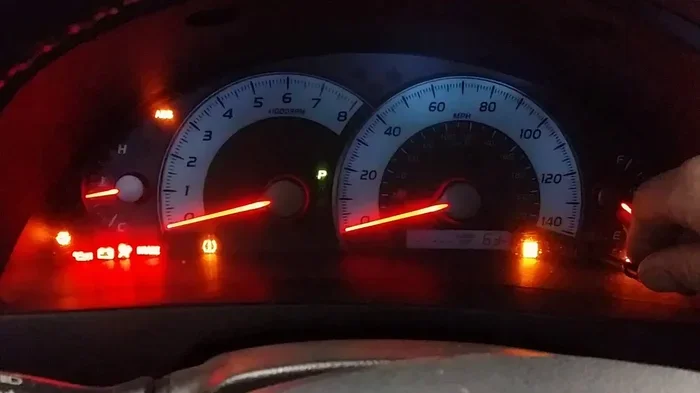
That little orange or yellow light on your dashboard can be annoying. It blinks at you every time you start the car. It says “maintenance required.” But what does it actually mean? And more importantly, how do you make it go away?
If you drive a 2011 Toyota Camry, you are in luck. Resetting the maintenance light is one of the easiest DIY tasks you can do. You do not need a mechanic. You do not need expensive tools. All you need is a few minutes and this guide.
The maintenance required light on your Camry is part of the Toyota oil life system. It tracks your driving habits and reminds you when it is time for an oil change or other scheduled service. Sometimes the light stays on even after you have already taken care of the service. That is when you need to reset it. This article will show you exactly how to do that, step by step.
We will cover every method that works on the 2011 Camry. We will also answer common questions and share tips to help you avoid mistakes. By the end of this guide, you will feel confident resetting that light yourself whenever it comes on.
Let us get started. Your Camry deserves to have a clean dashboard and a clear maintenance schedule.
What Does the Maintenance Required Light Mean?
Before we dive into the reset process, let us understand what this light is trying to tell you. The maintenance required light is not the same as the check engine light. It does not mean something is broken. It means your vehicle is due for routine maintenance.
On the 2011 Toyota Camry, this light typically comes on every 5,000 miles. It is part of Toyota’s oil life monitoring system. The system uses your driving conditions to estimate when the oil needs changing. Hard driving, short trips, and dusty conditions can trigger the light sooner.
Here are some key things to know about the maintenance light:
- It is a reminder, not an emergency. You can usually drive a short distance to get the service done.
- It tracks oil life, not engine health. The light does not detect low oil pressure or engine damage.
- It resets after service. Once you get an oil change or complete the required maintenance, the light should be cleared.
- It follows a mileage interval. Most 2011 Camry models use a 5,000-mile reset cycle.
If you ignore this light for too long, it can lead to old oil circulating through your engine. Fresh oil keeps your Camry running smoothly. So it is best to address the light promptly.
How to Reset the Maintenance Light Using the Trip Meter Method
The trip meter method is the most common way to reset the maintenance light on a 2011 Toyota Camry. It uses the buttons on your dashboard or steering wheel controls. This method works on most Camry models from that year.
Step-by-Step Instructions
Follow these steps carefully. Each step is simple and takes just a few seconds.
- Turn the ignition to the “ON” position. Do not start the engine. Just press the start button or turn the key to the accessory position. The dashboard lights will come on.
- Locate the trip meter reset button. On the 2011 Camry, this is usually the small button on the end of the turn signal stalk or a button near the instrument cluster.
- Press and hold the trip meter button. Keep holding it down. You should see the odometer screen change.
- Look for the maintenance menu. The screen will cycle through different display options. Wait for the maintenance required message to appear.
- Release the button and press it again quickly. This confirms the reset command. The light should start flashing.
- Turn the ignition off and then back on. The maintenance light should now be off. If it is still on, repeat the process.
This method works because it tells the car’s computer that you have completed the service. The oil life system resets to zero, and the light clears from the display.
Quick Tip: If the light does not go away after the first attempt, try holding the trip meter button for a longer period. Some Camry models require a longer press to enter the maintenance menu.
How to Reset the Maintenance Light Using the Odometer Button
Some 2011 Toyota Camry models use a different button layout. If your trip meter method did not work, try the odometer button approach. This method is equally effective.
What You Will Need
- Access to the driver’s side dashboard buttons
- The ignition key or push-start button
- A few minutes of your time
Step-by-Step Instructions
- Turn the ignition to “ON” without starting the engine. All the dashboard lights should illuminate.
- Find the odometer or trip display button. This is usually located on the instrument panel near the speedometer.
- Press the button repeatedly until you see the trip A or trip B display. You want the small odometer screen, not the big mileage number.
- Turn the ignition to “OFF.” Then turn it back to “ON” within a few seconds.
- Press and hold the odometer button as you turn the key to “ON” again. Hold it for about five seconds.
- Watch the display. The maintenance light should flash and then turn off. The trip meter will reset to zero.
This method resets the oil life system in your Camry. It clears the maintenance counter and turns off the dashboard warning.
Quick Tip: Make sure you are not pressing the wrong button. The odometer button is usually small and recessed. Use the tip of a pen if needed.
Why Won’t My Maintenance Light Go Away?
Sometimes the maintenance light stays on even after you have followed the reset steps. This can be frustrating. There are several reasons why this might happen on a 2011 Toyota Camry.
Common Reasons the Light Stays On
- The reset was not completed properly. You may need to repeat the steps more carefully.
- The oil change was not logged. The car’s computer may still think service is overdue.
- A different issue is triggering the light. Low oil pressure or a sensor problem can cause a similar warning.
- The battery was recently disconnected. This can sometimes reset the system incorrectly.
- There is a software glitch. Older Camry models can occasionally have electronic hiccups.
If you have tried both reset methods and the light is still on, do not panic. First, check your oil level using the dipstick. Low oil can sometimes trigger a maintenance warning. If the oil level is fine, the issue may be electrical.
In some cases, you may need to visit a Toyota dealer. They have professional diagnostic tools that can clear stubborn maintenance lights. This is a quick and usually affordable service. You can also check our guide on how to get the maint reqd light off for additional troubleshooting tips.
When to See a Mechanic
You should see a mechanic if the maintenance light comes back immediately after you reset it. If the light is flashing instead of staying solid, that is a different warning. Flashing lights usually indicate a more serious problem. Also, if you notice any unusual engine sounds, reduced performance, or other dashboard warnings, get your Camry checked right away.
Many Toyota owners wonder whether they can handle this at home or need professional help. The truth is, resetting the light is a simple task. But diagnosing the underlying cause is a different story. If you are unsure, a quick visit to a trusted mechanic can save you time and money in the long run.
How Often Does the Maintenance Light Come On?
Understanding the maintenance schedule for your 2011 Toyota Camry helps you stay ahead of the light. The maintenance required light is designed to remind you of regular service intervals.
Standard Maintenance Intervals for the 2011 Camry
| Service | Interval | Light Trigger? |
|---|---|---|
| Oil Change | Every 5,000 miles | Yes |
| Tire Rotation | Every 5,000 miles | Sometimes |
| Air Filter Replacement | Every 15,000 miles | No |
| Brake Inspection | Every 15,000 miles | No |
| Transmission Fluid | Every 30,000 miles | No |
| Coolant Flush | Every 60,000 miles | No |
The maintenance required light primarily tracks oil changes. Other services like tire rotations and brake inspections do not always trigger the light. However, it is a good practice to reset the light after every oil change. This keeps your maintenance log accurate and your dashboard clean.
For more information about Toyota maintenance schedules, you can also visit your local Toyota dealer. They can provide a detailed service plan tailored to your driving habits. And if you are curious about whether you can take your Camry to any dealer for service, check out our article on taking your Toyota to any dealer for service.
Tips to Avoid Maintenance Light Problems
Prevention is always better than cure. Here are some simple tips to keep your maintenance light working properly and avoid unnecessary trips to the reset process.
Keep a Maintenance Log
Write down every oil change and service visit. Include the date, mileage, and type of service. This log helps you track when the light should come on next. It also gives you proof of maintenance if you ever sell the Camry.
Use Quality Oil and Filters
The 2011 Camry performs best with the recommended oil grade. Check your owner’s manual for the correct specification. Using cheap or wrong oil can affect the oil life system readings. This can cause the maintenance light to come on earlier than expected.
Reset After Every Service
Make it a habit to reset the light immediately after each oil change. Whether you do it yourself or a mechanic handles it, a quick reset keeps the system accurate. If you are unsure about the process, ask the service advisor to walk you through it.
Monitor Other Dashboard Warnings
The maintenance light is not the only warning on your Camry’s dashboard. Learn what each light means. This knowledge helps you respond quickly to real problems and ignore harmless reminders.
Can I Drive My Camry with the Maintenance Light On?
Yes, you can drive your 2011 Toyota Camry with the maintenance light on for a short distance. The light is a reminder, not an emergency warning. However, you should not ignore it for too long.
Driving with old oil can reduce engine performance over time. The oil breaks down and loses its ability to lubricate moving parts. This can lead to increased wear and tear on your engine. So while it is safe to drive to the nearest service center, do not make a habit of postponing the reset and the oil change.
If you are planning a long road trip, address the maintenance light before you go. A fresh oil change gives you peace of mind and protects your engine on the highway. It is a small investment that pays off in the long run.
Final Thoughts
Resetting the maintenance light on your 2011 Toyota Camry is something every owner should know how to do. It takes just a few minutes and requires no special tools. Whether you use the trip meter method or the odometer button method, the process is straightforward.
Remember, the maintenance required light is your Camry’s way of telling you it is time for routine service. Resetting the light after each oil change keeps your maintenance schedule accurate. It also keeps your dashboard looking clean and professional.
If you ever feel stuck, do not hesitate to consult your owner’s manual or visit a Toyota dealer. They are always happy to help. And if the light keeps coming back despite your best efforts, there may be an underlying issue that needs professional attention.
Now that you know how to reset the maintenance light, you are fully equipped to handle this common Camry task. Keep this guide bookmarked for future reference. Your 2011 Toyota Camry will thank you with reliable performance and a worry-free dashboard.
For additional Toyota Camry tips and guides, explore our other articles on maintenance, troubleshooting, and ownership. Stay proactive about your car’s health, and the maintenance required light will only ever be a brief reminder, not a constant annoyance.
Frequently Asked Questions
Can I reset the maintenance light without starting the engine?
Yes, you can reset the maintenance light without starting the engine. Simply turn the ignition to the “ON” position using the start button or key. All the dashboard lights will come on, and you can follow the reset steps from there. The engine does not need to be running for the trip meter or odometer button methods to work.
How do I know if the maintenance light reset was successful?
After completing the reset steps, turn the ignition off and then back on. If the maintenance required light does not appear on the dashboard, the reset was successful. You can also check the trip meter display to see if the maintenance message has been cleared. If the light stays on, repeat the process or try the alternate reset method.
What is the difference between the maintenance required light and the check engine light?
The maintenance required light is a routine reminder for scheduled service like oil changes. The check engine light indicates a potential problem with the engine or emissions system. The maintenance light is yellow or orange and shaped like a wrench. The check engine light is usually red or yellow and shaped like an engine. If the check engine light is on, you should have the vehicle diagnosed by a professional.
Will resetting the maintenance light clear any stored error codes?
No, resetting the maintenance light does not clear error codes. The maintenance light is part of the oil life monitoring system, not the diagnostic trouble code system. If you have stored error codes, you will need an OBD-II scanner to clear them. However, the maintenance light reset is a separate process that only affects the service reminder.
How often should I reset the maintenance light on my 2011 Camry?
You should reset the maintenance light every time you get an oil change or complete a scheduled service. For most 2011 Toyota Camry models, this means resetting the light every 5,000 miles. Keeping a consistent reset schedule ensures the oil life system accurately tracks your maintenance intervals and helps you stay on top of your Camry’s service needs.
Can I use an OBD-II scanner to reset the maintenance light?
Yes, you can use an OBD-II scanner to reset the maintenance light on a 2011 Camry. However, the built-in dashboard methods are simpler and do not require any additional equipment. An OBD-II scanner is more useful if you need to clear diagnostic trouble codes or check for other issues. For a routine maintenance light reset, the trip meter or odometer button method is the fastest and easiest approach.