How Do I Reset the Maintenance Light on a 2009 Toyota Camry
Resetting the maintenance light on a 2009 Toyota Camry is a quick and easy process you can do at home in minutes. You just need to locate the trip meter reset button, hold it while turning the key, and watch the light disappear. This guide covers every method, common mistakes, and expert tips to keep your Camry running smoothly.
Have you ever looked at your dashboard and noticed that annoying maintenance required light staring back at you? It happens to every Toyota Camry owner eventually. If you drive a 2009 model, you are not alone in wondering how to make it go away. The good news is that resetting this light is something you can do yourself without visiting a mechanic.
The 2009 Toyota Camry has a straightforward maintenance reminder system. Once you know the steps, the process takes less than five minutes. Whether you just changed your oil or are preparing for a road trip, this guide will walk you through everything. We will cover the exact steps, common mistakes, and helpful tips to make the job easy.
Many people think they need special tools or expensive dealership visits to handle this. That is simply not true. With a few button presses and a little patience, your dashboard will be clear again. Let us dive into the details and get that light off your Camry dashboard for good.
Key Takeaways
- Simple Process: Resetting the maintenance light on a 2009 Toyota Camry takes just a few minutes with no tools needed.
- Multiple Methods: You can reset it using the trip meter button, the steering wheel controls, or the instrument cluster.
- No Mechanic Required: This is a DIY-friendly task that saves you time and money.
- Prevents Confusion: Keeping the light off after service helps you track your next oil change accurately.
- Common Mistakes Exist: Avoid holding the wrong buttons or skipping steps that cause the light to return.
- Related Maintenance Matters: Understanding your maintenance schedule helps you stay ahead of service needs.
📑 Table of Contents
- Understanding the Maintenance Light on Your 2009 Toyota Camry
- How to Reset the Maintenance Light on a 2009 Toyota Camry
- Common Mistakes When Resetting the Maintenance Light
- Why You Should Reset the Maintenance Light After Service
- When to Seek Professional Help
- Maintenance Schedule for the 2009 Toyota Camry
- Frequently Asked Questions
- Conclusion
Understanding the Maintenance Light on Your 2009 Toyota Camry
Before we jump into the reset process, it helps to understand what this light actually means. The maintenance required light is a service reminder. It does not mean something is broken. Instead, it tells you that your car is due for routine maintenance based on mileage.
Toyota designed this system to help owners stay on top of regular service intervals. The light typically comes on every 5,000 miles. It is a friendly nudge, not a warning sign. Knowing this takes the stress out of seeing that little symbol on your instrument cluster.
What Triggers the Maintenance Light?
The maintenance light activates based on your driving patterns and mileage. Here are the common triggers:
- Mileage Interval: The system counts miles since the last reset. At around 5,000 miles, it triggers.
- Time-Based Reminders: Even with low mileage, time can trigger the light after about 12 months.
- Oil Life System: The Camry tracks oil quality and life remaining, which ties into the reminder.
- Ignition Cycles: Each time you turn the car on and off, the system logs data.
Understanding these triggers helps you know when to expect the light. It also makes the reset process feel less mysterious. Once you understand the system, you will feel more confident handling it yourself.
How to Reset the Maintenance Light on a 2009 Toyota Camry
Now for the part you have been waiting for. The reset process is simple and works every time if you follow the steps correctly. There are a couple of methods you can try depending on your preference.
Method 1: Using the Trip Meter Reset Button
This is the most common and easiest way to reset the light. Here is exactly what to do:
- Turn the ignition key to the ON position. Do not start the engine yet.
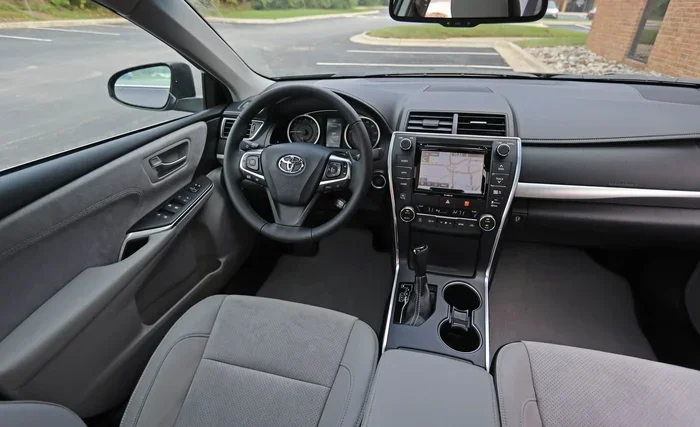
- Locate the trip meter reset button on the dashboard or steering column.
- Press and hold the reset button firmly.
- While holding the button, turn the ignition key to the OFF position, then back to ON.
- Continue holding the button for about 10 seconds.
- Watch the maintenance required light on the dashboard. It should flash and then turn off.
- Release the button. The reset is complete.
This method works for most 2009 Camry models. If the light does not turn off the first time, try repeating the steps. Sometimes it takes a second attempt. The key is to hold the button long enough during the right ignition cycle.
Method 2: Using the Steering Wheel Controls
Some 2009 Camry models use steering wheel controls instead of a physical trip button. If your car has this setup, follow these steps:
- Turn the ignition to the ON position without starting the engine.
- Use the steering wheel buttons to navigate to the trip meter display.
- Press and hold the trip reset button on the steering wheel.
- While holding it, turn the ignition to OFF and then back to ON.
- Hold the button until the maintenance light flashes and disappears.
- Release the button once the light is off.
The steering wheel method works the same way but uses different controls. If you are not sure which method applies to your Camry, try Method 1 first. It works on nearly all 2009 models.
Common Mistakes When Resetting the Maintenance Light
Even though this process is simple, people make mistakes that cause frustration. Avoiding these common errors will save you time and prevent the light from coming back.
Mistake 1: Releasing the Button Too Early
The most common mistake is letting go of the reset button too soon. You need to hold it for a full 10 seconds or more. If you release it early, the system does not register the command. The light will stay on or come back after a few drives.
Mistake 2: Turning the Key to START Instead of ON
Make sure you only move the key to the ON position, not the START position. START is where the engine cranks. ON is where the dashboard lights up but the engine stays off. Mixing these up will reset nothing.
Mistake 3: Not Checking the Result
After you release the button, watch the dashboard carefully. The light should flash once and then go dark. If it stays on, the reset did not work. Simply try the process again more carefully.
Mistake 4: Forgetting to Service the Car
Resetting the light does not replace actual maintenance. Always complete your oil change or service first. Turning off the service reminder without doing the work just hides the problem until next time.
If you run into issues and the light keeps returning, you might want to check other related systems. For instance, understanding your fuel gauge and how much fuel remains can sometimes help diagnose dashboard warning patterns. You can learn more about fuel levels and warning lights in our guide on how many gallons are left when the light comes on.
Why You Should Reset the Maintenance Light After Service
Resetting the light after completing maintenance is important for several reasons. It keeps your records accurate and helps you plan future service appointments.
Tracking Your Service Intervals
When you reset the light, the system starts counting from zero again. This gives you a clear picture of when your next service is due. Without resetting, the light stays on and loses its meaning as a reminder system.
Keeping Your Car Value High
A well-maintained Camry holds its value better. Accurate service records and a clean dashboard show potential buyers that the car has been cared for. Resetting the maintenance light after each service is part of that care routine.
Peace of Mind
There is something satisfying about clearing that warning from your dashboard. It means you have taken care of your car and can drive with confidence. No more distracting lights competing for your attention while you focus on the road.
If you are dealing with other dashboard lights or warning symbols, understanding how to manage them is important. For example, knowing how to reset your maintenance required light is a skill every Camry owner should have in their toolkit.
When to Seek Professional Help
Most of the time, resetting the maintenance light is a simple DIY task. But there are situations where professional help makes sense. Knowing when to call a mechanic saves you from unnecessary frustration.
Light Keeps Coming Back
If you reset the light and it returns within a few days, something may be wrong. The maintenance system could have a fault that needs professional diagnosis. A dealership or qualified mechanic can scan the system and identify the issue.
Multiple Warning Lights On
If the maintenance light appears alongside other warning symbols, do not ignore it. Multiple lights often indicate a deeper problem. Check your oil pressure, coolant levels, and other vital systems before attempting a simple reset.
After Major Service or Repairs
Sometimes after a major repair, the maintenance system needs a professional reset. This is common after engine work or electrical repairs. A dealership has the tools to fully reset the system and clear any stored codes.
For those who also want to turn off related dashboard indicators, understanding the full process of turning off the maintenance required light can provide additional methods and troubleshooting steps that go beyond the basic reset.
Maintenance Schedule for the 2009 Toyota Camry
Resetting the light is only one part of staying on top of your Camry’s health. Following a proper maintenance schedule keeps your car running strong for years.
Regular Service Intervals
The 2009 Toyota Camry follows a standard maintenance schedule. Here is a quick overview:
- Every 5,000 Miles: Oil change, tire rotation, and general inspection.
- Every 15,000 Miles: Air filter replacement and brake inspection.
- Every 30,000 Miles: Transmission fluid flush and spark plug replacement.
- Every 60,000 Miles: Coolant flush and major belt inspection.
Sticking to this schedule prevents unexpected breakdowns. It also ensures your Camry maintenance system stays accurate and reliable.
Quick Tips for Maintaining Your 2009 Camry
- Keep a log of every service and reset the light immediately after.
- Check your oil level between changes, especially if you drive frequently.
- Monitor tire pressure monthly for better fuel economy and safety.
- Replace windshield wipers every 6 to 12 months for clear visibility.
- Use the recommended oil weight for your engine, such as 5W-30 or 0W-20.
These small habits add up over time. They keep your 2009 Camry feeling like new and prevent costly repairs down the road.
Frequently Asked Questions
How do I reset the maintenance light on a 2009 Toyota Camry?
Turn the ignition to ON without starting the engine, press and hold the trip meter reset button, then turn the key to OFF and back to ON. Continue holding the button for about 10 seconds until the maintenance light flashes and turns off. Release the button and the reset is complete.
Why does the maintenance light keep coming back after I reset it?
The light may return if you have not reached the next service interval or if there is a fault in the maintenance system. Make sure you have completed the required service first. If the problem persists, a professional diagnostic check can identify any underlying issues with the system.
Can I reset the maintenance light without starting the engine?
Yes, you do not need to start the engine. Simply turn the key to the ON position, which powers up the dashboard without cranking the engine. From there, follow the standard reset steps using the trip meter button or steering wheel controls.
How often does the maintenance light come on in a 2009 Toyota Camry?
The maintenance light typically activates every 5,000 miles or after 12 months, whichever comes first. This interval aligns with Toyota’s recommended oil change and service schedule for the Camry. Resetting the light after each service keeps the system accurate.
Will resetting the maintenance light affect my car’s warranty?
No, resetting the maintenance light has no impact on your warranty. The light is simply a service reminder. However, keeping accurate records of your maintenance is important for warranty claims, so always document your services even after resetting the indicator.
What other dashboard lights should I be aware of on the 2009 Camry?
The 2009 Camry has several dashboard indicators including the check engine light, oil pressure warning, battery light, and tire pressure monitoring. Each serves a different purpose. Understanding what each light means helps you respond appropriately and keep your car safe and reliable.
Conclusion
Resetting the maintenance light on a 2009 Toyota Camry is one of the simplest and most useful skills any Camry owner can learn. The process takes just a few minutes, requires no special tools, and can be done from the comfort of your own driveway. By following the steps outlined in this guide, you can confidently handle this task whenever the reminder light appears on your dashboard.
Remember to always complete your actual maintenance before resetting the light. The reset is just a way to clear the reminder after service is done. Keep track of your service intervals, stay consistent with your maintenance routine, and your 2009 Camry will reward you with years of reliable performance.
Do not let that little light stress you out anymore. You now know exactly what to do. The next time it comes on, you will be ready. Happy driving, and keep that Camry in great shape!