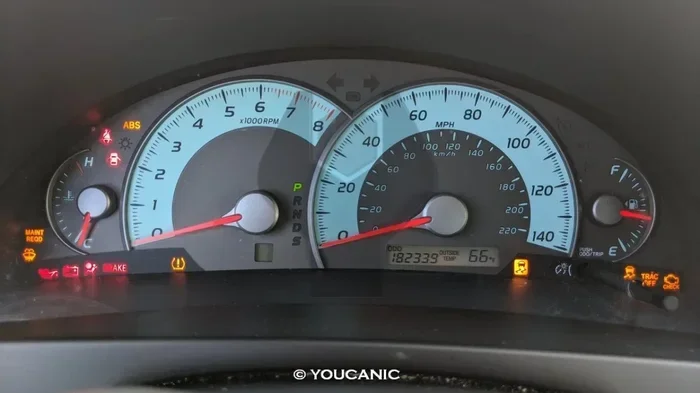
How Do I Reset My Camry A Complete Step by Step Guide
Resetting your Toyota Camry is easier than you think. Whether you need to clear the maintenance required light, reset the oil change indicator, or reboot your dashboard, this guide walks you through every method step by step. You will learn the exact procedures for different Camry model years, common mistakes to avoid, and when to seek professional help.
There is something satisfying about hitting the right buttons and watching your Toyota Camry’s dashboard return to a clean slate. Maybe you just finished an oil change and that annoying maintenance light is still staring at you. Maybe the trip meter is stuck and you need a fresh start. Whatever the reason, how do I reset my Camry is one of the most common questions Toyota owners ask.
This guide covers everything you need to know. From the maintenance required light to the check engine light, from the oil change indicator to the trip meter, you will find clear, step-by-step instructions. We will also cover what not to do, because some mistakes can cause more harm than good. By the end, you will feel confident handling resets on your own.
Let us dive in.
Key Takeaways
- Multiple reset methods exist: You can reset your Camry using the steering wheel controls, the instrument panel buttons, or a simple battery disconnect.
- The maintenance required light is the most common reset need: Most Toyota Camry owners need to reset this light after an oil change or service.
- Model year matters: The reset process varies slightly between older and newer Camry models, so always check your specific year.
- Some resets require a dealer scan tool: Certain warning lights and error codes need professional diagnostic equipment to clear.
- Prevention is key: Following your Toyota maintenance schedule helps avoid frequent resets and keeps your Camry running smoothly.
📑 Table of Contents
- Why You Might Need to Reset Your Camry
- How to Reset the Maintenance Required Light on Your Camry
- Resetting the Check Engine Light and Other Dashboard Warnings
- How to Reset the Oil Change Indicator on a Toyota Camry
- Resetting the Trip Meter and Odometer on a Toyota Camry
- Resetting Other Electronic Systems on Your Camry
- When to See a Professional for Camry Reset Issues
- Preventing Future Reset Needs on Your Toyota Camry
- Final Thoughts on Resetting Your Camry
Why You Might Need to Reset Your Camry
Your Toyota Camry uses a series of lights and indicators to communicate with you. Some of these signals are designed to reset automatically after a certain condition is met. Others require manual intervention. Understanding why these lights appear and when they need resetting helps you stay on top of your vehicle’s health.
The most common reasons drivers need to reset their Camry include completing a scheduled service, clearing a temporary fault code, or simply wanting a fresh start on the trip meter. Whatever your reason, knowing the correct reset procedure saves time and money. You do not need to visit a dealership every time a light pops up.
Common Dashboard Indicators That Need Resetting
Not all warning lights are the same. Some signal serious problems. Others are simply reminders. Here are the indicators that commonly need a manual reset on a Toyota Camry:
- Maintenance Required Light – This is the most common one. It comes on based on mileage intervals and reminds you to service your vehicle.
- Oil Change Indicator – After you change your oil, this light may stay on until you manually reset it.
- Check Engine Light – This light can indicate anything from a loose gas cap to a serious engine problem. Sometimes it needs a reset after the issue is fixed.
- Trip Meter – You may want to reset your trip A or trip B readings for tracking purposes.
- Service Interval Reminder – Similar to the maintenance light but specific to certain service milestones.
How to Reset the Maintenance Required Light on Your Camry
The maintenance required light is the number one reason people search for how to reset their Camry. Good news: it is a straightforward process on most model years. The exact steps depend slightly on your Camry’s year and trim level, but the general method is very similar.
Reset Method for Most Toyota Camry Models (2007 and Newer)
Follow these steps carefully. Take your time and do not rush through the process.
- Turn the ignition to the ON position. Do not start the engine. Just push the power button or turn the key to the accessory position.
- Press the trip meter reset button. This is usually located on the instrument panel near the speedometer. Hold it down for a few seconds.
- Navigate to the maintenance menu. Use the steering wheel controls or the instrument panel buttons to scroll through the display options.
- Select the reset option. Look for a menu item that says “Maintenance Reset” or something similar.
- Confirm the reset. Press and hold the button again until the light blinks or the display confirms the reset.
- Turn the ignition off and back on. This confirms the reset was successful. The maintenance light should no longer be visible.
Reset Method for Older Camry Models (2006 and Earlier)
Older Camry models use a slightly different approach. The process is still simple, but the button locations may vary.
- Turn the key to the ON position without starting the engine.
- Locate the trip odometer button on the instrument cluster.
- Press and hold the button for about five seconds.
- The maintenance light should blink and then turn off after you release the button.
- Turn the key to OFF and then back to ON to verify the reset.
If the light persists after following these steps, you may need to try a battery disconnect method. Disconnect the negative battery terminal for about 15 minutes, then reconnect it. This resets the entire electrical system and often clears stubborn lights.
For more detailed guidance on resetting maintenance lights specifically, check out our article on How Can I Reset My Maintenance Required Light. It covers additional methods and troubleshooting tips.
Resetting the Check Engine Light and Other Dashboard Warnings
The check engine light can be intimidating. It is designed to alert you to potential problems with your vehicle’s emissions system, engine, or other critical components. However, sometimes the light stays on even after you have fixed the problem. In those cases, you need to reset it.
Using an OBD-II Scanner
The most reliable way to reset the check engine light on a Camry is by using an OBD-II scanner. This tool plugs into the diagnostic port under your dashboard and reads any stored error codes.
- Locate the OBD-II port under the dashboard on the driver’s side.
- Plug in the scanner and turn the ignition to ON.
- Read the error codes displayed on the scanner.
- Clear the codes using the scanner’s menu.
- Turn the ignition off and then back on to verify the light is gone.
When the Light Comes Back
If the check engine light returns after a reset, there is an underlying issue that has not been resolved. Do not simply reset it repeatedly. The light is trying to tell you something. Common causes include a loose gas cap, faulty oxygen sensors, or issues with the catalytic converter. Address the root cause first, then reset the light.
For situations where you want to verify your vehicle’s history or check for any outstanding issues, you might also want to check if a vehicle is stolen for free using online tools. This ensures your Camry’s identification is clean and there are no hidden issues tied to the vehicle.
How to Reset the Oil Change Indicator on a Toyota Camry
The oil change indicator is different from the maintenance required light, though they are related. After you get an oil change, the indicator may not reset automatically. You need to do it manually.
Step-by-Step Oil Change Reset
- Turn the ignition to ON without starting the engine.
- Press the trip meter reset button repeatedly until you see the maintenance screen.
- Hold the reset button for about three seconds.
- The oil change indicator should reset and display a confirmation message.
- Turn the ignition off and verify the light is gone on your next start.
This process works on most Camry models from the past 15 years. If your specific model year has a different procedure, consult your owner’s manual. The manual will have the exact steps tailored to your vehicle.
Keeping up with your Toyota Camry maintenance schedule is one of the best ways to avoid frequent resets. Regular oil changes, fluid checks, and inspections keep your car running at its best and reduce the likelihood of warning lights appearing in the first place.
Quick Tips for Oil Change Reset Success
- Always reset the oil change indicator immediately after your oil change.
- Use the correct grade of oil recommended for your Camry model.
- Keep a log of your oil changes so you know when the next one is due.
- If the indicator does not reset after following the steps, try the battery disconnect method.
Resetting the Trip Meter and Odometer on a Toyota Camry
The trip meter on your Camry is useful for tracking short distances, fuel economy calculations, or monitoring specific trips. At some point, you may want to reset it back to zero. The process is simple and quick.
How to Reset Trip A and Trip B
Most Toyota Camry models have two trip meters: Trip A and Trip B. You can reset each one independently.
- Trip A is typically used for tracking daily commutes or individual trips.
- Trip B is useful for monitoring fuel efficiency between fill-ups.
To reset either trip meter, press and hold the trip meter button on the instrument panel for about two seconds. The reading will return to zero. Release the button, and the new zero reading will be recorded.
Resetting the Odometer
The odometer is different from the trip meter. The odometer tracks the total lifetime mileage of your vehicle. You cannot and should not reset the odometer. Tampering with an odometer is illegal in most jurisdictions and can significantly reduce the resale value of your Camry. If you notice your odometer is not functioning correctly, have it inspected by a qualified mechanic.
Resetting Other Electronic Systems on Your Camry
Your Toyota Camry has several electronic systems that may occasionally need a reset. These include the traction control system, the stability control system, and various electronic settings like clock and audio presets.
Traction Control Reset
If your traction control light is on and you have addressed the underlying issue, you may need to reset it. In some cases, the system resets automatically once the problem is fixed. If it does not, you can try the following:
- Turn off the engine and wait 30 seconds.
- Restart the engine and check if the light is off.
- Drive at a steady speed for a few minutes. The system may recalibrate itself.
For more information on managing traction control settings, you can refer to our guide on how to manually turn off traction control.
Battery Disconnect Reset for Stubborn Systems
Sometimes, a full electrical reset is needed. This involves disconnecting the car battery for a short period. Here is how to do it safely:
- Turn off the engine and all electronic accessories.
- Open the hood and locate the negative battery terminal.
- Use a wrench to loosen the cable and disconnect it from the terminal.
- Wait 15 to 20 minutes. This allows the vehicle’s computer to fully reset.
- Reconnect the cable and tighten it securely.
- Start the engine and check if the warning lights have cleared.
Be aware that disconnecting the battery will also reset your radio presets, clock, and possibly your power window settings. You will need to reprogram these after reconnecting the battery.
When to See a Professional for Camry Reset Issues
While many resets are simple and can be done at home, some situations require professional attention. Knowing when to seek help saves you time and prevents costly mistakes.
Signs You Need Professional Help
- The check engine light keeps returning after multiple resets.
- Multiple warning lights are on at the same time.
- Your Camry will not start after a reset attempt.
- You hear unusual noises from the engine or dashboard area.
- The reset procedure does not work despite following all steps correctly.
A professional mechanic or Toyota dealer has access to advanced diagnostic tools that can read and clear error codes more thoroughly than a basic OBD-II scanner. They can also identify underlying issues that may be causing persistent warning lights.
Can You Take Your Camry to Any Toyota Dealer for Service?
Yes, you can take your Toyota Camry to any Toyota dealer for service and resets. However, if your Camry is still under warranty, it is best to have the work done at an authorized dealer to maintain your warranty coverage. For out-of-warranty vehicles, any qualified mechanic or Toyota dealership can handle resets and diagnostics.
Preventing Future Reset Needs on Your Toyota Camry
The best way to deal with reset issues is to prevent them from happening in the first place. Regular maintenance and good driving habits go a long way toward keeping your Camry’s systems functioning properly.
Simple Habits That Help
- Follow the Toyota maintenance schedule outlined in your owner’s manual.
- Check your fluid levels regularly including oil, coolant, and brake fluid.
- Keep your gas cap tight after every fill-up. A loose gas cap is one of the most common triggers for the check engine light.
- Drive smoothly and avoid harsh braking or sudden acceleration.
- Address warning lights promptly instead of ignoring them.
These habits not only reduce the need for resets but also extend the overall lifespan of your Camry. A well-maintained Toyota Camry can easily last 200,000 miles or more with proper care.
Final Thoughts on Resetting Your Camry
Resetting your Camry does not have to be complicated. Whether you are clearing the maintenance required light, resetting the oil change indicator, or rebooting the trip meter, the steps are straightforward and manageable for most car owners. The key is to follow the correct procedure for your specific model year and to address any underlying issues before attempting a reset.
Remember that some resets are temporary fixes. If a warning light keeps coming back, there is a real problem underneath that needs attention. Do not just keep resetting the light and hoping it goes away. Use the reset as a tool, not a band-aid.
With the information in this guide, you now have the knowledge to handle most Camry resets on your own. Keep your owner’s manual handy, and do not hesitate to reach out to a professional when needed. Your Toyota Camry is a reliable machine, and with a little attention, it will keep running strong for years to come.
Frequently Asked Questions
How do I reset my Camry maintenance light after an oil change?
Turn the ignition to ON without starting the engine, then press and hold the trip meter reset button until the maintenance light blinks and turns off. Turn the ignition off and back on to confirm the reset was successful. This works on most Camry models from the past 15 years.
Why does the maintenance required light keep coming back on my Camry?
If the maintenance required light keeps returning, it usually means the service interval has not been properly reset, or there is an underlying issue that needs attention. Try resetting the light again following the correct procedure. If it persists, have your Camry inspected by a mechanic to rule out any hidden problems.
Can I reset the check engine light on my Camry without a scanner?
Yes, you can try disconnecting the negative battery terminal for 15 minutes. This clears the electrical system and often resets the check engine light. However, if the underlying problem is not fixed, the light will return. A scanner is the most reliable way to properly diagnose and clear the light.
How do I reset the trip meter on a Toyota Camry?
Press and hold the trip meter reset button on the instrument panel for about two seconds. The reading will return to zero. You can reset Trip A and Trip B independently using the same method. Note that the odometer cannot and should not be reset.
What should I do if resetting my Camry does not work?
If standard reset methods do not work, try disconnecting the battery for 15 to 20 minutes. If the problem persists, visit a Toyota dealer or qualified mechanic. There may be a deeper electrical or diagnostic issue that requires professional tools to resolve.
Is it safe to reset warning lights on my Camry myself?
Yes, it is generally safe to reset reminder lights like the maintenance required light or oil change indicator. However, be cautious with the check engine light. Resetting it without fixing the underlying problem can mask serious issues and potentially lead to more expensive repairs down the road.
=== CONCLUSION ===
Resetting your Toyota Camry is a skill every owner should have. Whether it is the maintenance required light, the oil change indicator, the check engine light, or the trip meter, the process is simpler than most people think. You do not need expensive tools or dealership visits for most resets. With the right guidance, you can handle these tasks in minutes from your own driveway.
Remember to always address the root cause of any warning light before resetting it. Use resets as a tool to clear confirmed fixes, not to ignore problems. Keep up with your Camry’s maintenance schedule, drive responsibly, and your Toyota will reward you with years of reliable service.
Now that you know exactly how to reset your Camry, you are empowered to take control of your vehicle’s maintenance. Keep this guide bookmarked for future reference, and share it with fellow Camry owners who might benefit from it.


