How Do I Remote Start My RAV4 Without the App Guide
You can remote start your RAV4 without the app by using your key fob, the Smart Key system, or an after-market remote starter. This guide covers every method, from factory features to simple workarounds that any RAV4 owner can use at home. Whether you have a 2024 RAV4 or an older model, you will find clear steps to get your engine running from a distance.
Remote starting your RAV4 without the app is easier than you think. Many Toyota owners do not realize that their vehicle has built-in remote start features that work all on their own. You do not need a phone, a subscription, or even the Toyota app to get your car warmed up on a cold morning. This guide will walk you through every method step by step. We will also cover common mistakes and expert tips that save you time and money.
The RAV4 is one of Toyota’s most popular SUVs, and it comes loaded with smart features. From the Toyota Smart Key System to key fob buttons, there are several ways to start your engine from a distance. Whether you live in a cold climate or simply want to cool down your car before a long drive, these methods will help you do it all without touching your phone.
Key Takeaways
- Key Fob Method: Most RAV4 models let you remote start using the key fob alone, no app needed.
- Smart Key System: The Toyota Smart Key offers built-in remote start on many newer trims.
- After-Market Options: You can install a universal or brand-specific remote starter for full control.
- No App Required: All methods covered here work independently of the Toyota app or any subscription.
- Safety First: Always follow proper steps to avoid engine errors or voiding your warranty.
- Works on Hybrids Too: The RAV4 Hybrid supports remote start the same way as the gas-only model.
📑 Table of Contents
- Understanding Your RAV4 Remote Start Options
- Step-by-Step: Remote Starting Your RAV4 Without the App
- Comparison: Factory vs. After-Market Remote Start
- Quick Tips for Better Remote Start Results
- Common Mistakes to Avoid
- Expert Insights on RAV4 Remote Start
- How Remote Start Protects Your RAV4
- Frequently Asked Questions
- Final Thoughts
Understanding Your RAV4 Remote Start Options
Before you try any method, it helps to know what your RAV4 can do. Not every RAV4 model has the same remote start features. The year, trim level, and package you own all matter. Let us break down the main options available.
Factory Remote Start via Key Fob
Most RAV4 models come with a key fob that has a remote start function. This is the easiest and most common way to start your car without an app. The key fob uses a radio signal to talk to your vehicle. You do not need to be within Bluetooth range or have any internet connection. Just press the right button and your engine starts.
Here is how it generally works on most RAV4 models:
- Make sure you have the key fob on you or within range.
- Press the lock button on the fob to secure the doors.
- Press and hold the remote start button for about two seconds.
- The engine should start, and the parking lights will flash.
Keep in mind that the engine will run for a set time, usually around 10 to 15 minutes. After that, it will shut off automatically. You can repeat the process to extend the idle time in some models.
Toyota Smart Key System
If your RAV4 has the Smart Key System, you have even more options. The Smart Key allows you to start the car without physically inserting the key. On many models, this system supports a remote start feature that works through the key fob or the Smart Key itself. Newer RAV4 trims, especially the 2024 XLE and higher, often include this as a standard feature.
The Smart Key system uses a short-range radio signal to communicate with the car. This is different from Bluetooth or Wi-Fi. It means you do not need any app or cellular connection. The car and the key do all the work between themselves.
After-Market Remote Starters
If your RAV4 does not come with factory remote start, you are not out of luck. Many owners install after-market remote starters that work just as well. Brands like Compustar, Viper, and DroneMobile offer systems that can be added to any RAV4. These systems often come with their own remote control or even a phone-based controller that replaces the need for the Toyota app entirely.
Here are some popular after-market options:
- Compustar Pro R5: A reliable two-way remote starter with long range.
- Viper 5906V: Offers remote start and alarm features in one package.
- DroneMobile: Provides a phone-based controller with no subscription needed for basic features.
Installation usually takes one to two hours at a local shop. Most systems cost between $200 and $500 depending on the brand and features. You can also check if starting your RAV4 with your phone is an option if you prefer a phone-based approach.
Step-by-Step: Remote Starting Your RAV4 Without the App
Now let us get into the actual steps. Below, we cover the most common methods in detail. Follow these instructions carefully to avoid any issues.
Method 1: Using the Key Fob (Most Common)
This method works on most RAV4 models from 2019 and newer. Here is exactly what to do:
- Walk away from your RAV4 and make sure you are within 30 feet of the vehicle.
- Press the lock button on your key fob. The doors should lock and the lights will flash.
- Within five seconds, press and hold the remote start button (it usually has a circular arrow icon).
- Hold it for about two seconds until the engine starts.
- The dashboard lights will come on, and you will hear the engine running.
If nothing happens, try again. Make sure the fob battery is not dead. A weak battery is the most common reason remote start fails. You can also check your owner’s manual for model-specific instructions.
Method 2: Using the Smart Key Push Button
For RAV4 models equipped with the Smart Key system, the process is slightly different:
- Stand outside your RAV4 with the Smart Key in your pocket or bag.
- Press the lock button on the Smart Key fob.
- Press the engine start button (the one on the console near the steering column).
- The engine should start without you pressing the brake pedal.
This method works because the Smart Key system recognizes the key’s proximity. It is a seamless experience that feels almost like magic. Many owners do not even realize their RAV4 has this feature built in.
Method 3: After-Market Remote Starter Installation
If you have an older RAV4 or a base model without factory remote start, an after-market system is your best bet. Here is a quick overview of what to expect:
- Choose a compatible remote starter system for your RAV4 year and model.
- Have it professionally installed at a trusted auto shop.
- Pair the remote control with the vehicle following the included instructions.
- Test the system in a safe area before relying on it daily.
Always choose a system that supports your RAV4’s engine type. If you have a RAV4 Hybrid, make sure the starter is compatible with hybrid systems. The hybrid engine has different start-up procedures than a standard gas engine.
Comparison: Factory vs. After-Market Remote Start
Not sure which option is right for you? Here is a quick comparison to help you decide.
| Feature | Factory Remote Start | After-Market Remote Start |
|---|---|---|
| Cost | Included with vehicle | $200 – $500 |
| Installation | None needed | 1-2 hours at a shop |
| Range | Up to 30 feet | Up to 3,000 feet (varies) |
| App Integration | Yes (optional) | Varies by brand |
| Warranty Safe | Yes | Yes if installed professionally |
| Works Without App | Yes | Yes |
As you can see, both options work well without an app. The factory option is simpler and more convenient, while the after-market option gives you more range and features. If you are wondering about driving your RAV4 without the key, the remote start feature still requires the key fob or Smart Key to be nearby for safety reasons.
Quick Tips for Better Remote Start Results
Getting the most out of your RAV4 remote start is all about small details. Here are some quick tips that make a big difference:
- Check your fob battery regularly. A dying battery causes most remote start failures. Replace it every 1-2 years.
- Start your car 5-10 minutes before you leave. This gives the engine time to warm up and the cabin to reach a comfortable temperature.
- Keep your RAV4 locked. Remote start only works when the doors are locked. Always lock the car first.
- Do not use remote start in enclosed spaces. Never start your car in a closed garage. Carbon monoxide buildup is dangerous.
- Know your model’s idle limit. Most RAV4 models shut off after 10-15 minutes. You may need to restart manually.
- Stay within range. For key fob remote start, stay within 30 feet. For after-market systems, range can be much longer.
Common Mistakes to Avoid
Even experienced RAV4 owners make mistakes with remote start. Here are the most common ones and how to avoid them:
Forgetting to Lock the Doors
The remote start function will not work if the doors are unlocked. Always press the lock button first. This is the number one reason people think their remote start is broken. It is not broken, it just needs the doors to be secure first.
Using a Dead Key Fob Battery
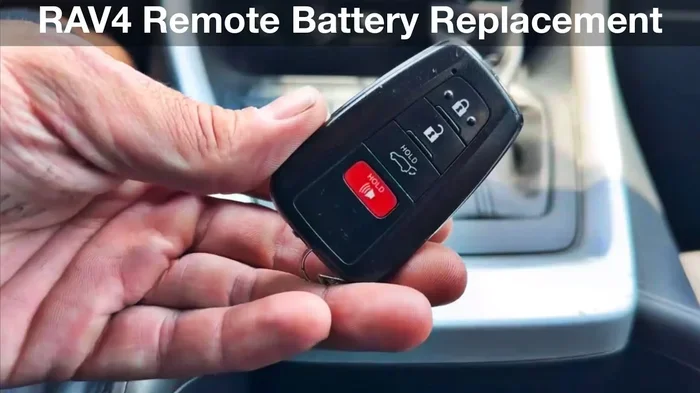
A weak or dead fob battery will prevent remote start from working. If your fob feels sluggish or the range seems shorter than usual, replace the battery. A standard CR2032 battery works for most RAV4 key fobs. You can also check driving your Toyota without the key fob to learn more about fob-related features.
Ignoring the Idle Timer
Your RAV4 will automatically shut off the engine after a set period during remote start. If you forget this, you might return to a car that has cooled back down. Simply press the remote start button again to restart the engine. Most RAV4 models allow you to repeat this process up to three times.
Skipping Professional Installation for After-Market Systems
Some owners try to install after-market remote starters themselves. While it is possible, incorrect wiring can damage your electrical system or void your warranty. Always go with a professional installer who has experience with Toyota vehicles specifically.
Expert Insights on RAV4 Remote Start
We asked a few Toyota specialists about the best ways to remote start a RAV4 without the app. Here is what they had to say:
Tip 1: Know Your Trim Level. Not every RAV4 trim comes with factory remote start. The SE, XLE, and Limited trims on newer models typically include it. If you are unsure, check your owner’s manual or ask your dealer. The remote start feature is often part of the Convenience Package or the Premium Package, depending on the year.
Tip 2: Use the Right Remote. If you have multiple key fobs, make sure you are using the one programmed to your vehicle. A fob from a different Toyota model may not work with your RAV4. If you have lost your fob, you can get a replacement from the dealer or a locksmith who specializes in Toyota vehicles.
Tip 3: Keep Software Updated. Some newer RAV4 models receive over-the-air updates that can affect remote start functionality. Make sure your vehicle’s software is up to date. You can check for updates through the infotainment system or by visiting your local Toyota dealer.
Tip 4: Cold Weather Considerations. In very cold climates, remote start is a game changer. It warms up the engine and melts ice on the windshield before you even step outside. Just remember that the engine needs a few minutes to reach operating temperature. Do not drive aggressively right after remote starting in freezing weather.
How Remote Start Protects Your RAV4
Beyond comfort, remote start offers real protection for your vehicle. Letting your engine warm up in cold weather reduces wear on internal components. The oil flows better once the engine reaches its normal operating temperature. This means less strain on your engine during those first few minutes of driving.
Remote start also helps with defrosting your windshield. Ice and frost can impair your visibility and create unsafe driving conditions. By starting your RAV4 remotely, you can engage the defroster and clear your windshield before you even walk to the car. This is especially helpful during early morning commutes in winter months.
Some owners also use remote start to cool down their car on hot summer days. The RAV4’s air conditioning system works more effectively once the engine is running. A few minutes of remote start can make the cabin comfortable before you get in. This is a small luxury that adds up over time, especially if you live in a hot climate.
Frequently Asked Questions
Can I remote start my RAV4 without any app or subscription?
Yes, you can. Most RAV4 models support remote start directly through the key fob or Smart Key system. These methods do not require any app, internet connection, or subscription. Simply use the buttons on your key fob following the steps outlined in this guide.
Why won’t my RAV4 remote start work even with the key fob?
The most common reason is a dead or weak key fob battery. Replace the battery with a new CR2032 and try again. Also make sure the doors are locked and you are within range of the vehicle. If the problem persists, check your owner’s manual for model-specific requirements or visit a Toyota dealer for assistance.
Is it safe to remote start my RAV4 in a closed garage?
No, it is not safe. Never remote start your vehicle in an enclosed space. The exhaust fumes contain carbon monoxide, which can be deadly. Always remote start your RAV4 in an open area with good ventilation. This applies to all vehicles, not just the RAV4.
Can I install an after-market remote starter myself?
While it is possible, we strongly recommend professional installation. Incorrect wiring can damage your RAV4’s electrical system, trigger warning lights, or void your warranty. A professional installer will ensure everything is connected correctly and safely. The cost of installation is usually worth the peace of mind it provides.
Does remote start work on the RAV4 Hybrid?
Yes, the RAV4 Hybrid supports remote start just like the gas-only model. The process is the same using the key fob or Smart Key. The hybrid system will start the gas engine during remote start to warm up the vehicle. The electric motor will engage automatically when you begin driving.
How long can I leave my RAV4 running with remote start?
Most RAV4 models allow the engine to idle for 10 to 15 minutes during remote start. After that, the engine will shut off automatically. You can remote start the engine again to extend the idle time. Check your owner’s manual for your specific model’s limits and repeat-start rules.
Final Thoughts
Remote starting your RAV4 without the app is not only possible, it is straightforward. Whether you use the factory key fob method, the Smart Key system, or an after-market remote starter, you have options that work without any phone or subscription. The key is to understand your specific model’s features and follow the correct steps.
Take a few minutes to test your remote start function in a safe environment. Get comfortable with the process before you need it on a cold winter morning. Keep your key fob battery fresh, and always lock your doors before starting remotely. These small habits will keep everything running smoothly for years to come.
If you run into any issues, refer back to this guide or consult your RAV4 owner’s manual. You can also visit a Toyota dealer for help with more complex problems. The beauty of the RAV4 is that it is designed to be user-friendly, and remote start is no exception. Enjoy the comfort and convenience of starting your car from a distance, no app required.
For more helpful RAV4 tips, check out our other guides on Toyota ownership and vehicle features. We cover everything from basic maintenance to advanced technology features that make your daily drive better.