How to Reset the Subaru Forester Radio the Easy Way
Resetting the Subaru Forester radio is simpler than most people think. Whether your screen is frozen, the audio is cutting out, or the system is acting up, a quick reset can solve the problem. This guide walks you through both soft and hard reset methods with clear, easy-to-follow steps. You will also learn common causes, prevention tips, and when to call a professional. Get your Forester’s audio back to normal in minutes.
Dealing with a stubborn radio in your Subaru Forester can be frustrating. You turn the key, press the power button, and nothing happens. Or maybe the screen freezes right in the middle of your favorite song. Whatever the issue, resetting the Subaru Forester radio is often the quickest fix. This guide shows you exactly how to do it, step by step, without any confusing tech talk.
Many Forester owners face radio issues at some point. It might be a frozen screen, distorted sound, or the system simply refusing to turn on. The good news is that most of these problems are easy to solve. You do not need to be a mechanic or a tech expert. With the right steps, you can get your audio system back up and running in just a few minutes.
In this article, we cover everything you need to know. We start with the most common reasons your radio might act up. Then we walk you through both the soft reset and hard reset methods. We also share tips to prevent future problems and tell you when it is time to see a professional. By the end, you will feel confident tackling any radio issue on your Subaru Forester.
Key Takeaways
- A soft reset is the first step and takes less than a minute to complete.
- A hard reset involves disconnecting the battery and clears all temporary glitches.
- Common causes include software bugs, loose connections, and electrical issues.
- Prevention tips can help you avoid future radio problems altogether.
- Professional help may be needed if the reset methods do not work.
- Regular updates and maintenance keep the infotainment system running smoothly.
- Knowing the steps saves time and money on unnecessary dealership visits.
📑 Table of Contents
- Why Does the Subaru Forester Radio Need a Reset?
- How to Perform a Soft Reset on the Subaru Forester Radio
- How to Do a Hard Reset on the Subaru Forester Radio
- Common Subaru Forester Radio Problems and How to Fix Them
- Tips to Keep Your Subaru Forester Radio Running Smoothly
- When Should You Seek Professional Help?
- How Does the Subaru Forester Radio Compare to Other Models?
- Final Thoughts on Resetting Your Subaru Forester Radio
Why Does the Subaru Forester Radio Need a Reset?
Understanding why your radio needs a reset helps you prevent the problem from coming back. Think of the infotainment system like a small computer. Just like any computer, it can freeze, glitch, or slow down over time. The Subaru Forester radio runs on software, and like all software, it sometimes needs a fresh start.
Here are the most common reasons you might need to reset the Subaru Forester radio:
- Software glitches: The system can freeze after a power surge or a sudden shutdown.
- Firmware bugs: Older software versions sometimes cause audio dropouts or screen freezes.
- Loose connections: Wiring behind the dashboard can shift, causing intermittent issues.
- Battery voltage drops: A weak car battery can confuse the radio’s internal systems.
- Overheating: Prolonged use in hot weather can cause the system to shut down unexpectedly.
- Aftermarket device conflicts: Adding new speakers or amplifiers can sometimes interfere with the factory radio.
Most of these issues are minor and temporary. A simple reset clears the system’s memory and forces it to restart with a clean slate. It is like restarting your phone when it starts acting weird. Before you try anything complex, always start with the easiest method first.
How to Perform a Soft Reset on the Subaru Forester Radio
A soft reset is the easiest and safest way to restart your radio. It does not delete any settings, presets, or saved stations. Think of it as a quick refresh for the system. You should always try this method first before moving on to more involved steps.
What Is a Soft Reset?
A soft reset simply restarts the radio’s software without erasing any data. It closes all running processes and starts fresh. This method works for most minor glitches, including frozen screens, audio cutouts, and unresponsive buttons. It takes less than a minute and requires no tools.
The soft reset is similar to how you might restart your phone or computer. You are not losing anything. All your favorite stations, Bluetooth pairings, and audio settings stay exactly where they are. This makes it the go-to first step for almost any radio issue.
Step-by-Step Soft Reset Instructions
Follow these simple steps to soft reset your Subaru Forester radio:
- Press and hold the power button. Find the power or volume knob on your radio panel. Press and hold it for about 10 to 15 seconds.
- Wait for the screen to go black. The display should turn off completely. This tells you the system is shutting down.
- Release the button. Let go of the power button and wait a few seconds.
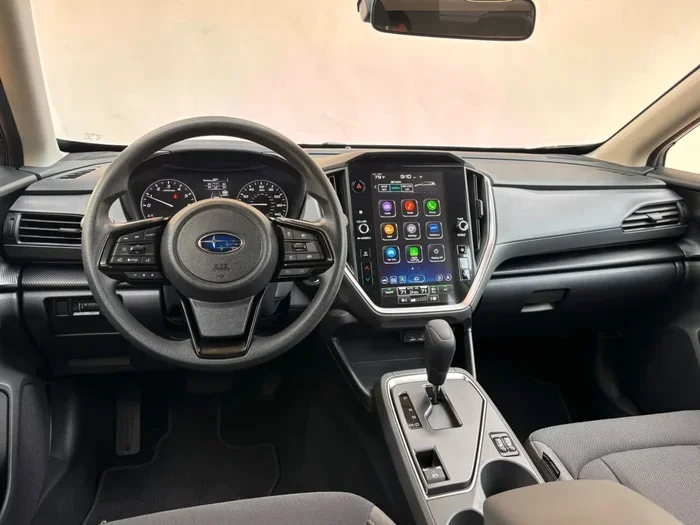
- Press the power button again. The radio should restart and display the main screen.
- Check the audio. Play a station or a Bluetooth connection to make sure everything works properly.
If the soft reset does not work, do not worry. Move on to the hard reset method, which we cover next. Most of the time, the soft reset solves the problem right away.
How to Do a Hard Reset on the Subaru Forester Radio
A hard reset is a deeper level of troubleshooting. It completely powers down the radio system and clears all temporary data. This method is more effective for stubborn issues that a soft reset cannot fix. However, it does require a bit more effort.
When Should You Use a Hard Reset?
You should try a hard reset when the soft reset fails. If your radio screen stays frozen even after a restart, or if the system refuses to power on at all, a hard reset is the next logical step. It is also useful if you notice strange error messages or if the audio distorts every time you turn the system on.
Keep in mind that a hard reset may erase your saved radio presets and Bluetooth connections. You will need to set those up again after the reset. Think of it as a fresh installation of the system. It takes a little extra time, but it solves most deep-rooted issues.
Step-by-Step Hard Reset Guide
Here is how to perform a hard reset on your Subaru Forester radio:
- Turn off the engine. Make sure your Forester is parked and the ignition is in the off position.
- Open the hood. Locate the car battery. You will need to disconnect the negative terminal.
- Disconnect the negative battery cable. Use a wrench to loosen the nut on the negative terminal. Pull the cable off carefully.
- Wait for at least 15 minutes. This gives the radio system time to fully discharge and reset its memory.
- Reconnect the negative cable. Place the cable back on the terminal and tighten the nut securely.
- Start the engine. Turn the key or press the start button to power on the car.
- Check the radio. The system should reboot and return to its default settings.
This method works because cutting the power completely drains any residual electricity from the radio’s circuit board. It resets the system to its factory state. After reconnecting the battery, the radio will take a few moments to initialize. You may see the Subaru logo appear on the screen during this process.
If you are not comfortable working with the battery, you can also try simply leaving the car doors closed and the ignition off for 30 minutes. This gives the system enough time to fully power down. Some Forester owners have had success with this simpler approach before going to the battery disconnect method.
Common Subaru Forester Radio Problems and How to Fix Them
Not all radio issues require a full reset. Sometimes the problem is smaller and easier to fix. Here are some common issues Forester owners face and how to address them.
Radio Screen Frozen or Unresponsive
A frozen screen is the most common radio complaint. It usually happens when the system has too many processes running at once. Maybe you were switching between Bluetooth, radio, and navigation all at the same time. The system gets overwhelmed and locks up.
To fix this, start with the soft reset method we described earlier. Hold the power button for 15 seconds. If that does not work, try the hard reset. In most cases, one of these two methods will unfreeze the screen immediately.
Another trick is to make sure your firmware is up to date. Subaru occasionally releases updates that fix known bugs. You can check for updates through the Subaru Starlink system if your Forester has that feature. Keeping your system updated prevents many common glitches before they happen.
Audio Cutting Out or Distorted Sound
If your radio sounds fuzzy or keeps cutting out, the problem might not be the software. It could be a physical issue. Check the antenna connection first. A loose or damaged antenna causes poor reception and static noise.
Next, inspect the speakers. Over time, moisture can get behind the dash and affect speaker connections. If the distortion only happens at certain volumes, the issue might be a blown speaker. A soft reset will not fix a hardware problem like this, but it is always worth trying first.
Radio Will Not Turn On At All
A radio that will not power on can be alarming. Before you panic, check the obvious things first. Is the fuse for the radio blown? Open the fuse box under the dashboard and look for the radio fuse. If it is blown, replace it with a new one of the same amperage.
If the fuse is fine, try the hard reset method. A complete power drain often fixes radios that refuse to turn on. If neither of these works, the issue might be with the wiring or the radio unit itself. At that point, it is time to visit a professional.
Tips to Keep Your Subaru Forester Radio Running Smoothly
Prevention is always better than cure. A few simple habits can keep your Forester’s radio system in great shape for years. Here are some tips that every owner should follow.
- Keep your firmware updated: Regular updates fix bugs and improve performance. Check through the Subaru Starlink system for available updates.
- Avoid overloading the system: Do not switch between too many audio sources at once. Let the system process one input before moving to the next.
- Turn off the radio before starting the engine: This reduces power surges that can stress the system.
- Keep the dashboard vents clear: Proper airflow prevents the infotainment unit from overheating.
- Use quality audio files: Low-quality audio files can cause the system to stutter or lag.
- Inspect connections annually: Check that all cables and connections behind the dash are secure.
- Restart the system monthly: A regular restart clears temporary files and keeps things running smoothly.
These simple habits take very little time. But they make a big difference in the long run. Many Forester owners report years of trouble-free radio use just by following these basic maintenance tips.
When Should You Seek Professional Help?
Most radio issues respond well to a soft or hard reset. But sometimes the problem runs deeper than a simple restart can fix. Knowing when to call a professional saves you time and prevents further damage to your system.
You should consider professional help if:
- The radio still does not work after both soft and hard resets.
- You notice a burning smell or see smoke coming from the dashboard.
- The screen has physical damage, such as cracks or discoloration.
- The radio issue is accompanied by other electrical problems in the car.
- You hear a persistent buzzing or popping sound from the speakers.
These signs could indicate a serious electrical problem or hardware failure. A trained technician at a Subaru dealership or a trusted auto electronics shop can diagnose the issue properly. They have specialized tools and access to factory service manuals that the average owner does not have.
Before visiting a mechanic, make sure you have tried all the reset methods in this guide. It saves you a trip and potentially a costly repair bill. Many radio problems are software-related and resolve with a simple reset. But if the hardware is truly damaged, a professional can get it fixed right the first time.
How Does the Subaru Forester Radio Compare to Other Models?
The Subaru Forester radio system holds up well against competitors in the compact SUV segment. It offers a clean interface, solid Bluetooth connectivity, and responsive controls. The standard audio system provides clear sound for most listening needs. For those who want more, the available upgraded audio system adds richer bass and clearer highs.
Compared to some rivals, the Forester’s radio system is straightforward and reliable. It does not have all the flashy features of some luxury brands, but it gets the job done well. The lack of bloatware also means fewer things can go wrong. This simplicity is one reason why a reset usually fixes most issues quickly.
For owners who use their Forester for towing or hauling gear, the radio system remains stable and dependable. Even with additional electrical loads from trailers or rooftop carriers, the audio system rarely experiences problems. This speaks to the overall quality and design of the Subaru electrical architecture.
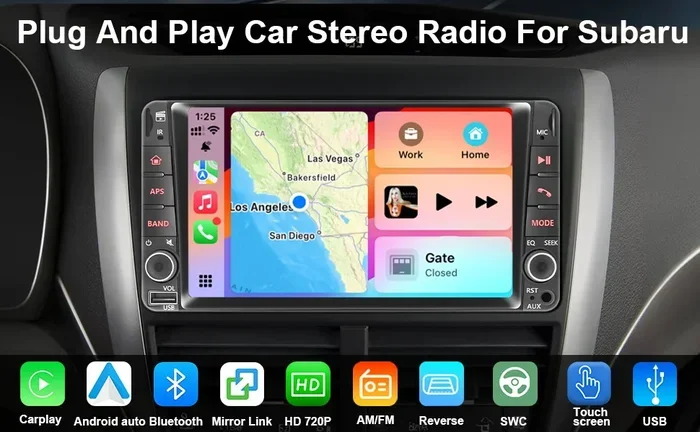
If you also use features like Apple CarPlay or Android Auto, you might wonder about compatibility. The good news is that the Forester’s infotainment system works seamlessly with these platforms. You do not need any extra subscriptions or special equipment to use them. Just connect your phone and start streaming.
Overall, the Subaru Forester radio is a solid system that serves its purpose well. When issues do arise, the reset methods in this guide handle the vast majority of them. It is a reliable system that rewards owners who take a few minutes to keep it maintained.
Final Thoughts on Resetting Your Subaru Forester Radio
Resetting the Subaru Forester radio does not have to be a stressful experience. Whether you choose the soft reset or the hard reset method, both are simple and effective. The key is to start with the least invasive option and work your way up only if needed.
Most radio issues in the Forester come from minor software hiccups. A quick restart clears those out and gets you back to enjoying your music, podcasts, and calls. Keeping your system updated and following the prevention tips in this article helps you avoid problems in the future.
Remember, you are not alone if your Forester radio gives you trouble. It is a common experience shared by many owners. The good news is that the fix is almost always simple and takes just a few minutes. With the steps outlined in this guide, you have everything you need to troubleshoot and resolve the issue on your own.
So the next time your Subaru Forester radio acts up, stay calm. Grab a few minutes, follow the steps, and get back on the road with your favorite tunes playing. Your Forester deserves to sound its best, and now you know exactly how to make that happen.
Frequently Asked Questions
How long does a Subaru Forester radio reset take?
A soft reset takes less than one minute. A hard reset, including the battery disconnect, takes about 20 to 30 minutes total. The actual reset process is quick, but you need to wait for the system to fully discharge before reconnecting the battery.
Will resetting the Subaru Forester radio delete my saved stations?
A soft reset keeps all your saved stations and settings intact. A hard reset may clear your presets and Bluetooth pairings, requiring you to set them up again. This is why it is best to try the soft reset first.
Why does my Subaru Forester radio keep freezing?
Freezing is usually caused by outdated firmware or too many active processes. Try updating your system through Subaru Starlink and avoid switching between multiple audio sources rapidly. If the problem persists, a hard reset often resolves the issue.
Can I reset the Subaru Forester radio without disconnecting the battery?
Yes. The soft reset method does not require any battery work. Simply hold the power button for 10 to 15 seconds until the screen goes dark, then press it again to restart. This works for most minor glitches.
Is it safe to disconnect the car battery to reset the radio?
It is generally safe and is a common troubleshooting method. Just make sure your car is parked, the ignition is off, and you disconnect the negative terminal only. Wait at least 15 minutes before reconnecting. If you are unsure, consult your owner’s manual or a professional.
What should I do if neither reset method works?
If both resets fail, the issue is likely hardware-related. Check the radio fuse first, then inspect the antenna and speaker connections. If everything looks fine, take your Forester to a Subaru dealership or a qualified auto electronics technician for a proper diagnosis.