Quick Guide How to Change the Clock in Subaru Forester
Changing the clock in your Subaru Forester is a quick fix you can do without a mechanic. This guide shows you how to adjust the time using the infotainment screen, steering wheel controls, or manual knob. You’ll also learn to switch between 12-hour and 24-hour formats, sync with your phone, and troubleshoot common issues. Follow these simple steps to keep your Subaru Forester clock accurate.
Ever glanced at your dashboard and realized the time is wrong? It happens to the best of us. Whether you’ve just swapped in a new battery or crossed time zones, the Subaru Forester clock can drift off. Knowing how to change the clock in Subaru Forester takes just a few minutes, and you don’t need a mechanic. In this guide, we’ll walk you through every method, from the touchscreen to the steering wheel buttons. You’ll also discover how to fix a stuck clock, switch to 24-hour format, and keep your time accurate after a reset. Let’s dive in.
The Subaru Forester clock is part of the vehicle’s infotainment system. It displays the current time on the dashboard or center screen. Modern Foresters from 2019 onward have a digital display that you can adjust with a few taps. Older models might use a simpler knob or button setup. No matter the year, the process is straightforward once you know where to look. This article covers all model years and trim levels, so you’ll find the right steps for your specific vehicle.
Before you start, make sure your vehicle is parked safely. You can adjust the clock while driving, but it’s safer to pull over. Having the owner’s manual nearby can help if you get stuck. Most Subaru Forester models share the same basic controls, so the steps below will work for the 2015, 2018, 2020, 2022, and 2024 versions. Let’s get started with the first method.
Key Takeaways
- Multiple methods exist: You can change the clock via the infotainment touchscreen, steering wheel buttons, or the manual knob—no tools required.
- Switch time formats easily: Toggle between 12-hour and 24-hour display in the vehicle settings menu in under a minute.
- Phone pairing syncs time: Connecting your phone through Apple CarPlay or Android Auto can automatically update the clock if you set your device to automatic time.
- Battery disconnect resets the clock: After a jump start or battery swap, the clock often reverts to 12:00—just re-enter the correct time.
- Troubleshooting is simple: A frozen clock usually fixes with a screen restart or a quick reset of the infotainment system.
- Time zone changes matter for travel: Adjust the time zone setting when crossing state lines to keep your Subaru Forester clock accurate.
📑 Table of Contents
Understanding the Clock System in the Subaru Forester
How the Clock Works in Different Model Years
The Subaru Forester clock has evolved over the years. Early models (2013–2018) often used a small analog or simple digital display near the speedometer. You could adjust the time by pressing a button on the steering wheel or turning a knob on the dashboard. Newer models (2019–2024) feature a full-color infotainment touchscreen that controls the clock, radio, navigation, and vehicle settings. The clock is just one small part of the infotainment system, but it’s one of the most used features.
In the latest 2024 models, the clock can sync with your phone’s time if you enable Apple CarPlay or Android Auto. This means the clock updates automatically when you cross time zones. If you’re using the base model without a touchscreen, the clock controls are still accessible through a simple menu. Understanding which system your Forester uses helps you choose the right method below.
Where to Find the Clock Controls
On most Subaru Foresters, the clock settings live inside the vehicle settings menu. You can access it by pressing the “Menu” or “Settings” button on the steering wheel or touchscreen. Once inside, look for “Display,” “Clock,” or “Time Settings.” The exact path varies slightly by year:
- 2019–2021 models: Press the “Settings” button on the steering wheel, then scroll to “Clock.”
- 2022–2024 models: Tap the “Home” icon on the touchscreen, then select “Vehicle Settings” and “Clock.”
- Base models without touchscreen: Use the knob on the radio panel to highlight “Clock” and press the center button.
Knowing where the controls are saves you time. If you can’t find the option, check the owner’s manual for your specific trim. The clock is also tied to the battery—if the battery dies, the clock will reset.
Why Accurate Time Matters
An incorrect clock can cause small frustrations, like missing a deadline or arriving late. More importantly, the clock syncs with other features. For example, the backup camera timestamp, navigation arrival times, and even some safety alerts rely on accurate time. If the clock is off, your daylight saving time toggle might not work correctly. Keeping the Subaru Forester clock accurate ensures all these systems work in harmony. It’s a quick check that pays off in reliability.
How to Change the Clock in Subaru Forester: Step-by-Step
Preparing Your Vehicle
Before adjusting the clock in Subaru Forester, park the car on a level surface and turn the ignition to the “On” position. You don’t need to start the engine, but the infotainment system must be powered. If your Forester has a touchscreen, tap the screen to wake it up. For models with physical buttons, press the “Power” or “Mode” button to activate the display. Having the engine running can prevent the system from dimming or going to sleep while you adjust the time.
Gather any tools you might need. In most cases, you only need your fingers. For older models, a small flathead screwdriver might help if you need to access a hidden reset button. Keep the owner’s manual handy—it often includes a diagram of the controls. Now you’re ready to make the change.
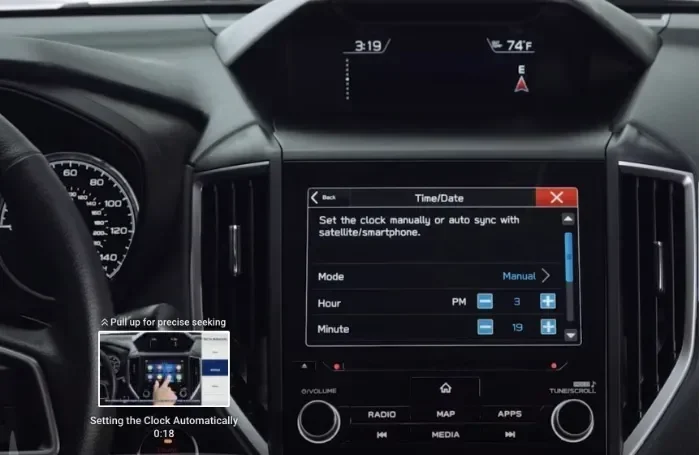
Adjusting the Clock Using the Infotainment Screen
This is the most common method for 2019 and newer Subaru Foresters. Follow these steps to change the clock in Subaru Forester using the touchscreen:
- Tap the “Home” icon on the touchscreen to return to the main menu.
- Select “Vehicle Settings” or the gear icon.
- Scroll down and tap “Clock.”
- Use the on-screen arrows or tap the hour and minute fields to adjust the time.
- Choose AM or PM if your display is in 12-hour format.
- Tap “Save” or “Set” to confirm.
Some models let you switch to a 24-hour format right from this menu. If the clock doesn’t respond, try restarting the infotainment system by holding the power button for 10 seconds. The Subaru Forester clock should snap back to normal after the reboot.
Using the Steering Wheel Controls
If your Forester doesn’t have a touchscreen, you can still adjust the time with the steering wheel buttons. This method works on many 2015–2020 models. Here’s how:
- Press the “Menu” or “Settings” button on the left side of the steering wheel.
- Use the up and down arrows to highlight “Clock.”
- Press the “OK” or “Enter” button to select it.
- Use the arrow buttons to change the hour and minute values.
- Press “OK” again to save the new time.
This method is simple and doesn’t require taking your eyes off the road for long. The Subaru Forester clock updates immediately. If the buttons feel unresponsive, check that the steering wheel controls are enabled in the settings menu. Sometimes the “Control Lock” feature disables them while driving.
Manual Knob Adjustment for Older Models
For Subaru Foresters from 2013 and earlier, the clock might be adjusted with a physical knob near the radio. Turn the knob to highlight the time display, then press it to enter edit mode. Use the knob to scroll through hours and minutes, then press again to save. This analog-style control is durable and easy to use. If the knob is stuck, a gentle wiggle often frees it. Avoid using force, as the plastic gears inside can break.
Comparison: Clock Adjustment Methods by Model Year
Not sure which method applies to your Forester? This table breaks it down by model year and trim level.
| Model Year | Display Type | Adjustment Method | Time Format Options |
|---|---|---|---|
| 2013–2018 | Small digital or analog | Steering wheel buttons or radio knob | 12-hour only |
| 2019–2021 | Touchscreen (7-inch) | Infotainment menu | 12-hour or 24-hour |
| 2022–2024 | Touchscreen (8–11.6-inch) | Infotainment menu + steering wheel | 12-hour, 24-hour, auto-sync |
As you can see, newer models offer more flexibility. The 2024 Xle and higher trims even support automatic time syncing through the phone connection. If you’re unsure about your specific trim, check the owner’s manual or visit the Subaru website.
Common Mistakes When Adjusting the Clock
- Adjusting while driving: This is distracting and dangerous. Always park fully before making changes.
- Forgetting to save: After you adjust the hour and minute, always tap “Save” or “Set.” Pressing the back button discards your changes.
- Ignoring the time zone: If you travel frequently, an incorrect time zone setting will keep the clock wrong even after you adjust the hour.
- Using the wrong format: Switching to 24-hour mode without realizing it can make the clock look off by 12 hours.
Adjusting Time Format, Time Zone, and Sync
Switching Between 12-Hour and 24-Hour Format
Many drivers prefer the 24-hour format, especially if they travel internationally or work night shifts. Changing the Subaru Forester clock to 24-hour display is easy. In the “Clock” menu, look for a toggle labeled “24-Hour Format” or “Military Time.” Switch it on, and the display changes from 2:30 PM to 14:30. This setting is available on all touchscreen models from 2019 onward. For older models, you may need to enter a hidden service menu, but that’s rarely necessary.
The 24-hour format eliminates AM/PM confusion. It’s especially helpful if you use the clock to time your drives or track fuel fill-ups. Some owners also use it to sync with their smartwatch. Once you switch, the clock stays in that format until you change it back.
Changing the Time Zone for Travel
If you frequently cross state lines or drive to Canada, the time zone setting can save you from manual adjustments. In the “Clock” menu, look for “Time Zone” or “Zone Setting.” Select your current region from the list. The clock will automatically adjust based on your location. Some Foresters use GPS to detect the time zone, while others rely on the phone’s location if Apple CarPlay is active.
Keep in mind that the daylight saving time toggle is separate. You’ll need to enable or disable DST manually in the same menu. The system usually updates DST automatically on the second Sunday in March and the first Sunday in November in the United States. If the toggle doesn’t switch, you may need to update the infotainment software.
Syncing with Your Phone’s Clock
One of the best ways to keep the Subaru Forester clock accurate is to let your phone handle the time. When you connect your phone via Apple CarPlay or Android Auto, the clock can pull the exact time from your device. To make this work, you first need to pair your phone. If you’re not sure how, here’s how to put your phone in pairing mode. Once paired, go to the “Clock” settings and enable “Sync with Phone” or “Auto-Time.” The clock will now update whenever your phone’s time changes. This is especially handy when you travel across time zones or when daylight saving time kicks in.
For automatic updates on your phone itself, you can set your device to automatic time. This ensures your phone’s clock is always correct, which in turn keeps the Forester’s clock in sync. The process is simple and works with both iPhone and Android.
Note: The phone sync feature works best when the phone is connected via USB or Bluetooth. If the connection drops, the clock may revert to manual mode. Reconnect your phone to restore automatic syncing.
Troubleshooting When the Clock Won’t Change
Clock Stuck on Wrong Time After Battery Disconnect
A dead battery or a jump start often resets the Subaru Forester clock to 12:00. This is normal behavior. The infotainment system loses its stored settings when power is cut. Once you reconnect the battery or install a new one, the clock will show the wrong time. To fix this, simply follow the step-by-step instructions above to set the correct time. The process takes less than two minutes.
If the clock remains stuck at 12:00 even after you try to adjust it, the infotainment system might need a reset. Turn the ignition off, then disconnect the negative battery terminal for 30 seconds. Reconnect it and turn the ignition on. The system will reboot, and you can set the clock again. This hard reset clears any temporary glitches that prevent the clock in Subaru Forester from updating.
Infotainment Screen Freezes During Clock Adjustment
Sometimes the touchscreen freezes when you’re in the “Clock” menu. This can happen if the system is low on memory or if a software update is pending. Don’t panic. The first step is to perform a soft reset. Press and hold the power button on the touchscreen for 10–15 seconds until the screen goes black. Wait a few seconds, then press it again to restart. The Subaru Forester clock menu should reload normally.
If the screen remains frozen, you can try a factory reset of the infotainment system. This will erase your saved radio stations and Bluetooth pairings, so use it as a last resort. Check the owner’s manual for the specific reset procedure for your model year. In most cases, a simple restart fixes the issue.
Daylight Saving Time Won’t Toggle
If the daylight saving time switch is grayed out or won’t move, the system might be in a “lock” mode. This happens when the GPS or phone connection is lost. Reconnect your phone or wait for the GPS signal to return. The toggle should become active again. If it still won’t budge, check for a software update. Subaru frequently releases infotainment updates that fix bugs related to the clock settings and DST handling.
Common Mistakes When the Clock Won’t Change
- Assuming the battery is dead: A frozen clock is often a software glitch, not a battery problem. Try a soft reset first.
- Ignoring the GPS signal: Without GPS, the time zone toggle may lock. Wait for a signal or connect your phone.
- Skipping software updates: Outdated infotainment software can cause clock bugs. Always keep the system up to date.
What to Do After a Battery Disconnect or Reset
Why the Clock Resets to 12:00
The Subaru Forester clock relies on power from the battery to maintain its settings. When the battery is disconnected—even for a few minutes—the system loses the stored time. This is by design, not a defect. The clock acts like a simple quartz timer that needs to be reinitialized. Other settings like radio presets and Bluetooth pairings may also reset, but the clock is the most noticeable because it’s always in your line of sight.
Understanding this helps you stay calm when it happens. It’s not a sign of a broken system. It just means you need to set the time again. The process is the same as the first time you adjust it, so you’ll be a pro after the second time.
How to Re-Set the Clock Quickly
After a battery disconnect, follow these fast steps to restore the correct time:
- Turn the ignition to “On” and wait for the infotainment system to fully boot.
- Navigate to “Settings” > “Clock.”
- Adjust the hour and minute using the on-screen controls or steering wheel buttons.
- Confirm the AM/PM or 24-hour format.
- Tap “Save” and verify the time matches your phone or watch.
Pro tip: If you have a smartphone with the correct time, use it as a reference. This ensures you don’t make a double mistake. The Subaru Forester clock should now be perfectly synced.
Preventing Future Time Resets
While you can’t completely prevent the clock from resetting after a battery disconnect, you can minimize the hassle. Keep a portable battery maintainer connected if you store your Forester for long periods. This keeps the battery charged and preserves the infotainment settings. You can also enable phone-based time sync, so even if the clock resets, it will update automatically once your phone reconnects. A few small habits save you from constantly re-entering the time.
Related Infotainment Features That Affect Your Clock
Subaru Starlink and Apple CarPlay Time Sync
The Subaru Forester clock can behave differently depending on your infotainment package. If your Forester is equipped with Subaru Starlink, the system offers enhanced connectivity, including real-time traffic, weather, and navigation. Starlink also manages the clock’s behavior when you’re connected to the internet. If you’re wondering whether you need Subaru Starlink to use Apple CarPlay, the answer is that Apple CarPlay can function without Starlink on most models, but Starlink adds extra features. You can read more about this in our guide on Do You Need Subaru Starlink To Use Apple Carplay. The key takeaway is that Starlink doesn’t control the clock directly, but it does improve overall system stability, which can prevent clock freezes.
When Apple CarPlay is active, the clock on the infotainment screen often switches to show your phone’s time. This is convenient, but it can be confusing if you prefer the car’s own clock. You can toggle between the car clock and the phone clock in the “Clock” settings. The Subaru Forester clock will remember your preference for next time.
Using the Backup Camera Display and Clock Overlays
Some Subaru Forester owners notice a small clock overlay when they engage the backup camera. This is normal and cannot be turned off on most models. The clock in the backup view is synced with the main dashboard clock, so if you adjust one, the other updates too. This feature helps you time your parking maneuvers and reminds you of the current time without looking away from the screen. If the backup camera clock appears out of sync, check the main clock settings first. A mismatch usually means the main clock needs a refresh.
Expert Insight: Keeping Your Clock Accurate Long-Term
To keep the Subaru Forester clock accurate over the long haul, follow these simple habits. First, let your phone handle time syncing whenever possible. Second, update the infotainment software at least once a year. Subaru releases updates that improve clock accuracy and fix DST bugs. Third, if you live in an area with frequent power outages, consider a battery maintainer. Finally, if you notice the clock drifting by more than a minute or two, it could be a sign of a failing internal clock battery on the infotainment unit. In that case, a visit to the dealer can replace the small backup battery and restore perfect accuracy.
Common Mistake: Many owners try to adjust the clock while the vehicle is in motion. This is distracting and can be dangerous. Always adjust the clock when the car is fully stopped and parked. If you need to make a quick change at a red light, use the steering wheel controls, but it’s much safer to pull over.
Common Mistake: Forgetting to save the new time. After you adjust the hour and minute, always tap “Save” or “Set.” If you just press the back button, your changes won’t be applied. This is the most common reason people think the clock adjustment isn’t working.
In conclusion, knowing how to change the clock in Subaru Forester is a basic skill that every owner should have. Whether you use the touchscreen, steering wheel buttons, or manual knob, the process is simple and takes just a couple of minutes. You can switch to 24-hour format, adjust the time zone for travel, and sync with your phone for automatic updates. If the clock ever gets stuck, a quick reset or infotainment reboot usually solves the problem. Keep this guide bookmarked for the next time the time is off. A accurate clock makes every drive smoother and more organized.
Frequently Asked Questions
Can I change the clock while the Subaru Forester is moving?
Yes, you can adjust the clock while driving, but it is not recommended. Taking your eyes off the road to tap a screen or press buttons is a distraction. For safety, always make time adjustments when the vehicle is fully parked.
Why does my Subaru Forester clock reset to 12:00 after a battery change?
This is normal behavior. When the battery is disconnected, the infotainment system loses power and resets to its default settings, including the clock. Simply re-enter the correct time using the steps in this guide.
Does the Subaru Forester clock automatically update for daylight saving time?
On most models from 2019 onward, the clock can update automatically if the time zone and DST settings are enabled. The system uses GPS or phone data to determine the correct date. If it doesn’t update, check for an infotainment software update.
Can I sync the Subaru Forester clock with my iPhone?
Yes. When you connect your iPhone via Apple CarPlay, the clock can sync with your phone’s time. Enable the “Sync with Phone” or “Auto-Time” option in the Clock settings to make this work.
What should I do if the clock menu is grayed out?
A grayed-out clock menu often means the infotainment system is in a locked state. Try a soft reset by holding the power button for 10 seconds. If that doesn’t work, restart the vehicle and try again. Ensure the vehicle is in park and the ignition is on.
Is there a way to hide the clock from the backup camera display?
On most Subaru Forester models, the clock overlay on the backup camera cannot be turned off. It is designed to stay visible at all times. If the backup clock appears out of sync, adjust the main dashboard clock to fix it.