How to Change the Time Settings in Subaru Crosstrek
Changing the time in your Subaru Crosstrek is quick and simple once you know where to look. Whether you need to adjust the clock manually or switch to automatic time, the process takes just a few minutes. This guide walks you through every method, including the infotainment system, Bluetooth pairing, and model-specific steps for different Subaru Crosstrek years.
Have you ever jumped into your Subaru Crosstrek and noticed the clock is wrong? Maybe you just moved to a new time zone, or the battery died and reset everything. Whatever the reason, fixing the clock is easy once you know where to look. This guide shows you exactly how to change the time settings in Subaru Crosstrek models, no matter what year you drive.
We cover every method you can use. From the built-in infotainment screen to Bluetooth syncing with your phone, you will find the right approach for your situation. The steps are simple, and you do not need any special tools or mechanic skills. Let us get your clock set correctly.
Before we dive in, it helps to understand a few basics about how the Subaru Crosstrek clock settings work. Most models use the infotainment system as the central hub for all vehicle settings, including the clock. Some newer models also support automatic time through connected phone features. Let us walk through each option step by step.
Key Takeaways
- Easy Manual Adjustment: You can change the time in your Subaru Crosstrek directly from the infotainment screen in under a minute.
- Automatic Time Option: Linking your phone via Bluetooth can sync your clock automatically, so you never have to adjust it manually.
- Model Year Differences: Different Subaru Crosstrek model years may have slightly different menus, but the process is similar across all generations.
- 24-Hour Format Available: You can switch between 12-hour and 24-hour time formats to match your preference.
- Time Zone Settings Matter: Setting the correct time zone ensures your clock stays accurate, especially after long trips.
- No Special Tools Needed: All time adjustments can be done through the vehicle’s built-in interface without any extra equipment.
📑 Table of Contents
- How to Change the Time in Subaru Crosstrek Using the Infotainment System
- Using Bluetooth to Sync Time Automatically
- Time Zone Settings in the Subaru Crosstrek
- Model-Specific Time Setting Instructions
- Troubleshooting Common Clock Issues
- Quick Tips for Keeping Your Subaru Crosstrek Clock Accurate
- Expert Insights on Vehicle Clock Settings
- How Long Does It Take to Change the Time?
- Final Thoughts
How to Change the Time in Subaru Crosstrek Using the Infotainment System
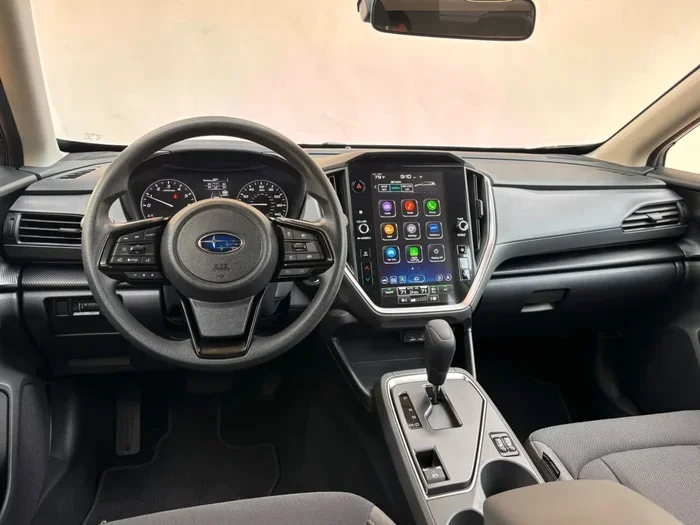
The most common way to adjust the clock is through the Subaru Crosstrek infotainment system. This method works on most model years and does not require a phone or internet connection. Here is how to do it.
Step-by-Step Guide for Manual Clock Adjustment
Follow these simple steps to change the time manually:
- Start your Subaru Crosstrek and wait for the infotainment screen to fully load.
- Press the Settings button on the main screen. It usually looks like a gear icon.
- Look for the Clock or Time & Date option in the menu list.
- Select the option and you will see the current time displayed.
- Use the up and down arrows or the touchscreen to adjust the hours and minutes.
- Choose AM or PM if your display uses the 12-hour format.
- Press the Set or Confirm button to save your changes.
That is it. Your clock should now show the correct time. If you have a 2022 Subaru Crosstrek or newer, the menu layout might look slightly different, but the steps are very similar. The Settings gear icon is always your starting point.
Switching Between 12-Hour and 24-Hour Format
Some drivers prefer the 24-hour format because it avoids any confusion between morning and evening times. You can easily switch your Subaru Crosstrek display settings between formats:
- Go to Settings on the infotainment screen.
- Find the Clock or Time & Date menu.
- Look for a Format or Display option.
- Toggle between 12-hour and 24-hour format.
- Confirm your selection.
This small change can make a big difference, especially if you are used to the military-style 24-hour clock. It is one of those quick tweaks that makes your daily drive more comfortable.
Using Bluetooth to Sync Time Automatically
If you pair your phone with your Subaru Crosstrek, you can set the clock to update automatically. This is one of the best features of modern infotainment systems. When your phone connects, it shares the current time with the vehicle.
How to Enable Automatic Time Sync
Here is how to set up automatic time through Bluetooth:
- Make sure your phone has the correct time and time zone set.
- Put your phone in pairing mode. To do this, go to your phone’s Bluetooth settings and make it discoverable. You can learn more about this process in our guide on how to put your phone in pairing mode.
- On your Subaru Crosstrek infotainment screen, go to Settings and then Bluetooth.
- Select your phone from the list of available devices.
- Accept the pairing request on both devices.
- Once connected, look for a Time Sync or Auto-Update option in the Bluetooth settings.
- Turn on automatic time sync.
Now every time you start your car, the clock will check your phone and update itself. This is especially helpful if you travel across time zones often. You do not need to remember to change the clock anymore.
Why Automatic Time Sync Is Convenient
Automatic time syncing removes the hassle of manual adjustments. If you compare it to setting your device to automatic time, the concept is the same. Your phone already knows the correct time, so why not let it share that information with your car? It is a small feature that saves you real effort over time.
Time Zone Settings in the Subaru Crosstrek
If you travel a lot or have recently moved, the time zone setting on your Subaru Crosstrek matters a great deal. An incorrect time zone will cause the clock to show the wrong time, even if the hours and minutes are correct.
How to Set or Change the Time Zone
Follow these steps to adjust your time zone:
- Open the Settings menu on the infotainment screen.
- Navigate to Clock or Time & Date settings.
- Find the Time Zone option.
- Scroll through the list and select your current time zone.
- Save the setting and exit the menu.
Some Subaru Crosstrek models also support automatic time zone detection. This feature uses your phone’s GPS data to determine the correct time zone. If available, you can turn it on in the same Clock settings menu.
Time Zone Tips for Frequent Travelers
If you drive across state lines or international borders regularly, consider these tips:
- Keep automatic time zone detection turned on if your model supports it.
- Manually verify the time after long trips to make sure it updated correctly.
- Note that some older Subaru Crosstrek models do not have automatic time zone features, so you will need to adjust manually.
Model-Specific Time Setting Instructions
Not all Subaru Crosstrek models are exactly the same. The menu layout and available options can vary depending on the year and trim level. Here is a quick look at what to expect for different generations.
Subaru Crosstrek 2018-2021
Models from this range use a slightly older infotainment interface. The clock setting is usually found under Settings, then Device Settings or Vehicle Settings. The manual adjustment process is straightforward and similar to what we described above.
Subaru Crosstrek 2022 and Newer
Newer models feature updated software with a cleaner interface. The clock settings are easier to find and offer more options, including automatic time sync and digital clock customization. If you have a 2024 Subaru Crosstrek, you will likely find the Time & Date option right in the main Settings menu without needing to dig through submenus.
Subaru Crosstrek Hybrid Models
The hybrid version of the Crosstrek follows the same clock-setting process. The hybrid powertrain does not affect the infotainment system’s time settings. Whether you drive the standard model or the hybrid, the steps remain the same.
Troubleshooting Common Clock Issues
Sometimes the clock in your Subaru Crosstrek will not cooperate. Here are the most common problems and how to fix them.
Clock Resets After Battery Replacement
If your clock resets every time you replace the car battery, this is normal behavior. The vehicle loses power temporarily during a battery swap, and the clock resets to a default value. Simply follow the manual adjustment steps again to set the correct time.
Clock Won’t Update After Phone Pairing
If your clock does not sync after connecting your phone, try these steps:
- Disconnect Bluetooth and reconnect your phone.
- Check that your phone’s time is set to automatic.
- Restart the infotainment system by holding the power button for a few seconds.
- Make sure the Time Sync option is enabled in Bluetooth settings.
Clock Shows Wrong Time After Software Update
Occasionally, a software update can reset your clock preferences. This is a minor glitch and easy to fix. Just go back into the clock settings and re-enter your preferred time and format.
Quick Tips for Keeping Your Subaru Crosstrek Clock Accurate
Here are some practical tips to keep your clock running correctly:
- Check the time regularly. A quick glance at the clock when you start your car takes only a few seconds.
- Use automatic sync whenever possible. Bluetooth time sync eliminates the need for manual adjustments.
- Update your infotainment software. Subaru occasionally releases updates that improve clock accuracy and add new features.
- Keep your phone’s time settings correct. If you rely on Bluetooth syncing, your phone needs the right time to share with your car.
- Note your time zone. After moving or traveling, always verify the time zone setting is correct.
These small habits will save you from ever driving with a wrong clock again. They take almost no time but make a real difference in your daily routine.
Expert Insights on Vehicle Clock Settings
Many drivers underestimate the importance of having the correct time in their vehicle. But the clock affects more than just telling time. Your Subaru Crosstrek uses the clock for various system functions, including scheduling maintenance reminders and tracking trip data. An incorrect clock can throw off these features.
Automotive experts also point out that the clock setting is connected to other vehicle systems. For example, some safety features and driver-assist technologies rely on accurate time stamps for logging events. Keeping your clock correct is a small but meaningful part of overall vehicle maintenance.
If you ever find yourself struggling with the clock settings, remember that you are not alone. Many Crosstrek owners face the same question. The good news is that the process is simple and takes only a couple of minutes once you know the steps.
How Long Does It Take to Change the Time?
One of the best things about adjusting the clock in your Subaru Crosstrek is how fast it is. In most cases, you can change the time in under two minutes. The manual process involves just a few taps on the screen. If you are using Bluetooth auto-sync, the setup takes a bit longer the first time, but after that, it happens automatically every time you start the car.
Compare this to other car tasks. For instance, ordering a car from the manufacturer can take weeks or even months. Changing the clock is one of the quickest vehicle adjustments you will ever make.
Final Thoughts
Changing the time in your Subaru Crosstrek is a simple task that anyone can do. Whether you prefer manual adjustment through the infotainment screen or automatic syncing through Bluetooth, the process is straightforward and fast. We covered every method in this guide so you can pick the one that works best for you.
Remember to check your Subaru Crosstrek clock settings after battery replacements, software updates, or long trips. These are the moments when the clock is most likely to drift. Keeping it accurate ensures your vehicle systems work as intended and gives you peace of mind.
Take a few minutes today to verify your clock is set correctly. It is one of those small maintenance tasks that pays off every single day you drive. Your future self will thank you when you are not rushing to figure out what time it is during your morning commute.
Frequently Asked Questions
Can I change the time in my Subaru Crosstrek without using the touchscreen?
Yes, some Subaru Crosstrek models allow you to adjust the time using the steering wheel controls and the dashboard display. Look for a Settings or Clock button on your steering wheel controls to access the basic clock functions without touching the touchscreen.
Why does my Subaru Crosstrek clock reset after I turn off the car?
This usually happens when the vehicle battery is weak or has been recently replaced. The clock loses power when the battery is disconnected or dies. Setting the time again and checking your battery health should resolve this issue.
Does the Subaru Crosstrek clock change automatically for daylight saving time?
If you have Bluetooth time sync enabled and your phone updates automatically for daylight saving time, your car clock will also update. Otherwise, you will need to manually adjust the clock when daylight saving time changes.
Can I set a different time zone in my Subaru Crosstrek while traveling?
Yes, you can manually change the time zone in the Clock settings menu. This is useful when you travel across time zones and want your car clock to reflect the local time accurately.
Is it possible to hide the clock display on the Subaru Crosstrek screen?
Some Subaru Crosstrek models allow you to customize the infotainment display layout. You can check the Display Settings menu to see if there is an option to show or hide the clock on the main screen.
What should I do if the clock settings menu is not visible on my screen?
Try restarting the infotainment system by holding the power button for about 10 seconds. If the menu still does not appear, check for any available software updates for your system. A restart or update usually resolves display glitches.