How Do You Turn On Rain-Sensing Wipers in a Hyundai
Want to know how do you turn on rain-sensing wipers in a Hyundai? This guide walks you through the simple steps for any Hyundai model. You’ll learn about the rain-sensing wiper system, Hyundai wiper control buttons, and auto wipers Hyundai features. We also cover common issues and maintenance tips to keep your wipers working perfectly.
Key Takeaways
- Easy Activation: You can turn on rain-sensing wipers in a Hyundai with just a few button presses or a steering wheel control.
- Model-Specific Steps: Different Hyundai models like Sonata, Tucson, and Kona have slightly different wiper control locations.
- Sensor Location: The rain sensor is usually behind the rearview mirror, and it detects water on the windshield automatically.
- Quick Maintenance: Keeping the sensor clean and using quality wiper fluid ensures reliable performance.
- Troubleshooting: If the system doesn’t work, check the fuse, sensor, or wiper blade condition first.
- Safety Boost: Rain-sensing wipers improve visibility and reduce driver distraction in wet conditions.
📑 Table of Contents
How Do You Turn On Rain-Sensing Wipers in a Hyundai?
If you own a Hyundai, you might wonder how do you turn on rain-sensing wipers in a Hyundai. The answer is simpler than you think. Most Hyundai models come with an automatic rain-sensing wiper system. This feature uses a sensor to detect rain on your windshield. It then adjusts the wiper speed for you. You just need to know where the controls are. This guide will show you exactly how to activate them. We’ll cover the steps, model differences, and quick fixes. By the end, you’ll feel confident using your rain-sensing wipers every time it rains.
Rain-sensing wipers are a great convenience. They keep your view clear without you touching a button. You can focus more on the road. The system works with a small sensor mounted near the rearview mirror. It shines an infrared beam onto the windshield. When water droplets hit the glass, the beam reflects differently. The sensor tells the wiper motor to start or speed up. You can also turn the feature off if you prefer manual control. Let’s dive into the details.
Understanding Rain-Sensing Wipers
What Is a Rain-Sensing Wiper System?
A rain-sensing wiper system is an advanced feature in modern Hyundais. It automatically turns the wipers on and off based on how much rain is on the windshield. You don’t need to flip a switch. The car does the work for you. This system uses a special sensor that sits behind the rearview mirror. The sensor sends out invisible infrared light. When the light hits a dry windshield, it bounces straight back. When raindrops are on the glass, the light scatters. The sensor reads this scattered light and calculates the rain intensity. Then it tells the wiper motor to start or change speed. The whole process happens in seconds. You get a clear view without lifting a finger.
How the Sensor Detects Rain
The sensor is a small electronic unit. It is usually mounted on the windshield near the top of the rearview mirror. It looks like a small black dot or strip. The sensor uses a camera-like principle but with light beams. It can detect even very light mist. You can adjust the sensitivity in most models. Some Hyundais let you choose how sensitive the system is. You might see a menu on the infotainment screen. The sensor also works at night. It can detect rain even when it is dark. This makes night driving in storms much safer. The system ignores things like dust or insects most of the time. It is designed to focus on water droplets. If you have a dirty windshield, the sensor might get confused. That’s why keeping the glass clean matters.
Quick Tip: Use a glass cleaner that is streak-free. A clean windshield helps the rain sensor work perfectly. Spray the cleaner on a microfiber cloth, not directly on the sensor area.
Common Mistake: Many drivers put aftermarket covers or tint strips over the sensor area. This blocks the infrared beam. Always keep the sensor zone clear and uncovered.
How to Turn On Rain-Sensing Wipers in Your Hyundai
Locate the Wiper Control
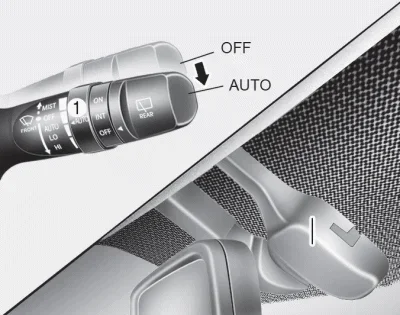
The first step is to find the wiper control. In most Hyundais, the wiper stalk is on the left side of the steering column. You will see a lever with different positions. Some models use a button on the infotainment screen instead. The rain-sensing wiper icon looks like a windshield with curved lines. It might also show a droplet symbol. If you can’t find the icon, check your owner’s manual. The manual has a diagram of the controls. You can also search the settings menu on the touchscreen. Look for a section called “Wipers” or “Driver Assistance.”
Step-by-Step Activation
Follow these simple steps to turn on the rain-sensing wipers:
- Start the engine and let the car warm up for a few seconds.
- Look at the wiper stalk on the left side of the steering wheel.
- Push the stalk toward you once. This puts the wipers in the intermittent mode.
- Look for the rain-sensing icon on the instrument cluster. It should light up.
- Now, spray a little water on the windshield with the washer fluid.
- Watch the wipers. They should start automatically and adjust their speed.
- To turn the system off, push the stalk away from you or select the manual wiper option.
If your Hyundai has a steering wheel control, the process is slightly different. You will find a wiper button on the left side of the steering wheel. Press the button with the rain-sensing symbol. The system will activate. You can also use the touchscreen to toggle the feature on or off. Some models let you set the sensitivity level. You can choose between low, medium, and high sensitivity. Higher sensitivity means the wipers turn on with less rain.
Expert Insight: Many drivers don’t know that you can adjust the wiper delay time. If you drive in light drizzle, set the delay to a longer interval. This saves battery and keeps the windshield from over-wiping. You can find this setting in the vehicle’s smart settings menu.
Hyundai Models That Offer Rain-Sensing Wipers
Not every Hyundai has rain-sensing wipers as standard. The feature is more common in higher trims and newer models. Here is a quick look at which Hyundais offer this handy system.
| Model | Trims with Rain-Sensing Wipers | Sensor Location | Manual Override |
|---|---|---|---|
| Hyundai Sonata | SEL, Limited, Ultimate | Behind rearview mirror | Wiper stalk or touchscreen |
| Hyundai Tucson | SEL, Limited, Calligraphy | Behind rearview mirror | Steering wheel button |
| Hyundai Kona | EX, Limited | Behind rearview mirror | Wiper stalk |
| Hyundai Santa Fe | SEL, Limited, Calligraphy | Behind rearview mirror | Touchscreen or stalk |
| Hyundai Elantra | Limited, Hybrid Limited | Behind rearview mirror | Wiper stalk |
If you are not sure whether your Hyundai has this feature, check the owner’s manual. You can also look for the rain-sensing icon on the dashboard when you start the car. The feature is often part of a larger safety package that includes things like forward collision avoidance and lane keeping assist. If you have a base model, you can sometimes add a rain-sensing wiper retrofit kit. Talk to a Hyundai dealer for compatibility. They can install the sensor and module for you. It is a great upgrade for older models.
Quick Tip: Before buying a used Hyundai, ask the seller if the rain-sensing wipers work. Test it by spraying water on the windshield while the car is running. The wipers should start on their own.
Troubleshooting Common Issues
Wipers Not Activating Automatically
If your rain-sensing wipers don’t turn on, don’t panic. There are a few common reasons. First, check if the system is turned on. Sometimes the feature gets toggled off by accident. Look for the rain-sensing icon on the dash. If it is not lit, the system is off. Next, make sure the windshield is clean. Dirt or a film on the glass can block the sensor’s infrared beam. Wipe the area behind the rearview mirror with a glass cleaner. Also, check the wiper fluid level. Low fluid can sometimes cause the system to disable itself. Finally, inspect the wiper fuse. A blown fuse will stop the wipers from working at all. You can find the fuse box under the hood or in the owner’s manual.
Sensor Gets Dirty and Stops Working
The rain sensor is very sensitive. A small speck of dirt or a bug splatter can block it. If the wipers stop working in the rain, clean the sensor area. Use a soft microfiber cloth and a little glass cleaner. Gently wipe the inside of the windshield behind the mirror. Do not use harsh chemicals. They can damage the sensor’s coating. If cleaning doesn’t help, the sensor might need recalibration. A Hyundai dealer can run a diagnostic scan and reset the system. Sometimes a software update fixes the issue. Always keep the sensor zone free of stickers or accessories.
Common Mistake: Some drivers use a dashboard cover that hangs over the sensor area. This blocks the infrared beam completely. Remove any covers or sunshades that cover the top of the windshield near the mirror.
Expert Insight: In cold climates, ice can form over the sensor. The system will not work until the ice melts. Use your defroster to warm the windshield first. Never scrape ice directly over the sensor area with a hard object. It can scratch the sensor lens.
Maintenance Tips for Long-Lasting Performance
Keep the Sensor Clean
The rain sensor needs a clear view of the windshield. Clean it once a month or more often if you drive in dusty areas. Use a gentle glass cleaner and a soft cloth. Pay special attention to the spot behind the rearview mirror. A clean sensor means the wipers will activate at the right time. It also prevents false activations. If you notice the wipers turning on when there is no rain, a dirty sensor is often the cause.
Replace Wiper Blades Regularly
Even with a rain-sensing system, worn wiper blades cause streaks. Streaks can confuse the sensor because the light reflects unevenly. Replace your wiper blades every six months. Look for Hyundai-specific blades to ensure a perfect fit. You can also use generic blades that match the size. When you install new blades, wipe the windshield with a cleaner too. This removes any oil or residue that the old blades left behind. Fresh blades and a clean sensor work together for the best performance.
Use Quality Washer Fluid
Always use washer fluid that is designed for cold weather. In winter, use fluid with antifreeze properties. Regular water can freeze in the reservoir and damage the pump. A good washer fluid also cleans the glass better. It leaves fewer streaks that could affect the sensor. Keep the reservoir full, especially before rainy seasons. Running out of washer fluid can also trigger a warning light on the dash.
Quick Tip: Add a rain-repellent treatment to your windshield. Products like Rain-X help water bead up and roll off. This makes the rain sensor work even better because the water is more visible to the infrared beam.
Key Takeaways: Keep the sensor area clean, replace wiper blades every six months, use quality washer fluid, and never block the sensor zone. These simple habits will keep your rain-sensing wipers working flawlessly for years.
Final Thoughts
Turning on rain-sensing wipers in a Hyundai is easy once you know the steps. You just need to find the control, activate the system, and let the sensor do the work. The feature is available on many Hyundai models, from the Sonata to the Tucson. It adds a layer of convenience and safety to your driving. Remember to keep the sensor clean and the wiper blades in good condition. If you run into issues, start with the simple fixes we covered. A little maintenance goes a long way. Now you have all the knowledge to use your rain-sensing wipers with confidence. Enjoy the drive, even when the weather is not on your side.
Final Thought: Whenever you see rain on your windshield, just sit back and let your Hyundai handle the wiping. It is one of the best small tech perks you get with a modern car.
Frequently Asked Questions
Can I retrofit rain-sensing wipers on an older Hyundai model?
Yes, you can often add a rain-sensing wiper kit to older models. Visit a Hyundai dealer or a qualified auto electrician. They can install the sensor and module. Make sure the kit is compatible with your specific model year.
Why do my rain-sensing wipers sometimes turn on when there is no rain?
This usually happens when the sensor is dirty or the windshield has a film. Bugs, water spots, or a wax residue can confuse the sensor. Clean the sensor area with a glass cleaner and a soft cloth. The issue should resolve after a thorough cleaning.
Where is the rain sensor located in a Hyundai?
The rain sensor is typically mounted behind the rearview mirror. It attaches to the windshield with a small bracket. You can see a small black dot or strip on the glass near the mirror. That is the sensor window.
Can I adjust the sensitivity of the rain-sensing wipers?
Yes, most Hyundai models let you adjust sensitivity. Look for a wiper or driver assistance setting in the infotainment menu. You can choose low, medium, or high sensitivity. Higher sensitivity makes the wipers react to lighter rain.
Do rain-sensing wipers work in freezing temperatures?
The sensor itself works in cold weather, but ice can block it. If the windshield is covered in ice, the system will not activate. Use your defroster to melt the ice first. Never pour hot water on the sensor area, as it can crack the glass.
Will rain-sensing wipers drain my car battery?
No, the system is designed to be energy-efficient. It only uses power when the wipers are actually moving. The sensor draws a very small amount of current. You will not notice any impact on your battery life.