How Do You Turn Off the Hold Button on Toyota Corolla
The Hold button on a Toyota Corolla Hybrid lets you preserve battery power for later use. Turning it off is simple — just press the Hold button again to deactivate the mode. This guide walks you through every step, explains what Hold mode does, and answers common questions so you can drive with confidence.
The Toyota Corolla Hybrid is one of the most popular compact hybrids on the road today. It offers great fuel economy, smooth driving, and a suite of smart features that make everyday commutes easier. One of those features is the Hold button, which can be a little confusing if you have never used it before. Many drivers wonder how to turn it off, when to use it, and whether it affects their fuel mileage.
This article gives you a complete walkthrough on how to turn off the Hold button on a Toyota Corolla. Whether you are a new Corolla owner or have been driving one for years, you will find clear, practical steps that work every time. We also explain what Hold mode does, why it matters, and how it fits into your overall driving experience.
Key Takeaways
- Press the Hold button again: The fastest way to turn off Hold mode on a Toyota Corolla is to press the same button you used to activate it.
- Hold mode preserves battery charge: It keeps the hybrid battery at a set charge level for later electric-only driving.
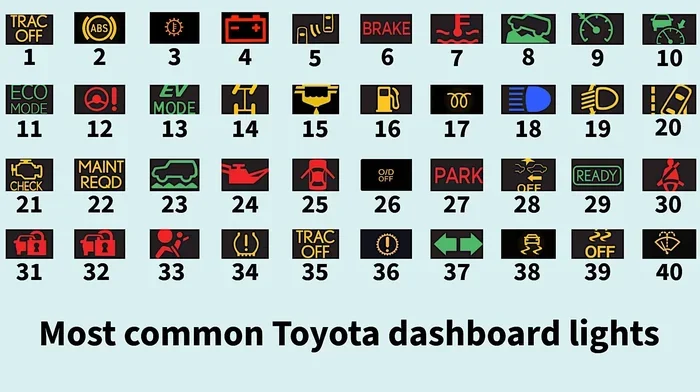
- Check your dashboard indicator: A green Hold icon confirms the mode is active, and it disappears when you turn it off.
- Hold mode works best in certain conditions: It is most useful in city driving, hilly areas, or when approaching a low-emission zone.
- You can combine Hold mode with other driving modes: Switching between Eco, Normal, and Sport modes works alongside the Hold function.
- Consult your owner manual: Some Corolla model years have slight variations in how the Hold button behaves.
📑 Table of Contents
- What Does the Hold Button Do on a Toyota Corolla?
- How Do You Turn Off the Hold Button on Toyota Corolla?
- Hold Mode vs. Other Driving Modes on the Toyota Corolla
- When Should You Turn Off Hold Mode?
- Common Mistakes People Make With the Hold Button
- Tips for Getting the Most Out of Your Toyota Corolla Hybrid
- How Does Hold Mode Compare to Turning Off Other Toyota Features?
- Final Thoughts
What Does the Hold Button Do on a Toyota Corolla?
Before you learn how to turn off the Hold button, it helps to understand what it does. The Hold mode on a Toyota Corolla Hybrid is designed to preserve battery power. When you activate it, the car holds the hybrid battery at a specific charge level instead of using that stored energy for driving.
Why Would You Use Hold Mode?
There are several practical reasons to use Hold mode:
- Saving battery for city driving: You can save the electric charge for stop-and-go traffic where electric-only mode is most efficient.
- Approaching a low-emission zone: Some areas require zero-emission driving. Hold mode ensures you have enough battery power to cruise through without using the gas engine.
- Driving through hilly terrain: Preserving battery on flat roads and using it later on steep inclines can improve overall efficiency.
- Preparing for a short trip: If you only need electric power for a brief drive, Hold mode keeps the battery ready.
When Hold mode is active, a green indicator light appears on your dashboard. This lets you know the system is working as intended. Once you turn it off, the indicator disappears, and the car returns to its normal hybrid operating mode.
How Do You Turn Off the Hold Button on Toyota Corolla?
Turning off the Hold button is straightforward. The process is the same whether you are in a 2020, 2021, 2022, 2023, or 2024 Toyota Corolla Hybrid. Here is the step-by-step method.
Step-by-Step Instructions
- Locate the Hold button: On most Toyota Corolla Hybrid models, the Hold button is found on the steering wheel or the center console near the drive mode selector.
- Press the Hold button once: A single press deactivates the Hold mode. The green indicator on your dashboard will turn off.
- Verify the mode is off: Check the instrument cluster. The Hold icon should no longer be displayed. Your car will now use the battery and gas engine together in the standard hybrid cycle.
- Resume normal driving: The car will automatically manage battery and fuel usage based on driving conditions.
That is it. One press is all it takes. There is no complicated menu to navigate, no settings to adjust, and no need to restart the engine.
What If the Hold Button Does Not Respond?
Sometimes the Hold button may not seem to work. Here are a few things to check:
- Make sure the car is running: The Hold button only works when the hybrid system is active. Press the power button to start the car if it is off.
- Check the brake pedal: Most Toyota systems require you to have your foot on the brake before changing driving modes.
- Look for a dashboard warning: If there is a system error, a warning light may appear. Refer to your Toyota Corolla owner manual for guidance.
- Try restarting the hybrid system: Turn the car off and back on. This resets the system and often fixes minor glitches.
If none of these steps work, there may be a sensor or electrical issue. In that case, it is best to visit a certified Toyota service center for a proper diagnosis.
Hold Mode vs. Other Driving Modes on the Toyota Corolla
The Toyota Corolla Hybrid offers several driving modes that work alongside the Hold button. Understanding how they interact helps you get the most out of your vehicle.
Eco Mode
Eco mode adjusts the throttle response and air conditioning to maximize fuel efficiency. It does not directly affect battery usage the way Hold mode does. You can use Eco mode with or without Hold mode active.
Normal Mode
Normal mode is the default setting. It balances power and efficiency without any special restrictions. When you turn off Hold mode, the car typically returns to Normal mode automatically.
Sport Mode
Sport mode delivers more immediate throttle response and uses the gas engine more aggressively. You can put your car in sport mode while Hold mode is off. However, using Sport mode drains the battery faster, so it is best to turn off Hold mode before switching to Sport if you want full hybrid performance.
| Feature | Hold Mode | Eco Mode | Normal Mode | Sport Mode |
|---|---|---|---|---|
| Preserves Battery | Yes | No | No | No |
| Limits Gas Usage | No | Yes | No | No |
| Throttle Response | Normal | Soft | Normal | Sharp |
| Best For | City driving, EV zones | Highway cruising | Everyday driving | Quick acceleration |
| Dashboard Indicator | Green Hold icon | Green Eco icon | No special icon | Green Sport icon |
When Should You Turn Off Hold Mode?
Hold mode is useful, but it is not always the best choice. Here are some situations where you should turn it off:
- Highway driving: On the highway, the gas engine is more efficient. Hold mode keeps the battery idle, which wastes its potential.
- Long road trips: If you are driving for hours, you want the hybrid system to manage power freely. Turning off Hold mode lets the car optimize fuel and battery use automatically.
- Battery is low: If your hybrid battery is already low, Hold mode will keep it at that low level. Turn it off so the car can start recharging through regenerative braking.
- You need full power: When you want the combined power of the gas engine and electric motor, Hold mode limits what the battery can do. Turning it off gives you access to the full hybrid system.
A good rule of thumb is to use Hold mode only when you specifically need to save battery for a short period. At all other times, let the car manage the hybrid system on its own.
Common Mistakes People Make With the Hold Button
Even experienced drivers make mistakes with the Hold button. Here are the most common ones and how to avoid them.
Mistake 1: Leaving Hold Mode On All the Time
Some drivers activate Hold mode and forget to turn it off. This means the battery sits at a preserved charge level while you drive on the highway, where that energy could have been used. Always check your dashboard to confirm whether Hold mode is active.
Mistake 2: Confusing Hold Mode with EV Mode
Hold mode is not the same as EV mode. EV mode forces the car to drive on electric power only. Hold mode simply preserves the current battery level. Understanding the difference helps you choose the right mode for your driving situation.
Mistake 3: Ignoring Dashboard Warnings
If the Hold light flashes or stays on when you press the button to turn it off, something may be wrong. Do not ignore this. Check your owner manual or consult a Toyota technician.
Mistake 4: Pressing the Wrong Button
Some Toyota models have similar-looking buttons for Drive Mode, Hold, and EV Select. Take a moment to confirm you are pressing the correct button. The Hold button usually has a clear “H” or “Hold” label on it.
Tips for Getting the Most Out of Your Toyota Corolla Hybrid
Beyond the Hold button, there are several ways to improve your Toyota Corolla Hybrid experience.
- Use regenerative braking: Lift off the accelerator early when approaching stops. This charges the battery and improves fuel economy.
- Keep tires properly inflated: Proper tire pressure reduces rolling resistance and helps the hybrid system work more efficiently.
- Plan your routes: If you know you will enter a low-emission zone, activate Hold mode before you arrive so you have enough electric power.
- Monitor battery health: Keep an eye on the hybrid battery indicator. If you notice the battery draining faster than usual, it may be time for a check-up.
- Read your owner manual: The manual has specific details about your model year. It covers all buttons, indicators, and system behaviors in detail.
Taking a few extra minutes to understand your Corolla’s features pays off in the long run. You will save fuel, reduce wear on the engine, and enjoy a smoother ride every time you drive.
How Does Hold Mode Compare to Turning Off Other Toyota Features?
Many Toyota owners wonder how the Hold button compares to other feature toggles in the car. For example, some drivers also need to turn off steering assist in a Toyota or turn off automatic high beams at some point. These features work differently from Hold mode but follow a similar philosophy: giving the driver control over the vehicle’s systems.
Just like you can toggle steering assist or automatic high beams on and off, the Hold button is a driver-controlled feature. Toyota designed these systems to be intuitive, so you can switch between modes quickly without distractions. The key difference is that Hold mode affects the hybrid powertrain, while features like steering assist and high beams affect driver assistance and visibility.
If you ever need to adjust other vehicle systems, the same principle applies: find the button or setting, make your change, and confirm it on the dashboard. Toyota keeps its controls consistent across models, so once you learn one system, the others feel familiar.
Final Thoughts
The Hold button on a Toyota Corolla Hybrid is a helpful feature, but only when you know how to use it properly. Turning it off is as simple as pressing the button once. Understanding when to use Hold mode and when to turn it off gives you better control over your fuel economy, battery health, and overall driving experience.
Remember to check your dashboard indicators, avoid common mistakes, and refer to your owner manual whenever you are unsure. With these tips, you will get the most out of your Toyota Corolla Hybrid for years to come. Drive safely and enjoy the ride.
Frequently Asked Questions
Can I turn off the Hold button while driving?
Yes, you can turn off Hold mode while driving. Just press the Hold button once, and the system will deactivate immediately. There is no need to stop the car or shift into park. The dashboard indicator will confirm the mode is off.
Does turning off Hold mode affect fuel economy?
Turning off Hold mode allows the hybrid system to manage battery and fuel usage freely. This can improve fuel economy on highways and long trips. However, the difference is usually small and depends on your driving conditions.
Why is my Hold button not working on my Toyota Corolla?
If the Hold button does not respond, first make sure the car is running and your foot is on the brake. Try restarting the hybrid system by turning the car off and back on. If the problem persists, consult a Toyota service technician for a diagnostic check.
Can I use Hold mode with EV mode at the same time?
No, Hold mode and EV mode serve different purposes. Hold mode preserves battery charge at a set level, while EV mode forces the car to drive on electric power only. Using both at the same time is not possible on most Toyota Corolla Hybrid models.
Is it bad to leave Hold mode on all the time?
Leaving Hold mode on all the time is not harmful, but it is not efficient either. It keeps the battery at a preserved charge level even when the car does not need it. This can reduce the benefit of regenerative braking and limit electric-only driving when it would be most useful.
Where is the Hold button located on a Toyota Corolla Hybrid?
The Hold button is typically located on the steering wheel or the center console near the drive mode selector. On some model years, it may also be found on the instrument panel. Check your owner manual for the exact location on your specific Corolla Hybrid trim.