How Do I Enable Toyota Connect Your Step by Step Guide
Toyota Connect is a powerful connected car service that brings navigation, emergency assistance, and remote features right to your fingertips. In this guide, we walk you through exactly how to enable Toyota Connect step by step, from creating your account to activating all the key features. Whether you own a new RAV4 or a Camry, you will have everything you need to get started right here.
If you have been wondering how to get Toyota Connect up and running in your vehicle, you are in the right place. Toyota Connect is a suite of smart connected services designed to make your driving experience safer, more convenient, and more connected. From remote vehicle controls to real-time navigation, this system brings a lot of value to everyday driving.
In this guide, we break down the entire process of enabling Toyota Connect. We cover everything from checking your vehicle’s compatibility to walking through the account setup. You will also learn about the key features included with the service and how to troubleshoot if something does not work right away. Let us get started.
Key Takeaways
- Toyota Connect is a suite of connected car services that works through your vehicle’s built-in modem and the Toyota app.
- Enabling Toyota Connect requires a simple account setup through the Toyota Owners portal or the mobile app.
- Not all Toyota models come standard with Toyota Connect, so checking your vehicle’s compatibility first is essential.
- A subscription plan is needed for full access, though some features may offer a free trial period.
- You can enable Toyota Connect yourself at home in most cases, or visit a dealer for hands-on help.
- Troubleshooting common issues is straightforward and often just requires a quick reset or app update.
- Toyota Connect offers features like remote start, GPS tracking, and emergency alerts that make owning a Toyota safer and more convenient.
📑 Table of Contents
- What Is Toyota Connect and Why Should You Enable It?
- Before You Begin: Check Your Vehicle Compatibility
- How to Enable Toyota Connect: Step by Step
- How to Enable Toyota Connect Through Your Dealer
- Troubleshooting Common Toyota Connect Issues
- Toyota Connect Benefits: Why It Is Worth Enabling
- Tips for Getting the Most Out of Toyota Connect
- Frequently Asked Questions About Toyota Connect
- Final Thoughts on Enabling Toyota Connect
What Is Toyota Connect and Why Should You Enable It?
Toyota Connect is a connected vehicle technology platform offered by Toyota. It uses a built-in cellular modem in your car to communicate with Toyota servers. This connection allows you to access a range of services through the Toyota Owners app or your vehicle’s infotainment system.
The system has been available on many Toyota models for several years now. It continues to evolve with new features and improved connectivity. Think of Toyota Connect as a digital assistant that lives inside your car. It can help you in emergencies, guide you to new destinations, and even let you start your vehicle from your phone.
Key Features of Toyota Connect
Here are some of the most popular features that come with Toyota Connect:
- Remote Start: Start your engine from your phone before you even get in the car.
- GPS Vehicle Tracking: Locate your vehicle if it is parked or, in worst-case scenarios, stolen.
- Emergency Assistance: Automatically contact emergency services if a serious collision occurs.
- Remote Lock and Unlock: Lock or unlock your doors from anywhere.
- Vehicle Health Reports: Get updates on your car’s maintenance needs and fluid levels.
- Destination Send: Send a destination from your phone directly to your car’s navigation system.
- Wi-Fi Hotspot: Some plans include a mobile Wi-Fi hotspot for passengers.
These features work together to make your Toyota smarter and more responsive to your needs. And the best part is that most of them are available right from your smartphone.
Before You Begin: Check Your Vehicle Compatibility
Not every Toyota model or year comes equipped with Toyota Connect. Before you try to enable the service, you need to confirm that your vehicle supports it. This step saves you a lot of time and frustration later on.
How to Check if Your Toyota Supports Toyota Connect
Start by checking your vehicle’s model year and trim level. Generally, Toyota Connect is available on models from 2017 and newer, though some older models may also support it. Here is how you can check:
- Look at your infotainment screen. If you see a “Connected Services” or “Toyota Connect” option in the menu, your vehicle likely supports it.
- Check your owner’s manual. The manual will list all connected services available for your specific model.
- Visit the Toyota website. Toyota’s official site has a tool where you can enter your VIN to see what features are available.
- Ask your dealer. A quick call to your local Toyota dealer can confirm compatibility in minutes.
If your vehicle does not have the built-in hardware for Toyota Connect, unfortunately, you cannot add it after purchase. The modem and antenna are factory-installed components. This is why checking compatibility first is so important.
Also, keep in mind that some features may vary depending on your region and your specific Toyota Connect subscription plan. If you want to understand what is included without a paid plan, you can read more about using Toyota Connect without a subscription on our site.
How to Enable Toyota Connect: Step by Step
Now for the part you have been waiting for. Here is the full walkthrough for enabling Toyota Connect. The process is straightforward and should only take about 10 to 15 minutes.
Step 1: Download the Toyota Owners App
First, download the Toyota Owners app on your smartphone. It is available for both iOS and Android devices. Go to the App Store or Google Play Store and search for “Toyota Owners.” Once downloaded, open the app and create your account.
You will need your vehicle’s 17-digit VIN to register. You can find this on your dashboard near the windshield or on your vehicle registration card. Having this ready makes the process much faster.
Step 2: Create Your Toyota Account
Next, create your Toyota account within the app. You will be asked for basic information like your name, email address, and phone number. Choose a strong password to keep your account secure.
Once your account is created, you will be prompted to link your vehicle. Enter your VIN again, and the system will associate your car with your account. This is what allows the app to communicate with your specific vehicle.
Step 3: Activate Your Toyota Connect Subscription
After linking your vehicle, you need to activate your Toyota Connect subscription. Toyota offers different plans, and some new vehicles come with a complimentary trial period. During this trial, you can access most features for free.
To activate your subscription:
- Go to the “Services” tab in the Toyota Owners app.
- Select “Toyota Connect” from the menu.
- Choose the plan that fits your needs.
- Enter your payment information to complete the activation.
If your vehicle came with a trial, you will see an option to start the trial first. You can always upgrade or change plans later. The app walks you through each step clearly, so it is hard to get lost.
Step 4: Enable Features on Your Vehicle
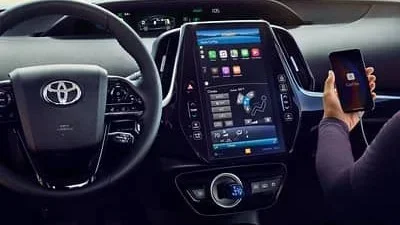
Once your subscription is active, you need to enable the individual features on your vehicle. Go to the infotainment screen in your car. Navigate to the “Settings” menu and look for “Toyota Connect” or “Connected Services.”
From there, you can toggle each feature on or off based on your preference. Here are the features you might want to enable:
- Emergency Assistance
- Remote Lock and Unlock
- Vehicle Location
- Destination Send
- Wi-Fi Hotspot
Enabling these features ensures they are ready to use whenever you need them. Some features, like Emergency Assistance, may be enabled by default for safety reasons.
How to Enable Toyota Connect Through Your Dealer
If you prefer not to set things up yourself or run into issues, you can always visit your Toyota dealer. A service advisor can walk you through the entire process and ensure everything is working correctly.
Many dealers will enable Toyota Connect for free if your vehicle is still under warranty. They can also help you understand which plan is best for your driving habits. If you are considering visiting a dealer, you might also want to check whether you can take your Toyota to any dealer for service, as this can affect where you go for support.
Before visiting, call ahead and ask if they offer Toyota Connect setup assistance. Not all dealerships provide this, but many do, especially for new vehicle purchases. It is a convenient option if you are not comfortable with technology or if the app is not working as expected.
Troubleshooting Common Toyota Connect Issues
Even with a smooth setup, you might run into issues from time to time. Toyota Connect relies on both your vehicle’s hardware and your phone’s software, so problems can come from either side. Here are the most common issues and how to fix them.
Toyota Connect App Not Connecting
If the app will not connect to your vehicle, start with the basics. Make sure your phone has a stable internet connection. Check that Bluetooth is turned on if you are trying to pair your phone. Sometimes simply closing the app and reopening it fixes the problem.
You should also check for app updates. Go to the App Store or Google Play Store and see if there is an update available for the Toyota Owners app. Outdated software is one of the most common causes of connection problems.
Features Not Working After Activation
If you have activated your subscription but certain features are not working, try restarting your vehicle. Turn the engine off, wait 30 seconds, and turn it back on. This refreshes the vehicle’s connection to Toyota’s servers.
You can also try logging out of the app and logging back in. This re-establishes the connection between your account and your vehicle. If the issue persists, contact Toyota Connect customer support. They are available by phone and can walk you through advanced troubleshooting steps.
Wi-Fi Hotspot Not Working
If your Wi-Fi hotspot feature is not working, first check your data plan. The hotspot requires an active data connection through your Toyota Connect plan. Make sure your plan includes hotspot data and that you have not exceeded your data limit.
Also, try disconnecting and reconnecting your device to the hotspot. Sometimes the connection gets stuck and needs a fresh start. If none of these steps work, a dealer visit may be necessary to check the vehicle’s Wi-Fi module.
Toyota Connect Benefits: Why It Is Worth Enabling
You might be wondering if enabling Toyota Connect is really worth it. The answer is yes for most Toyota owners. Here is why:
Peace of mind is the biggest benefit. Knowing that you can track your vehicle, call for emergency help, and remotely lock your doors gives you confidence every time you park in an unfamiliar area.
Convenience is another major advantage. Remote start means you can warm up or cool down your car before you get in. Destination send means you can plan your route on your phone and send it directly to your car’s screen. These small conveniences add up to a much better daily driving experience.
For those who drive their Toyota without the key fob, Toyota Connect adds another layer of digital access and control that makes the experience seamless.
Finally, Toyota Connect can help you stay on top of maintenance. The vehicle health reports remind you when it is time for an oil change or tire rotation. This proactive approach can save you money by catching issues early before they become expensive repairs.
Tips for Getting the Most Out of Toyota Connect
To really make the most of your Toyota Connect experience, keep these tips in mind:
- Keep your app updated. Toyota regularly releases updates that improve performance and add new features.
- Enable notifications. This way you get alerts for maintenance reminders, security events, and subscription updates.
- Explore all features. Many owners only use a fraction of what Toyota Connect offers. Take time to browse through every option in the app.
- Set a reminder to review your subscription. Before your trial ends, decide if you want to continue. This prevents unexpected charges.
- Use the roadside assistance feature. If you ever find yourself stranded, this feature connects you directly to help.
These simple habits will keep your Toyota Connect experience smooth and rewarding for years to come.
Frequently Asked Questions About Toyota Connect
Here are answers to some of the most common questions people have about enabling and using Toyota Connect.
Do I need a subscription to use Toyota Connect?
Some Toyota Connect features come with a free trial period when you purchase a new vehicle. However, to access the full range of services, you will need an active subscription. The subscription can be monthly or annually, and pricing varies by plan. You can find more details about using Toyota Connect with or without a subscription on our site.
Can I enable Toyota Connect on an older Toyota model?
Toyota Connect requires specific hardware that is built into the vehicle at the factory. If your older Toyota model does not have this hardware, you cannot add Toyota Connect later. Check your vehicle’s compatibility by looking at the infotainment system or contacting your dealer.
Is Toyota Connect available on all Toyota models?
Toyota Connect is available on most newer Toyota models, but availability depends on the model year, trim level, and region. Higher trim levels often include Toyota Connect as standard, while base trims may offer it as an optional package. Always verify with your specific vehicle’s features.
What should I do if my Toyota Connect stops working?
If Toyota Connect stops working, start by restarting your vehicle and checking your internet connection. Update the Toyota Owners app to the latest version. If the issue continues, contact Toyota customer support or visit your dealer. They can run diagnostics on your vehicle’s connected services module.
Can I transfer my Toyota Connect subscription to a new vehicle?
In most cases, you can transfer your Toyota Connect subscription to a new Toyota vehicle. Contact Toyota customer support or use the Toyota Owners app to initiate the transfer. You may need to provide your new vehicle’s VIN and confirm your subscription details.
How do I cancel my Toyota Connect subscription?
You can cancel your Toyota Connect subscription through the Toyota Owners app or by contacting Toyota customer support. Log into your account, go to the subscription section, and follow the cancellation prompts. Keep in mind that cancellation may be subject to your current plan terms, so review them before canceling.
Final Thoughts on Enabling Toyota Connect
Enabling Toyota Connect is a straightforward process that opens up a world of convenience and safety features for your Toyota. From the initial account setup to activating your subscription and enabling individual features, each step is designed to be simple and user-friendly.
Whether you choose to set it up yourself through the app or visit your dealer for assistance, the result is the same: a smarter, more connected driving experience. The features included with Toyota Connect add real value to your daily routine and can provide peace of mind in unexpected situations.
Take the time today to go through the steps outlined in this guide. You will be glad you did. And remember, if you ever run into trouble, your Toyota dealer and the Toyota Owners app support team are always there to help. Happy driving.