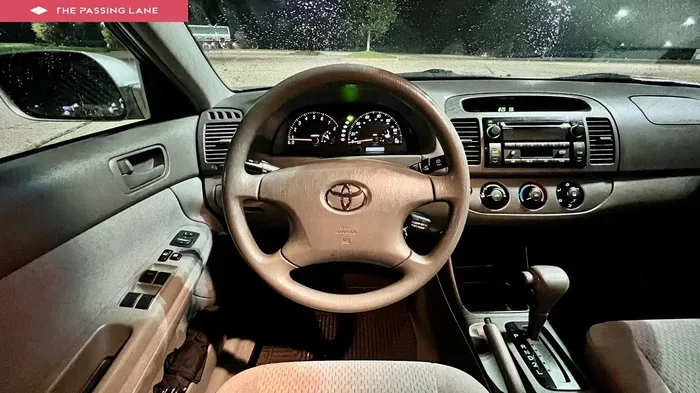
Does a 2004 Toyota Camry Have Bluetooth Connectivity
The 2004 Toyota Camry does not come with factory Bluetooth in most trims. However, you can add Bluetooth functionality through aftermarket adapters and receivers. This guide covers every option for adding wireless calling and audio streaming to your 2004 Camry, from simple plug-and-play devices to full infotainment upgrades.
Have you ever jumped into your 2004 Toyota Camry and wished you could stream music or take calls without fumbling with wires? You are not alone. Many owners of older Toyota models want the convenience of modern wireless technology. But here is the big question: does a 2004 Toyota Camry have Bluetooth? The short answer is no, not from the factory. But the good news is that you have several great options to add this feature yourself.
In this article, we will walk you through everything you need to know about Bluetooth connectivity in the 2004 Camry. We will cover factory specs, aftermarket solutions, installation tips, and much more. Whether you are a tech beginner or a DIY enthusiast, you will find practical advice here. Let us dive in and explore how you can bring wireless connectivity to your trusty Camry.
Key Takeaways
- No Factory Bluetooth: Most 2004 Toyota Camry models did not include Bluetooth as a standard or optional feature.
- Aftermarket Adapters Work Great: Plug-and-play Bluetooth adapters can add hands-free calling and audio streaming to your existing factory radio.
- Multiple Options Available: You can choose from FM transmitters, AUX adapters, or full Bluetooth receivers depending on your budget and needs.
- Installation Is Simple: Most Bluetooth add-on devices require no wiring or technical skills to set up.
- Check Your Trim Level: Higher-end 2004 Camry models may have different audio systems that affect compatibility with Bluetooth add-ons.
- Pairing Is Quick: Once installed, connecting your phone to a Bluetooth adapter takes just a few seconds.
📑 Table of Contents
- Does a 2004 Toyota Camry Have Bluetooth From the Factory?
- How to Add Bluetooth to a 2004 Toyota Camry
- Bluetooth Adapter Comparison for the 2004 Camry
- Step-by-Step: Pairing Your Phone to a Bluetooth Adapter
- Common Mistakes to Avoid When Adding Bluetooth
- Expert Insights on Bluetooth in Older Toyotas
- Can You Use Bluetooth with a Cassette Deck in the 2004 Camry?
- Does Adding Bluetooth Affect Your Car’s Warranty or Resale Value?
- Final Thoughts
Does a 2004 Toyota Camry Have Bluetooth From the Factory?
The 2004 Toyota Camry was a popular sedan, but Bluetooth technology was still relatively new in the automotive world at that time. Toyota did not make Bluetooth a standard feature in most of its models during this era. So, the answer to does a 2004 Toyota Camry have Bluetooth is mostly no. Let us break this down by trim level and audio system.
Factory Audio Systems in the 2004 Camry
The 2004 Camry came with different audio systems depending on the trim level. The base models featured a standard CD player with an AM/FM radio. Higher trims offered a six-disc CD changer and a better sound system. Neither of these systems included built-in Bluetooth capability. Toyota started adding Bluetooth to its vehicles more consistently around 2007 and 2008, so the 2004 model year missed that window entirely.
Some owners assume that if their car has a CD player with an auxiliary input, it might have Bluetooth. That is not the case for the 2004 Camry. The auxiliary input jack, if present, was designed for wired connections only. You would need a cable to connect your phone to the radio. This is where aftermarket Bluetooth solutions come in handy.
Why Toyota Did Not Include Bluetooth in 2004
Bluetooth in cars became popular after 2005. In 2004, most drivers still used cassette adapters or FM transmitters to play music from their phones. Toyota focused on reliability and comfort in the 2004 Camry rather than adding cutting-edge tech features. The car was all about durability and a smooth ride, not wireless connectivity. That mindset shaped every decision Toyota made for this model year.
How to Add Bluetooth to a 2004 Toyota Camry
Even though your 2004 Camry does not have factory Bluetooth, you can easily add it. There are several aftermarket options available, ranging from budget-friendly to more advanced setups. Let us look at the most popular methods.
Option 1: Bluetooth FM Transmitter
An FM transmitter is the simplest and most affordable way to add Bluetooth to your Camry. This small device plugs into your car’s cigarette lighter or power outlet. It broadcasts your phone’s audio to an open FM radio frequency. You then tune your car radio to that frequency and hear your music or take calls through your car speakers.
Here is why many Camry owners love FM transmitters:
- Price: Most FM transmitters cost between $15 and $40.
- No Wiring: Plug and play. No need to open your dashboard.
- Hands-Free Calling: Most transmitters include a built-in microphone for calls.
- Portable: You can move it between cars easily.
The downside is sound quality. FM transmitters can sometimes pick up static or interference. If you live in an area with crowded FM frequencies, you might notice some noise. But for everyday use, a good FM transmitter works surprisingly well.
Option 2: Bluetooth AUX Adapter
If your 2004 Camry has an auxiliary input jack, a Bluetooth AUX adapter is a fantastic option. This small receiver plugs directly into the AUX port and creates a wireless Bluetooth connection. Your phone pairs with the adapter, and audio streams directly through your car speakers.
Here are the benefits of a Bluetooth AUX adapter:
- Better Sound Quality: No FM interference means cleaner audio.
- Stable Connection: Bluetooth AUX adapters maintain a strong signal.
- Easy Setup: Pair your phone and you are ready to go.
- Compact Size: Most adapters are small and fit neatly in the AUX port.
One thing to keep in mind is that not all 2004 Camry models came with an AUX input. Check your dashboard or owner’s manual first. If you do not have an AUX port, you might need an adapter that connects to the CD changer port or the factory radio harness. This is where things get a little more involved.
Option 3: Full Bluetooth Car Receiver
For the best experience, consider a full Bluetooth car receiver. This device replaces your factory radio or connects to it through the existing wiring. A Bluetooth receiver offers the strongest signal, the best sound quality, and the most features. Many models also support NFC pairing, which lets you connect your phone with a simple tap.
Installing a full Bluetooth receiver does require some basic knowledge of car audio. You will need to remove your factory radio and wire the new receiver into your car’s electrical system. If you are comfortable with basic car electronics, this is a straightforward project. Otherwise, a local auto shop can handle the installation for you. If your Camry has been on the road for a while and you are also wondering can a Camry last 300,000 miles, a tech upgrade like Bluetooth can be part of keeping your vehicle running strong.
Option 4: Upgrade the Entire Infotainment System
If you want a complete transformation, you can replace your entire factory radio with a modern aftermarket head unit. Many of today’s aftermarket radios come with built-in Bluetooth, touchscreen displays, and even Apple CarPlay or Android Auto support. This is the most expensive option, but it also delivers the best overall experience.
Popular brands like Pioneer, Kenwood, and Alpine offer head units designed to fit the 2004 Camry dash. You will need a dash kit and wiring harness to make the swap clean and professional. Some owners also upgrade their speakers at the same time for an even better sound system.
Bluetooth Adapter Comparison for the 2004 Camry
Choosing the right Bluetooth solution depends on your budget, your audio system, and how much installation work you are willing to do. Here is a quick comparison of the main options:
| Option | Price Range | Sound Quality | Installation Difficulty | Hands-Free Calling |
|---|---|---|---|---|
| FM Transmitter | $15 – $40 | Good | Very Easy | Yes |
| Bluetooth AUX Adapter | $20 – $50 | Great | Easy | Yes |
| Full Bluetooth Receiver | $50 – $150 | Excellent | Moderate | Yes |
| Full Infotainment Upgrade | $150 – $400+ | Best | Advanced | Yes |
As you can see, there is a Bluetooth solution for every budget. Even the most affordable FM transmitter gives you wireless calling and music streaming. If you want premium sound and features, a full infotainment upgrade is the way to go.
Step-by-Step: Pairing Your Phone to a Bluetooth Adapter
Once you have chosen your Bluetooth adapter, setting it up is quick and easy. Here is a simple walkthrough that works for most Bluetooth devices:
- Power on the adapter. Plug it into your power source or turn it on if it has a built-in battery.
- Put the adapter in pairing mode. Most devices have a button or switch for this. The indicator light will usually flash blue or red.
- Go to your phone’s Bluetooth settings. Open the Settings app and tap on Bluetooth.
- Search for available devices. Your phone will scan and show the adapter in the list.
- Tap to pair. Select the adapter name and wait for the connection to establish.
- Test the connection. Play some music or make a test call to make sure everything works.
Most Bluetooth adapters remember your phone once paired. So you only need to do this setup once. The next time you get in your car, the connection should happen automatically within seconds.
Common Mistakes to Avoid When Adding Bluetooth
Adding Bluetooth to your 2004 Camry is straightforward, but a few common mistakes can cause frustration. Here is what to watch out for:
- Buying the wrong adapter type. Make sure you know whether your Camry has an AUX input, a CD changer port, or only a factory radio. Buying the wrong adapter means extra hassle.
- Ignoring sound quality. Cheap FM transmitters can introduce static. If sound quality matters to you, invest in a Bluetooth AUX adapter or receiver instead.
- Skipping the power source check. Some Bluetooth adapters need a constant power supply. Make sure your power outlet works before you buy.
- Not updating the firmware. Some Bluetooth receivers have firmware updates that improve performance. Check the manufacturer’s website after purchase.
- Forgetting to turn off Bluetooth on other devices. If your phone is already connected to headphones or a speaker, it might not pair with the car adapter smoothly.
If you are also keeping up with regular maintenance on your Camry, it is worth checking does your car say when you need an oil change to make sure all your systems are running properly alongside your new Bluetooth setup.
Expert Insights on Bluetooth in Older Toyotas
Automotive experts agree that adding Bluetooth to older vehicles is one of the best upgrades you can make. It improves safety by enabling hands-free calling and enhances your driving experience with wireless music streaming. According to car audio specialists, the Bluetooth AUX adapter offers the best balance of price, ease, and sound quality for older Toyotas like the 2004 Camry.
One expert tip is to place your Bluetooth adapter near the center console, where it gets a clear line of sight to your phone. This reduces connection drops and improves audio stability. Also, keep your phone’s Bluetooth settings set to “discoverable” during the initial pairing process only. After pairing, you can turn off discoverable mode for better security.
If you are also considering other upgrades for your Camry, you might wonder about things like high mileage on a Camry and how various tech additions affect the overall vehicle experience. The good news is that adding Bluetooth has no negative impact on your Camry’s longevity or performance.
Can You Use Bluetooth with a Cassette Deck in the 2004 Camry?
Some 2004 Camry models still had cassette players, especially in earlier production runs. If your Camry has a cassette deck, you have a couple of options. A Bluetooth cassette adapter looks like a regular cassette tape but contains a Bluetooth receiver inside. You simply pop it into the cassette slot and pair your phone. It is a clever and affordable solution that works surprisingly well.
Another option is to use an FM transmitter with a cassette adapter combo. These devices let you power the transmitter through the cassette slot while broadcasting your phone’s audio to the FM radio. Both solutions are inexpensive and do not require any permanent modifications to your car.
Does Adding Bluetooth Affect Your Car’s Warranty or Resale Value?
Adding Bluetooth through aftermarket devices does not affect your car’s warranty in any way. These are non-invasive accessories that plug in or sit on the dashboard. They do not alter your car’s electrical system or factory components. If you ever decide to sell your 2004 Camry, a Bluetooth adapter can actually improve resale value. Buyers love cars that have modern connectivity features, even if they are added aftermarket.
That said, if you choose a full infotainment system swap, keep the original factory radio. Many buyers of older Toyotas appreciate originality, and having the stock radio to reinstall can be a selling point. A clean, professional installation goes a long way toward maintaining your Camry’s value.
Final Thoughts
So, does a 2004 Toyota Camry have Bluetooth? Not from the factory, but that should not stop you from enjoying wireless connectivity. With so many affordable and easy-to-use options available, adding Bluetooth to your Camry is one of the best upgrades you can make. Whether you choose a simple FM transmitter, a Bluetooth AUX adapter, or a full infotainment overhaul, you will love the convenience of hands-free calling and wireless music streaming.
Your 2004 Camry has served you well, and with a Bluetooth addition, it can keep up with modern technology. The process is simple, the cost is low, and the results are fantastic. Pick the option that fits your budget and your Camry’s audio setup, and you will be streaming and calling wirelessly in no time.
Take some time today to explore your options. Your Camry deserves the convenience of Bluetooth, and you deserve a better driving experience. Happy upgrading!
Frequently Asked Questions
Can I add Bluetooth to a 2004 Toyota Camry without any tools?
Yes, you can. The easiest method is a Bluetooth FM transmitter or a Bluetooth AUX adapter. Both options require no tools and plug directly into your car’s power outlet or AUX port. You can be up and running in under five minutes.
Will a Bluetooth adapter work with all 2004 Camry trims?
Most Bluetooth adapters work with all 2004 Camry trims. The key factor is your audio system. If you have an AUX input, an AUX adapter is ideal. If not, an FM transmitter works with any factory radio. For full integration, a Bluetooth receiver connected to the factory harness is the best choice.
Is Bluetooth in a 2004 Camry safe for hands-free calling?
Yes, absolutely. Aftermarket Bluetooth adapters provide hands-free calling through your car’s speakers and a built-in microphone. This keeps your hands on the wheel and eyes on the road, making it a safer alternative to holding your phone while driving.
How far can my phone be from the Bluetooth adapter?
Most Bluetooth adapters have a range of about 30 feet (10 meters). As long as your phone is within that range and in the car, the connection will stay stable. If you leave your phone in your pocket or on the passenger seat, you should not experience any dropouts.
Can I use Bluetooth and charge my phone at the same time?
Yes, many Bluetooth FM transmitters and AUX adapters include a USB charging port. This lets you connect your phone for audio streaming while also charging the battery. Check the specifications of the adapter you choose to confirm it has a charging port.
Do I need an internet connection for Bluetooth in my Camry?
No. Bluetooth is a wireless technology that connects devices directly without needing Wi-Fi or mobile data. You do not need an internet connection to stream music or make hands-free calls through a Bluetooth adapter in your 2004 Camry.
=== CONCLUSION ===
The 2004 Toyota Camry may not have come with factory Bluetooth, but that is hardly a limitation. With the wide range of affordable and easy-to-use aftermarket options available today, you can bring wireless connectivity to your Camry in minutes. From simple FM transmitters to full infotainment upgrades, there is a solution for every budget and every comfort level.
Adding Bluetooth not only modernizes your driving experience but also improves safety through hands-free calling. It is one of those upgrades that makes you wonder why you did not do it sooner. So pick your preferred option, follow the setup steps, and enjoy wireless streaming and calling in your trusty 2004 Toyota Camry.


