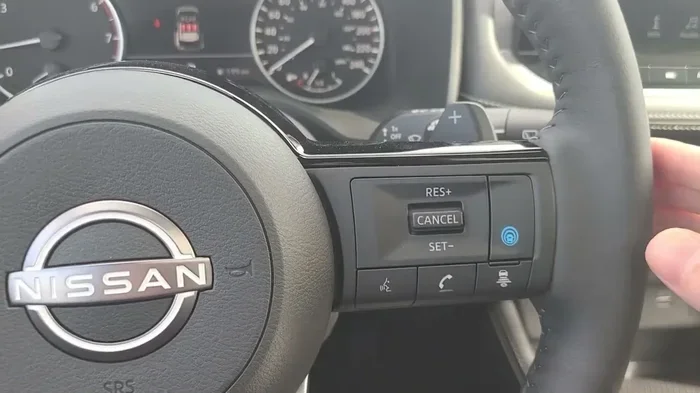
Here is How to Set Cruise Control on a 2021 Nissan Rogue
Setting cruise control on a 2021 Nissan Rogue is simple and straightforward once you know where the controls are located. This guide walks you through every step, from basic cruise control activation to using the adaptive cruise control system. You will learn how to set your speed, adjust the following distance, and troubleshoot common issues.
Driving on long highway trips can get tiring, especially when you have to keep your foot on the throttle for hours. The 2021 Nissan Rogue comes with a cruise control system that makes those drives much more comfortable and less exhausting. Whether you are new to the Rogue or have been driving one for a while, knowing how to properly set and use cruise control can make a big difference in your driving experience.
In this guide, we will walk you through everything you need to know about the cruise control system on the 2021 Nissan Rogue. We will cover the basic steps for setting cruise control, explain how the adaptive cruise control feature works, and share tips for getting the most out of this convenient technology. You will also learn about common issues and how to fix them, so you can stay safe and confident on the road.
The cruise control system on the 2021 Nissan Rogue is designed to be user-friendly. The controls are located right on the steering wheel, so you do not have to take your hands off the wheel for long. Once you understand the basics, setting cruise control becomes second nature. Let us dive into the details and help you master this feature.
Key Takeaways
- Easy Activation: Setting cruise control on the 2021 Nissan Rogue takes just a few seconds using the steering wheel controls.
- Adaptive Option Available: The Rogue comes with adaptive cruise control that automatically adjusts your speed based on traffic.
- Simple Controls: The resume, cancel, and set buttons make managing cruise control intuitive and safe.
- Common Issues Are Fixable: Most cruise control problems can be resolved with simple checks and resets.
- Safety First: Always stay alert and avoid using cruise control in poor road or weather conditions.
- Driver Assistance Feature: Cruise control works best on highways and open roads where speed is steady.
📑 Table of Contents
Understanding Cruise Control on the 2021 Nissan Rogue
Before you learn how to set cruise control, it helps to understand what the system does and how it works. The cruise control system on the 2021 Nissan Rogue allows you to maintain a steady vehicle speed without keeping your foot on the accelerator pedal. This is especially useful on long highway drives where the speed limit stays the same for extended periods.
The 2021 Nissan Rogue offers two types of cruise control. The first is the standard cruise control, which lets you set a fixed speed. The second is the adaptive cruise control, which uses a radar sensor to detect vehicles ahead and automatically adjusts your speed to maintain a safe following distance. Both systems are controlled through buttons on the steering wheel, making them easy to access while driving.
Understanding the difference between these two systems is important. Standard cruise control is great for open highways with little traffic. Adaptive cruise control shines in situations where traffic flow varies and you need the car to handle speed adjustments on its own. Both systems work together with other driver assistance features to make your time behind the wheel safer and more relaxed.
What Is Cruise Control?
Cruise control is a driver assistance feature that automatically maintains your car’s speed. When you activate cruise control, the car’s computer takes over the throttle and keeps the vehicle moving at the speed you have set. You can cancel cruise control at any time by pressing the cancel button or tapping the brake pedal.
The system works best on open roads and highways where the traffic flow is steady. It is not designed for stop-and-go city driving or roads with frequent curves. Understanding when and where to use cruise control is key to getting the most benefit from it. Using it in the wrong conditions can actually reduce your safety rather than improve your comfort.
What Is Adaptive Cruise Control?
The adaptive cruise control on the 2021 Nissan Rogue goes a step further. It uses a forward-looking radar sensor to detect the speed of vehicles in front of you. If the car ahead slows down, your Rogue will automatically slow down too. When the road clears, it will resume your set speed.
This feature is incredibly helpful during rush hour traffic or on long drives where you encounter varying traffic conditions. The adaptive system takes the stress out of highway driving by handling speed adjustments for you. It is one of the reasons the 2021 Nissan Rogue remains a popular choice among SUV buyers who value comfort and modern technology.
How to Set Cruise Control on a 2021 Nissan Rogue
Now that you understand the basics, let us get into the step-by-step process. How to set cruise control on a 2021 Nissan Rogue is simpler than you might think. The entire process takes just a few seconds once you know where the controls are located and what each button does.
Step 1: Locate the Cruise Control Buttons
The cruise control buttons on the 2021 Nissan Rogue are located on the right side of the steering wheel. You will find buttons for ON/OFF, SET, RESUME, CANCEL, and the up and down arrow controls for adjusting speed. Familiarize yourself with these buttons before you start driving, so you know exactly where they are without looking.
Press the ON button to activate the cruise control system. You will see a cruise control indicator light on the dashboard turn on. This lets you know the system is ready to use. The indicator is usually a small icon that looks like a speedometer with an arrow. If you do not see the light, the system is not yet activated.
Step 2: Accelerate to Your Desired Speed
Drive the Rogue to the speed you want to maintain. This could be the highway speed limit or any speed that feels safe and comfortable for the road conditions. Use the accelerator pedal to reach your desired speed. Make sure you are in the correct gear and that the road ahead is clear.
Once you are at the right speed, press the SET button. The vehicle will now maintain that speed automatically. You will see the set cruise control indicator appear on the dashboard. At this point, you can take your foot off the accelerator pedal and let the car do the work. The throttle control is now managed by the cruise control system.
Step 3: Adjust the Speed
If you need to change the set speed, you can do so easily. Use the up and down arrow buttons on the steering wheel to increase or decrease the speed in small increments. Each press typically changes the speed by about 1 mile per hour.
For larger adjustments, you can hold down the arrow buttons. This lets you speed up or slow down quickly until you reach the new desired speed setting. The dashboard display will update in real time to show the current set speed. This makes it easy to fine-tune your cruise control to match changing road conditions or speed limits.
Step 4: Cancel and Resume Cruise Control
There may be times when you need to temporarily turn off cruise control. Pressing the CANCEL button on the steering wheel or lightly tapping the brake pedal will deactivate the system. The cruise control indicator on the dashboard will turn off, but your set speed is still stored in the system’s memory.
To resume cruise control at the previously set speed, press the RESUME button. The Rogue will automatically accelerate back to the stored speed. This is very convenient when you need to slow down briefly for traffic or road conditions and then return to your cruise speed. It saves you from having to set the speed all over again.
It is important to note that if you turn the cruise control system off completely using the ON/OFF button, the stored speed will be cleared. You will need to set a new speed from scratch. Always remember to reactivate the system when conditions allow you to resume using cruise control.
Using Adaptive Cruise Control on the 2021 Nissan Rogue
The adaptive cruise control feature on the 2021 Nissan Rogue adds a layer of convenience and safety to your highway driving. It is especially useful when traffic is moving at varying speeds and you do not want to constantly adjust your throttle manually. This feature is a game-changer for long road trips and daily highway commutes.
How to Activate Adaptive Cruise Control
To use adaptive cruise control, start by pressing the ON button on the steering wheel, just like you would for standard cruise control. Then, press the SET button while driving at your desired speed. The adaptive cruise control system will activate, and the dashboard will display the adaptive cruise control indicator. This indicator usually looks different from the standard cruise control icon, so it is easy to tell which system is active.
Once activated, the system uses the radar sensor to monitor the road ahead. If there is a slower-moving vehicle in front of you, the Rogue will automatically reduce speed to maintain the set following distance. When the road ahead clears, it will return to your preset speed smoothly and without any input from you. This seamless adjustment is what makes adaptive cruise control so convenient.
Adjusting the Following Distance
The 2021 Nissan Rogue allows you to adjust the following distance between your vehicle and the one ahead. This is an important safety feature because it ensures you have enough time to react to sudden changes in traffic. The following distance setting is one of the most critical aspects of using adaptive cruise control effectively.
Use the distance button on the steering wheel to cycle through the available distance settings. The Rogue typically offers multiple distance options, from short to long. A longer following distance gives you more time to react, which is especially helpful at higher speeds or in wet road conditions. Here is a quick reference for choosing the right distance:
- Short Distance: Best for light traffic on open highways where vehicles move at similar speeds.
- Medium Distance: A good all-around setting for most highway driving conditions.
- Long Distance: Ideal for high speeds, wet roads, or heavy traffic where extra buffer room is needed.
Choosing the right following distance depends on your driving style and the road conditions. In heavy traffic, a shorter distance may be more practical because it prevents other drivers from cutting into your space. On open highways at high speeds, a longer distance provides a safer buffer and gives the radar sensor more time to detect changes ahead.
Adaptive Cruise Control in Stop-and-Go Traffic
One of the best features of adaptive cruise control is how it handles stop-and-go traffic. The system can slow the Rogue down to a complete stop if the vehicle ahead of you stops. When traffic starts moving again, you can press the RESUME button or gently press the accelerator pedal to accelerate back to your set speed.
However, it is important to remember that adaptive cruise control is a driver assistance feature, not a fully autonomous system. You should always keep your hands on the steering wheel and stay alert. The system may not detect all obstacles, and it is not a replacement for active driving. Always be prepared to take control when needed.
If you are interested in comparing how this feature stacks up against other vehicles in terms of value, you might want to check out how much a brand new car costs when considering features like adaptive cruise control as part of your overall value assessment.
Common Cruise Control Issues and How to Fix Them
Like any electronic system, the cruise control on the 2021 Nissan Rogue can sometimes experience issues. Most of these problems are minor and easy to fix with a few simple checks. Here are some common issues you might encounter and how to address them effectively.
Cruise Control Will Not Engage
If your cruise control will not turn on, the first thing to check is whether the system is switched on. Make sure the ON/OFF button on the steering wheel is pressed and the indicator light is visible on the dashboard. If the light is not coming on, there may be a blown fuse or an electrical issue that needs further investigation.
Another common reason is that the brake pedal is being pressed slightly, which prevents cruise control from engaging. Make sure your foot is completely off the brake pedal before trying to set cruise control. Also, check that the clutch pedal (if your Rogue has a manual transmission) is fully released. Sometimes a slightly sticky brake pedal can interfere with cruise control activation without you even noticing.
If these simple checks do not resolve the issue, the problem may be with the cruise control switch itself or the vehicle speed sensor. In that case, it is best to have a qualified technician diagnose the problem. Understanding typical bumper repair labor costs can give you a baseline for what to expect from mechanic services when more involved repairs are needed.
Cruise Control Keeps Cancelling Unexpectedly
If your cruise control keeps turning off unexpectedly, it could be due to the brake pedal switch. The system is designed to cancel cruise control when you tap the brake, so a faulty brake light switch can cause it to cancel randomly. This is a common issue that is relatively easy and inexpensive to fix.
Another possibility is that the vehicle speed sensor is sending incorrect signals to the cruise control module. In this case, you may need to have the sensor checked and potentially replaced. The cost of this repair varies depending on the labor rate in your area and the specific sensor involved.
Sometimes, a loose or corroded wiring connection can also cause cruise control to malfunction. Inspect the connectors under the dashboard near the steering column. If you notice any visible damage or corrosion, cleaning or replacing the connector may resolve the issue.
Adaptive Cruise Control Sensor Issues
The radar sensor for adaptive cruise control is usually located behind the front grille or bumper. If this sensor becomes dirty or covered in snow, ice, or debris, the system may not work properly. Cleaning the sensor area often resolves this issue quickly and easily.
In some cases, the sensor may need to be recalibrated after a front-end collision or repair. If the adaptive cruise control light stays on or flashes on your dashboard, it is a sign that the sensor needs attention. Have a qualified technician inspect the system to ensure it is functioning correctly. Regular cleaning of the sensor area can help prevent many of these issues.
Tips for Safe Cruise Control Use
Cruise control is a great convenience, but using it safely is essential. Here are some practical tips to help you get the most out of the cruise control system on your 2021 Nissan Rogue while staying safe on the road. These tips will help you avoid common pitfalls and ensure a smooth, relaxed driving experience.
Use Cruise Control on Suitable Roads
Cruise control works best on highways and open roads where the speed limit is consistent and the road is straight. Avoid using cruise control on winding roads, steep hills, or roads with heavy traffic. The system is not designed to handle sudden changes in road conditions or sharp turns, and using it in these situations can be dangerous.
In wet or icy conditions, it is also best to avoid cruise control. If your wheels lose traction while cruise control is active, the system may continue to accelerate, which can lead to a loss of control. Keeping your foot on the pedal gives you immediate control when you need it most. Always assess the road conditions before deciding to engage cruise control.
Stay Alert and Keep Your Hands on the Wheel
Even with cruise control engaged, you must remain fully alert and keep your hands on the steering wheel. The 2021 Nissan Rogue is not a self-driving car, and cruise control is a driver assistance feature that requires your active attention. The system handles throttle control, but it does not handle steering or make decisions about obstacles in the road.
Some drivers get too comfortable with cruise control and become drowsy or distracted. This is especially dangerous on long highway drives. Take breaks every couple of hours, and never rely on cruise control to compensate for fatigue. If you feel sleepy, pull over in a safe location and rest before continuing your journey.
Know How to Cancel Quickly
It is important to know how to quickly cancel cruise control in an emergency. Tapping the brake pedal or pressing the CANCEL button on the steering wheel will immediately deactivate the system. Make it a habit to keep your right foot near the brake pedal, even when cruise control is active. This muscle memory can make a big difference in an emergency situation.
Familiarize yourself with all the cruise control buttons on the steering wheel before you start a long trip. The more comfortable you are with the controls, the safer and more confident you will be behind the wheel. Practice using the SET, RESUME, and CANCEL buttons in a safe, low-traffic area until using them feels completely natural.
When to Avoid Using Cruise Control
While cruise control is a helpful feature, there are situations where it is best to keep it turned off. Understanding when not to use cruise control is just as important as knowing how to use it properly. Using cruise control in the wrong situations can reduce your safety and control over the vehicle.
Avoid using cruise control in heavy urban traffic where you need to constantly adjust your speed. The stop-and-go nature of city driving is not suited for cruise control and can actually be distracting if the system keeps engaging and disengaging. This constant activation and deactivation can also wear on the cruise control system components over time.
In adverse weather conditions such as heavy rain, snow, or ice, cruise control can be dangerous. Wet or slippery roads increase the risk of hydroplaning, and if your car starts to slide while cruise control is active, the system may not respond quickly enough to prevent an accident. Always switch off cruise control when road conditions are less than ideal.
Also, avoid using cruise control on unfamiliar roads with many curves or elevation changes. You need full control of your throttle in these situations to respond to sudden changes in the road. Save cruise control for familiar, straight, and open highways where the driving conditions are predictable and consistent.
Finally, if you are feeling tired or drowsy, do not rely on cruise control to keep you safe. Fatigue is one of the leading causes of accidents, and cruise control can give drivers a false sense of security. Pull over and rest if you are feeling fatigued on a long drive. No cruise control feature is worth risking your safety or the safety of others on the road.
For those who enjoy working on their vehicles, you might be curious about Are Toyotas difficult to work on compared to Nissan models when it comes to maintenance and system complexity.
Conclusion
The 2021 Nissan Rogue offers a well-designed cruise control system that makes long drives more comfortable and less tiring. Whether you are using standard cruise control or the adaptive cruise control feature, the process is simple and intuitive. The steering wheel controls put everything you need right at your fingertips, and the system responds quickly and reliably.
By following the steps outlined in this guide, you can confidently set cruise control on your 2021 Nissan Rogue and enjoy a more relaxed driving experience. Remember to always stay alert, use cruise control in appropriate conditions, and keep your hands on the wheel. The cruise control system is a tool to assist you, not replace you as the driver.
If you encounter any issues with your cruise control system, the troubleshooting tips in this guide should help you identify and resolve most problems. For more complex issues, do not hesitate to consult a professional mechanic. Taking care of your vehicle and its features ensures that you get the best performance and safety for years to come.
Enjoy the comfort and convenience of cruise control on your 2021 Nissan Rogue, and drive safely on every journey. Mastering this feature will make your highway drives more pleasant and help you arrive at your destination feeling less fatigued and more refreshed.
Frequently Asked Questions
Can I set cruise control at any speed on the 2021 Nissan Rogue?
You can set cruise control at most speeds, but there are limits. The minimum speed for engaging cruise control is typically around 25 miles per hour. You cannot set cruise control below this speed. Also, the system will not engage if the brake pedal is pressed or if the clutch is not fully released on manual transmission models.
How do I know if adaptive cruise control is active on my 2021 Nissan Rogue?
When adaptive cruise control is active, a special indicator light will appear on your dashboard. This light usually looks different from the standard cruise control icon. Check your owner’s manual for the exact icon location. The dashboard display will also show the set speed and the following distance setting.
What happens if the cruise control radar sensor gets dirty?
If the radar sensor gets dirty, the adaptive cruise control system may not work properly or may turn off automatically. The sensor is located behind the front grille or bumper. Cleaning it with a soft cloth and mild soap usually resolves the issue. If the problem persists after cleaning, the sensor may need professional inspection or recalibration.
Can I use cruise control in the rain on the 2021 Nissan Rogue?
It is not recommended to use cruise control in rainy conditions. Wet roads increase the risk of hydroplaning, and if your wheels lose traction while cruise control is active, the system may continue to accelerate. This can reduce your ability to react quickly. Always turn off cruise control when road conditions are wet, icy, or otherwise unsafe.
How do I turn off cruise control completely on the 2021 Nissan Rogue?
To turn off cruise control completely, press the ON/OFF button on the steering wheel. This deactivates the system and clears the stored speed from memory. You can also press the CANCEL button to temporarily deactivate cruise control while keeping the system ready to resume. The difference is that ON/OFF clears the memory, while CANCEL keeps it stored.
Does the 2021 Nissan Rogue have cruise control on all trim levels?
Standard cruise control is available on most trim levels of the 2021 Nissan Rogue. However, adaptive cruise control may only be available on higher trim levels or as part of a technology package. Check the specific trim specifications for your model year to confirm which cruise control features are included. You can also refer to the vehicle’s window sticker or owner’s manual for detailed equipment information.