How to Remote Start an Infiniti QX80 the Simple Way
Remote starting your Infiniti QX80 is easier than you think. This guide walks you through the factory remote start method, the Infiniti InTouch app, and common troubleshooting steps. You will learn how to warm up your truck, extend engine life, and enjoy comfort with just the push of a button.
There is nothing quite like stepping into a warm Infiniti QX80 on a freezing winter morning. The seats are heated. The steering wheel is toasty. The defroster is already clearing your windshield. This is the magic of remote start Infiniti technology, and it changes your daily routine in a big way.
If you own a QX80 or are thinking about buying one, you might be wondering how to use the remote start feature. The good news is that it is simpler than most people think. Whether you use the factory key fob or the Infiniti InTouch app, the process takes just seconds. In this guide, we will walk you through every method, every tip, and every fix for common problems. By the end, you will be a remote start pro.
We will also cover which QX80 trims support this feature, what aftermarket options look like, and how to get the most out of your system. Let us dive in and get your truck warming up the right way.
Key Takeaways
- Factory Remote Start Is Built-In: Many Infiniti QX80 trims come with remote start already included, so you may not need any extra hardware.
- The Key Fob Method Is Simple: Pressing the lock button three times quickly starts the engine from outside your vehicle.
- The Infiniti InTouch App Adds Control: You can start your QX80 from your phone using the dedicated mobile app with a few taps.
- Cold Weather Benefits Are Real: Remote starting lets your engine warm up and your cabin heat up before you step inside.
- Aftermarket Options Exist Too: If your trim does not have factory remote start, a quality aftermarket kit can add this feature easily.
- Troubleshooting Is Straightforward: Most remote start issues relate to key fob battery, range, or the brake pedal position.
- Regular Maintenance Helps: Keeping your oil change and key fob battery fresh ensures smooth remote start operation.
📑 Table of Contents
- Understanding the Infiniti QX80 Remote Start System
- How to Set Up Remote Start on Your Infiniti QX80
- Step-by-Step Guide to Remote Starting Your QX80
- Benefits of Remote Starting Your QX80
- Common Remote Start Issues and How to Fix Them
- Aftermarket Remote Start Options for the QX80
- Expert Tips for Getting the Most Out of Remote Start
- Conclusion
Understanding the Infiniti QX80 Remote Start System
The Infiniti QX80 is a full-size luxury SUV with a lot of premium features. Remote engine start is one of the most useful ones. It lets you start the truck from outside using your key fob or smartphone. The engine turns on, the climate control kicks in, and your vehicle prepares itself for your arrival.
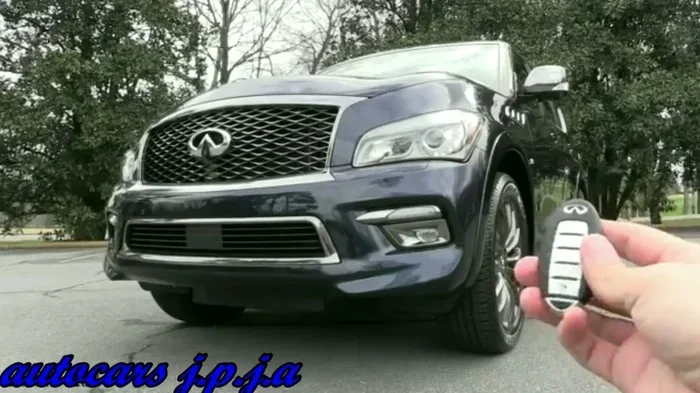
Not all QX80 models come with factory remote start. The feature is typically bundled into higher trims or optional packages. Understanding which trim you have is the first step. Check your owner’s manual or look for the remote start button on your key fob. If you see a curved arrow icon, your QX80 likely supports remote start.
What Is Factory Remote Start?
Factory remote start means the feature was installed by Infiniti at the time of manufacturing. It works seamlessly with your QX80’s systems. There is no extra hardware to buy. Everything is already wired and programmed. You simply press a sequence of buttons on your key fob, and the engine starts.
Factory systems also integrate with your vehicle’s security features. The engine will shut off if someone tries to drive the truck without the key fob inside. This gives you both convenience and safety. For many QX80 owners, the factory system is all they will ever need.
Which QX80 Trims Support Remote Start?
The Infiniti QX80 comes in several trims. The base Lumen and Luxe trims may or may not include remote start depending on the model year. Higher trims like the Monograph and Signature Edition are more likely to have it standard. Here is a quick breakdown:
- Lumen and Luxe: May require a convenience or premium package for remote start.
- Monograph: Often includes factory remote start as part of the package.
- Signature Edition: Typically comes with remote start as a standard feature.
If you are unsure, check your QX80 owner’s manual or contact your local Infiniti dealer. They can confirm whether your specific vehicle has the feature. You can also look at the key fob for a dedicated remote start button.
How to Set Up Remote Start on Your Infiniti QX80
Setting up remote start on your QX80 is straightforward if you have the factory system. The process differs slightly depending on whether you use the key fob or the mobile app. Let us go through both methods step by step.
Using the Factory Key Fob Method
The factory key fob method is the most common way to remote start a QX80. Here is how it works:
- Make sure you are outside the vehicle and within range.
- Press the lock button on your key fob once.
- Immediately press the lock button three times in quick succession.
- The headlights will flash, and the engine will start.
That is it. The truck will idle for a set amount of time, usually around 10 to 15 minutes. You can extend the runtime by repeating the sequence while the engine is running. The climate control system will activate automatically based on your last settings.
One important thing to remember: you must have the smart key inside the vehicle for the engine to keep running. If the system does not detect the key fob inside, it will shut the engine off after a short period. This is a security feature built into every Infiniti QX80.
Programming Your Remote Start
Some QX80 models let you customize the remote start duration and climate settings. To access these options, you may need to visit the vehicle settings menu on the dashboard display. Look for the “Remote Start” or “Vehicle Settings” section. From there, you can adjust how long the engine idles and which climate zones are active.
If you cannot find these settings, consult your owner’s manual. Every model year may have slight differences in the menu layout. The manual will also explain any safety requirements, like making sure the parking brake is engaged before remote starting.
Step-by-Step Guide to Remote Starting Your QX80
Now that you know the basics, let us walk through the full process of actually using remote start in real-world situations. Whether it is a cold winter morning or a hot summer day, the steps are the same.
The Basic Remote Start Sequence
Here is the simplest way to remote start your QX80:
- Step 1: Exit the vehicle and make sure all doors are closed.
- Step 2: Ensure the smart key is inside the vehicle.
- Step 3: Press the brake pedal once (this is required on some models).
- Step 4: Press the lock button once on the key fob.
- Step 5: Press the lock button three times quickly.
- Step 6: Wait for the headlights to flash and the engine to start.
Once the engine is running, the climate control will begin heating or cooling the cabin based on your last settings. The dual zone climate control on the QX80 means both the driver and passenger sides get warm air. This is a huge comfort feature, especially during those bitterly cold mornings.
Using the Infiniti InTouch App
If your QX80 has the Infiniti InTouch system, you have another powerful option. The mobile app lets you start your truck from anywhere with cell service. Here is how to set it up:
- Download the Infiniti InTouch app from the App Store or Google Play.
- Create an account and pair it with your QX80 using the vehicle’s VIN.
- Follow the on-screen prompts to link your phone to the truck.
- Open the app, tap “Remote Start,” and confirm the action.
The app is incredibly convenient. You can start your QX80 from your office, a store parking lot, or even while you are still inside your house. The remote start range depends on your cellular connection and the truck’s GPS system. Most users report reliable performance within a few miles of the vehicle.
One great thing about the app is that you can check your fuel level, tire pressure, and lock status all from your phone. It adds a layer of connectivity that makes owning a QX80 even more enjoyable. If you are interested in comparing vehicle costs, you might also want to check out how much a brand new car costs overall to understand the QX80’s place in the market.
Benefits of Remote Starting Your QX80
Remote start is not just a luxury. It provides real, practical benefits that every QX80 owner can appreciate. Let us look at why this feature is worth using regularly.
Comfort and Convenience
The most obvious benefit is comfort. On a freezing morning, you do not have to sit in a cold truck waiting for the heater to work. On a hot summer day, you can cool down the cabin before you get in. The QX80’s spacious interior means it takes a while to heat or cool, and remote start solves that problem entirely.
You also save time. Instead of waiting for the engine to warm up while you sit inside, you can finish your coffee, check your messages, or walk to your vehicle already warmed up. It is a small luxury that adds up to a much better daily experience.
Engine Health in Cold Weather
Cold weather is tough on engines. Thick oil does not circulate well when temperatures drop. Metal parts contract and create more friction during the first few minutes of driving. By using remote engine start, you give your QX80’s engine time to warm up and circulate oil before you start driving.
This is especially important for the QX80’s 5.6-liter V8 engine. That powerful engine needs proper warmup to perform at its best. Over time, letting the engine idle for a few minutes before driving can reduce wear and extend engine life. Think of it as a small investment in long-term reliability.
Safety and Visibility
Remote start also improves safety. A warm defroster clears frost and fog from your windshield much faster. Heated mirrors defrost quickly, giving you better visibility. The QX80’s LED headlights also turn on automatically when you remote start, which helps you see and be seen in low-light conditions.
These small safety gains add up, especially during winter months when visibility is often poor. You are not rushing to scrape ice off your windshield or waiting for fog to clear. You walk to a fully prepared vehicle.
Common Remote Start Issues and How to Fix Them
Like any technology, remote start can sometimes act up. Most problems are easy to fix with basic troubleshooting. Here are the most common issues QX80 owners face and how to solve them.
Key Fob Battery Problems
The most common reason for remote start failure is a weak key fob battery. If your fob is not working consistently, the battery is likely dying. Replacing it is simple and inexpensive. Most Infiniti key fobs use a CR2032 coin cell battery.
To replace the battery:
- Flip the fob over and slide the small tab to release the back cover.
- Remove the old battery and insert a new CR2032 battery.
- Snap the cover back into place.
- Test the remote start function.
Keeping a spare battery in your glove box is a smart habit. A dead fob battery can leave you stranded if you rely on the keyless entry and push-button start features too.
Range Limitations
Remote start has a limited range, typically around 200 to 300 feet. If you are too far from your QX80, the signal may not reach. This is normal and not a malfunction. Make sure you are within range before pressing the buttons.
Obstacles like thick walls, large buildings, and other vehicles can also block the signal. If you are in a crowded parking garage, try moving to a more open area and try again. The Infiniti InTouch app bypasses this limitation since it uses cellular networks instead of radio signals.
Brake Pedal Position
Some QX80 models require the brake pedal to be pressed before remote start will work. This is a safety feature. If your truck will not start remotely, check that you have pressed the brake pedal. This is an easy fix that many people overlook.
Also make sure the vehicle is in Park (P) and the parking brake is engaged. The system will not remote start if it detects the transmission is in any other gear. These safety checks are in place to protect you and your vehicle.
Aftermarket Remote Start Options for the QX80
If your QX80 trim does not come with factory remote start, you are not out of luck. Aftermarket remote start systems are widely available and can be professionally installed. These systems add the same convenience to your truck without needing a newer model.
Popular Aftermarket Systems
Several brands offer high-quality aftermarket remote start kits for the Infiniti QX80. Brands like Compustar, DroneMobile, and Viper are popular choices. These systems typically include a remote control, a control module, and a bypass module that integrates with your truck’s existing security system.
Most aftermarket systems offer a longer range than factory systems, sometimes up to 1,000 feet or more with a two-way remote. Some also include smartphone integration, letting you start your truck from anywhere in the world using a mobile app.
Installation Costs and Considerations
Professional installation for an aftermarket remote start system typically costs between $200 and $500, depending on the brand and complexity. The remote start kit itself can range from $100 to $400. So your total investment is usually between $300 and $900.
It is important to have the system installed by a qualified technician. Improper installation can void your warranty or cause electrical issues. If you are near an Infiniti dealer, they may offer installation services as well. Always check with your dealer before installing any aftermarket electronics.
One thing to keep in mind: some aftermarket systems may not integrate perfectly with all QX80 features. For example, the system might not control the heated seats or the climate control the same way the factory system does. Ask the installer about compatibility with your specific model year before committing.
If you are curious about what kind of maintenance keeps a vehicle like the QX80 running well over time, you might want to check out how many miles a car can last with proper care. It is a great companion read for any luxury SUV owner.
Expert Tips for Getting the Most Out of Remote Start
To get the best experience from your QX80 remote start system, follow these expert tips:
- Keep your key fob battery fresh: Replace the battery every 12 to 18 months to avoid unexpected failures.
- Set your climate preferences in advance: Program your preferred temperature so the system starts heating or cooling immediately.
- Use the app for longer distances: When you are more than 300 feet away, the Infiniti InTouch app is more reliable than the key fob.
- Do not remote start in enclosed spaces: Always start your truck in an open area to avoid carbon monoxide buildup.
- Check your model year: Remote start features vary between model years. Make sure you are following the correct procedure for your specific QX80.
- Keep the vehicle locked: Remote start works best when all doors and the liftgate are securely closed.
These simple habits will keep your remote start system working reliably for years. They also help protect your engine and your safety. A little maintenance goes a long way with luxury vehicles like the QX80.
Conclusion
Remote starting your Infiniti QX80 is one of the best features of owning this luxury full-size SUV. Whether you use the factory key fob method, the Infiniti InTouch app, or an aftermarket system, the process is simple and rewarding. You get a warm or cool cabin, a warmed-up engine, and a head start on your day every single time.
The key is understanding your specific QX80’s capabilities and following the correct steps. Keep your key fob battery charged, stay within range, and always ensure the vehicle is in Park with the brake engaged. These small habits make a big difference in how well your remote start system works.
If your QX80 does not have factory remote start, an aftermarket kit is a worthwhile investment. The comfort and convenience are well worth the cost. And remember, taking care of your vehicle through regular maintenance like oil changes and battery replacements ensures that every feature, including remote start, works its best.
Now that you know how to remote start an Infiniti QX80 the simple way, you can enjoy this feature every day. Get out there, press those buttons, and let your QX80 do the work for you.
Frequently Asked Questions
Can I remote start my Infiniti QX80 with the InTouch app?
Yes, if your QX80 has the Infiniti InTouch system, you can use the mobile app to start your truck remotely. Simply download the app, pair it with your vehicle using the VIN, and tap the remote start button. This method works from anywhere with cell service and is more reliable than the key fob at longer distances.
Why won’t my Infiniti QX80 remote start work?
The most common reasons are a weak key fob battery, being out of range, or the brake pedal not being pressed. Make sure your smart key is inside the vehicle, all doors are closed, and the truck is in Park. If the problem persists, replace the key fob battery and try again.
Is remote start bad for my QX80’s engine?
No, factory remote start systems are designed to be safe for your engine. In fact, allowing your engine to idle and warm up in cold weather can reduce wear on internal components. The system automatically shuts off the engine after a set time, so there is no risk of running it too long.
How far can I be from my QX80 when using remote start?
With the factory key fob, the typical range is about 200 to 300 feet. Using the Infiniti InTouch app, the range extends to wherever you have cell service. Aftermarket two-way remote systems can reach up to 1,000 feet or more, depending on the brand and model.
Can I add remote start to a QX80 that does not have it factory?
Yes, aftermarket remote start kits are widely available and can be professionally installed. Popular brands include Compustar, DroneMobile, and Viper. Installation typically costs between $300 and $900 total, including the kit and professional labor. Always check with your dealer before installing aftermarket electronics.
How long does the engine run when I remote start my QX80?
Most factory systems idle the engine for 10 to 15 minutes. You can usually extend the runtime by repeating the remote start sequence while the engine is running. After the set time expires, the engine will automatically shut off. The Infiniti InTouch app also lets you control the duration in some cases.