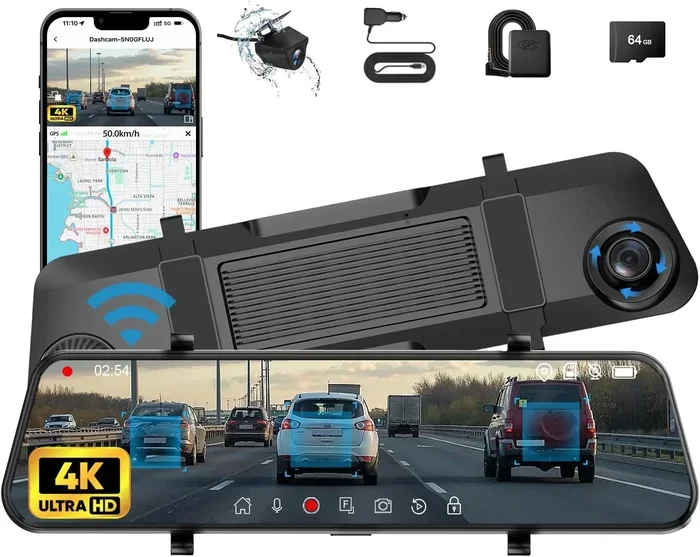
Best Car Camera With GPS for Recording Your Road Trips
A car camera with GPS combines high-definition video recording with precise location tracking, giving you a complete record of every journey. Whether you are documenting road trips, protecting yourself in accidents, or sharing your adventures online, the right GPS-enabled dash cam makes all the difference. In this guide, we break down the top models, key features to look for, and practical tips to help you choose the best car camera with GPS for your needs.
Every road trip tells a story. The winding mountain roads, the scenic coastal drives, the unexpected detours through small towns. A car camera with GPS captures all of it, not just as video but with exact location data, speed readings, and route maps attached to every clip.
Whether you are a frequent traveler, a rideshare driver, or simply someone who wants extra security on the road, a GPS-enabled car camera is one of the smartest investments you can make. It does so much more than a regular dash cam. It knows where you are, how fast you are going, and it keeps a detailed log of every trip you take.
In this article, we will walk you through everything you need to know about car cameras with GPS. We will cover the top features, the best models on the market, common mistakes to avoid, and practical tips to get the most out of your device. By the end, you will have a clear picture of exactly what to look for and which camera fits your needs best.
Key Takeaways
- GPS adds valuable context: A car camera with GPS records your exact location, speed, and route alongside your video footage.
- Loop recording is essential: This feature ensures your camera never runs out of storage by automatically overwriting old clips.
- 4K resolution makes a big difference: Higher resolution captures more detail, which is crucial for evidence and travel memories.
- Parking mode protects your car: Even when the engine is off, a good GPS car camera keeps watch using motion or impact detection.
- G-sensor saves important clips: Automatic collision detection locks footage so it cannot be accidentally overwritten.
- Wide-angle lenses capture more: A 140 to 170-degree field of view covers more of the road and surrounding area.
- Easy setup matters: The best car cameras with GPS are simple to install and use, even for beginners.
📑 Table of Contents
- Why a Car Camera With GPS Is a Game Changer
- Key Features to Look For in a Car Camera With GPS
- Top Car Cameras With GPS Reviewed
- How to Install and Set Up Your Car Camera With GPS
- How GPS Data Enhances Your Road Trip Experience
- Common Mistakes People Make With Car Cameras With GPS
- Key Takeaways for Getting the Most From Your Car Camera With GPS
- Final Thoughts
Why a Car Camera With GPS Is a Game Changer
A standard dash cam records what happens in front of your car. A car camera with GPS does that and so much more. It layers location data on top of your video, creating a detailed record of your entire journey. Think of it as a smart travel companion that never forgets a thing.
Here are the biggest reasons a GPS-enabled dash cam is worth every penny:
- Proof of location: If an accident occurs, GPS coordinates prove exactly where it happened. This is invaluable for insurance claims and legal matters.
- Speed tracking: The camera records your vehicle’s speed alongside the video. This helps you monitor your driving habits and stay safe.
- Route mapping: Many car cameras with GPS let you review your routes on a map after the trip. It is like having a built-in travel journal.
- Travel documentation: Road trip enthusiasts love being able to geotag their footage. You can later map out every stop, scenic overlook, and hidden gem you discovered.
- Incident evidence: GPS data combined with video footage creates a powerful, time-stamped record that insurance companies and law enforcement take seriously.
The difference between a basic dash cam and a GPS car camera is like the difference between a photograph and a fully annotated travel diary. One shows you what happened. The other tells you exactly where and when it happened.
Key Features to Look For in a Car Camera With GPS
Not all GPS dash cams are created equal. Some are packed with advanced features, while others keep things simple. Understanding what matters most helps you make a confident choice. Here are the features you should prioritize.
Video Resolution and Image Quality
Resolution is one of the first things to check. Most quality car cameras with GPS offer at least 1080p Full HD. However, 4K resolution is becoming the new standard, and for good reason. Higher resolution means sharper details. You can read license plates, see road signs clearly, and capture fine details in the landscape around you.
Look for a camera that records at 30 frames per second or higher. This ensures smooth, natural-looking video, especially when you are driving on bumpy roads or at higher speeds.
GPS Tracking Accuracy
The GPS module in your car camera should be fast and accurate. Some models use dual-band GPS for better precision, even in areas with poor signal like tunnels or dense urban canyons. The best GPS tracking car cameras sync location data seamlessly with video timestamps, making playback and review effortless.
Wide-Angle Lens
A wide field of view is critical for a dash cam. Look for lenses with a 140 to 170-degree angle. This captures more of the road, including lanes on either side of your vehicle. It also helps reduce blind spots and gives you a more complete picture of any incident.
Loop Recording
Loop recording is a must-have feature. It automatically overwrites the oldest footage when the memory card is full. This means you never have to stop and manage files manually. The best car cameras with GPS segment clips into short intervals, usually one to five minutes, so the system runs smoothly and efficiently.
G-Sensor and Incident Detection
A G-sensor detects sudden movement or impact. When it senses a collision, it automatically locks the current video file, preventing it from being overwritten. This is one of the most important safety features in any GPS dash cam. Make sure the sensitivity settings are adjustable so you can fine-tune it to your preferences.
Parking Mode and Battery Life
Parking mode is a game changer for car security. When your vehicle is parked and turned off, the camera stays on in a low-power state. It uses motion detection or impact detection to start recording if someone bumps your car or attempts theft. Some models use a supercapacitor instead of a battery, which handles extreme temperatures much better.
Storage and Memory
Most car cameras with GPS use microSD cards for storage. Look for models that support cards up to 256GB or more. A larger card means longer recording times before the loop system kicks in. Always use a high-speed U3 or V30 rated card for smooth, uninterrupted recording.
Quick Tips for Choosing the Right Features
- Prioritize 4K resolution if you plan to share footage online or use it for travel content.
- Choose a camera with dual-band GPS for the most accurate location tracking.
- Make sure the G-sensor has adjustable sensitivity levels.
- Pick a model with supercapacitor-based parking mode for reliability in hot and cold climates.
- Go for at least 140-degree wide-angle lens coverage.
Top Car Cameras With GPS Reviewed
Now that you know what features matter, let us look at some of the best car cameras with GPS available right now. Each of these models brings something unique to the table.
BlackVue DR900X-2CH Plus
The BlackVue DR900X-2CH Plus is widely regarded as one of the premium GPS dash cams on the market. It records in stunning 4K resolution on the front and 1080p on the rear. Its dual GPS system tracks location and speed with impressive accuracy. The built-in Wi-Fi lets you stream and download footage directly to your phone. Parking mode is robust, with both motion detection and impact detection options. The only downside is the price, which is on the higher end.
Garmin Dash Cam 67W
Garmin is a trusted name in GPS technology, and the Dash Cam 67W lives up to that reputation. It features a 1440p resolution, built-in GPS, and a wide 180-degree field of view. The camera is easy to mount and use. Its driver assistance features, like forward collision warning, add extra value. The Garmin app lets you review GPS data and video clips on your smartphone. It is a great option for those who want a reliable, no-fuss car camera with GPS.
Thinkware U3000
The Thinkware U3000 is a sleek, powerful dash cam that delivers 4K video quality. It includes a Sony STARVIS 2 sensor for excellent low-light performance. GPS tracking is accurate and detailed. The built-in AI detects lane departures and forward collisions. The QLED display makes reviewing footage easy right from the camera. It is one of the best choices for drivers who want cutting-edge technology in a clean, unobtrusive design.
Vantrue N4 Pro 2K
The Vantrue N4 Pro offers excellent value for its price. It records in 2K resolution and includes GPS tracking, loop recording, and a G-sensor. The wide 166-degree lens captures a generous view of the road. Built-in GPS logs your route and speed automatically. The camera is compact, easy to install, and works well for both daily commuting and road trips. It is a strong contender in the budget-friendly GPS car camera category.
Comparison Table
| Model | Front Resolution | GPS | Field of View | Parking Mode | Price Range |
|---|---|---|---|---|---|
| BlackVue DR900X-2CH Plus | 4K | Dual GPS | 152 degrees | Yes (Supercapacitor) | Premium |
| Garmin Dash Cam 67W | 1440p | Yes | 180 degrees | Yes | Mid-Range |
| Thinkware U3000 | 4K | Yes | 150 degrees | Yes | Premium |
| Vantrue N4 Pro | 2K | Yes | 166 degrees | Yes | Budget-Friendly |
How to Install and Set Up Your Car Camera With GPS
Installing a car camera with GPS is simpler than most people think. You do not need to be a mechanic or a tech expert. Most dash cams come with everything you need right out of the box. Here is a step-by-step guide to get you up and running.
Step 1: Choose the Right Mounting Spot
The best location for your dash cam is behind the rearview mirror, near the top of the windshield. This position gives the camera a clear, unobstructed view of the road. Make sure it does not block your line of sight. Clean the windshield with alcohol wipes before applying the mount for a strong, bubble-free hold.
Step 2: Attach the Camera and Route the Cable
Stick or suction-mount the camera in place. Then, route the power cable along the top edge of the windshield, behind the headliner, and down to the fuse box. Most kits include a rearview mirror channel or adhesive cable clips to keep everything neat and tidy.
Step 3: Connect to Power
Plug the cable into a fuse adapter or a 12V power outlet. Hardwiring the camera to the fuse box is the best option because it provides a cleaner installation and enables parking mode. If you prefer a simpler setup, a cigarette lighter adapter works well too.
Step 4: Insert the Memory Card and Power On
Insert a formatted microSD card into the camera. Power it on and wait for the GPS signal to lock. Most cameras display a GPS icon once the signal is acquired. This usually takes about 30 seconds to a minute, especially when you are starting a new trip.
Step 5: Adjust Settings
Use the companion app or the camera’s touchscreen to adjust settings. Set the resolution to your preference, enable loop recording, adjust G-sensor sensitivity, and configure parking mode. Once everything is set, you are ready to hit the road.
Common Mistakes to Avoid During Installation
- Mounting the camera too low: This limits your view and can miss important details like license plates.
- Forgetting to format the SD card: Always format the card in the camera before first use to avoid compatibility issues.
- Leaving loose cables: Loose cables can rattle while driving and may interfere with the steering wheel.
- Ignoring GPS signal: Always wait for the GPS lock before starting your trip to ensure accurate tracking.
How GPS Data Enhances Your Road Trip Experience
One of the most exciting benefits of a car camera with GPS is how it transforms your road trip footage into a rich, data-rich experience. Here is how GPS data adds value beyond just safety and security.
Creating Travel Maps and Journals
Many GPS dash cam apps let you view your recorded routes on a map. You can see exactly where you drove, which roads you took, and how long you spent at each stop. It is like having a digital travel journal that writes itself. Some cameras even let you tag specific clips with location names, making it easy to organize and share your adventures.
Sharing Your Journey
If you enjoy creating travel content for social media or a blog, GPS-tagged footage is a goldmine. You can overlay route maps on your videos, show speed data during exciting driving moments, and give viewers a sense of exactly where each scene was captured. This level of detail makes your content stand out and feels incredibly immersive.
Tracking Driving Habits
The GPS speed data your camera collects can also help you become a better driver. By reviewing your trip history, you can see how often you speed, how smoothly you brake, and how efficiently you drive. Over time, this awareness can lead to safer, more fuel-efficient driving habits.
Expert Insight: Why GPS Data Matters for Road Trips
According to automotive experts, GPS-enabled dash cams are becoming the new standard for serious road trippers. The combination of video and location data creates a comprehensive record that no standard camera can match. Whether you are documenting a cross-country adventure or simply commuting to work, the GPS layer adds context and value that enhances the entire experience.
Common Mistakes People Make With Car Cameras With GPS
Even the best car camera with GPS will not deliver great results if you make avoidable mistakes. Here are the most common errors and how to prevent them.
Skipping Firmware Updates
Manufacturers regularly release firmware updates that improve GPS accuracy, fix bugs, and add new features. Skipping updates means you miss out on performance improvements. Check for updates every few months through the companion app.
Using Low-Quality SD Cards
Cheap, slow SD cards can cause recording failures, file corruption, and dropped frames. Always use high-quality, high-speed microSD cards rated U3 or V30. Brands like Samsung, SanDisk, and Lexar are reliable choices for dash cam storage.
Ignoring the GPS Antenna Position
Some dash cams have external GPS antennas that need to be mounted on the roof or near a window for the best signal. If the antenna is hidden behind metal or placed in a poor location, GPS tracking will be inaccurate. Always follow the manufacturer’s placement guidelines.
Not Testing Before a Long Trip
Do not wait until you are halfway through a road trip to discover your camera is not working. Always test the camera, GPS signal, and memory card before hitting the road. A quick five-minute check can save you from missing important footage.
Forgetting to Adjust Settings for the Trip
Different trips call for different settings. A long highway drive may benefit from lower resolution to save storage, while a scenic coastal road trip is worth recording in 4K. Take a moment to adjust resolution, loop recording interval, and GPS logging based on your trip type.
Key Takeaways for Getting the Most From Your Car Camera With GPS
- Invest in 4K resolution: It captures more detail and makes your footage look professional.
- Always use a quality microSD card: U3 or V30 rated cards ensure smooth, reliable recording.
- Keep your firmware updated: Updates improve GPS accuracy and add new features over time.
- Test before every major trip: A quick check prevents surprises on the road.
- Use the companion app: Most GPS dash cams have apps that let you review maps, speed data, and footage on your phone.
- Mount the camera correctly: Behind the rearview mirror at the top of the windshield gives the best view.
- Enable parking mode: It keeps your car protected even when you are not in it.
Final Thoughts
A car camera with GPS is more than just a safety device. It is a travel companion, a memory keeper, and a peace-of-mind tool all in one. From capturing stunning road trip footage with precise location data to providing critical evidence in the event of an accident, the benefits are clear and compelling.
Whether you choose a premium model like the BlackVue DR900X or a budget-friendly option like the Vantrue N4 Pro, the key is to prioritize features that match your driving habits and travel style. Focus on video quality, GPS accuracy, and reliability, and you will be well on your way to finding the perfect GPS dash cam for your car.
Road trips are meant to be enjoyed without worry. With the right car camera with GPS on your windshield, you can drive with confidence knowing that every mile is being recorded, every route is being mapped, and every moment is being saved. So gear up, hit the road, and let your camera capture the journey of a lifetime.
Frequently Asked Questions
What is a car camera with GPS and why do I need one?
A car camera with GPS is a dash cam that records video and simultaneously tracks your location, speed, and route using a built-in GPS module. You need one because it adds valuable context to your footage, helps with insurance claims, and lets you map out your road trips with precision.
Can I use a car camera with GPS as a regular dash cam?
Absolutely. A GPS car camera works just like a standard dash cam for recording video. The GPS feature simply adds an extra layer of data, including location, speed, and route information, which enhances the value of your recordings.
How accurate is the GPS tracking in car cameras?
Most modern GPS dash cams offer very accurate tracking, especially models with dual-band GPS. Accuracy can vary depending on the model and signal conditions, but in open areas, the location data is typically precise within a few meters.
Does a car camera with GPS use a lot of battery power?
Not really. Dash cams are designed to be low-power devices. Many models use supercapacitors instead of batteries for parking mode, which handles temperature extremes better and lasts longer than traditional batteries.
What memory card should I use with my GPS car camera?
Use a high-speed microSD card rated U3 or V30 with at least 64GB of storage. Brands like Samsung EVO, SanDisk Ultra, and Lexar are proven choices. Avoid cheap, unbranded cards as they can cause recording errors and file corruption.
Is it hard to install a car camera with GPS?
No, installation is straightforward for most models. You mount the camera behind the rearview mirror, route the cable along the windshield, and connect it to a power source. Many car cameras with GPS also come with companion apps that make setup and configuration quick and easy.
=== CONCLUSION ===
A car camera with GPS is one of the most useful and versatile tools you can add to your vehicle. It combines video recording with precise location tracking, speed monitoring, and route mapping to give you a complete picture of every journey. From safety and security to travel documentation and content creation, the benefits are wide-ranging and genuinely valuable.
By focusing on the right features, choosing a quality model, and following proper installation and maintenance practices, you can enjoy years of reliable, high-quality recording. Whether you are capturing breathtaking road trip scenery or protecting yourself on the daily commute, the best car camera with GPS makes every drive more meaningful and more secure.


