How to Turn On Traction Control in a Volkswagen Jetta
Turning on traction control in a Volkswagen Jetta is simple and can greatly improve your safety on wet or icy roads. The traction control system helps prevent wheel spin and keeps your Jetta stable when driving on slippery surfaces. In this guide, we walk you through exactly where to find the traction control button, how to activate it, and what to do when the traction control light comes on.
Driving a Volkswagen Jetta feels great. The handling is smooth, the ride is comfortable, and the car responds well when you press the gas. But what happens when the road turns wet? Or when snow starts falling? That is where traction control comes in. This system is one of the most important safety features in your Jetta, and knowing how to use it properly can make a big difference.
Many drivers do not fully understand what traction control does or how to turn it on. Some people even drive for years without ever touching the button. That is a missed opportunity. Traction control helps prevent your wheels from spinning when you accelerate on slippery surfaces. It works behind the scenes to keep your Jetta stable and predictable, especially in challenging weather conditions.
In this article, we will cover everything you need to know about traction control in a Volkswagen Jetta. We will show you where the button is, how to activate the system, what each dashboard light means, and how to troubleshoot common problems. Whether you drive a newer Jetta or an older model, this guide has you covered. Let us get started.
Key Takeaways
- Easy Activation: The traction control button in a Volkswagen Jetta is usually located near the steering wheel or on the center console, making it simple to turn on.
- Safety First: Traction control works alongside your anti-lock braking system and electronic stability control to keep you safe on slippery roads.
- Warning Lights Matter: A flashing or steady traction control light on your dashboard signals a potential issue that needs attention.
- Driving Modes Help: Some Jetta trims offer drive mode settings that interact with traction control for a customized driving experience.
- Common Fixes Exist: Most traction control problems can be resolved with simple steps like checking the brake light switch or resetting the system.
📑 Table of Contents
- What Is Traction Control and Why Does It Matter?
- Where Is the Traction Control Button in a Volkswagen Jetta?
- How to Turn On Traction Control in a Volkswagen Jetta
- What Does the Traction Control Light Mean?
- Common Traction Control Problems and How to Fix Them
- Tips for Driving with Traction Control
- How Traction Control Compares to Other Safety Systems
- When to See a Mechanic
- Final Thoughts on Traction Control in the Volkswagen Jetta
What Is Traction Control and Why Does It Matter?
Traction control is a vehicle safety system that prevents your wheels from losing grip when you accelerate. When one or more wheels start to spin faster than the others, the system automatically reduces engine power or applies the brakes to that wheel. This helps you maintain control of the vehicle.
In a Volkswagen Jetta, the traction control system works hand in hand with other safety features. These include the anti-lock braking system (ABS) and the electronic stability control (ESC). Together, these systems form a safety net that helps you stay on the road, especially when conditions are less than ideal.
You might wonder if you really need traction control. The answer is yes. Here are a few reasons why it matters:
- Prevents wheel spin: When you hit a patch of ice or standing water, your wheels can spin uselessly. Traction control steps in to stop this from happening.
- Improves stability: The system helps keep your Jetta tracking straight, even when road conditions are uneven.
- Boosts confidence: Knowing your car has traction control gives you more confidence when driving in rain, snow, or on gravel roads.
- Reduces accident risk: By preventing loss of traction, the system helps you avoid accidents caused by slipping or sliding.
The Volkswagen Jetta has included traction control in most of its models for many years. It is not just a luxury feature. It is a core part of the car’s safety engineering. Understanding how to use it properly is one of the best things you can do as a Jetta owner.
Where Is the Traction Control Button in a Volkswagen Jetta?
Finding the traction control button in a Volkswagen Jetta is usually straightforward. However, the exact location can vary depending on your model year and trim level. Let us walk through the most common places to look.
Locating the Button by Model Year
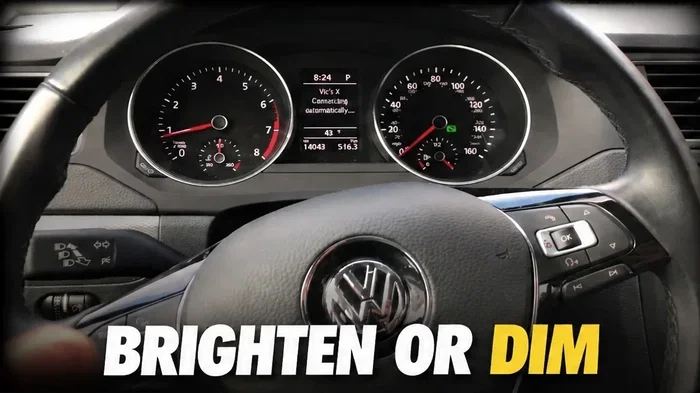
2011-2018 Volkswagen Jetta: In these models, the traction control button is typically found on the left side of the steering wheel or on the center console near the gear shifter. Look for a button with a symbol that looks like a car with wavy lines underneath it. This icon represents the traction control or stability control system.
2019 and Newer Volkswagen Jetta: The newer Jettas have a slightly different layout. The traction control button may be integrated into the drive mode selection panel. Some models place it near the shift lever or on the dashboard area just below the infotainment screen.
Older Models (Pre-2011): If you are driving an older Jetta, the traction control button might be located on the center console or even on the instrument panel. The symbol remains the same: a car with squiggly lines beneath the wheels.
What the Traction Control Button Looks Like
The icon for traction control is easy to spot once you know what to look for. It usually shows a stylized car with curved lines or wavy patterns beneath the rear wheels. Some Volkswagen models use a similar icon for the stability control system, and the buttons may be combined into one. Pressing the button once typically turns the traction control off, and pressing it again turns it back on.
How to Turn On Traction Control in a Volkswagen Jetta
Turning on traction control in your Volkswagen Jetta is a quick process. Follow these steps to make sure the system is active and ready to help you when you need it most.
Step-by-Step Activation Guide
- Start your Jetta: Turn the ignition to the “on” position or start the engine. The dashboard lights will illuminate briefly as the car runs its self-check.
- Look for the traction control button: Scan the steering wheel area, center console, or dashboard for the traction control symbol.
- Press the button once: When you press the button, the traction control system activates. You may see the traction control light on the dashboard turn off or change from a warning to a steady green or white icon.
- Check the dashboard: Look for the traction control light to confirm the system is on. If the light is off or shows a steady indicator, the system is active and monitoring your wheels.
- Drive safely: With traction control on, you can drive confidently knowing the system will intervene if any wheel starts to slip.
Understanding Traction Control Modes
Some Volkswagen Jetta trims come with multiple driving modes that interact with the traction control system. These modes adjust how the car responds to your inputs and can change the behavior of traction control.
- Normal Mode: This is the default setting. Traction control is fully active and provides standard intervention levels for everyday driving.
- Sport Mode: In sport mode, the car responds more aggressively to throttle inputs. Traction control may allow slightly more wheel slip before intervening, giving you a sportier feel. If you are curious about how to switch to sport mode, check out our guide on how to put your car in sport mode.
- Snow Mode: Available on some trims, snow mode starts the car in a higher gear and reduces wheel spin. Traction control is more sensitive in this mode, which is ideal for icy or snowy conditions.
Not all Jetta models have these modes. If your car does not have a drive mode selector, the traction control system works in a single default mode that is always active unless you manually turn it off.
What Does the Traction Control Light Mean?
The traction control light on your Volkswagen Jetta dashboard is one of the most important warning indicators to understand. When this light behaves in a certain way, it tells you something about the health of the system.
Steady Traction Control Light
A steady traction control light usually means the system is turned off. If you recently pressed the traction control button, the system is simply deactivated. Press the button again to turn it back on, and the light should go off.
Flashing Traction Control Light
A flashing traction control light is more concerning. It typically indicates that the system has detected a problem and has been disabled. Common reasons for a flashing light include:
- Faulty wheel speed sensors: These sensors tell the traction control system how fast each wheel is spinning. If one fails, the system cannot work properly.
- Low brake fluid: The traction control system shares components with the braking system. Low brake fluid can trigger the warning light.
- ABS module issues: Since traction control and ABS work together, a problem with the ABS module can cause the traction control light to flash.
- Wiring or electrical problems: Damaged wiring or connectors can disrupt communication between the sensors and the control module.
Traction Control Light and Wrench Light Together
If you see the traction control light alongside the wrench light, it could signal a broader issue with your vehicle’s electronic systems. In some cases, a bad battery can cause multiple warning lights to illuminate at once, including the wrench light. If you are seeing this combination of lights, it is worth investigating your battery health. Our article on can a bad battery cause the wrench light to come on covers this topic in detail.
Common Traction Control Problems and How to Fix Them
Even though traction control is a reliable system, it can sometimes malfunction. Here are the most common issues Jetta owners face and what you can do about them.
Problem 1: Traction Control Will Not Turn On
If you press the traction control button and the system does not activate, try these steps:
- Turn the car off and back on again. Sometimes the system needs a full restart to reset.
- Check if the brake light switch is working. A faulty brake light switch can prevent traction control from engaging.
- Inspect the fuse box. A blown fuse related to the traction control or ABS system can disable the feature.
- Make sure you are not in a mode that disables traction control, such as certain sport or off-road settings.
Problem 2: Traction Control Light Stays On After Startup
A traction control light that stays on after the car starts usually means the system has detected a fault. Here is what to do:
- Check the brake fluid level: Low brake fluid is a common and easy-to-fix cause.
- Inspect the wheel speed sensors: Dirt or debris on the sensors can cause false readings. Clean them gently with a soft cloth.
- Run a diagnostic scan: A mechanic can use an OBD-II scanner to read error codes and pinpoint the exact issue.
- Check the battery voltage: A weak battery can cause erratic behavior in electronic systems, including traction control. The stability control system relies on a steady power supply to function correctly.
Problem 3: Traction Control Activates Too Often
If your traction control seems to kick in too frequently, even on normal roads, the system might be overly sensitive. This can happen when:
- Tire pressure is uneven across the wheels.
- Tires are worn out and have reduced grip.
- The wheel speed sensors are dirty or damaged.
- The system software needs a reset or update.
Start by checking your tire pressure and tread depth. If those look good, a visit to a mechanic for a diagnostic check is a smart next step.
Problem 4: Traction Control Does Not Work in Wet Conditions
If you notice your wheels spinning on wet roads even with traction control on, the system may not be functioning correctly. First, confirm that traction control is actually turned on by checking the dashboard indicator. If it is on and still not working, the issue could be with the wheel speed sensors or the traction control module itself.
Tips for Driving with Traction Control
Knowing how to turn on traction control is only half the battle. Understanding how to drive with it effectively will help you get the most out of this safety feature.
When to Keep Traction Control On
- Rainy days: Wet roads reduce tire grip significantly. Traction control helps prevent wheel spin when you accelerate from a stop or on uphill drives.
- Snow and ice: These are the most challenging road conditions. Traction control works overtime to keep your Jetta stable.
- Gravel or dirt roads: Loose surfaces can cause unexpected wheel spin. Traction control helps maintain control.
- City driving: Even in normal city driving, traction control provides an extra layer of safety during sudden stops and starts.
When You Might Turn Traction Control Off
There are a few situations where turning off traction control can be helpful:
- Deep snow or mud: Sometimes a little wheel spin helps you gain momentum when stuck in snow or mud. Turning off traction control allows the wheels to spin freely.
- Racing or track driving: On a closed track, experienced drivers may prefer to manage traction manually.
- Installing snow chains: If you need to put chains on your tires, you will want to turn off traction control first to avoid damaging the system.
Remember to turn traction control back on once you have cleared the difficult conditions. Leaving it off for everyday driving reduces your safety margin.
Quick Tips for Optimal Traction Control Performance
- Keep your tires properly inflated at all times.
- Replace worn tires promptly to maintain good grip.
- Have the wheel speed sensors cleaned during regular maintenance visits.
- Never ignore a flashing traction control light. Address it quickly.
- If you are unsure about a warning light, consult a certified Volkswagen mechanic.
- Keep your brake fluid at the recommended level.
- Consider using winter tires during cold months for better overall traction.
How Traction Control Compares to Other Safety Systems
Traction control does not work alone. It is part of a family of safety systems in the Volkswagen Jetta. Understanding how they relate helps you appreciate the full picture of your car’s safety capabilities.
| System | Primary Function | How It Helps |
|---|---|---|
| Traction Control | Prevents wheel spin during acceleration | Keeps wheels gripping the road when you press the gas |
| ABS (Anti-Lock Braking System) | Prevents wheels from locking during braking | Allows you to steer while braking hard |
| ESC (Electronic Stability Control) | Prevents the car from sliding or skidding | Corrects oversteer and understeer by braking individual wheels |
| Drive Mode Selection | Adjusts throttle, steering, and traction response | Customizes car behavior for different road conditions |
All of these systems work together to keep you safe. When one system detects a problem, it often shares information with the others. This is why a single warning light can sometimes point to an issue that affects multiple systems.
For example, if your ABS system has a fault, the traction control light might also come on because both systems share the same wheel speed sensors and control module. This interconnected design makes your Jetta safer overall, but it also means you need to pay attention to all warning lights on your dashboard.
When to See a Mechanic
Most traction control issues can be resolved with simple fixes. However, some problems require professional attention. Here are signs that it is time to visit a mechanic:
- The traction control light stays on after you try to reset the system.
- Multiple warning lights appear on your dashboard at the same time.
- You notice a change in braking performance, such as longer stopping distances.
- The car pulls to one side when traction control activates.
- You hear unusual sounds, such as grinding or clicking, when the system engages.
- Diagnostic scans reveal error codes related to the ABS or stability control module.
A certified Volkswagen mechanic has the tools and expertise to diagnose and fix traction control problems properly. Do not ignore persistent warning lights. Addressing them early can prevent more serious and expensive repairs down the road.
Final Thoughts on Traction Control in the Volkswagen Jetta
Traction control is one of the most valuable safety features your Volkswagen Jetta has to offer. It works silently in the background, ready to step in the moment your wheels start to slip. Knowing how to turn it on, when to use it, and how to troubleshoot common problems puts you ahead as a Jetta owner.
Take a moment to locate the traction control button in your car today. Familiarize yourself with the dashboard lights and what they mean. These small steps can make a big difference the next time you face a rainy road or an unexpected patch of ice.
Keep your Jetta maintained, pay attention to warning lights, and always drive with confidence. Your traction control system is there to help you. The key is knowing how to use it properly and when to seek professional help if something goes wrong.
If you are curious about other vehicle safety and maintenance features, check out our article on turning off steering assist to learn more about how vehicle assist systems work across different brands. Staying informed about your car’s features helps you become a safer and more confident driver.
Frequently Asked Questions
Can I drive my Volkswagen Jetta with the traction control light on?
You can drive short distances with the traction control light on, but it is not recommended. The light means the system has detected a fault and may not intervene if your wheels start to slip. Have the issue diagnosed and repaired as soon as possible to ensure your safety.
Does turning off traction control save fuel in a Volkswagen Jetta?
No, turning off traction control does not significantly affect fuel economy. The system only activates when it detects wheel spin, so it has minimal impact on normal driving. Keeping it on is always the safer choice.
Why does my traction control light come on when it rains?
The traction control light may briefly illuminate when the system is actively working to prevent wheel slip on wet roads. If the light stays on after the rain stops or does not go away after restarting the car, there may be a sensor or system issue that needs attention.
Can a dead battery affect the traction control system in a Volkswagen Jetta?
Yes, a weak or dead battery can cause erratic behavior in electronic systems, including traction control. The system relies on a stable electrical supply to function properly. If you are experiencing electrical issues, it is worth checking your battery health.
How often should I have my traction control system checked?
You should have the traction control system inspected during regular maintenance visits, typically every 10,000 to 15,000 miles. If you notice any warning lights or changes in how the system behaves, have it checked immediately.
Is traction control the same as stability control in a Volkswagen Jetta?
Traction control and stability control are related but not the same. Traction control prevents wheel spin during acceleration, while stability control corrects the car’s direction when it starts to slide or skid. Both systems work together to keep you safe on the road.
=== CONCLUSION ===
Turning on traction control in a Volkswagen Jetta is a simple process that can greatly enhance your driving safety. Whether you are navigating wet roads, icy streets, or simply want extra peace of mind, the traction control system is there to help. Now that you know where the button is, how to activate it, and what to do when something goes wrong, you are better equipped to handle any road condition with confidence.
Take care of your Jetta, stay alert to dashboard warnings, and always keep your traction control system in good working order. Safe driving starts with knowing your vehicle and using every tool at your disposal. Drive safe, and enjoy the ride.