How to Turn Off Daytime Running Lights on Hyundai Palisade
Turning off daytime running lights on your Hyundai Palisade is simple once you know the right steps. This guide covers every method, from the steering wheel controls to the infotainment system, so you can customize your vehicle’s lighting to your preference. Whether you’re dealing with a DRL issue or just want to switch them off, you’ll find clear, actionable instructions inside.
Have you ever glanced at your Hyundai Palisade and thought those bright daytime running lights are just a bit too much? Maybe they’re draining your battery, or perhaps you simply prefer the look of your vehicle without them. Whatever your reason, learning how to turn off daytime running lights on Hyundai Palisade is something every Palisade owner should know. This guide walks you through every method, every potential hiccup, and every safety consideration you need to keep in mind.
Daytime running lights, or DRLs, are designed to make your vehicle more visible during daylight hours. They automatically turn on when you start your engine and turn off when you activate your low beam headlights. For many drivers, this is a great safety feature. But for others, DRLs can be annoying, especially if they stay on when you don’t want them to. The good news is that the Hyundai Palisade offers several ways to manage or disable these lights. Let’s dive in.
Key Takeaways
- Multiple Methods Available: You can turn off DRLs using the steering wheel switch, the infotainment settings, or by adjusting the headlight knob on your Hyundai Palisade.
- Know Your Model Year: The process varies slightly depending on your Palisade’s model year and trim level, so always check your owner’s manual first.
- Safety Matters: Disabling DRLs may affect visibility in low-light conditions, so understand the trade-offs before making changes.
- Common Issues Exist: Sometimes DRLs stay on due to a faulty module, blown fuse, or software glitch, and these can be troubleshooted at home.
- Legal Considerations: Some regions require daytime running lights, so check local laws before turning them off permanently.
- Regular Maintenance Helps: Keeping your vehicle’s electrical system in good shape prevents unexpected lighting issues.
📑 Table of Contents
- Understanding Daytime Running Lights on the Hyundai Palisade
- Why You Might Want to Turn Off Daytime Running Lights
- How to Turn Off Daytime Running Lights on Hyundai Palisade
- Common Issues When Turning Off DRLs on the Hyundai Palisade
- Safety Considerations When Disabling Daytime Running Lights
- Maintenance Tips for Your Hyundai Palisade Lighting System
- Expert Insights on Vehicle Lighting Systems
- Conclusion
Understanding Daytime Running Lights on the Hyundai Palisade
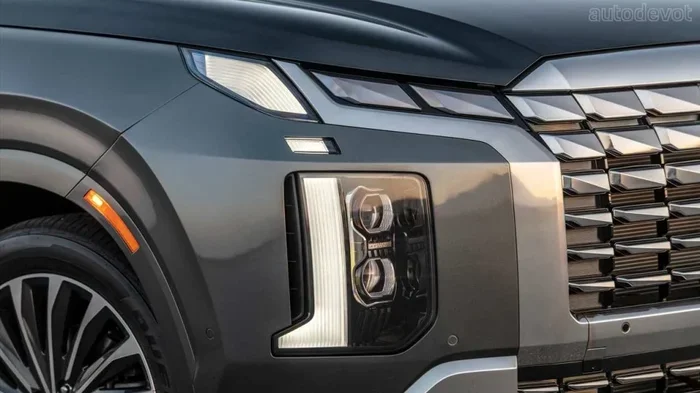
Before you go tweaking any settings, it helps to understand what DRLs are and how they work on the Hyundai Palisade. DRLs are low-intensity lights positioned at the front of your vehicle. They are not the same as your headlights. Instead, they operate at a lower power level to increase your vehicle’s visibility to other drivers during the day.
On the Palisade, the DRL system is integrated into the vehicle’s electrical architecture. When you turn the ignition on, the DRLs activate automatically. They stay on until you manually turn on your headlights or until the system determines there is enough ambient light to deactivate them. This is all controlled by the vehicle’s DRL module, a small computer that manages the lighting functions.
It is important to note that DRLs are different from your fog lights or high beams. They serve a specific purpose: reducing daytime accidents by making vehicles more noticeable. However, not every driver appreciates this feature. Some find the lights distracting, while others worry about the slight impact on fuel economy and battery health.
How DRLs Work on the Palisade
The Hyundai Palisade uses an automatic DRL system. This means you do not need to flip any switch to activate them. They come on with the engine. The system relies on sensors that detect ambient light levels. When it is dark enough, the DRLs turn off and your headlights kick in instead. This seamless transition is designed for convenience and safety.
The DRLs on the Palisade use LED technology in most trim levels. LEDs are energy-efficient and long-lasting, which is why they have become the standard in modern vehicles. However, even LED lights draw a small amount of power, and over time, this can have a minor effect on your fuel economy.
Why You Might Want to Turn Off Daytime Running Lights
There are several valid reasons why a Hyundai Palisade owner might want to disable their daytime running lights. Let us explore the most common ones.
Battery Drain Concerns. While DRLs are designed to be energy-efficient, they do draw power from your vehicle’s electrical system. If you park your Palisade for extended periods, the DRLs can slowly drain your battery. This is especially true if you have an older battery or if your vehicle has other electrical accessories drawing power at the same time.
Personal Preference. Some drivers simply do not like the look of DRLs. They may find them too bright or too flashy. Others prefer the classic look of a vehicle without front lights on during the day. There is nothing wrong with this preference, and the Hyundai Palisade gives you the option to accommodate it.
Avoiding Distraction. In certain driving conditions, bright DRLs can be distracting to other drivers, especially in areas with heavy fog or rain. The reflected light can momentarily blind other motorists. Turning them off in these conditions can improve overall road safety.
Legal Requirements. In some countries and regions, daytime running lights are mandatory by law. In others, they are optional. If you live in an area where DRLs are not legally required, you have the freedom to turn them off. Always check your local regulations before making any changes to your vehicle’s lighting system.
How to Turn Off Daytime Running Lights on Hyundai Palisade
Now for the part you have been waiting for. Here is exactly how to turn off daytime running lights on Hyundai Palisade. There are multiple methods depending on your model year and the features available on your trim level.
Method 1: Using the Steering Wheel Controls
The most straightforward way to manage your DRLs is through the steering wheel-mounted controls. On most Hyundai Palisade models, you will find a light control stalk on the left side of the steering column. This stalk controls your headlights, fog lights, and DRL settings.
To access the DRL settings, follow these steps:
- Start your vehicle and ensure the engine is running.
- Locate the light control stalk on the left side of the steering column.
- Rotate the stalk to the “Auto” position if it is not already there.
- Look for the DRL toggle option on the steering wheel control panel.
- Press the button to disable the daytime running lights.
On some Palisade models, the DRL setting is integrated into the headlight control menu. You may need to cycle through the options by pressing the stalk repeatedly until you reach the DRL off position. The instrument cluster should display a confirmation message when the DRLs are successfully disabled.
Method 2: Through the Infotainment System
The Hyundai Palisade comes with a powerful infotainment system that allows you to customize many vehicle settings, including your lighting preferences. This method works especially well if you prefer using the touchscreen to manage your vehicle.
Here is how to access the DRL settings through the infotainment system:
- Press the “Settings” button on your infotainment screen.
- Navigate to the “Vehicle” or “Lighting” section.
- Look for the “Daytime Running Lights” option.
- Toggle the switch to the “Off” position.
- Exit the settings menu. Your DRLs should now be disabled.
Keep in mind that the exact menu path may vary slightly depending on your Hyundai Palisade model year. Newer models with the latest software updates may have slightly different menu layouts. If you cannot find the DRL option, try updating your infotainment system software through the settings menu or by visiting a Hyundai dealership.
Method 3: Adjusting the Headlight Knob
Some Hyundai Palisade models allow you to control DRL behavior through the headlight knob located near the steering column. This method is particularly useful for older model years.
To use this method:
- Turn the ignition to the “ON” position.
- Locate the headlight knob, usually found on the left side of the dashboard or steering column.
- Turn the knob to the “Off” position. This should deactivate the DRLs along with the headlights.
- Some models require you to hold the knob in the “Off” position for a few seconds before the DRLs fully disable.
If this method does not work for your specific Palisade model, do not worry. Not all trims and model years support this approach. Move on to the next method for an alternative solution.
Method 4: Using the Vehicle Settings App
Newer Hyundai Palisade models come equipped with the Bluelink connected car system. This system includes a mobile app that allows you to control various vehicle features remotely, including lighting settings.
To disable DRLs through the Bluelink app:
- Download and open the Bluelink app on your smartphone.
- Log in to your account and connect to your vehicle.
- Navigate to the “Vehicle Settings” section.
- Find the “Lighting” or “DRL” option.
- Toggle the DRL setting to “Off.”
This method is incredibly convenient if you want to adjust your DRL settings before you even get into the vehicle. It is also a great way to manage your vehicle’s lighting system when you are away from the car.
Common Issues When Turning Off DRLs on the Hyundai Palisade
Sometimes, even after following the steps correctly, your daytime running lights may not turn off. This can be frustrating, but it is usually caused by a few common issues. Let us look at what might be going wrong and how to fix it.
DRLs Stay On After Disabling
If your DRLs remain on after you have tried to turn them off, the first thing to check is whether the headlight switch is in the correct position. Many drivers accidentally leave the headlight switch in the “Auto” mode, which can override the DRL disable command. Try switching the headlight knob to the “Off” position and then back to “Auto” to reset the system.
Another common cause is a software glitch in the infotainment system. Simply restarting your vehicle can often resolve this issue. Turn off the engine, wait for 30 seconds, and then restart. Check the DRL settings again to see if the changes have taken effect.
Dashboard Warning Lights
Sometimes, when you try to modify lighting settings, you may notice warning lights appearing on your dashboard. This can be alarming, but it is usually not a cause for serious concern. If you see a warning light that looks like a battery or an electrical symbol, it could indicate a problem with the vehicle’s electrical system.
For example, if you notice a wrench-shaped warning light on your dashboard, this could be related to a maintenance issue rather than a DRL problem. To learn more about what dashboard warning lights mean and how to address them, you can check our guide on can a bad battery cause the wrench light to come on. Understanding your dashboard indicators helps you respond appropriately to any vehicle warnings.
If the warning light persists after you have disabled the DRLs, it may be worth having your vehicle inspected by a certified Hyundai technician. They can run diagnostic tests to identify any underlying electrical issues that might be affecting your lighting system.
DRLs Re-enable Themselves After Restart
Some Hyundai Palisade owners report that their DRLs turn back on after they restart the vehicle. This usually happens because the vehicle resets to its default settings each time the engine starts. To prevent this, make sure you save your DRL settings in the infotainment system or steering wheel controls before turning off the engine.
If saving the settings does not work, you may need to visit a Hyundai dealership to have the DRL module reprogrammed. This is a rare issue, but it does happen on some model years. A technician can update the module software to ensure your preferences are retained between engine starts.
Safety Considerations When Disabling Daytime Running Lights
Turning off your DRLs is a personal choice, but it comes with important safety considerations. Let us go through what you need to keep in mind before you disable this feature.
Reduced Visibility. Daytime running lights are designed to make your vehicle more visible to other drivers. When you turn them off, your Palisade becomes less noticeable during daylight hours. This is especially true in overcast conditions, fog, or heavy rain. Other drivers may not see your vehicle as easily, which could increase the risk of a collision.
Legal Implications. In some regions, daytime running lights are required by law. Turning them off could result in a traffic citation or, worse, contribute to an accident that is legally your fault. Always verify your local regulations before disabling DRLs. If you are unsure, consult the Hyundai Palisade owner’s manual or contact your local Department of Motor Vehicles.
Impact on Other Lighting Systems. Disabling DRLs does not affect your headlights, fog lights, or taillights. These systems will continue to work normally when activated. However, if you frequently forget to turn on your headlights at dusk or in low-light conditions, disabling the DRLs could leave you driving with no front lights at all. This is a significant safety risk.
Insurance Considerations. While disabling DRLs is unlikely to affect your car insurance directly, any modification that impairs your vehicle’s visibility could be considered in the event of an accident. It is always best to prioritize safety over aesthetics.
Maintenance Tips for Your Hyundai Palisade Lighting System
Keeping your Hyundai Palisade lighting system in top condition ensures that your DRLs and headlights work reliably when you need them most. Here are some practical maintenance tips.
Regular Bulb Checks. Even though the Palisade uses LED DRLs, it is still a good idea to inspect your lights regularly. LED bulbs can dim over time or fail prematurely if there is a voltage irregularity. Check all your front and rear lights at least once a month.
Keep the Electrical System Clean. Corrosion on battery terminals or wiring connectors can affect your lighting system’s performance. If you notice flickering DRLs or headlights, inspect the electrical connections for signs of corrosion or wear. Cleaning the terminals with a baking soda and water solution can often resolve minor issues.
Update Your Software. Hyundai regularly releases software updates for the Palisade’s infotainment and lighting systems. These updates can fix bugs, improve performance, and add new features. Check for updates through the Bluelink app or by visiting your local Hyundai dealership.
Address Issues Promptly. If you notice any persistent problems with your DRLs, do not ignore them. A small issue today can become a bigger problem tomorrow. For instance, if your DRLs are flickering or staying on when they should be off, it could indicate a failing DRL module or a wiring issue. Addressing these problems early can save you time and money in the long run.
For general vehicle maintenance guidance, including how to handle routine services, you might find our article on whether you can just drive up to Jiffy Lube for an oil change helpful for understanding quick maintenance options that keep your vehicle running smoothly.
Expert Insights on Vehicle Lighting Systems
Automotive experts generally agree that daytime running lights are a valuable safety feature. Studies have shown that vehicles with DRLs are involved in fewer daytime accidents compared to those without them. The Insurance Institute for Highway Safety has published research supporting the effectiveness of DRLs in reducing collision rates.
However, experts also acknowledge that not every driver benefits from DRLs. Drivers who primarily operate their vehicles in well-lit urban areas may find DRLs unnecessary. Similarly, drivers who park their vehicles for long periods may prefer to disable DRLs to preserve battery life.
The key takeaway from automotive professionals is this: if you choose to disable your DRLs, do so with full awareness of the trade-offs. Make sure you have a reliable habit of turning on your headlights when conditions require it. The Hyundai Palisade is a well-engineered vehicle, and its lighting system is designed to work as a cohesive unit. Any modifications should be made thoughtfully and with safety in mind.
For broader discussions on vehicle electrical systems and common issues, our article on can a check engine light go off by itself provides additional context on how vehicle warning systems operate and when you should be concerned.
Conclusion
Learning how to turn off daytime running lights on Hyundai Palisade gives you greater control over your vehicle’s appearance and functionality. Whether you use the steering wheel controls, the infotainment system, the headlight knob, or the Bluelink app, the process is straightforward and accessible. Just remember that with this control comes responsibility. Always consider the safety implications of disabling your DRLs and stay aware of your local legal requirements.
Your Hyundai Palisade is a premium SUV with a sophisticated lighting system. Taking the time to understand and customize this system ensures that your driving experience is exactly the way you want it. Whether you keep the DRLs on or turn them off, the most important thing is that you feel confident and safe behind the wheel.
If you ever encounter persistent issues with your Palisade’s lighting system, do not hesitate to consult a professional. A certified Hyundai technician can diagnose and resolve complex electrical problems quickly and safely. Enjoy your drive, and make your Palisade truly yours.
Frequently Asked Questions
Can I turn off daytime running lights on all Hyundai Palisade trims?
Yes, all Hyundai Palisade trims allow you to manage DRL settings, though the method may vary slightly depending on the model year and trim level. Higher trims with the Bluelink system offer additional control through the mobile app. Always refer to your owner’s manual for the specific steps for your trim.
Will turning off DRLs affect my Hyundai Palisade’s warranty?
No, turning off daytime running lights through the vehicle’s built-in settings does not void your warranty. However, if you modify the wiring or DRL module directly, this could potentially affect coverage. Always use the manufacturer-approved methods to disable DRLs.
Do daytime running lights drain the Hyundai Palisade battery?
DRLs draw a small amount of power, but the impact on battery life is minimal under normal driving conditions. However, if you park your Palisade for extended periods, the cumulative drain can become noticeable, especially if the battery is older or weak.
Are daytime running lights required by law in the United States?
DRLs are not federally mandated in the United States, but some states and regions may have specific requirements. It is important to check your local traffic laws before disabling DRLs. In many other countries, DRLs are legally required for all vehicles.
Why do my Hyundai Palisade DRLs stay on even after I turn them off?
This is usually caused by the headlight switch being in the “Auto” position or a software glitch in the infotainment system. Try resetting the system by turning the engine off and on again, or cycle the headlight knob between positions. If the issue persists, a visit to a Hyundai service center may be needed.
Can I use my low beam headlights instead of DRLs during the day?
Yes, when you turn on your low beam headlights, the DRLs automatically deactivate. This is the standard design across all Hyundai Palisade models. Using your low beams during the day provides similar visibility benefits while giving you more control over your lighting preferences.
=== CONCLUSION ===
Knowing how to turn off daytime running lights on Hyundai Palisade empowers you to tailor your vehicle to your exact preferences. With multiple methods available, from simple steering wheel controls to the advanced Bluelink app, you have the flexibility to manage your DRLs whenever you need to. Just remember to prioritize safety, stay informed about local regulations, and keep your vehicle’s electrical system well-maintained. Your Palisade is built to perform, and with the right knowledge, you can make every drive exactly the way you want it.