How to Charge a BMW Key Fob for Longer Battery Life
Knowing how to charge a BMW key fob can save you time and money. This guide walks you through every method, from USB charging to battery replacement, so your BMW remote stays reliable. We also share proven tips to make your BMW key battery last longer.
Key Takeaways
- BMW key fobs support USB and wireless charging depending on the model and year.
- A healthy BMW key battery lasts 3 to 5 years with proper care.
- You can charge most BMW keys using a standard USB cable or a wireless charging pad.
- Avoid extreme temperatures to protect your BMW key fob battery life.
- Replace the battery instead of charging if your key fob is older and does not support recharge.
- You can still drive your BMW if the key fob battery dies using the backup physical key.
📑 Table of Contents
- How to Charge a BMW Key Fob for Longer Battery Life
- Understanding Your BMW Key Fob Battery
- How to Charge a BMW Key Fob
- Tips for Extending BMW Key Fob Battery Life
- What to Do When Your BMW Key Fob Battery Is Low
- BMW Key Fob Maintenance Schedule
- Common Mistakes to Avoid with BMW Key Fobs
- When to Seek Professional Help for Your BMW Key
- Final Thoughts
How to Charge a BMW Key Fob for Longer Battery Life
Your BMW key fob is one of the most important parts of your driving experience. It locks the doors, starts the engine, and even opens the trunk with a simple press. But what happens when the BMW key fob battery starts to die? You might notice the remote range getting shorter or the buttons becoming unresponsive.
This guide shows you exactly how to charge a BMW key and keep it working like new. Whether you own a newer BMW with a rechargeable fob or an older model that uses a coin-cell battery, we have you covered. You will learn the charging methods, battery types, and simple habits that extend BMW key fob battery life by years.
Many BMW owners do not realize that BMW key fob maintenance is easier than they think. A few small changes to your daily routine can prevent frustrating moments at the parking lot or garage. Let us dive into everything you need to know about keeping your BMW remote key powered up and ready to go.
Understanding Your BMW Key Fob Battery
Before you learn how to charge a BMW key, it helps to understand what kind of battery your fob uses. BMW has used different key designs over the years, and the battery type depends on your model and the year it was made.
Types of BMW Key Fobs
BMW vehicles come with several key types. The most common ones include the standard remote key, the comfort access key, and the newer BMW Digital Key. Each type has a different battery setup.
The older BMW models use a CR2032 coin-cell battery. This is the same small, round battery found in watches and garage door openers. These batteries are not rechargeable, so you simply replace them when they die. You can find these batteries at any grocery store or auto parts shop for a few dollars.
Newer BMW models, especially those from 2018 onward, come with rechargeable BMW key fobs. These fobs have a built-in lithium-ion battery that you can charge through a USB port or a wireless charging pad. This is a big upgrade because you do not need to buy replacement batteries anymore.
How Long Does a BMW Key Battery Last?
A BMW key fob battery life depends on the type of battery and how often you use the remote. For coin-cell batteries, most owners get about 2 to 4 years of use. For rechargeable fobs, the built-in battery can last 3 to 5 years before it starts to hold less charge.
Your driving habits play a big role too. If you use the key fob buttons constantly, the battery will drain faster. Similarly, if you leave the fob near other electronic devices, it might lose charge more quickly. Understanding your battery type is the first step toward better BMW key fob battery care.
How to Charge a BMW Key Fob
Now that you know what kind of battery your BMW key uses, let us look at the actual charging process. The method you use depends on your BMW model and the year of your key fob.
Method 1: USB Charging for Rechargeable BMW Keys
If your BMW has a rechargeable key fob, you can charge it using a standard USB cable. Most newer BMW models come with a small USB port on the back of the key fob. Here is how you do it.
- Find the small USB port on the back of your BMW key fob. It is usually hidden under a small rubber flap or near the key blade.
- Plug one end of a micro-USB or USB-C cable into the fob. The cable type depends on your BMW model year.
- Connect the other end to a USB power source. You can use a wall adapter, a laptop, or even a car USB port.
- Wait for the LED light on the fob to turn green or solid, which means the battery is full.
- Unplug the cable and test the key fob by pressing a button.
This method is simple and works well for daily use. You can charge your BMW key overnight or while you are at work. Most owners find that a full charge lasts several weeks of normal use.
Method 2: Wireless Charging for BMW Keys
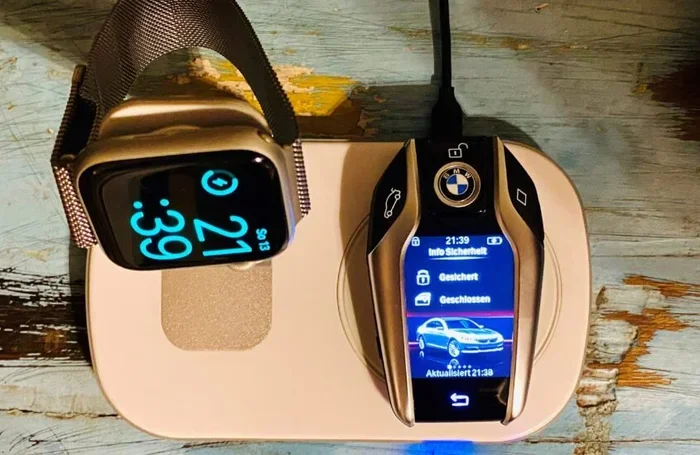
Some BMW models support wireless BMW key charging. If your car has a wireless charging pad in the center console, you can simply place the key fob on it. The charging pad sends power through electromagnetic induction, so there is no cable needed.
To use this method, make sure the wireless charging pad is turned on. Place the key fob flat on the pad with the BMW logo facing up. The LED light on the fob will show that it is charging. This is the most convenient option because you do not have to find a cable every time.
Keep in mind that not all BMW models have wireless charging. Check your owner’s manual or ask your dealer if your specific model supports this feature.
Method 3: Replacing the Coin-Cell Battery
If your BMW key uses a CR2032 battery or similar coin-cell, you cannot charge it. Instead, you need to replace the battery entirely. This is a quick and easy process that takes about two minutes.
First, find the small release button on the back of the key fob. Press it to pop out the metal key blade. Then use a flat-head screwdriver or a coin to pry open the fob casing. Inside, you will see the coin-cell battery. Remove it carefully and insert a new CR2032 battery with the positive side facing up. Snap the casing back together and reinsert the key blade.
Can Any Dealership Replace a Key Fob Battery? Yes, any BMW dealership can replace the battery for you if you prefer not to do it yourself. Many dealerships will do it for free or for a small fee. This is a great option if you are not comfortable opening the fob on your own.
Tips for Extending BMW Key Fob Battery Life
Charging your BMW key is only part of the equation. The way you handle and store your fob has a big impact on how long the battery lasts. Here are some practical tips to help you get the most out of every charge.
Store Your Key Fob Properly
Where you keep your BMW key fob matters more than you might think. Extreme temperatures can damage the battery and shorten its lifespan. Do not leave your key fob in direct sunlight, inside a hot car, or near a heating vent.
The ideal storage spot is a cool, dry place at room temperature. A drawer in your home or a dedicated key bowl works perfectly. If you leave the fob in your car overnight, try to keep it in the center console or the glove box where the temperature stays more stable.
Avoid Unnecessary Button Presses
Every time you press a button on your BMW key fob, it uses a small amount of battery power. While one press does not use much, doing it hundreds of times a day adds up. Try to be deliberate with your key fob usage.
For example, instead of pressing the unlock button every time you walk to your car, consider using the physical key blade if you are close by. Some BMW models also support proximity detection, which means the car unlocks automatically when the fob is nearby. Use this feature when possible to save battery power.
Keep Your Fob Clean and Dry
Dirt and moisture can damage the internal components of your BMW key fob. Over time, grime can build up around the buttons and the battery compartment, causing poor electrical contact. This can make the fob work harder and drain the battery faster.
Wipe your key fob with a soft, slightly damp cloth once a week. Avoid using harsh chemicals or soaking the fob in water. If your fob gets wet, dry it thoroughly before using it again. Keeping the fob clean is a simple habit that pays off in longer BMW key battery life.
Update Your BMW Software
BMW regularly releases software updates that improve the efficiency of the key fob system. These updates can optimize how the fob communicates with the car, which reduces unnecessary battery drain.
Check with your BMW dealer or use the BMW app to see if there are any available updates for your vehicle. Keeping your software up to date is one of the easiest ways to maintain good BMW key fob battery health over time.
Use the Backup Physical Key
Every BMW key fob comes with a backup physical key blade. Many owners forget about this and rely entirely on the remote. Using the physical key to lock and unlock your car from time to time gives the remote a break and saves battery.
This is especially useful when you are close to your car and do not need the remote range. It is a small habit that makes a big difference over months and years of ownership.
What to Do When Your BMW Key Fob Battery Is Low
Even with the best care, every BMW key fob will eventually show signs of a low battery. Recognizing these signs early helps you avoid being locked out of your car.
Signs Your BMW Key Fob Battery Is Dying
Watch for these warning signs that your BMW key fob needs attention:
- Reduced remote range. You have to stand closer to the car for the buttons to work.
- Delayed response. The fob takes longer to lock or unlock the doors.
- Intermittent working. The fob works sometimes but not others, especially in cold weather.
- Warning message on the dashboard. Some BMW models display a key battery low warning on the instrument cluster.
- Buttons feel less responsive. The buttons do not click as firmly as they used to.
If you notice any of these signs, it is time to either charge or replace your BMW key battery. Ignoring these warnings can eventually leave you unable to start your car or unlock the doors.
Can You Drive a BMW If the Key Fob Battery Dies?
Yes, you can still drive your BMW even if the key fob battery is completely dead. BMW vehicles are designed with a backup system. You can place the dead fob against the start button, and the car will read the fob through the button itself. This allows you to start the engine even without a working battery in the fob.
However, this backup method is not always convenient. It works best as a temporary solution until you can charge or replace the BMW key fob battery. If you find yourself frequently dealing with a dead fob, it is worth looking into how to charge a BMW key properly or replacing the battery before it becomes a regular problem.
For more details on what happens when a key fob battery dies, you can read about Can You Drive a Car If the Key Fob Battery Dies on our site. It covers the backup start process for multiple car brands, including BMW.
BMW Key Fob Maintenance Schedule
Like any other part of your BMW, the key fob benefits from regular maintenance. A simple schedule can keep your fob working perfectly and prevent unexpected failures.
| Task | Frequency | Why It Matters |
|---|---|---|
| Clean the fob with a soft cloth | Weekly | Prevents dirt buildup and poor button contact |
| Check battery level | Monthly | Catches low battery before it becomes a problem |
| Charge rechargeable fob | Every 2-4 weeks | Keeps the battery at optimal level |
| Replace coin-cell battery | Every 2-4 years | Prevents sudden failure from old battery |
| Update BMW software | As available | Optimizes fob communication and efficiency |
| Inspect fob for physical damage | Every 6 months | Catches cracks or water damage early |
Following this simple schedule takes only a few minutes each month but saves you from the hassle of a dead key fob at the worst possible moment.
Common Mistakes to Avoid with BMW Key Fobs
Even the best BMW key fob can experience problems if you make certain mistakes. Here are the most common errors owners make and how to avoid them.
Leaving the Fob Near Electronics
Placing your BMW key fob next to your phone, tablet, or other electronic devices can cause signal interference. In some cases, this can even drain the battery faster. The electromagnetic fields from these devices can confuse the fob and make it work harder to communicate with your car.
Instead, store your fob in a separate pocket or a dedicated key holder away from other electronics. This small change can noticeably improve your BMW key fob battery life.
Using the Wrong Battery Type
If your BMW key uses a coin-cell battery, make sure you use the correct type. Using the wrong battery can damage the fob or cause it to malfunction. Always check your owner’s manual for the exact battery specification before purchasing a replacement.
Ignoring the Warning Signs
Many BMW owners ignore the low battery warning until the fob stops working completely. By that point, you might be stranded or locked out of your vehicle. Pay attention to the early signs and take action as soon as you notice reduced range or delayed response.
Not Doing Anything After Replacing the Battery
After you replace the battery in your BMW key fob, there are a few steps you should take to make sure everything works properly. For more details on what to do after a battery replacement, check out our guide on Do You Have to Do Anything After Replacing a Key Fob Battery. It covers important post-replacement steps that many people overlook.
When to Seek Professional Help for Your BMW Key
Most BMW key fob issues can be solved at home with a simple charge or battery replacement. However, there are times when professional help is the right choice.
If your BMW key fob still does not work after charging or replacing the battery, the problem might be with the fob’s internal electronics. Water damage, a dropped fob, or worn-out circuitry can all cause persistent issues. In these cases, it is best to visit a BMW dealership or a qualified automotive locksmith.
A professional can diagnose the exact problem and recommend the right solution. They can also reprogram the fob if needed, which is something most owners cannot do on their own. Do not hesitate to seek help if the basic troubleshooting steps do not resolve the issue.
Final Thoughts
How to charge a BMW key is a simple skill that every BMW owner should know. Whether you use USB charging, wireless charging, or regular battery replacement, taking care of your BMW key fob battery keeps your driving experience smooth and hassle-free.
By following the tips in this guide, you can extend BMW key fob battery life and avoid the frustration of a dead remote. Store your fob properly, clean it regularly, and stay on top of battery replacements. These small habits add up to big savings in time and money over the life of your BMW.
Remember, your BMW key fob is more than just a convenience. It is a key part of your vehicle’s security and functionality. Treat it well, and it will serve you reliably for many years to come. Keep this guide bookmarked for future reference, and share it with fellow BMW owners who might benefit from these tips.
Frequently Asked Questions
How long does it take to charge a BMW key fob?
Most rechargeable BMW key fobs take about 1 to 2 hours to fully charge using a USB cable. Wireless charging may take slightly longer. A full charge typically lasts several weeks of normal daily use.
Can I use any USB cable to charge my BMW key?
You should use the USB cable that came with your BMW or one that matches the port type on your key fob. Most newer BMW keys use micro-USB or USB-C connectors. Using the wrong cable may not fit or may charge slowly.
What type of battery does my BMW key fob use?
Older BMW models use a CR2032 coin-cell battery, while newer models from 2018 onward typically have a rechargeable lithium-ion battery built into the fob. Check your owner’s manual to confirm which type your specific model uses.
How do I know if my BMW key fob battery is low?
Common signs include reduced remote range, delayed button response, intermittent working, and a battery low warning message on your dashboard. Some BMW models also show a warning in the iDrive system when the fob battery is running low.
Is it safe to charge my BMW key overnight?
Yes, it is generally safe to charge your BMW key overnight. Most rechargeable BMW key fobs have built-in protection that stops charging once the battery is full. However, it is still best to use a quality USB charger and avoid charging in extreme temperatures.
Can I replace the BMW key fob battery myself?
Yes, replacing a coin-cell battery in a BMW key fob is a simple DIY task. You just need a small flat-head screwdriver or a coin to open the fob casing. If you prefer not to do it yourself, any BMW dealership can replace the battery for you quickly and affordably.
=== CONCLUSION ===
Charging your BMW key fob does not have to be complicated. With the right method and a few simple habits, you can keep your BMW remote working perfectly for years. Whether you charge via USB, use wireless charging, or replace the battery on schedule, the key is consistency and care.
Start today by checking your BMW key fob battery level and following the tips in this guide. Your future self will thank you the next time you walk to your car with your hands full and the door unlocks instantly at your approach. How to charge a BMW key is one of those small things that makes a big difference in your daily driving experience.